Blogs
|
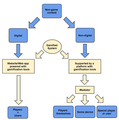
The most popular definition of gamification is the widely quoted definition from Deterding, Dixon, Khaled and Nacke (2011): "the use of design elements characteristic for games in non-game contexts". This definition can be extended to the use of game design elements in non-game contexts, to drive game like engagement in order to promote desired behaviours.A gamified system can then be defined as any non-game context with the addition of game elements. The purpose of a gamified system is to engage users and influence their behaviours in order to reach the system’s objectives more efficiently. A Gamified SystemIf the context is digital, then the gamified system is some software application incorporating those game elements. The system can be a website or a web application. It can run on a server and be accessed by a computer with a web browser or it can be an app running on a smartphone storing data in the cloud. The system can be built as a gamified system from the start or some piece of gamification software can be added to an existing application. If the context is non-digital, a software system can be used to support the addition of the game elements and to monitor users’ activities. The software system may rely on specific devices or other applications to get the data from the non-digital context or it may need the intervention of a human user.The users of gamified systems, those whose behaviours are to be changed, are called players. Players may have an active or a passive role in their relation to the system. If the context is non-digital, mediators are needed, either human users or some specific device. The system might have other kind of non-player users that act as mediators between the system and the non-game context. Players themselves can also act as mediators having an active role within the gamified system. In digital non-game contexts, gamification platforms like PunchTab, Uplaude or CaptainUp provide tools to power websites, blogs and web applications. These tools can be simple add-ons or plug-ins to monitor and reward the players’ activities. In this approach, users take a passive role since they cannot control what is monitored and just let the system watch their actions.Systems like Nike+, a well-known example of gamification, are non-game, non-digital contexts where a device (a smartphone or other specific device from Nike) act as a mediator, monitoring players' (runners) activities. Another similar example is Zamzee, targeting a younger audience.ClassDojo is an example of a gamified system, where the non-game context is non-digital (a classroom) and a special user (the teacher) monitors the players' (students) activities. ChoreWars is a another example where the special user can also be a player.Lift is a gamified system where players through the web or using an app, can set personal goals to improve their habits (like doing more exercise or drinking more water, the top popular habits). Each player's achievements can be shared with other players. Lift is an example where the players themselves act as mediators, monitoring and registering their own activities. Foodzy is another system where the players act as mediators.(this post is based in a paper recently presented at the PLE Conference 2013 in Berlin - Simões, Redondo, Díaz, Vilas & Aguiar (2013); see also this other post).ReferencesDeterding, S., Dixon, D., Khaled, R., & Nacke, L. (2011). From Game Design Elements to Gamefulness: Defining "Gamification, Proceedings of the 15th International Academic MindTrek Conference Envisioning Future Media Environments.Simões, Jorge; Redondo, Rebeca Díaz; Vilas, Ana Fernández; Ademar Aguiar (2013). Using Gamification to Improve Participation in a Social Learning Environment. In: THE PLE CONFERENCE 2013, 2013. Berlim. The PLE Conference 2013 Proceedings (to be published)
Education & eLearning Blog
.
Blog
.
<span class='date ' tip=''><i class='icon-time'></i> Jul 20, 2015 12:22pm</span>
|
|
"if a resumé or CV is a bunch of claims, Open Badges are a bunch of evidence" Badges are definitely the top game element used in gamified systems (possibly because it is the easiest one to use). In education, badges have been used for some time. The latest release of Moodle, Moodle 2.5, includes badges. Moodle's badges are compatible with Mozilla Open Badges. A FAQ is available to help teachers awarding them.According to Moodle, badges are a good way of celebrating achievement and showing progress.A free set of badges that can be used in Moodle or in any other website is available at MoodleBadges. Badg.us is a service for creating and issuing badges. Apparently it only works with Mozilla Open Badges. With OpenBadges.me it is also possible to create badges.To know more about badges and how to use them in education scenarios, a MOOC supported by COURSESites is starting in September 9: Welcome to Badges: New Currency for Professional Credentials.A video available in the course overview highlights some of the benefits of badges:Here are some of the key ideas:A badge is a validated indicator of accomplishment, skill, quality or interest that can be earned in any learning environment.The Open Badge infrastructure will make it easy to issue, display, and manage badges across the web.Digital badges will make the accomplishments of individuals, in online and offline spaces, visible to anyone and averyone including potential employers, educators and communities.Badges can be used in formal and informal learning scenarios. They are a tool to show individual accomplishments and a way to promote lifelong learning. P2PU is an example of an open education project aiming at lifelong and informal learning (and it uses badges). Rails for Zombies is another example of the use of badges to learn Ruby on Rails (in the zombie way :).See also these other posts:Badges & Educação (in portuguese but with some links in english).More on Badges (title in english but contents in portuguese). The MoodleBadge for Creative Thinking
Education & eLearning Blog
.
Blog
.
<span class='date ' tip=''><i class='icon-time'></i> Jul 20, 2015 12:21pm</span>
|
|
In 1990, Boeing researcher Tom Caudell first coined the term "augmented reality" to describe a digital display used by aircraft electricians that blended virtual graphics onto a physical reality. As for the computer science world’s definition of augmented reality (AR) though, it’s more detailed, but essentially the same: Augmented reality is the interaction of superimposed graphics, audio and other sense enhancements over a real-world environment that’s displayed in real-time.
According to Wikipedia " Augmented reality (AR) is a term for a live direct or indirect view of a physical real-world environment whose elements are augmented by virtual computer-generated imagery".
You will understand the concept of Augmented Reality better when you see it work. So here are some interesting videos that demonstrate how augmented reality works.
VIDEO 1
VIDEO 2 ( Courtesy : eLearning Blog Dont Waste Your Time)
VIDEO 3
Video 4 (Courtesy: Augmented Reality to Help Military Mechanics Fix Vehicles)
More on Augmented Reality
Augmented Reality Explained by CommonCraft
35 Awesome Augmented Reality Examples
Augmented Reality for Learning: eLearning Technology
Resources on Augmented Reality
Rupa Rajagopalan
.
Blog
.
<span class='date ' tip=''><i class='icon-time'></i> Jul 20, 2015 12:21pm</span>
|
|
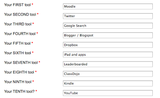
Once again, the Vote for the Top 100 Tools for Learning 2013 is open until Friday 27 September 2013. The list will be revealed on Monday, 30 September 2013. It is possible to vote through the c4lpt website or by tweeting to @C4LPT. Voters much choose 10 tools for learning.This is my choice for 2013:Friday 27 September 2013, and the Top 100 Tools list will be revealed on Monday 30 September 2013. - See more at: http://c4lpt.co.uk/top100tools/voting/#sthash.RUP92mfb.dpufTwo of these tools are gamification tools (Leaderboarded and ClassDojo) that I used before. Moodle is a well known e-learning tool that has been used in several learning scenarios (current release is using badges - see this post). Twitter can also be a very valuable if we choose the right people to follow.Meanwhile, last year's list is available: The Top 100 Tools for Learning 2012 (#1 Twitter). For the 2011 list see this post (also, Twitter #1).The Top 100 Tools for Learning 2 The Top 100 Tools for Learning 2013 Top 100 Tools for Learning 2012Top 100 Tools for Learning 2012Vote for the Top 100 Tools for Learning 201Vote for the Top 100 Tools for Learning 2013
Education & eLearning Blog
.
Blog
.
<span class='date ' tip=''><i class='icon-time'></i> Jul 20, 2015 12:21pm</span>
|
|
I receive a lot of queries on how to design Instructor Led Training (ILT) programs. Such queries most often come from professionals who have experience designing e-learning programs. In my opinion, if you have experience in designing e-learning programs, you can use the same skills to design ILTs too. You do not need any unique skillsets to design ILTs. All that you need is basic Instructional Design skills, some common sense and some creativity
In this post, I will explain -
What is an Instructor Led Training program
What matters most when you design Instructor Led Training programs
What goes into an Instructor Led Training program toolkit
What goes into an Instructor Led Training developer toolkit
So here we begin!
What is an ILT program?
An ILT program is a training program that happens in the presence of an instructor or trainer. The instructor may be knowledgeable and experienced in the learning material, but can also be used more for their facilitation skills and ability to deliver material to learners.
An instructor/trainer might deliver the training in a :
Physical classroom or
Virtual classroom
What matters most while designing ILTs
While basic Instructional Design knowledge/skills is a prerequisite, there are two important things that you should pay attention to while designing ILTs.
First is CONTEXT. You should always keep in mind that the training will happen in a classroom setting (virtual or physical) and a live instructor will interact with the learners.
Second is TARGET AUDIENCE. As an instructional designer, you should keep in mind that you are designing training material for both the Instructor and the Learners. With this in mind, you will be able to work in the right direction.
What goes into the ILT program toolkit
While I believe there are no hard and fast rules to designing ILT programs, there are standard materials that are part of an ILT toolkit. Let us look at some typical materials that are created for ILTs. We will use this New Employee Orientation material for illustration purpose.
An ILT program toolkit has all of the following:
A POWER POINT PRESENTATION
A power point presentation with the key learning points of the training program is designed for the trainer/instructor. The trainer/instructor speaks/interacts with the learners keeping the power point presentation in focus. The power point presentation is never self-contained or comprehensive and the trainer/instructor fills the gap.
The power point presentation typically captures the entire training flow including:
Welcome note
Training objectives
Training agenda
Key learning points in each Lesson/Topic
Activity/assessment details
Summary
Next steps
Here is a sample powerpoint presentation created for an ILT program:
Click on the image to access the complete presentation
THE FACILITATOR’S GUIDE
The facilitator’s guide is designed for the trainer/instructor who delivers the training program to the learners. This guide has all the information that is essential for a trainer/instructor to effectively conduct the training program. The facilitator’s guide is designed with reference to the powerpoint presentation created for the training program.
A facilitator’s guide typically has:
Training overview
Training objectives
Training agenda
Tips on how to prepare to deliver the training
List of training materials to keep handy
Briefing on training contents/activities
When you design the facilitator’s guide you need to keep in mind that you are instructing the trainer/instructor on how to conduct the training program. This includes the following from the trainer’s perspective:
What to say
When to say
What to ask
What to show
What activities/discussions to conduct
PS: Some Instructional Designers do train the trainer programs via web conferencing or in a physical meeting. Some others also deliver training programs themselves. In either case, the facilitator’s guide is important.
Here is a snapshot of a section from a facilitator’s guide designed for an ILT program that describes how to start the training program:
Click on the image to access the complete document
THE PARTICIPANTS HANDBOOK
The participants handbook is used by the learners during the training program. The instructor usually circulates printed handbooks to the learners before starting the training program. Learners use the handbook for reference during the training program.
A participants handbook typically has:
Training objectives
Training agenda
Dos and Donts
Key learning points
Instructions on how to take the activities
Provision to jot down notes, write answers etc.
Here are some examples of participants handbook:
Key points handout
Activity handout
Sample participant workbook
Things listed above are part of any ILT program. There are some things that an Instructional Designer might require while designing materials for an ILT. These materials will go into the ILT Developer Toolkit.
What goes into the ILT Developer toolkit
Your ILT toolkit can have developer support material to help you meet standards and guidelines.
The ILT Developer toolkit may have:
Getting started guides
Language and style guides
Templates for power point presentations, facilitator’s guide and participant’s handbook
Sample ILT materials
Here is an example of an ILT Developer Toolkit.
Conclusion
With this I conclude my post here and leave it open for comments/discussion.
If you have experience designing ILTs, please try to share any of the following here:
Tips and tricks
Useful ILT resources
Some examples of ILTs
Rupa Rajagopalan
.
Blog
.
<span class='date ' tip=''><i class='icon-time'></i> Jul 20, 2015 12:20pm</span>
|
|
(Shared by Zac Fitz-Walter on Gamification Weekly, issue 20)Digital Games for Empowerment and Inclusion (DGEI): The Potential of Digital Games for Empowerment and Social Inclusion of Groups at Risk of Social and Economic Exclusion: Evidence and Opportunity for Policy (European Comission - Joint Research Centre, Information Society Unit).This report shows the potential of games to support those at risk of social and economic exclusion (Gamification Weekly). The report finds that "games-based approaches offer a particular opportunity to reach people at risk" in particular young people not in Employment, Education or Training (NEETs).Gamification, as a new concept is referred. A definition is provided and the relation of gamification with serious games is addressed. Also, the report mentions the potential of using digital games in education.Definition of Gamification (Glossary, page 205):Applying game design elements to non-game activities, often with the goal of engaging people more in these activities.The "Serious Game" and "Gamification" Industries (page 125)(...)However none of these terms has captured the imagination so much as the term ‘Gamification’, a sufficiently vague concept that has served to reinvigorating some of the serious game work, which may be too serious, Gamification focuses on how to exploit the gameplay elements of digital games in applications that are not digital games, but in practice implementations are frequently based in online services and mobile apps. In 2012, Gamification ideas, long used in weight-loss and child motivation, are attracting considerable interest from consultants and policy makers linked to ideas of 'nudging'. However it is not immediately clear whether those with the expertise to develop gamification are game designers or have any relationship with digital games development, and whether the tools of gamification can be considered part of 'serious games and gaming'. However discussion of gamification often end up addressing 'serious games', and proponents of ‘serious games’ are starting to appropriate the term to promote their own work. As Escribano (2012) suggests, conventional and low key use of game approaches has taken a technological turn (Escribano, 2012). One of the key popularisers of the idea through her games and publications is game designer Jane McGonigal, who explicitly developed the idea in developing an online tool with game-based techniques to promote personal empowerment, using the resilience approach. Clearly, the current trend of gamification is closely linked to the potential of ICTs, and the rich tools of digital gaming, and the popularity of the gamification idea focuses attention more clearly on the game like motivational elements of 'serious gaming' rather than the technological elements.(...)Education (page 128)Use of digital games in the education sector is one of the oldest applications of games. From the supply side they can be developed as part of an educational publishing business, and more recently, the elearning industry. However, educational games, according to the report of the EC Engage project122, have always been "low budget, low tech, poor cousins of the computer game industry. Up until recently, very few commercial companies have provided good quality educational games. Historically, these games have been written by teachers and academics who wish to utilize the technology within there teaching, but usually do not have the skill, not the finance, to create a high quality product". This is changing with new expertise, tools andchanging business models for distribution. Games in education can be replacements for text books and other media, or tools for game-making and a more radical gamified approach to teaching and learning. Serious uptake in the formal education sector however, depends on significant innovation in practices of formal schooling, and in the procurement and certification systems for education products.
Education & eLearning Blog
.
Blog
.
<span class='date ' tip=''><i class='icon-time'></i> Jul 20, 2015 12:19pm</span>
|
|
There are umpteen web resources on Instructional Design, learning and training. However there are very few blogs, networks and websites that give you really useful information. In this post, I would like to list those blogs and websites that provide learning professionals with lot of useful information absolutely free of cost.
Here’s presenting TOP 10 resources for learning professionals across the globe:
ASTD - If you check the Archives section in this website, you will find articles written from the year 2000 to 2009. The articles are very insightful and a must read for all learning professionals.
eLearning Technology - You must check this blog for latest news/updates in the learning/training industry. This blog also has lots of external links that lead to really good web resources on learning/training.
The Rapid eLearning blog - If you are a designer or an avid PowerPoint user, then this blog is just for you. This blog is exclusively on rapid e-learning and has loads of tips and tricks which makes it one of the best freely available resources on e-learning design.
Upside Learning Blog - If you are interested in MLearning, Augmented Reality and other latest technologies for e-learning, then you must visit this blog.
Kapp Notes - If you are interested in Game Based Learning and Immersive Learning, then this blog is for you. This blog has lots of good examples and case studies on the subject.
The Learning Circuits Blog - This blog is known for its "Question of the Month" feature. The questions are focused on learning/training and the responses are insightful.
PINOT - If you are interested in learning about non-training solutions for performance improvement, then join this social network. This network has focus groups and useful discussions, resources are available within each group.
C4LPT - If you are interested in social learning examples and tools for learning, then you must visit this site. This site lists top 100 tools for learning and has excellent getting started guides for social learning.
Making Change - This blog has useful tips and tricks on e-learning design and also good e-learning examples.
Learnability Matters - This blog again has useful tips and tricks on e-learning design, e-learning case studies and some e-learning examples. There are some articles that give good introduction to Instructional Design concepts/practices.
Hope you find this list useful!
Rupa Rajagopalan
.
Blog
.
<span class='date ' tip=''><i class='icon-time'></i> Jul 20, 2015 12:19pm</span>
|
|
Leaderboards are one of the most popular game elements that are used in gamified systems, along with points, badges or achievements (see How Gamification Can Drive Behavioural Change). Essentially they appeal to extrinsic motivation and are a means to give feedback to the players. Badges are probably at the top of this list. They are used in many systems and recently, Moodle's latest version also includes badges (see All About Badges and Open Badges). There is a lot of information, blog posts and academic papers about how to use badges and there are even MOOCs on badges.On the other hand, leaderboards are less mentioned although they are also common in gamified systems. Applications like Leaderboarded can be used to easily create leaderbords. Gamified systems in the education sector do not use leaderboards so often, probably because they appeal to competition.A recent paper presented at Gamification 2013 (see this other post), Reimagining Leaderboards: Towards Gamifying Competency Models through Social Game Mechanics, discusses how to use leaderboards as social game mechanic. Leaderboards are game elements that can be collaborative and qualitative and not only quantitative and competetive. In this way, leaderboards are a social game element. The paper proposes a framework that uses a prosocial leaderboards. Prosocial interactions occur when individuals act in the interest of others. The paper defines social gamification as "... an emerging subgenre of gamified systems that use game mechanics and elements from social games, which feature interactions designed for close peers and direct ties to social networking systems , in which they are often embedded". It then cites one of our previous works, A Social Gamification Framework for a K-6 Learning Platform, mentioning that in our proposal, game elements were taken directly from social games. We also have our own definition of social gamification: the use of design elements from social games in non-game contexts to drive game like engagement in order to promote desired behaviours. In the Gamification 2013 paper, leaderbords are defined as "... a performance comparison game element". They can be single or mutiplayer. Single player leaderboards compare the players latest score to the previous scores. Multiplayer leaderboards can display rankings of near performing peers (a usual approach in social games) or rankings of high performing peers (where players with lower score may not be present, leading to demotivation, which is a drawback for this kind of leaderboards).An example of a multiplayer leaderboard of high performing peers is the Gamification Gurus Leaderboard built with Leaderboarded:The prosocial learderboard approach uses elements like status, scarcity, karma points and group leaderboard. These elements are used to encourage prosocial behaviours. In this prosocial approach all users must benefit and social interaction is achieved through altruism, sharing, reciprocity and gratitude. The concept is being applied in a competency-based assessment system for medical education.Leaderboards, that at first are nothing more than an extrinsic motivator can, in this approach, be used to promote social interaction and to foster intrinsic motivation. It appeals to relatedeness and to a feeling of doing something not just for our own sake but for the sake of our group or community.ReferencesSeaborn, K., Pennefather, P., Fels, D. (2013). Reimagining Leaderboards: Towards Gamifying Competency Models through Social Game Mechanics, Proceedings of Gamification 2013, Stratford, Ontario, Canada, 107-110Simões, J., Redondo, R. D., Vilas, A. F. (2013). A Social Gamification Framework for a K-6 Learning Platform. Advanced Human-Computer Interaction 29, 2, 345-353.
Education & eLearning Blog
.
Blog
.
<span class='date ' tip=''><i class='icon-time'></i> Jul 20, 2015 12:19pm</span>
|
|
Some weeks back, I posted some videos on Augmented Reality that illustrated how this concept may be applied in real life. I found some interesting videos that showcase Augmented Reality Games. I thought they are worth sharing in the T-Bites section. So here are you go:
VIDEO 1 ( via Tom Kuhlmann)
VIDEO 2
VIDEO 3
Read more about Mc Donald’s Augmented Reality Game here:
No McDonald’s on Pandora, but Plenty of Avatar at McD’s
Avatar - Experience Pandora After the Movie Ends
VIDEO 4
If you have read any article or seen any videos on Augmented Reality games, please do share them here.
Rupa Rajagopalan
.
Blog
.
<span class='date ' tip=''><i class='icon-time'></i> Jul 20, 2015 12:19pm</span>
|
|
http://csi.softwareadvice.com/gamification-preventing-support-agent-burnout-1022112/Another paper presented at Gamification 2013 shows how to use a leaderboard to improve behaviour change (see this previous post Leaderboards: A Social Game Element). The paper, Time's Up: Studying Leaderboards For Engaging Punctual Behaviour (João Costa, Rina Renee Wehbe, James Robb and Lennart E. Nacke) studies the use of a leaderboard for improving punctuality of participants to regular work meetings. Again, the authors conclude that leaderboards are more effective if they are used as a social game mechanic. They conducted an experiment where data were collected from 28 participants, members of the Laboratory of Games And Media Entertainment Research (GAMERLab). The arrival times to meetings of laboratory members were recorded for nine meetings.Concerning the different kinds of leaderboads, discussed in the previous post, the leaderboard in this experiment was a multiplayer leaderboard, ranking high performance peers.These are the authors' main conclusions:"Our study showed that leaderboards do give way to positive social behaviours like social comparisons, which were of great importance to the majority of the participants, in particular to assess their improvement or standing in comparison to those who were of their interest, as opposed to assessing themselves in the global panorama of punctuality.In conclusion, our study shows the possibility of gamifying meetings to improve the punctuality of the work group. This can help individuals project a better self-image, keep on task and increase their productivity."The paper is available in the conference proceedings.
Education & eLearning Blog
.
Blog
.
<span class='date ' tip=''><i class='icon-time'></i> Jul 20, 2015 12:19pm</span>
|