Blogs
|
Um vídeo (17m) com um extrato de um webinar promovido pela Badgeville que relata uma experiência de gamification na educação, na Kaplan University. Nesta experiência, o elemento de jogo usado são as badges.
Nesta experiência foram aplicadas badges automáticas (atribuídas pela plataforma usada) e badges manuais (atribuídas pelos professores). As badges automáticas foram definidas com base em dados históricos (quais os comportamentos dos alunos de sucesso e como se comparam com os comportamentos dos alunos com insucesso) e com base em dados recolhidos junto dos professores (qual o tipo de comportamentos que os alunos devem exibir de forma a aumentar o seu envolvimento nas aulas). As badges manuais podem ser atribuídas pelos pares (para criar uma envolvente social) e pelos professores (para que estes também participem ativamente).
Nesta experiência foram, de acordo com os autores, observados os seguintes resultados:
Maiores índices de satisfação dos alunos;
Maior participação;
Mais tempo passado pelos alunos na sala de aula;
Melhores classificações;
Menor número de desistências;
Menor número de alunos com insucesso.
A gravação completa do webinar e e as questões colocadas pela audiência estão também disponíveis.
Education & eLearning Blog
.
Blog
.
<span class='date ' tip=''><i class='icon-time'></i> Jul 20, 2015 12:28pm</span>
|
|
Last year during March 1st week, Writers Gateway had kick started its Game of the Week series. A lot of people appreciated and enjoyed the games posted in this blog. The series went on for 8 months and it came to an end after that. I wanted to continue posting games atleast on a monthly basis, but then I guess some things are nice when they are short-lived. Otherwise it becomes an overdose or gets redundant.
This year Writers Gateway presents T-Bites to its readers. T-Bites? What does this mean? Is that what you ask? Well, its just a name and nothing more than that.
Lets go on to the real matter. What’s T-bites all about? Let me explain. Well, there is so much talk about technology and new training/learning models and methodologies these days. The role of an Instructional Designer is changing with times. Instructional Design is about designing a training solution indeed. However training solutions these days are not just restricted to e-learning or Instructor Led Training programs. Web 2.0, the Immersive Internet, Virtual Classrooms and other technologies are changing the way people learn or train.
T-Bites is going to give you small doses of information sourced from the web on the field of training/learning. The information could be innovative training approaches/models, corporate training examples, trends in existing learning/training approaches, variations or insight into existing training approaches and much more. Each T-bite will have a short write-up with additional resources and pointers to articles on the web. T-bites would be a fortnightly series. You should expect the first T-bite on April 12th.
How you can contribute?
Get Featured : Mail me some quick interesting facts/information from the training/learning industry and I will post the information in one of the T-bites series with due credit given to you.
Submit add-ons : You check a T-bite and have thoughts/ ideas or more resources/articles on the topic. Please feel free to submit the resource links or your thoughts/ideas.
Hope you enjoy T-bites series. Looking forward to your contribution and feedback.
Cheers,
Rupa
Rupa Rajagopalan
.
Blog
.
<span class='date ' tip=''><i class='icon-time'></i> Jul 20, 2015 12:28pm</span>
|
|
Mais um case study proposto pelo GamFed. Desta vez trata-se de um site gamificado para promoção e venda de bilhetes para um espectáculo da Broadway: The Book of Mormon.
O site usa o BigDoor’s Gamified Loyalty Platform para aumentar o nível de envolvimento dos utilizadores que são essencialmente pessoas que pretendem comprar bilhetes on-line para o espetáculo. A adoção de uma estratégia de gamification tem em vista que os utilizadores divulguem o espectáculo nas redes sociais.
Essencialmente, são usados pontos, leaderboards, badges e desafios (challenges).
O prazo para participação no peer review termina a 26 de maio. Posteriormente será disponibilizado o respetivo white paper.
Ver as contribuições anteriores para o GamFed:
- Disco Flipper.
- TechHub Google Campus Noise Meter.
Education & eLearning Blog
.
Blog
.
<span class='date ' tip=''><i class='icon-time'></i> Jul 20, 2015 12:28pm</span>
|
|
In organizations, when groups of people are working on a project, how they effectively collaborate and support each other is very critical to the success of the project.
Let us consider an example of how collaboration might occur in an organization. A team of 4 people are working on a report which includes one writer who sits in India and 3 Subject Matter Experts (SME) who sit in the US. Now the writer has to effectively collaborate with the Subject Matter Experts to write a high quality report. How would the writer go about it?
He would start writing the draft version of the report in a Word document. To get inputs and clarify his doubts with the SMEs the writer would use any or all of the following:
Email
Instant Messaging tool such as MSN messenger
Web Conferencing tool such as Skype
While working on the Word document, he needs to get out of the application and log into MSN or Skype to clarify his doubts. Basically he will be switching between applications to do his work. Above all the writer will keep mailing versions of the report for review to the SMEs.
What if this is possible?
The writer keeps writing the draft version of the report in an application. This has a word processing software, document sharing facility, instant messaging and VOIP all integrated within the application.
Let’s say the writer needs a quick input on a particular section and what he does is he checks if the SME is available online. He then invites the SME to join him using instant messaging from and requests the SME to review portion of the text he has written. The SME views the draft version of the report real time and suggests quick changes. The writer quickly makes the changes to the actual report. He then has some more questions and thinks he must have a quick conversation with the SME to sort it out. He enables the VOIP and has a quick talk with the SME. The writer does all this within the application and never ever once moves out of the application.
This is what Contextual Collaboration is about. Contextual collaboration is a new approach to collaborative software that involves embedding all the relevant applications, such as word processors, enterprise instant messaging (EIM), shared calendars, andgroupware, into a unified user interface that uses presence technology to enhance collaboration. This means that from within any of the applications people could communicate and instantly share any resources at their disposal. The goal of contextual collaboration is to make online collaboration as simple and intuitive as it is to work with people in the same room, while enabling that capacity between people anywhere in the world.
Here are some useful resources on Contextual Collaboration:
Improve Productivity with Contextual Collaboration - Derek Ruths
Contextual Collaboration Is The Future Of Real-Time Conferencing Technologies
From ICE Age to Contextual Collaboration
Related:
The Future of Online Collaboration: Interview with Jay Cross
Rupa Rajagopalan
.
Blog
.
<span class='date ' tip=''><i class='icon-time'></i> Jul 20, 2015 12:27pm</span>
|
|
Na sequência de um post anterior - Leaderboards & Educação - aborda-se aqui mais um elemento de jogos - as badges - que integra o conjunto conhecido por PBL (Points, Badges e Leaderboards) ou BLAP (Badges, Levels and Leaderboads, Achievements e Points).
(fonte: http://www.flickr.com/photos/inkytwist/3707964045/)
O que são badges?
Segundo um white paper da Mozilla são: "a symbol or indicator of an accomplishment, skill, quality or interest" ou, citando o Dictionary.com, "a special or distinctive mark, token, or device worn as a sign of allegiance, membership, authority, achievement, etc".
Uma "digital badge" é "an online record of achievements, tracking the recipient’s communities of interaction that issued the badge and the work completed to get it".
As badges (que podemos traduzir por insígnias ou distintivos) são um dos elementos de jogos que podem ser aplicados em estratégias de gamification (que, segundo algumas opiniões, se poderia traduzir por joguificação).
As badges digitais são então ícones que representam uma determinada proeza ou conquista. As badges existem desde há muito tempo no mundo não digital. É o caso dos escuteiros que as atribuem, os cintos de cores diferentes atribuídas nas artes marciais ou mesmo as medalhas e divisas usadas nos meios militares. Alguns ícones que podem ser usados em badges estão disponíveis no Simbly Project.
O site social Foursquare popularizou a utilização destas insígnias digitais premiando os seus utilizadores por estarem presentes em determinados locais (os utilizadores podem obter insígnias por visitarem várias vezes o mesmo local, por visitarem locais diferentes mas do mesmo tipo, por exemplo, um cinema ou uma loja).
As badges podem ser usadas como mecanismos de recompensa e de feedback. Usadas como mecanismos de recompensa apelam sobretudo à motivação extrínseca.
Qual o interesse para o setor da educação?
"Digital badges can support connected learning environments by motivating learning and signaling achievement both within particular communities as well as across communities and institutions".
Ver mais em:
Gamifying Student Engagement ("educators have also begun to adopt the reward structures of video games,
such as badges for meaningful achievements, into their lesson planning");
How to Use Badges for Positive Growth ("six ways badging systems can be used for achieving goals related to personal growth and learning"); ver ponto seguinte;
Six Ways to Look at Badging Systems Designed for Learning ("for over four years, Global Kids has developed badging systems within, after and outside of schools");
What if Badges Replace Grades ("what if we just scrap the entire concept of grades and replace them with one gaming element - badges?");
We’ve Been Gamifying All Along?!? ("but what if it is this system that finally gets through to that student?").
Como usar badges no contexto educativo e de formação?
O white paper referido acima inclui ainda um Badge System Framework, um guia de aplicação de badges. O Open Badges Project da Mozilla tem também ferramentas para auxiliar os professores na criação de badges.
Para além do projeto da Mozilla existem ferramentas disponíveis para os professores e formadores atribuírem badges. É o caso do ClassBadges que explica no vídeo abaixo de que forma se podem usar em sala de aula:
(ver também este outro vídeo de ClassBadges).
Outra ferramenta anunciada mas da qual ainda se sabe pouco é a Beye Badges.
Por ter lido este post, possivelmente já terá ganho uma badge, atribuída pelos componentes instalados no blogue (CaptainUp, Uplaude) ou pontos (PunchTab). Todas estas aplicações são gratuitas e podem ser usadas em contexto de formação.
Education & eLearning Blog
.
Blog
.
<span class='date ' tip=''><i class='icon-time'></i> Jul 20, 2015 12:27pm</span>
|
|
I found this interesting webinar on using puzzles in training. In this webinar, Thiagi and Tracy introduce different kinds of puzzles and their application in training. To access the webinar, click on the screeenshot below. Hope you enjoy the webinar as much as I did.
Rupa Rajagopalan
.
Blog
.
<span class='date ' tip=''><i class='icon-time'></i> Jul 20, 2015 12:27pm</span>
|
|
As badges e a sua aplicação na educação foram já abordadas neste post. As formas de as aplicar em contexto educativo e de formação têm sido muito discutidas e existem algumas experiências concretas na sua utilização. No entanto, evidências concretas e cientificamente validadas sobre o uso desta ou de outras mecânicas de jogos são escassas. Tendo isso em conta, Juho Hamari da Universidade de Tampere na Finlândia, levou a cabo uma experiência durante um ano e meio (dezembro de 2010 a julho de 2012). Esta experiência foi usada para avaliar se a aplicação de badges, numa perspetiva de definirem objetivos e proporcionarem uma envolvente social assim como a necessidade dos utilizadores em obterem badges, estariam positivamente relacionadas com o aumento de utilização de um serviço. Desta experiência resultou uma publicação científica.
Huotari é um dos autores de uma definição de gamification que gerou alguma polémica (ver este post). Neste seu último artigo, essa definição já aparece em paralelo com a cada vez mais consensual e citada definição de Sebastian Deterding: the use of game elements in non-game contexts. Hamari refere que as badges são a face mais visível da gamification, ao ponto deste conceito ser muitas vezes referido como badgification.
Hamari define badge, numa perspetiva sistémica, como um conjunto formado por um signo ou ícone (que fornece as pistas visuais e textuais sobre o significado da badge), uma recompensa (a própria badge) e as condições que determinam a forma de obter a badge.
A experiência de Hamari teve como população alvo (3234 indivíduos) os utilizadores de um serviço de trocas peer-to-peer, o Sharetribe. Foi usado um primeiro conjunto de hipóteses relacionadas com a comparação social (social comparison) no sentido de avaliar se o facto dos utilizadores compararem as badges obtidas e observarem os comportamentos que levavam os outros a obtê-las implicaria um aumento de atividade dos utilizadores.
As variáveis usadas para medir esse aumento de atividade foram: número de propostas de troca, número de transações completadas, número de comentários no site e número de page views.
A facto das badges poderem ser usadas para estabelecer um conjunto bem definido de objetivos (clear goals), quantificando esses objetivos e proporcionando feedback imediato (uma das condições para se atingir um estado de fluxo) foi usado para estabelecer um segundo conjunto de hipóteses.
A principal conclusão deste estudo foi que a simples introdução de uma mecânica de jogo não conduziu automaticamente a um aumento da atividade dos utilizadores mas o facto dos utilizadores poderem ativamente monitorar as suas badges e observar as dos outros implicou um aumento de atividade desses utilizadores.
Esta conclusão está em linha com o que já tem sido defendido aqui. A simples introdução de mecânicas de jogos em contextos não lúdico não tem efeito significativo para uma mudança de comportamento a longo prazo. A introdução desses elementos tem de ser feita de forma a proporcionar uma experiência com significado (meaningful gamification) e apelar à motivação intrínseca, procurando manter os utilizadores num estado de fluxo (ver Meaningful Gamification, Leaderboards & Educação, Gamification e Comportamento e Teoria do Fluxo).
Referências:
Hamari, J. (2013). Transforming homo economicus into homo ludens: A field experiment on gamification in a utilitarian peer-to-peer trading service. Electronic Commerce Research and Applications, 12. doi: 10.1016/j.elerap.2013.01.004
Education & eLearning Blog
.
Blog
.
<span class='date ' tip=''><i class='icon-time'></i> Jul 20, 2015 12:27pm</span>
|
|
ECGBL 2013: The 7th European Conference on Games Based Learning,
Instituto Superior de Engenharia do Porto (ISEP), Porto, Portugal
3-4 October 2013
Games have been shown to promote learning and the development of personal and social skills like socialization, teamwork, leadership, decision making and collaborative learning. Games have been successfully used in three distinct areas: training (professional and social context); formal education (classroom and school context), non-formal education (outside the school context). However, there is still a limited use of game-based learning. This has mainly to do with social concerns and stereotypes about the relation of games and education. But this limited use is also related to the lack of extended evidence of effective application. Throughout the years, ECGBL has been addressing this issue by providing a forum to exchange ideas and best practice among researchers and practitioners therefore contributing to a wider adoption of Game-Based Learning (GBL) in Europe.
Mini track on Gamifiying the classroom:
The impact of learning through the gamification approach;
Giving rewards to people who share experiences related to their progress in curriculum;
Implementing systems for rewarding student's visibility and status;
Gamifiying grading;
Designing challenges between users through embedding small casual games-like activities within academic tasks;
Reflecting on the intrinsic/extrinsic motivations that promote learning engagement in a gamified context.
The overall objective of this mini-track is to increase knowledge about utilizing gamification in educational settings. The mini track welcomes both conceptual and empirical work on the use of gamification strategies embedded in the regular dynamics of learners.
(See selected abstracts)
Education & eLearning Blog
.
Blog
.
<span class='date ' tip=''><i class='icon-time'></i> Jul 20, 2015 12:27pm</span>
|
|
By ruparajgo | View this Toon at ToonDoo | Create your own Toon
Though Instructional Design is a fast growing field, I still come across people who do understand what Instructional Design is about. Technical Writing is much better known than Instructional Design in India. I am not sure how it is in the rest of the world. Have you tried to explain Instructional Design to someone who has no clue what you are talking about? If so, how did you do it? This is going to be interesting especially today when the face of Instructional Design and the role of Instructional Designers are changing.
Wikipedia defines Instructional Design as the practice of maximizing the effectiveness, efficiency and appeal of instruction and other learning experiences. The process consists broadly of determining the current state and needs of the learner, defining the end goal of instruction, and creating some "intervention" to assist in the transition. I am not sure how much someone can understand what Instructional Design is about from such a definition.
To me, Instructional Design is about designing effective learning experiences irrespective of the tools and methodologies used. I will try to explain this using an example.
Let’s say you have to teach a few rhymes to a 2 year old kid. What are the options available?
Sing a few rhymes to the kid yourself and get the kid to learn a few rhymes.
Play a few audio cassettes or audio files and allow the kid to listen and learn.
Allow the kid to play a few games or watch a few videos on the computer.
While there are many options, it is important to use the right content, an effective approach that appeals to the kid and the perfect learning environment where the kid learns the best. This is where an Instructional Designer can help.
An Instructional Designer is someone who designs effective learning experiences that engages learners and helps them learn well. You have instructional designers in custom e-learning companies who deal with wide range of subjects, industries and develop learning content as and when demand arises. You also have Instructional Designers in software companies who focus on specific technologies and create learning content only for those technologies. You find templatized learning material and also creative learning material. All said and done everyone everywhere needs learning material in all forms be it physical workshops, online sessions, e-learning or virtual training programs.
With the available tools and technologies today, instructional design know-how, creative ideas and of course restrictions and limitations an Instructional Designer tries to design effective learning experiences for the classroom or online environment.
Well I am not sure if a layman would get this explanation of mine. Err! This is challenging.
Why don’t you try?
Rupa Rajagopalan
.
Blog
.
<span class='date ' tip=''><i class='icon-time'></i> Jul 20, 2015 12:27pm</span>
|
|
I am sure you must have read a lot about how audio and visuals must complement each other in e-learning courses. You must have heard experts say that voice-over used in e-learning must never read on-screen text. If you are using voice-over, try to minimize on-screen text and use a lot of visual elements. Of course, this makes a lot of sense because no one can read and listen at the same time with ease. That’s why a lot of e-learning courses these days provide Mute ON/OFF button so that the learner can choose to either listen or read.
However I notice a common problem with the use of Mute ON/OFF button. I would like to discuss the impact of this button and show an example of a possible solution in this post.
The Impact of Mute On/Off buttons
As mentioned earlier, most e-learning courses these days provide this toggle button using which you can choose to turn on or off the voice-over. Now what causes the hitch?
It does happen that after you turn off the voice over, things shown on-screen make no sense at all and the learner is completely disoriented.
In spite of using voice over, some e-learning courses do use on-screen text in the form of call-outs, small dialog boxes or labels. These e-learning courses use a combination of voice over, onscreen text, visuals and also have this Mute On/Off button. Now when you go through such a course you are faced with this challenge of looking at the visuals, reading onscreen text and listening at the same time.
If you turn off the voice over, you have to read the voice over script at the bottom of the screen, the onscreen text and decipher the visual elements to understand what the content is all about.
How do you solve this problem? How do you design your e-learning courses in such a way that visual elements and voice over complement each other? How do you ensure that the Mute ON/OFF button does not ruin your e-learning course?
This is what I think, all of us must keep in mind while designing our e-learning courses:
If you are using voice over, please try to avoid on-screen text. If you want to highlight the key learning points, give it to the learner towards the end of the topic or lesson in a printable format.
If you are providing the Mute On/Off button, make sure that your slide content makes sense when you turn off the voice- over. It is a good idea to give the voice-over script at the bottom of the screen but then it should not happen that the learner reads only the voice-over script and pays no attention to visuals elements or on-screen text. Then the whole purpose of using visual elements is not met.
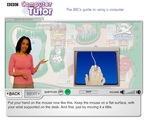
I would like to cite a good example for illustration purpose. Here is a snapshot of a slide from the course: BBC Computer Tutor.
In BBC Computer Tutor, you can choose to bring the volume to zero and switch on the subtitles. When you do this, the first thing you do is read the text at the bottom of the screen. You do not pay much attention to the anchor though you know she still exists.
After you read the subtitles, you then move on to the visuals on-screen. The course gives enough time for you to read the subtitles and then pay attention to the visuals on-screen. The visual elements keep repeating till you choose to move forward. For example the visual you see in the screenshot is a demonstration of mouse movement. The demonstration keeps repeating till you choose to go forward. You do not face the pressure of paying attention to both the visual elements and the subtitles at once.
Here the Mute ON/OFF button makes no negative impact on the course.
There cannot be any fixed solution to the problems discussed in this post. However if you continuously test your e-learning courses and you know what to test for, a lot of such problems can be avoided at an early stage.
Now it’s your turn to speak:
What’s your take? How do you test your e-learning courses that have Mute ON/OFF button? What are the things that you keep in mind while designing such courses?
Please share your thoughts.
Rupa Rajagopalan
.
Blog
.
<span class='date ' tip=''><i class='icon-time'></i> Jul 20, 2015 12:27pm</span>
|