Blogs
|
The software industry is loaded with help manuals and tutorials. It doesn’t matter how complex or easy the product is, a help manual or a tutorial is a must have.
Why would someone need a help manual or a tutorial if the product is self-explanatory, obvious, easy to use? In fact why not build applications/products that have usable user interfaces and require no training, no context sensitive help or cheat sheets. Yes, I am talking about intuitive applications that guide the user to complete their tasks on their own without referring to any support material or external resource. This post tries to raise some questions in favour of intuitive software applications/products.
Let’s begin with the basic question.
What users want?
Consider any user of a software application:
They are aware of their work processes.
They know their tasks.
All that they want to know is how to complete the tasks using a software product.
When users require tutorials or help manuals?
A user will need tutorials and help manuals when:
How the product can help them is not obvious.
The steps to use the features are not clear.
The user gets started with the product but is stuck with a task and is not able to proceed.
In some cases tutorials and help manuals also fail and people are left for hours figuring out how to complete a task using the product. Some give up and some start searching the entire web for help.
How software products/applications force users to seek help
I am an avid user of Facebook. I use it so frequently that I do not realize how challenging and difficult it is to use Facebook. The first time I visited Facebook, I was just too confused and apprehensive to use it.
Reasons
I knew it was a social networking site similar to Orkut. But then I really didn’t know where to get started.
I checked some profiles that were really organized. I was wondering how to achieve that perfection in my profile page.
It took me days to get comfortable with Facebook and use all its features effectively. I noticed that I was not alone. Many other newbies felt lost and some also gave up. For example one of my friends was wondering how to send a private message to someone in Facebook. If you are a ++regular Facebook user, you might find this strange and you might also think that my friend is not tech savvy. But that’s not the case. I am sure lots of others have problems figuring out a lot many simple things in Facebook.
With Facebook, you need to be patient and persistent. This way you will be able to figure out how to use it. But how may are that patient enough I wonder? The truth is there are really patient people in this world
Jokes apart, when it comes to Facebook, its a great way to connect with people and is really engaging. Above all there is peer pressure. I guess that’s why people push themselves to use the site, no matter how difficult it is to use. This might not be the case with business applications.
Another example is the new wordpress interface. If you regularly use wordpress, you should be knowing that wordpress has revamped their site completely. My mother who is 50 + is a regular user of wordpress. I taught her how to use it and she learnt really fast. After wordpress revamped their site appearance, she was completely lost and really didn’t know how to go about a simple task such as including an hyperlink which she did with ease in the previous interface.
The examples above are just to illustrate how difficult and annoying it can get to use a software product without any help/support. This being said, now I need to mention atleast two applications, that require no help manuals or tutorials to get started. Of course the choice is completely subjective. Feel free to challenge my choice
Applications that you can use without any help
Snagit
Snagit is a screen capture tool that helps people capture screenshots from software products/applications. I referred to no help manuals when I first used Snagit. Before using Snagit, I was using the Prt Scr option in the keyboard. When someone mentioned about Snagit, I was wondering what difference can this product create with a simple screen capture action. The product does create a lot of difference. It not only has some cool screen capture options but is also very easy to use. So here are the top 5 things I like about Snagit:
Top 5 things I like about Snagit
The main menu - where the screen capture options are obvious.
Guided Instructions - The product guides you to take your first screen capture.
The instruction "Press Print Screen to capture" is clearly stated in the main menu.
Once you click on "Capture" you are informed what to do next.
Tooltips - When you mouse over an option in the main menu, you see a feature description.
The snagit editor - The options in the editor are self-explainatory and easy to use.
Good Orientation - A new user trying to use Snagit, will be able to figure out the whats, whys and hows of the features in less than 15 minutes.
Here is an overview video of Snagit:
You can download the trial version here.
Ning
I would also vote for Ning when it comes to ease of use.
Ning is a service that allows you to create online social networks. Last we at Instructional Designers Community of India wanted to create an online social network for the community . We were sure about the kind of features and facilities that we wanted to facilitate interactions and learning activities within the community. We were evaluating some freely available networks when one of my friends referred Ning. Ning instantly communicated to us that it had all the features to make an online network work well. I liked it instantly and I also learned how to use it in a very short time. I needed no help manuals or tutorials to get started.
Top 3 Things I like About Ning
Simple and easy to use
How the product can help you is obvious.
Labels and naming conventions - These make the product features obvious.
Good Orientation - A new user can get started in less than 15 minutes.
Intuitive software applications will help companies bring down their training budget. Embedding the learning/training component within a software application may be challenging but not impossible. "Where there is a will, there is a way". And of course there may not be a single way to doing things though the usability concepts and principles may be obvious and remain the same . Here is an interesting article on 8 characteristics of successful user interfaces.
With this I end my post and leave it open for discussion:
Can you name one product that you managed to use without any help?
Do you think it is easy to eliminate software product tutorials?
What are the challenges in developing intuitive applications?
Is it a mental barrier or a technology barrier?
he first time I used Ning, I liked it instantly and I also learned how to use it in a very short time.
Rupa Rajagopalan
.
Blog
.
<span class='date ' tip=''><i class='icon-time'></i> Jul 20, 2015 12:19pm</span>
|
|
Call for papers for the 2014 World Conference on Information Systems and Technologies (WorldCIST'14) is a global forum for researchers and practitioners to present and discuss the most recent innovations, trends, results, experiences and concerns in the several perspectives of Information Systems and Technologies. Main themes: Information and Knowledge Management (IKM); Organizational Models and Information Systems (OMIS); Intelligent and Decision Support Systems (IDSS); Software Systems, Architectures, Applications and Tools (SSAAT); Computer Networks, Mobility and Pervasive Systems (CNMPS); Human-Computer Interaction (HCI); Health Informatics (HIS); Information Technologies in Education (ITE). Important Dates :Paper Submission: November 15, 2013 Notification of Acceptance: January 10, 2014 Camera-ready Submission: January 19, 2014
Education & eLearning Blog
.
Blog
.
<span class='date ' tip=''><i class='icon-time'></i> Jul 20, 2015 12:19pm</span>
|
|
I have not been very active in the blogging sphere this month. Reason - My laptop was in the service center for more than 2 weeks. I really felt crippled. I am glad I have my laptop back now and am writing this post, which I was supposed to write on 12th September.
If you have been following my blog, you must have got to read some posts tagged as "T-Bite". I started this fortnightly series in April and have posted interesting information related to learning/training. I am sure you enjoyed reading these posts and you also found them really useful. Every time I posted a T-Bite, there were so many re-tweets and some comments too. Above all T-bite posts entered eLearning Learning’s list of top posts of the month a couple of times, which is a matter of great honor for me.
Now that it’s been six months, I have decided to put an end to these series, though this has been really short. I am planning to come up with something new that would engage and interest you. So keep visiting this blog and watch out for yet another interesting series.
Till then here are the T-Bite posts for you, in case you missed reading any of them:
T-Bite - What is Contextual Collaboration?
T-Bite: How to Use Puzzles in Your Training Session
T-Bite: What is Web 3.0?
T-Bite: What is HTML5?
T-Bite: Top 5 Sites for E-learning Demonstrations
T-Bite: Cost of E-learning
T-Bite: History of Instructional Design
T-Bite: Depressing Survey of L&D
T-Bite: Interesting Videos on Augmented Reality
T-Bite: Top 10 Resources for Learning Professionals
T-Bite: Examples of Augmented Reality Games
Cheers,
Rupa
Rupa Rajagopalan
.
Blog
.
<span class='date ' tip=''><i class='icon-time'></i> Jul 20, 2015 12:19pm</span>
|
|
The International Congress on Education, Innovation and Learning Technologies, will be held in Barcelona, from 23 to 25 July 2014.This congress is organized by Professors from the C3i/Polytechnic Institute of Portalegre (Portugal) and the Extremadura University (Spain).Scientific Areas:Education;Innovation and Learning Technologies;Engineering Education. Important Dates:Abstracts sending: February 6th 2014;Acceptance notification: February 21st 2014;Complete Communications sending: April 8th 2014.
Education & eLearning Blog
.
Blog
.
<span class='date ' tip=''><i class='icon-time'></i> Jul 20, 2015 12:19pm</span>
|
|
When you have to get people to use a new product/application, there are definitely some challenges because the new product/application will bring a drastic change in the way they work. If the orientation to the new product/application is not done properly, people will simply be confused and resist using the product/application, no matter how beneficial it might be to them.
Using case studies/real life scenarios to orient people to a new product/application can do wonders. Let’s say a group of senior employees have been doing accounting using MS Excel for the past 10 years. If you have to introduce a new accounting software to them and get them to use it, you need to pick up one of their routine tasks and show them how to execute it using the new accounting software. More than anything you need to tell them how using the new accounting software will help them work more efficiently and what are the specific benefits which MS Excel does not offer. If you do not communicate this clearly, they will never understand why they must explore a new product when MS Excel is serving the purpose.
To illustrate the points mentioned above, let us now look at a sample e-learning program on new application training. Enspire Learning created this e-learning program for Texas Health Resources (a 16,000 employee hospital group) to train nurses on new medical records software aimed at streamlining their workday. Here is a screenshot from the e-learning program:
Please click on the image to access the e-learning
You will have to register with Enspire Learning to view the e-learning program
This e-learning program is a very good example of how case studies/real life scenarios can be used in new application training. Some noteworthy aspects in this e-learning program are as follows:
The e-learning program upfront communicates the benefits of using the new application as shown in the screenshot below:
The e-learning program does not attempt to teach everything that’s possible using the software. It does not teach too many things at a time. The focus is only on a single routine task - steps to order blood bank labs electronically. Check learning objectives in the screenshot below:
The e-learning program teaches how to input data from a handwritten note (as shown in the screenshot below) into the electronic system. This is what the nurses might have to do at work and this is something every nurse will want to know.
The e-learning program captures an end to end scenario - A doctor hands over a hand written note to a nurse who has to order blood bank labs electronically. The learner has to help the nurse execute this task using the electronic system.
Towards the end of the program, the learner sees the result of the steps he/she performed on the system.
The e-learning program is a TRY ME simulation, where the learner is guided to perform the steps on the application. The learner is given instant feedback/guidance, if he/she performs a wrong step or is lost.
The e-learning program also guides the learner on troubleshooting steps.
With this I end this post here and leave it open for discussion:
What’s your take on using case studies/scenarios for new application training? Share your thoughts in the comments section. Also share any other examples of scenario based e-learning programs for application training.
Rupa Rajagopalan
.
Blog
.
<span class='date ' tip=''><i class='icon-time'></i> Jul 20, 2015 12:19pm</span>
|
|
O 2º Encontro sobre Jogos e Mobile-Learning vai ter lugar na na Universidade de Coimbra a 9 de maio de 2014.Entre outros temas, os jogos e a sua aplicação no ensino, serão abordados no encontro. Destacam-se os Serious Games e a Gamification.Tema - Jogos e aprendizagem
:Jogos e m-Learning
Serious games
Experiências com jogos em contexto educativo
Os jogos e as redes sociaisGamificationApesar do encontro contar com oradores estrangeiros, estranha-se que o website do evento (que é muito básico) esteja apenas redigido em português. Fica a sugestão de um website, pelo menos também em inglês.Datas importantes:Até 31 de janeiro de 2014▪ Submissão das comunicações e posters (texto completo) 28 de fevereiro de 2014 ▪ Notificação aos autores do resultado da avaliação Até 15 de março de 2014▪ Envio da versão final da comunicação e poster▪ Inscrição e pagamento dos autores da comunicação
Education & eLearning Blog
.
Blog
.
<span class='date ' tip=''><i class='icon-time'></i> Jul 20, 2015 12:18pm</span>
|
|
I am very fond of fairy tales. As a kid I had two big books of fairy tales and used to get excited thinking about the chocolate house as described in the Hansel and Gretel story and also used to imagine the wonderland,the woods and the castles.
YouTube has lots of versions of these fairy tales. I am particularly fond of Shelley Duvall’s Faery Tale Theatre episodes. All the episodes are very well presented. If you are interested in checking out some episodes, please do watch these:
Cindrella
Hansel & Gretel
You must be wondering why I am talking about Faery Tale theatre and what has this got to do with Instructional Design. Well, there is a reason why I am writing about Faery Tale Theatre here.
I think every Instructional Designer must check at least one of these episodes and especially pay attention to:
THE NARRATION
THE DIALOGUES
I really admire the use of narration in these episodes. The narration is used intermittently and appropriately. The dialogues are also very well written.
This makes me think about writing voice scripts for e-learning. Voice scripts for e-learning must be conversational and engaging.For example, I like the way voice scripts have been written for the following e-learning courses:
BBC Computer Tutor
Enspire Learning’s E-learning Demo
The voice scripts in these courses are conversational, crisp and engaging. While writing voice scripts for e-learning, you keep the target audience in mind, you keep the context and the subject matter in mind and you pay attention to many other things. But some questions that come to my mind are these:
How do you learn to write effective voice scripts?
How do you make voice scripts engaging?
Do you think there are any specific guidelines/rules to writing effective voice scripts? or
Is this is something you will be able to do if you have good command over language and do a lot of reading?
Is writing good voice over scripts got to do more with creativity?
Do you think writing effective voice scripts can be taught?
I would love to hear from you on this. Please share your thoughts.
Rupa Rajagopalan
.
Blog
.
<span class='date ' tip=''><i class='icon-time'></i> Jul 20, 2015 12:18pm</span>
|
|
The Eden 2014 Annual Conference will take place in Zagreb from 10 to 13 June. "Workplace-based training supported by ICT tools is part of the solution to reduce skill shortages and mismatches. E-learning has become a dominant delivery method in learning settings at work across various sectors and a wide range of company sizes. Its advantages may be many, including flexibility, cost and time savings, and new work habits and improved working climate. ICT-enhanced learning may improve organisational performance and lead to increased staff commitment and the generation of new ideas."The 2013 Annual Conference Proceedings are available at the EDEN website.Important Dates:Paper Submission: 31 January 2014Registration Open: mid-February 2014Notification of Authors: 28 March 2014
Education & eLearning Blog
.
Blog
.
<span class='date ' tip=''><i class='icon-time'></i> Jul 20, 2015 12:18pm</span>
|
|
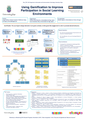
Poster presented at the Workshop on Monitoring PhD Student Progress, November 8th, 2013. The workshop took place in the University of Vigo, Spain and it was organised by the PhD Programme Doc_TIC together with other programmes. One of the workshop's activities was the presentation of the on-going thesis work by the PhD students of the organising programmes, with a poster or in an oral session. This was my contribution:
Education & eLearning Blog
.
Blog
.
<span class='date ' tip=''><i class='icon-time'></i> Jul 20, 2015 12:18pm</span>
|
|
Hello all,
We had been working on the quarterly newsletter of Instructional Designers Community of India for sometime now and finally the newsletter - IDConnect has shaped up and got released today. Here is a copy for all the readers of this blog Hope you enjoy the newsletter.
Click on the image to download
Rupa Rajagopalan
.
Blog
.
<span class='date ' tip=''><i class='icon-time'></i> Jul 20, 2015 12:18pm</span>
|