Blogs
|
VoKi é uma plataforma que permite aos seus utilizadores expressarem-se através de avatares (voki's). Voki resulta da junção de "vox" (voz em latim) e de Loki, uma personagem da mitologia nórdica. O utilizador pode gravar a mensagem que pretender e o seu voki reproduz essa mensagem usando a voz. O tipo de voz é customizável, assim como a aparência do voki. A mensagem pode ser inserida sob a forma de texto, gravada usando o microfone do computador, fazendo upload de um ficheiro ou ligando a através de um simples telefone. O voki pode depois ser embebido num website ou num post de um blogue de forma a que a mensagem possa ser ouvida (ver exemplo abaixo; a mensagem foi definida através de texto).
A plataforma disponibiliza ainda o Voki Classroom, um sistema de gestão escolar onde o professor pode inserir as suas turmas. Cada aluno tem depois a possibilidade de usar um voki para responder a actividades propostas pelo professor.
A funcionalidade de criação de voki's é gratuita mas o Voki Classroom é pago (existe uma versão de demonstração válida por 15 dias). Nesta opção é possível definir mensagens de maior duração (até 90 segundos) e estão disponíveis diversas outras funcionalidades que permitem interacção entre professor e alunos.
A plataforma é interessante quanto mais não seja pela possibilidade de criar e personalizar avatares que podem ser usados livremente. Os avatares são um dos elementos de jogos que podem ser usados na aplicação de gamification e esta plataforma disponibiliza um processo fácil para a sua criação com a particularidade dos avatares falarem.
É possível escolher entre 25 línguas (ver o segundo voki abaixo). O Voki é editável e a mensagem pode ser alterada.
Ver também este post.
Education & eLearning Blog
.
Blog
.
<span class='date ' tip=''><i class='icon-time'></i> Jul 20, 2015 12:58pm</span>
|
|
Manish Mohan has launched a salary survey for e-learning, content development and technical writing jobs in India.
I personally think such salary surveys are very useful because it helps you learn where you stand in your career.
I have already taken the survey.
Now it is your turn.
Participate in the survey now.
Rupa Rajagopalan
.
Blog
.
<span class='date ' tip=''><i class='icon-time'></i> Jul 20, 2015 12:57pm</span>
|
|
Foi publicado pela Gartner o Hype Cycle para 2012:
"Big data, 3D printing, activity streams, Internet TV, Near Field Communication (NFC) payment, cloud computing and media tablets are some of the fastest-moving technologies identified in Gartner Inc.'s 2012 Hype Cycle for Emerging Technologies. "
Na zona "Peak of Inflated Expectations" estão algumas das tecnologias e tendências abordadas neste blogue como a gamification (que é a tag mais usada nos posts publicados), BYOD e realidade aumentada. Relativamente à curva publicada em 2011, a gamification não sofre alteração, mantendo-se no mesmo ponto da curva. Segundo a Gartner, ainda serão necessários 5 a 10 anos para esta tecnologia/tendência atingir o "Plateau of Productivity".
Ver o Gartner Hype Cycle de 2011 publicado aqui.
Education & eLearning Blog
.
Blog
.
<span class='date ' tip=''><i class='icon-time'></i> Jul 20, 2015 12:57pm</span>
|
|
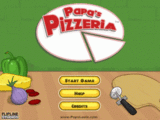
Papa’s Pizzeria is a time management game. The game is set in a pizzeria. The objective of the game is to help Roy run the pizzeria in Papa Louis’s absence.
You need to help roy take orders from customers and deliver the kind of pizza they want. The customer order typically contain the kind of topping, the position of topping, the baking time and the cutting style. For every successful delivery of pizza, you get tips.
The game proceeds in levels and you need to achieve the target for each level. You have to play the game only using your mouse.
Here are some screenshots of the game:
Arranging the topping as per order
Baking the Pizza to the customer’s desired time
Cutting the pizza as desired by the customer
Delivering the Pizza
The challenge of the game is to deliver the right pizza as fast as possible without making the customer wait.
What I liked about the game
The game introduction
The graphics
The simple interactivity model
The background score
Roy
Play the game now and let me know how you liked it
Rupa Rajagopalan
.
Blog
.
<span class='date ' tip=''><i class='icon-time'></i> Jul 20, 2015 12:57pm</span>
|
|
Um projecto em que estou envolvido - schoooools.com - procura um investigador brasileiro (ou residente no Brasil) que esteja na área de aplicação de badges em contextos de gamification. Como este blogue tem muitos leitores no Brasil, se algum deles estiver interessado ou conhecer alguém que esteja, por favor deixe os contactos num comentário de resposta a este post.
A project with which I am involved - schoooools.com - is seeking for a Brazilian researcher (or resident in Brazil) working in the application of badges in gamification contexts. As this blog has many readers in Brazil, if there is someone interested or know someone who might be interested, please leave the contacts in a comment in reply to this post.
Education & eLearning Blog
.
Blog
.
<span class='date ' tip=''><i class='icon-time'></i> Jul 20, 2015 12:57pm</span>
|
|
Technical Writing and Instructional Designing are never considered one and the same. If you go for a job interview, the hiring manager asks you for relevant experience in Instructional Desiging or Technical Writing. If you are applying for the post of a Technical Writer, only your experience in technical writing is considered. If you are applying for the post of an Instructional Designers, your experience on paper is considered and salary is fixed accordingly.
Till some years back I was also under the impression that Technical Writing and Instructional Designing are varied professions. Today I do not think so, especially when I have tried my hand at both of the professions.
In fact, these questions come to my mind now:
Why is Instructional Designing and Technical Writing treated separate?
Why is it debated whether Technical Writing is better than Instructional Designing or vice versa?
Do these job functions require completely different skill sets?
Is it really difficult for a Technical Writer to get into Instructional Designing or vice versa?
Let me now try to define the role and responsibilities of a Technical Writer and an Instructional Designer and then come back to my thoughts on the questions I raised.
Technical Writer
Skills
Coordination skills
Research skills
Good writing skills
Aptitude for Technology
Knowledge of one or more authoring tools such as Dreamweaver, Framemaker or Robohelp
Presentation Skills
Communication Skills
Creative Skills
Job
Create help manuals, installation guides and related manuals for applications or tools
Create marketing materials such as white papers, blogs, video tutorials and demos
Tasks
Has to understand why people need the product or application
Has to understand who will be using the product and for what purpose
Has to understand the technology before writing about it
Has to decide what kind of information will appeal the users (in case its for evangelizing, marketing material needs to be created or if it is to help users work with the features in the product, step by step instructions are required)
Has to interact with SMEs (developers) to get the right information
Has to structure content in a logical fashion
Has to follow or fix standards and guidelines for writing
Has to write concisely and precisely
Has to present information using visuals and text
Has to make sure information is useful to the users
Has to do a pilot testing and check if people are finding the information useful and the presentation appealing.
Instructional Designer
Job
Create e-learning courses or any training material.
Skills
Coordination Skills
Research Skills
Aptitude to quickly grasp any subject
Presentation skills
Visualization skills
Creative Skills
Analytical Skills
Knowledge of graphic design tools such as Photoshop, Flash (optional)
Communication Skills
Tasks
Has to understand why the client needs the training program or e-learning course
Has to understand who will be taking the course and their expectations
Has to understand the subject thoroughly
Has to decide what information to present
Has to decide how to present the information (visuals, audio, interactive exercises )
Has to interact with SMEs to get the required information
Has to logically structure information
Has to find out how to assess if learning has happened
Has to do pilot testing to check if the course is useful and appealing
Whatever I listed above, gives us a clue that the basic skills and also to some extend the tasks are more or less similar for both these professions.
So why these two professions are considered different?
Common points to support the difference would be:
Technical Writing
Is a support function
Requires familiarity with technology
Requires working with technology
Might be a high paying job
Has got to do with information architecture and design
Industry - software, telecom, anything that deals with applications, tools
Instructional Designing
Is a main stream job
Requires more of creative and visual skills
Has got to do with course architecture and design
Industry - varied
The differences I listed above are not convinving enough to makes these two professions poles apart.
In my opinion, what differentiates these two professions is :
The kind of solution you come up with
How you implement it
The reason why these two professions are not considered same is also because of popular myths as follows:
Myths about Technical Writing
You need not be creative
You need not innovate
Myths about Instructional Designing
You need not understand technology
You need not learn any graphic design or authoring tools
Today I am not sure if any writing professional can avoid using or knowing about technology. Technology has become part and parcel of life.
If you do not know technology, then you are missing out on something really important.
Also you need to be creative in any profession. Your creative skills set you apart from others, no matter what you do.
If you ask me if Technical Writing is better than Instructional Designing or vice versa, I will not have an answer. I have worked on e-learning courses and also user manuals. They are different solutions altogether, but the skills that was required was almost the same.
Is the transition from Technical Writing to Instructional Designing or vice versa a challenge in itself?
I would not say the transition will be a cakewalk. I would say it is not difficult. It is just the matter of understanding what you kind of solution you need to provide.
I think a mix of both Technical Writing and Instructional Designing skills is definitely an advantage. You get a broader perspective about content/documentation/learning solutions.
What is your take on this? Please share your thoughts!
Rupa Rajagopalan
.
Blog
.
<span class='date ' tip=''><i class='icon-time'></i> Jul 20, 2015 12:56pm</span>
|
|
Edheads Design a Cell Phone is a highly engaging and interactive learning game. The objective of the game is to design a cell phone that appeals to senior citizens.
The game is about gathering client requirements, designing a cell phone to meet the needs, testing the design with a small group of elderly people, getting the design out to the market and checking sales results. The sales results determines how successful your cell phone design has been.
The game has different phases. The first is the research phase where you check survey results and understand the requirements of senior citizens with respect to cell phones. The research data give you information about their expectations in terms of usage, usability,design and so on.
The second phase is the design phase where you design a cell phone. You need to make sure that you design the cell phone in such a way that it appeals to senior citizens.
After you design your cell phone you can do pilot testing and get feedback on your design. Based on the feedback you can choose to redesign or get it out to the market.
Once you are convinced with your design, you get it out to the market and the sales results determine your success.
What I liked About the game
I like the way the game brings out the significance of research, pilot testing and sales results when it comes to product design. The game clearly conveys that every phase in product design is critical and has to be taken seriously.
The game has a simple storyline and needs no help to play. There is guided assistance throughout the game.
The game has great visuals and voice over. The interactivity model used in the game is very simple. You just need to play the game by clicking your mouse.
The game encourages trial and error. Even if you fail to design the right cell phone, there are words of encouragement for you. This motivates you to play the game again and again
Try designing a cell phone for senior citizens and let me know how you enjoyed the experience
Play the game now!
Rupa Rajagopalan
.
Blog
.
<span class='date ' tip=''><i class='icon-time'></i> Jul 20, 2015 12:55pm</span>
|
|
Meal Masters II is a task based game. The objective of the game is to prepare a complete meal including starters, main course and dessert. The game gives you step by step instruction to cook a complete meal. The game controls are fairly simple. You play the game by simply clicking away using the mouse.
The game has no audio and is a little buggy too. The game also does not indicate when you make a wrong move.
However there is something interesting and fascinating about the game which might be relevant to any learning activity.
Let me quickly list the interesting elements in this game:
Orientation
Before you begin with the tasks, you get a chance to explore the kitchen and see where things are located. The arrows located at the sides of the screen allow you to move to different sections. I appreciate the fact that the game does not begin instantly and there is some kind of orientation that happens before you get started.
Attention to Detail
When you are cooking you need utensils, food stuff, vegetables and spices. I have played other cooking games too that capture cooking processes well.
However this game is slightly different from the rest of the cooking games I have played. Not only is the cooking process end to end in this game but also every little detail of cooking has been captured so well.
For example, apart from the usual vessels, there are measuring cups, grater and many more stuff that you might use while cooking in daily life.
The knives, spoons and related stuff are arranged in drawers.
When you hover over any utensil, the utensil name appears in the yellow banner at the bottom of the screen.
Every item in the fridge and cupboards are also labelled.
There is everything that you need for cooking - cutting board, the cooking plate, mixer and oven.This indicates attention to detail.
I also like this idea of labelling objects. The player is never lost or never groping for the right object.
Precise Instructions and Visual Representation
As mentioned earlier, this game has no voice over. There are instructions that appear in a static callout.
There is also visual representation of the utensil or food item that you have to look for. This is certainly a very creative idea. This saves your time from guessing and hunting for the objects.
The game does not lack voice over because the instructions are so precise and clear.
No Redundancy
If steps for a task are being repeated, you get to perform the steps the first time with instructions and the second time, you do it by yourself. So the instructions are never redundant.
When you play the game there is lot of silence. Yet you are engaged and engrossed in the game. If a game succeeeds in engaging you, then nothing else matters.
What do you think about this game?
Play the game now!
Rupa Rajagopalan
.
Blog
.
<span class='date ' tip=''><i class='icon-time'></i> Jul 20, 2015 12:54pm</span>
|
|
I have started reading this interesting book called Directing the Story by Francis Glebas. I am sure you have seen or heard of the movies Lion King and Pocahontas. Francis Glebas has worked on these really popular movies.
I am enjoying this book - Directing the Story in which Francis Glebas gives some practical tips on film making.
While I was reading this book, it struck me that whatever Glebas is talking about applies to e-learning too. I have always compared instructional designing to film making. I have also likened the role of an Instructional Designer to a movie maker.
Francis Glebas’ book now reinforces this thought again and again for me.
He begins the book by saying that people watch movies to get rid of boredom, to get entertained and to experience something that they might not experience in real life. But knowing this fact, does not help one become a better filmaker. You need specific tools and techniques to entertain the audience.
I seriously feel this applies to instructional designing too.
Why will someone go for e-learning? A pdf document or a wiki page can teach a lot too. People might want to take up e-learning courses simply because it is self paced and also because they think it might be less boring than a text book . When you think of e-learning, you expect some amount of learner engagement and some kind of fun. What’s the point navigating through chunks of text, images and animations onscreen if it does not appeal to you?
You know your learners want an engaging learning experience. But how does this knowledge help? You need to find out creative ways and methods to engage your learners.
This being said, let me jot down some striking thoughts in first 2 chapters in this book.
Please note the lines in italics have been picked up directly from the book Directing the Story
Thought 1
The most important thing about making a movie is that it must be about something big, important and significant. Otherwise why should we care?
Francis Glebas then goes on to say that the audience must find it worth watching the movie. The audience must get emotionally involved with what is being shown on big screen.
Well, does this not apply to e-learning too?
If somebody has a strong urge to gain knowledge, he/she will gain that knowledge using a wiki page, pdf document or even powerpoint presentation. It need not be e-learning that serves his/her purpose.
So before you start creating an e-learning course, you need to test the pulse of the learner. What does the learner actually want to learn? How interested is he/she to gain that knowledge? How useful will this knowledge be? Why e-learning at all? These are some pivotal questions.
If you find out these, then you will be able to create something that is really big and significant for the learner. You can also work towards creating a rich, engaging learning experience for the learner.
Thought 2
The audience is your customer - Give them what they want…….. You have to give them what they want, but not in the way they expect it. There has to be surprises along the way.
I seriously think the element of surprise will work wonders with e-learning. I am not sure how far you can implement this successfully. But this idea is enticing in itself.
This reminds me of BBC Computor Tutor. I think the element of surprise has been really used well in this course. You know you are going to learn to use the keyboard and mouse. How you learn is where the surprise element lies.
In this particular course, you keep expecting what is going to come next because you have no clue. As you go about discovering things, you learn to use the mouse and keyboard.
Thought 3
The audience must be part of what is happening on the screen. If its a joke and the audience is not in on the joke, they might get angry.
The audience has to be in that place and must be able to completely relate themselves to what is happening on screen.
When it comes to e-learning also, the learners must be in sync with what is being shown onscreen. If the learner feels left out, then there is no learning happening.
Thought 4
The director not only directs the actors and the crew but also the emotions of the audience. The director directs the attention of the audience to the events of the story.
Well, an instructional designer has to not only direct what has to go into the e-learning course but also needs to direct the attention of the learners to the subject matter being taught.
Thought 5
Boredom and confusion are enemies to good design and distracts your audience’s attention.
Francis Glebas says in a movie you can fight confusion by showing one thing at a time as you tell a story. You can fight boredom in a movie by weaving interesting narrative questions that create dramatic characters in escalating conflict.
Coming to e-learning, if your learners get confused or bored of whatever is being taught or what is being shown on screen, then the purpose does not get served.
In e-learning, you cannot have a dramatic story and characters all the time. But then every e-learning does have a storyline. So you can make sure that the story is flowing properly by asking "so what" after every slide. Also I guess even in e-learning it is important to convey one thing at a time. Every slide of an e-learning course must clearly convey the information to be given to the learner.
Thought 6
The director’s job is to figure out how to visually structure the story.
When you design an e-learning course, you must also be able to visually structure the subject matter. Your storyboard must clearly visualize the e-learning course in a series of pictures just as Francis Glebas says that while directing a movie, you visualize a story into a series of pictures.
Thought 7
You must watch a movie twice to analyze it.
I think you also need to go through an e-learning course more than twice to analyse the instructional design aspects. Francis Glebas says the first time you watch a movie, you are too keen in following the story and so you miss out on many things. Even with an e-learning course, the first time you are just interested in trying to understand what the course is all about. Its only the second or third time you pay attention to the design aspects.
With this I end my post here.
Please feel free to share your views in the comments section.
Rupa Rajagopalan
.
Blog
.
<span class='date ' tip=''><i class='icon-time'></i> Jul 20, 2015 12:54pm</span>
|
|
I have been using Camtasia for sometime now and I thought I must list down some practical tips on using this tool that might be useful to many others who are new to Camtasia like me. I would like to especially focus on the issues I faced and how I managed to solve it.
One big problem I faced with Camtasia was with adjusting call-out lengths. In rapid e-learning tools, call-out length indicates the time duration during which the call-out appears onscreen.
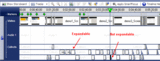
I noticed while using Camtasia that some call-outs in the timeline were expandable and some were not. I was puzzled for sometime thinking how to solve this problem.
Here is a screenshot highlighting call-outs that are expandable and non-expandable in the timeline:
In the screenshot above, the call-out marked "Expandable" looks like a rectangle. This call-out can be dragged along the time line and this sets the time duration for which the call - out appears onscreen.
If you notice , the callout marked "Not expandable" is not a rectangle but a triangle. Such call-outs are not expandable. No matter how much you try, you cannot expand the triangle shaped call-outs.
To make such call-outs expandable, all that you have to do is, use the Zoom In button in the timeline.
The screenshot below highlights the Zoom In button in red.
If you continuously click on the Zoom In button, you should see the call-outs in the timeline become expandable.
In the screenshot above, you see the call-outs appear as a rectangle. You can now easily expand the call-outs and adjust the time duration of these call-outs.
Hope this tip was useful!
Watch out for more tips
Rupa Rajagopalan
.
Blog
.
<span class='date ' tip=''><i class='icon-time'></i> Jul 20, 2015 12:53pm</span>
|