Blogs
|
Save authoring time and money - find out if Lectora Inspire is the right e-Learning tool for you
Lectora is a powerful platform for developing eLearning content, but what are its strengths and weaknesses as an authoring tool? And given your own needs, is it a good fit? With professional experience working in the most popular platforms (Articulate Studio, Storyline, Adobe Captivate and Lectora) I have experienced the strengths and limitations of each one. The strength of Lectora comes in its robust set of tools and its programming flexibility.
What is it?
Lectora Inspire is actually a suite of programs. When you purchase Inspire, you get:
Lectora Publisher - the authoring tool
An audio recorder and editor
A limited version of Camtasia - a screen recording software and editor
Snagit - for still image capture and editing
Flypaper - a tool for creating flash animations
Lectora is a robust authoring tool specifically built for eLearning. Its file structure follows a textbook analogy: the slides are "pages" that are grouped in chapters and sections all visible in the left side Title Explorer. Like most other platforms, Lectora’s interface is slide-based, with the program starting at slide 1 and going on from there.. So what are Lectora’s strengths and in what areas do other tools come out stronger?
Strengths
Power and flexibility - When you purchase the suite you have the biggest toolbelt of all the platforms in terms of what comes with it, listed above. This helps to make graphics, screen captures, and narration all within easy reach and of high quality.
Quizzing - This is perhaps Lectora’s strongest area, it was built for quizzing. Lectora has more built-in variables and actions than the other platforms so you can make custom quizzes using your own logic, feedback and tracking, or pick from Lectora’s built - in quiz templates .
Interactivity - With platforms like Articulate Studio, when you want to add an interaction or quiz, you do so via add-on programs (Engage and Quizmaker) which can make you feel like you have left the software altogether and must work within tight templates. Lectora’s interactions are built right on the slide and are highly customizable.
Areas where other platforms shine
Expense - Lectora Inspire is expensive, costing approxiamtley $2500for the full suite
Learning Curve -Lectora will take some time to master, especially if you plan to use variables and conditional actions. However,if you are coming from a powerpoint background and are not used to working within a timeline, Lectora may be easier for you than Captivate or Storyline.
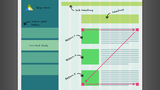
Flowchart View - If you are a person who prefers working with flowcharts and visual layouts, you might prefer Storyline which has "story viewIn Lectora you have to keep track of it in your head, draw a picture or actually look at slides to find the buttons and actions to see where they lead.
Software Simulation - While Lectora Inspire comes with Camtasia, a powerful screen capture tool, it comes with a limited version, not the full version. Adobe Captivate and Storyline integrate screen capture and interaction with video more seamlessly.
Take-Away
If you are working mostly with software simulation and screen capture, you might want to look to Captivate, Storyline, or the full version of Camtasia. If your eLearning is heavily quiz based and interactive, Lectora is a good choice to make. If you are working under time and budget constraints, it may be too much horsepower to fit your needs.
Ron Trilling
.
Blog
.
<span class='date ' tip=''><i class='icon-time'></i> Jul 21, 2015 07:27am</span>
|
|
Save authoring time and money - find out if Adobe Captivate is the right e-Learning tool for you
When shopping for software to develop your eLearning content, it is important to get the right tool for the job. Today we’re looking at Adobe Captivate and what its strengths and weaknesses are in comparison to competing tools like Articulate Studio, Storyline, and Lectora Inspire. Having worked with all of these, I have found Captivate to be, above all, a powerful and affordable tool with particular strength in software simulation/screen capture training.
What is it?
Adobe Captivate is a full-featured eLearning authoring software. It is available as a subscription or can be purchased.
Like most eLearning software platforms, Captivate’s interface is slide-based, with the program starting at slide 1 and going on from there. With Captivate, like Articulate Storyline but unlike Lectora and Articulate Studio, each slide has its own "timeline," where you set the appearance and timing of events and animations on the slide.
It is important to state that almost all the platforms do everything you need to do in one way or another, but some are stronger in certain areas. So what are Captivate’s strengths and in what areas do other tools come out stronger?
Strengths
Software Simulation - One of the slide types in Captivate is screencasting and another slide type is video demo. These features are integrated into Captivate and your recordings translate right to slides, with mouse movement and keypress events layered over as editable animation. No need to go outside the software. Nice!
Responsive Layout Options - Captivate is the only tool where you can see all three views on one slide in a responsive project. You can toggle from desktop, to tablet, to phone and even drag elements around on the slide to optimize the look of a particular view without affecting the other views.
Price - Captivate by itself costs about $1000, but it also comes as part of the subscription-based, for $30/mo Along with price, it integrates seamlessly with Adobe’s other tools like Photoshop, Illustrator and Flash.
Areas where other platforms shine
Quizzing - While Captivate has full interactive and quizzing capabilities, Lectora has more built-in variables and actions. If your interactions or quizzes are complicated or you want to customize their logic, Captivate might be slightly limiting.
Learning Curve -Captivate will take some time to master, especially if you have never worked with a timeline palette. But once mastered, it is a powerful platform. Articulate Studio is easier to learn since it works from within PowerPoint, but it doesn’t have near the power or flexibility as Captivate.
Flowchart View - If you are a person who prefers working with flowcharts and visual layouts, you might prefer Storyline which has "story view." In Captivate, you have to keep track of branching in your head, draw a picture, or actually look at slides to find the buttons and actions to see where they lead.
Take-Away
If your eLearning is heavily quiz-based and interactive, you might want to look to Lectora or Storyline. If you are working mostly with software simulation and screen capture, need a responsive authoring tool or are working under budget constraints, Captivate is a good choice to make.
Ron Trilling
.
Blog
.
<span class='date ' tip=''><i class='icon-time'></i> Jul 21, 2015 07:27am</span>
|
|
Make sure your e-Learning authoring investment is the best fit for you
When shopping for software to develop your e-Learning content, it is important to get the right tool for the job. Today we’re looking at Articulate Storyline and what its strengths and weaknesses are in comparison to competing tools like Articulate Studio, Adobe Captivate, and Lectora Inspire. Having worked with all of these, I have found Storyline to be a robust platform with particular strengths in advanced interactivity, animation and mobile publishing.
What is it?
Articulate Storyline is a full-featured e-Learning authoring software. Not to be confused with Articulate Studio, which is a more limited, PowerPoint-based program by the same company.
Like most e-Learning software platforms, Storyline’s interface is slide-based. With Storyline, like Adobe Captivate but unlike Lectora and Articulate Studio, each slide has its own "timeline," where you set the appearance and timing of events and animations on that slide.
It is important to state that almost all the platforms can help you create effective learning, but each have their strengths. So what are Storyline’s strengths and in what areas do other tools come out stronger?
Strengths
Advanced Interactivity - Articulate has a few unique features not found in any of the other platforms. One of these is the slider button, where users can drag a button along a slider, which can be used as a scale type interaction, triggering real time feedback in relation to the slider’s position. Other unique features are the ability to animate an object along a path and its freeform hotspot tool with which you can customize hotspot button shapes. In other programs your transparent button shapes are restricted to squares or circles.
Flowchart View - Storyline has the option to see your whole project in "Story View" which is a flowchart view of all the slides and how they relate to each other. Slides can be moved around and reorganized in this view. For a program with a lot of branching, it can be handy.
One-click mobile publishing - The publish settings for Storyline are the easiest among the platforms. It allows publishing for mobile and web all at once. It has an option to bundle its own Articulate Mobile Player for either iOS or Android instead of assuming those platforms will just use a browser to view HTML5 content. Along with this feature is the option to allow downloading for offline viewing.
Areas where other platforms shine
Screen Capture - While Storyline has an adequate screen recording option that creates a video, Adobe Captivate is stronger in this area. For example, in Captivate you can edit the cursor’s movements after the recording is complete.
Learning Curve -Storyline will take some time to master, especially if you have never worked with a timeline palette. But once mastered, it is a powerful platform. Articulate Studio is easier to learn since it works from within PowerPoint, but it doesn’t have the power or flexibility of Storyline .
Quizzing - While Storyline’s quizzing has plenty of options and flexibility, Lectora has more built-in variables and actions. If your interactions or quizzes are complicated or you want to customize their logic, you might want to closely compare Lectora with Storyline.
Take-Away
If you have the time and money, it is hard to go wrong with Articulate Storyline. However, if your e-Learning has some unique needs, like custom logic-based quizzing or elaborate screen capture, you might want to compare it closely with Lectora and Captivate, respectively.
Ron Trilling
.
Blog
.
<span class='date ' tip=''><i class='icon-time'></i> Jul 21, 2015 07:27am</span>
|
|
Find out if Camtasia is the right tool for your software training
When shopping for software to develop your eLearning content, it is important to get the right tool for the job. Today we’re looking at TechSmith’s Camtasia, a screen and audio capturing software. While other eLearning software platforms like Articulate Storyline, and Adobe Captivate also have screen capture capabilities, you may be asking yourself if what they have is robust enough for what you need to accomplish. Here we will examine Camtasia’s unique strengths and limitations as an eLearning tool.
What is it?
Camtasia is a full-featured screen and audio capturing and editing software with additional limited interactive quizzing capabilities. It can be bought by itself as Camtasia Studio, or a limited version of it comes bundled with the Lectora.
Because Camtasia is specifically a screen capture production tool it can’t really be compared to the limited screen capturing capabilities of other eLearning Software platforms because it has many more advanced features. As a video editor, it could be compared instead to software like After Effects or Adobe Premiere. But for our purposes, let’s look at what its strengths and limitations are as an eLearning Tool and whether it fits your needs.
Strengths
Advanced Video Editing - Editing your project after the initial recording is Camtasia’s strongest suit. Once recorded, video sections can be split, cut and pasted and moved around easily. The audio appears on a separate track and can be manipulated separately. There are also many ways to enhance the animation of mouse movement by adding highlight circles, effects on click, magnification and spotlighting.
Advanced Audio Editing - Removing room noise, leveling clips, and doing voice over after the screen recording is captured are all possible with Camtasia.
Adding Objects and other Media - The video and audio are only part of a Camtasia project. You also have the ability to add built-in callout areas, extra graphics like logos, sound effects, and images, something that can come in handy if you want to go back and replace a graphic or cover something up without re-recording.
ADA Compliance - There are three ways to create closed captions in Camtasia. Its speech-to-text feature can create captions in real time as you record, you can sync text from a written script and have it show on screen, or you can write in captions manually.
Limitations
Quizzing - While Camtasia does have the ability to add SCORM compliant quizzes, this is a very limited feature. There are only 4 types of questions to choose from and no real flexibility for custom functionality, custom logic or variables.
Interactivity -Camtasia is solely a screen and audio capture tool and not a tool specifically for interactive eLearning. Although there is a table of contents option for users to access different sections or videos, users do not interact directly with the program nor can there be branching logic in the navigation system as is possible with Lectora, Captivate or Storyline.
Take-Away
If your eLearning is heavily quiz-based and interactive, your best tool would be a full eLearning software package like Lectora, Captivate or Storyline. If you are working mostly with software simulation, screen capture or are working under tight ADA compliance, Camtasia Studio is a good choice to make.
Ron Trilling
.
Blog
.
<span class='date ' tip=''><i class='icon-time'></i> Jul 21, 2015 07:27am</span>
|
|
Enhance learner engagement with these 6 e-learning Interface design tips
Done correctly, design is a transparent method to enhance communication. Following are a few tips for creating a well-designed interface for your e-learning courses.
Keep it simple and clean
Use grid systems to align content in a way that is neat and easy to navigate. Content should be left-aligned for maximum readability. Know who your audience is and design accordingly i.e. age appropriate graphics and font size, appropriate icons for your industry, etc) . Keep cursive fonts to a minimum or leave them out completely, as they can be hard to read. Stick to a color palette of no more than 5 colors.
Give Visual Clues
If you want the user to do something such as click on a link or go to the next page, give them visual clues to do so. Replace text with buttons and icons. Use icons that are familiar and easily recognizable.
Un-clutter the menu
Keep clutter away from the menu. Fight the temptation to turn the menu into a game or a treasure hunt. The goal is to be able to read the menu with clarity and use it to navigate to different areas of content quickly and easily. If you have a deep menu system, consider expandable menus that fly-out to minimize clutter.
Design responsively up-front
Pre-plan if your training module will be viewed on a mobile device and if so, design accordingly. Design your interface to work across several devices by using 3 different width breakpoints: one for desktops, another for tablets, and another for mobile devices. Also, use percentages and ems instead of pixels to define type, width and images.
Use scan patterns to your advantage
Generally speaking, most people read from top to bottom, left to right. Their eyes usually scan a page in either an F pattern or a Z pattern. . The most important real estate on the page is the top left and the least eye-attracting area is bottom right. Use this knowledge to your advantage in your design. In addition, use design elements such as bullet points, color, contrast, white space and type size to create interest and help guide the eyes to where you want them to go
Follow Your Brand
Use your brand guidelines/brand standards as a basis for your design so that your employees feel at home and know that they haven’t stumbled upon another company’s site. Your company logo should be somewhere prominent on the welcome screen well as being visible on the interface for continuity.
By using these simple tips, you will create more effective e-learning interfaces that will help your learners better navigate through your course and retain content. The simplicity of a well-designed interface is transparent and seldom noticed, but subconsciously it is appreciated.
Ron Trilling
.
Blog
.
<span class='date ' tip=''><i class='icon-time'></i> Jul 21, 2015 07:27am</span>
|
|
A graphics toolkit will save you time and add consistency to your course
A graphics toolkit is a repository of graphics that can be re-used throughout your courses. It contains common graphic elements that make course development simpler and enables learners to focus on course content.
Why develop a Graphics Toolkit?
There are 4 main reasons to develop a graphic toolkit:
Simplifies future course development - A graphic toolkit serves as a foundation for all future courses, saving a lot of design and development time. Just keep adding to the toolkit as new features are needed.
To start a graphics toolkit, review several past or current courses to see what common features you continually use such as:
Navigation buttons
Headers/Footers
More Info buttons
Knowledge checks
Icons
Cutouts of people
Backgrounds
Page layouts
Chart formats
Video testimonials
Call to Action graphics
Pop-up info boxes
Develop these graphics so that they can be re-used throughout any course. Make sure that they will work responsively, regardless of the device or orientation. This means create them to be resizable to account for not only responsive environments, but different amounts of text they might contain. For these types of graphics, vector-based images are better than bitmap. If you have to use bitmap, make the reusable item very large. The best choice can sometimes be to create reusable shapes inside your eLearning software which will translate the graphic to css-styled html or SVG.
Improves usability - To make your courses more user friendly, keep your graphics and navigation consistent from course to course in both placement and design. Consistency makes programs easier for participants to use; they know how to navigate and where to look for specific content. This makes learners more comfortable and allows them to focus on learning, rather than navigating.
Saves production time - Do you have stock images that you reuse often, yet you always have to figure out where they are? Work more efficiently and save time by renaming stock files appropriately, rather than the stock house numerical filename.
Organize files in folders, sorting them by project or subject (or both) so you can easily locate them in the future. In some eLearning software, graphics can be stored in libraries and shared across projects. It can be good practice to create a starter template file that includes all reusable graphic in the library. Before publishing, you can delete unused items.
Provides a familiar, branded look - All company communication should look and feel the same to maintain brand integrity. From using the same fonts and spacing throughout each page to using the official color schemes, icon design and logo usage will provide brand continuity throughout your courses and provide your participants with familiarity.
Conclusion:
Having a reusable graphics toolkit will make your work easier and help you complete projects faster. Your course participants will also appreciate the added benefit of ease of use.
To keep your toolkit fresh and valuable, continue to add new elements to it as new projects are undertaken with new re-usable resources.
Ron Trilling
.
Blog
.
<span class='date ' tip=''><i class='icon-time'></i> Jul 21, 2015 07:27am</span>
|
|
Consider the following to maximize the return on your manufacturing training efforts
Training fundamentals transcend industry, but every industry does have its own unique considerations to take into account in order to develop effective e-learning solutions. When developing training for the manufacturing industry, you must consider that employees are often working on the floor, not in front of a computer in an office or cubicle. Here are some unique issues to take into account when developing training for manufacturing employees:
Consistency and diligence.
Issue: There’s a significant amount of time that goes into training manufacturing employees, especially with the changing landscape of compliance. Workers must understand the basics, but they also need to be able to adapt to new procedures and technology
Solution: Be consistent and diligent about training your employees. Ensure that training is an on-going process and that learning is approached incrementally. Don’t let long periods of time go by without training them. You won’t have to worry about bringing them up to speed on the latest technologies if you offer frequent training. Train your employees and retain them by giving them opportunities to learn and grow.
Bite size training.
Issue: Goals in manufacturing companies are focused on output. How can workers learn anything new when everyone is on the floor handling current operations and trying to meet deadlines?
Solution: Opt for short eLearning courses over longer ones. Try breaking down your training sessions into 15 - 20 minute increments. Test how effective your eLearning strategy is by picking a small sample of employees to train. Survey them to see how effective the training was for them and if the results are positive, use this as a basis to train the rest of the department.
Make Room for Training.
Issue: Manufacturing workers often don’t have their own workspace to train.
Solution: Develop training spaces your workers. Create a training room for them with a few computers or set up wireless connections throughout the company and purchase a few tablets or laptops for them to train with during downtime.
Mix Online with In-Hand.
Issue: One on one skills training is personnel intensive. How can I introduce my workers to e-learning?
Solution: Most of the education that takes place in the manufacturing industry is hands on, so this type of training definitely needs to be taken into consideration when training your workers. Videotape some of your one-on-one skills training sessions and incorporate this footage with other visuals and interactivity in your courses to get the best of both worlds.
Keeping these tips in mind when developing training for the manufacturing environment will help maximize the return on your training efforts. By placing an emphasis on training and being dedicated to helping your employees grow can result in more knowledgeable, productive and efficient employees in the future.
Ron Trilling
.
Blog
.
<span class='date ' tip=''><i class='icon-time'></i> Jul 21, 2015 07:27am</span>
|
|
If we want to learn English we have to understand the culture of the places where it is spoken.It's October.... Halloween is an annual holiday celebrated on October 31st . It has roots in the Celtic festival of Samhain and the Christian holy day of All Saints. The term derives from "All Hallows Eve" that means "eve of All Saints’ Day".Originally Halloween was a pagan festival, people thought that the living and the dead, came in contact on that night. Like most pagan festivals, long ago it was absorbed into the festivals of the expanding Christian church, and became associated with All Hallows Day, or All Saints Day, which fell on November 1st. The celebration of Halloween survived most strongly in Ireland. It was the end of summer festival, and was often celebrated in each community with a bonfire to ward off the evil spirits. Children would go from door to door in disguise as creatures from the underworld to collect treats, mainly fruit or nuts. Carving turnips as ghoulish faces to hold candles became a popular part of the festival, which has been adapted to carving pumpkins in America. Nowadays this festival is celebrated in many western countries as the U.K., U.S.A., Canada, New Zeland and Australia. HALLOWEEN IN THE UK Halloween celebrations in the United Kingdom include parties where guests arrive in a costume. Other people gather together to watch horror films, either at home or at a cinema. Some children go trick-or-treating. This means they dress up and go to other peoples' houses, knocking on the door for sweets or a snack. Those who do not give out a treat may be tricked with a joke. HALLOWEEN IN THE USA Today school dances and neighborhood parties called "block parties" are popular among young and old people. More and more adults celebrate Halloween. They dress up as historical or political figures and go to masquerade parties. In larger cities, costumed children and their parents gather at shopping malls early in the evening. Stores and businesses give parties with games and treats for the children. Teenagers enjoy costume dances at their schools. And what about you? What do you usually do for Halloween?Click on this link to see The Best Websites For Learning About Halloween:http://larryferlazzo.edublogs.org/2008/10/05/the-best-websites-for-learning-about-halloween/
Roberta Martino
.
Blog
.
<span class='date ' tip=''><i class='icon-time'></i> Jul 21, 2015 07:27am</span>
|
|
A ghost tour is a guided tour, usually conducted at night. You can visit places where ghosts are usually seen... Sometimesknown as a ghost walk or haunted history walk, a ghost tour is led by a guide who tells stories about ghosts, legends and history. Some are done on foot, walking from one haunted location to the next, some have guides who are dressed in period costumes. You can have a ghost tour in the USA or in the UK if you click on the following links...http://usasbesthauntedhouses.com/http://www.theshadowlands.net/places/uk.htmhttp://www.hauntedplaces.co.uk/index.htmlWe watched "Monster House" in our sixth grade! Watch the trailer!http://www.youtube.com/watch?v=qEaT6fNGOHw And what about you?Did you ever visit a haunted house?Are there any haunted places in your town?
Roberta Martino
.
Blog
.
<span class='date ' tip=''><i class='icon-time'></i> Jul 21, 2015 07:26am</span>
|
|
Yesterday we had a lot of fun, we had many activities...just take a look at our VIDEO! AND...WHAT DID YOU DO ON HALLOWEEN NIGHT?
Roberta Martino
.
Blog
.
<span class='date ' tip=''><i class='icon-time'></i> Jul 21, 2015 07:26am</span>
|