Blogs
|
Using online training you can now reach out to new audiences that you could not address in a cost effective way before.
Let’s face it: as a successful trainer, especially if you’re a trainer with a deep expertise, you are most likely not cheap. This is of course a good thing, but it also limits your market to rather large organizations or big corporations. Smaller companies, let alone individual employees, cannot afford your services.
Online training, if done correctly, can change this. It is an opportunity to sell your skills and experience to a larger audience. You can start by using your existing clients as marketing channels for your online training products. How does that work?
As an example, suppose you are training pharmacy employees. You tell them about the safe use of certain drugs: the correct dosage, the potential side effects to watch for and the best way to administer the drug. Suppose you could sell pharmacies an online training package which is really a light version of your original training. This training "light" is focused on one specific drug only and explains everything without any pharmacy jargon.
There are plenty of training opportunities outside your established base of customers
Now, why would pharmacists buy what is essentially a dumbed down version? To educate their customers of course. Think about having to read the instructions that are included in the box, in tiny script and boring prose. Surely an online presentation with a little quiz afterwards creates a much better learning experience.
As another example, if you are training personnel managers in interviewing and screening job applicants, why not sell your expertise to those same job applicants? After all, you already know exactly what personnel managers are looking for. Box your expertise in an online training and sell it directly to employees. Consider focusing on a select group (e.g. high potentials looking for a new career opportunity) as this facilitates your marketing efforts.
To turn your skills as a trainer into an online training package, there are various options. For starters, you can conduct an online seminar. This is a natural extension to what you’re already doing, presumably, on a day-to-day basis. You talk to a group of people, the only difference is you’re doing it online. For a potentially larger audience.
The other option is to extract yourself from the process, either entirely or partially. If you participate in asynchronous discussions - a fancy phrase for using e.g a forum - you get to decide when you provide the answers and advice. This means you can also employ other people to answer the easier questions for you. If you create a truly standalone interactive course, you eliminate yourself entirely from the process - freeing up your precious time for lucrative training sessions in big corporations.
In short: online training is an opportunity to expand your customer base because you can reach audiences which could not afford your services previously.
TrainerTops
.
Blog
.
<span class='date ' tip=''><i class='icon-time'></i> Jul 23, 2015 10:36am</span>
|
|
How do you create an engaging online training? Use video to illustrate the need for the training. For instance, if you train paramedics in dealing with aggression (and unfortunately, yes, paramedics do face aggression), you might start your online training with a video taken from a news item on this topic. This is not so different from a regular "live" training session: The video provides an illustration of the problem and then you step in to learn participants how to deal with a situation that they may face themselves.
Video in online training
In an online training, you can also set up a discussion based on the video. In all Learning Management Systems (LMS) I know, you can include a forum in a training. Just make it clear in the title and the description of the forum what the purpose is. If you have a small number of participants (or if you divide them into small groups), you can task everybody with posting a statement based on what they’ve picked up from the video.
As an aside: an online training video can be revisited over and over again. That sounds very boring, but here is a quote from an IBM trainer, Bob Rohr, who explains why this is actually great:
In 1997 IBM produced a series of online courses using streaming audio and video, and I played a role in that.
We had 500K students and I collected data from a good subset of that populations. I could scarcely call on a customer that had not taken the courses.
I found that many of them had taken the "classes" up to 10 times. When I asked why they would do that, they invariably said they replayed it until they "got it".
There is no Instructor that can endure repeating themselves 10 times, and the other students would revolt if you were to do that. As we all know peer pressure comes into play in classroom settings. Here, they were alone; no one knew they did not get it the first 9 times. The machine had no opinion on the matter; it would play it all day and night.
Bob cites an intrinsic advantage of computer based training: you can repeat as much as you like.
Finding Proper Videos
This is the hard part: Where do you find videos which are relevant for your training? Apart from shooting them yourself, there’s nothing for it but to look them up on Google. As an example, suppose you are training a group of managers how to motivate highly educated professionals. So, you are looking for a video, say on YouTube or Vimeo, which explains what really motivates people.
Try a few variations of what you are looking for:
youtube how to motivate professionals
youtube how are professionals motivated
youtube what motivates people
youtube what motivates us
youtube motivating professionals
In other words: apply your Google search skills to find relevant videos. You might come up with The surprising truth about what motivates us.
Embedding Your Videos in An Online Training
Once you have found a suitable video, you have to put it in your online training. Now, how this is done exactly depends on your LMS of choice, but it is usually not very complicated.
The easiest way is to just leave the video where it is: usually on YouTube or Vimeo. You do not download the video and then upload it again in your online training. Instead, you just link to the video. In for instance Moodle, one of the most successful LMS systems, this is enough to make the video available to the training participants. Here’s how it’s done:
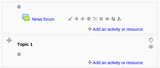
First, you add a new resource to your course (in Moodle, a training is called a course, which is divided into topics).
Then you select the resource "Label", which you can use to embed videos.
Type in the title of the video, select the text and click the "Insert/edit link" button.
In the little "Insert/edit link" window that pops up, simply input the url (the web address of the YouTube movie that you can copy from the address bar of your browser if you’re looking at the movie). Still inside the popup window, click on the "insert" button.
If the popup window has disappeared, the video title should now be underlined. Click the "Save and return to course" button (you may have to scroll down a bit to see it).
That’s it! You have added a video to your online training.
Maintenance: Watch Out for Broken Links
Unfortunately, there is no way to get notified if a YouTube video is no longer "in the air". In other words: if you embed a video, you have to check your online training regularly to see if the video can still be viewed. The video’s owners, or YouTube, may have taken the video down for whatever reason. So, watch out for broken links.
To summarize: you can use freely available videos, found through Google, to spice up your online trainings. Your trainees may revisit conceptually difficult videos until they "get it". Use an LMS (Learning Management System) to embed videos in your online training quickly and easily.
TrainerTops
.
Blog
.
<span class='date ' tip=''><i class='icon-time'></i> Jul 23, 2015 10:35am</span>
|
|
Social media is an ingrained part of today’s society.
Source: www.edudemic.com
See on Scoop.it - InformationCommunication (ICT)
Mr Kirsch's ICT Class Blog
.
Blog
.
<span class='date ' tip=''><i class='icon-time'></i> Jul 23, 2015 10:34am</span>
|
|
Creating an online training takes a lot of effort and time. Once you’re done, you want to make sure people will find your online training through search engines such as Google. And you don’t want to be just anywhere in the search results, you want to be on the very first page, preferably in the top five results. This is where Search Engine Optimization (SEO) comes in.
How Does Online Search Work?
SEO increases the rank of your online training site in search results. Just to be clear: this is not advertising, it’s all about getting people to find your online training through, mainly, Google.
So, how does it work? How can you improve the ranking of your online training in the search results? First of all, you need to know a little bit about how search engines actually work - not in any technical detail, but generally speaking.
How Do Search Engines Discover Any Online Training?
Imagine for a moment there were no search engines. What would you do to find an online training? Maybe you would visit a site where they list a lot of online training sessions. Or maybe you’d use the Yellow Pages website to find trainers and then look up their offerings.
Well, this is more or less what search engines do to discover and rank your website too. Actually, they try to visit all sites on the entire internet and one strategy for that is to follow links from one website to the next. Once they have found your website, they create a table with all the words on your site. For each word, they also keep count of how many times you used that word. So, it’s really a frequency list of keywords. Creating a frequency list of keywords is also called indexing.
If you start a search and type in keywords, a search engine will look up your keywords in those frequency lists. The search engine’s assumption is that sites with a very high frequency of the words you’re looking for, are more relevant to you than other sites.
But there is one more trick search engines use to determine the relevancy of a specific site. This is comparable to asking around before you make a purchasing decision on a car. If you hear a lot of people talking about a specific car dealer, you will be more inclined to visit that dealer, versus the other dealer that nobody seems to know about.
What search engines do, is measuring the number of incoming links. In other words: they count how many other websites link to your website to see how important your website is. While doing that, they also take into account what the nature of the linking websites is. For instance, if a website with hundreds of topics links to your online training, that link will count less than a link from another website which is specifically about online training.
Where to find a good one?
An analogy would be you - still shopping for a new car - listening more carefully to your sister who reads ten automobile magazines every week versus your brother-in-law who only brags about his own car. In other words: you assign more authority to more knowledgeable sources.
How Will Search Engines Find My Training Website?
Based on what we’ve learned about search engines, we can now specify two important rules:
Write text containing the relevant keywords
Make sure you have incoming links from relevant websites
If you follow these rules, search engines will find your training site and rank it high in relation to the set of keywords that best describe the nature of your training website. In other words: if people type in the keywords that are a very close match to your website, they will get to see your website on the first page of results.
As an aside, if you have a brand new training website, you can simply add it to Google using Google’s Webmaster Tools. Other search engines have similar tools to add your training site to their index.
Now, let’s look at each of the rules in some more detail.
Write text containing the relevant keywords
How do I know this actually works? Well, right now my blog post about productization for trainers ranks very high in Google if you use those exact keywords while searching for it. That’s because my blog post is highly specific and custom tailored to trainers.
To illustrate the importance of keywords, consider this. There is even a bunch of entrepreneurs who check if a specific search domain is still available. They will think up a number of highly specialized keyword sets, see if these keywords drive enough traffic (if search engine users click through to their website, based on those keywords) and only then they’ll create the actual product.
Make sure you have incoming links from relevant websites
What can you do about rule number two, making sure you’ve got a lot of other websites linking to yours? You could add your site to "web directories" such as the open directory project or the Yahoo! Directory. Unfortunately, these directories are so general in nature, that search engines do not assign much relevancy to a listing there in relation to the keywords which describe your training website. In other words: it doesn’t hurt to be listed in those directories, but it won’t make much of difference for your search engine ranking.
Another strategy is to link to your own website on all sites which allow user edited content. For instance, you could link to your website by posting a comment to a blog post (such as this one). However, unless your comment also contains something of actual value, such as relevant good advice, your "contribution" will be viewed as link spam. In that case, most blog owners will simply delete your comment or not even publish it in the first place.
So, the best way to go about this is by trying to help out other people. Only link to your own training site if you’re pretty sure your training would help people visiting the site that does the linking.
Should I Expose My Entire Online Training to Google?
Some LMS systems (learning management systems) offer the option to expose your online training to search engines such as Google. The advantage is that Google will be better able to index your site (this improves your site’s ranking).
However, even if your online training is configured to allow only search engines (outside your regular trainees of course), it’s still technically possible to gain access to your training. Malicious hackers might impersonate a search engine, for instance.
So, unless you’re offering a free training, accessible to all, you should not open up your training to any search engines.
Instead, create a very good summary for each training on the homepage of your LMS. This summary should contain all the relevant keywords and also a description of the intended audience. It would be even better to create a separate webpage for each summary, where you state everything there is to know about your training:
Topic(s)
Goals
Intended audience
Duration
Type of training (entirely online, blended or in face to face session only)
Anything else which is relevant to your specific training or situation
Be as specific as possible. If your training is mainly focused on sales managers but also contains some tips for all types of managers, stick to sales managers anyway. In other words: search engines love specialization and reward it every time over general descriptions.
Do I Need A Professional?
If you have read this far, then you do not need a professional. Seriously, all a professional can add to your online training’s SEO, is relieving you from the tedious job of checking your site’s ranking on a regular basis and trying to get your site posted on important and relevant sites. As a matter of fact, you are better qualified to judge whether a site is relevant. An SEO professional might list your online sales training on a site for sports trainers, just because both your sites contain the word ‘trainer’.
Black Hat Hacker
If you do want to hire a professional, make sure they do not employ any of the black hat SEO techniques. Black hat techniques try to trick search engines into ranking your site higher than is actually deserved. In other words: your site will also show up when less relevant keywords are used. This will ultimately result in a disappointment, as any resulting visitors of your site will not exactly find what they were looking for. The blackhat SEO "professional" will still charge you because, hey, they have led visitors to your training site…
Most Important SEO Tip: Content Is King
To conclude this post here is the most important SEO tip: content is king. The content of your training site should state exactly what you are offering. Do not be vague or general in the hope of winning more customers. Instead, go for content which is custom tailored to a very specific type of customer: your actual, existing customers. Try to write your training site’s content from their perspective. Use words they would use to find your site.
The post Beginners Guide: Your Training On The 1st Page in Google appeared first on TrainerTops Blog.
TrainerTops
.
Blog
.
<span class='date ' tip=''><i class='icon-time'></i> Jul 23, 2015 10:34am</span>
|
|
During the first semester of the 2014-15 school year, Gaggle Safety Management discovered and blocked 283,368 references of sex and 188,563 mentions of drugs in student email, text messages, discussion boards, email attachments and computer files.
Source: www.gaggle.net
See on Scoop.it - FootprintDigital
Mr Kirsch's ICT Class Blog
.
Blog
.
<span class='date ' tip=''><i class='icon-time'></i> Jul 23, 2015 10:33am</span>
|
|
Virtual worlds aren’t just for playing, they also open a gate to other didactic uses as virtual museums. I love going to all sort of museums, but taking your students with you is another thing as finding time, organizing the trip and preparing the goals can be resource consuming. The alternative is to attend a virtual museum while in classroom. The existing ones offer different options:Picture galleries: they just show a bunch of pictures of their expositions.Virtual reality exposition rooms: you can walk inside a 3D world interacting with the elements.A mixed approach of the previous ones.To better understand what this is about have a look at the Smithsonian National Museum of Natural History. Get inside, have a walk and realize the possibilities of this resource. Other options aren’t so impressive but they’re indeed equally valuable as the Louvre Museum.Some ideas to work with:Just a lovely walk inside the museum.A webquest: combine it with flow control tools, as Moodle.A cultural trip to solve some exercises or complete a presentation.
Adoni Sanz
.
Blog
.
<span class='date ' tip=''><i class='icon-time'></i> Jul 23, 2015 10:33am</span>
|
|
If your trainees are enrolled in your online training, do they know it’s your training? Are they aware of your name and your brand? Providing an online training creates a great opportunity for spreading awareness of your brand.
The Importance of Branding
Here is why you should seize the opportunity to improve awareness of your brand. As your trainees are engaged in the online training, they are presumably in a receptive mood. They are ready to acquire new skills. While they are in a receptive mood, they will be more likely to remember your name and brand.
This is important whenever the need for a new training rises. While many employees do not spontaneously request new training, some do. It would be great if they requested your training. Of course, that will only happen if they can recall your brand.
Also, some of your trainees may one day lead their own division or company. As leaders, they will usually recognize the value of training. At that point, you want to be sure they remember your name. That’s where branding comes in.
How to Brand Your Online Training
Do you have a visual style guide? If not, this is where your branding starts. Ask a designer for a comprehensive guide, covering everything from your logo, color scheme, fonts, and table layouts to forms and document templates.
Also, ask a professional photographer to take a portrait picture of you.
Ready? Okay, let’s take a look at three ways to brand your online training then.
Branding Your Scorm Packages
You may never know where they are opened, so brand your scorm packages
Many online training takes place through a "scorm package". These are the online trainings produced through authoring tools such as Captivate, Articulate or Lectora. Such tools allow you to create rich, interactive training experiences. But they also let you include graphical elements such as your logo. If you are adapt in using one of the aforementioned tools, create a visual online training template according to your visual style guide. Otherwise, ask a professional to do it for you.
Do you routinely create scorm packages and distribute them online? Then it is imperative that you brand your online training. Scorm packages can be displayed in a variety of completely different environments, mainly LMSs (learning management systems). You may not always control these environments in which case the only opportunity for branding is inside the scorm package.
Create a Template for Your LMS
If you do control your own Learning Management System (LMS), you can also create a visual template here. An LMS is website to manage online training. This means you reach the trainee with your branding before they even start the actual training, for instance on the login page.
Many LMSs also include profile pages where both trainees and trainers post their picture and provide some background information (optionally, of course). You should do that too, especially if you are a freelance trainer.
You should also consider creating an introduction page for new users, where you write a welcome message, followed by your name and portrait picture. This is called personal branding and it is especially important for freelance or otherwise solo trainers.
Design Your Email Signature
Your email signature is usually just your name and contact data at the bottom of your email message. In a previous post I talked about expanding your email signature for marketing purposes, for instance by including the training titles you are currently offering.
Support your brand with images. In my experience, simple images work best.
You can take this one step further by including your picture, your logo or even an entire professionally designed graphic element, maybe a nice background image for your list of training products.
And finally, if you offer any training through email, you should definitely brand your online training emails too. Not just the signature, but the entire email body. Remember that many email software does not show images by default though, so be sure your email based training also looks good without any of the images.
Stick to What You Do Best
Many LMSs, email applications, and scorm authoring tools offer the option to upload your logo, configure colors and list font families. Be warned however that this often creates a messy effect. Keep an eye on the end result: is it still looking professional? You really want to brand your online training in the best way possible.
Also, if you happen to be talented in visual design and want to invest the time yourself, great, go ahead. Otherwise, stick to what you do best and hire a professional designer instead. Make it clear to them that you want a visual template, not a design for a single page. A template can be reused to brand your online training time and again.
The post 3 Ways to Brand Your Online Training appeared first on TrainerTops Blog.
TrainerTops
.
Blog
.
<span class='date ' tip=''><i class='icon-time'></i> Jul 23, 2015 10:33am</span>
|
|
. Image credit: . Safer Internet Day 2015 - Save the date! . . . Safer Internet Day (SID) is organised by Insafe in February of each year to promote safer and more responsible use of online…
Source: gustmees.wordpress.com
See on Scoop.it - FootprintDigital
Mr Kirsch's ICT Class Blog
.
Blog
.
<span class='date ' tip=''><i class='icon-time'></i> Jul 23, 2015 10:32am</span>
|
|
Are you a new independent trainer wondering how to get clients? You’ve come to the right place. Here’s a beginners’ guide to getting clients for your training business.
First of all: congratulations on your decision to make it as a trainer! You’ve got a wonderful time ahead. You’ll meet a lot of new people and get to make interesting and important decisions.
Focus on a niche
One of the most important decisions is: what will your focus be? I know you want to take on as many assignments as you possibly can. And that’s okay - in the very beginning. Here’s a tip: call established training or consulting firms and see if they have any gaps where you can fill in as a freelance trainer.
So, taking on as many assignments as you can is okay. But on the other hand you must also try to specialize as early as possible. Pick a niche and stick to it. This makes your marketing efforts infinitely easier.
As an example, let’s talk about Mike, the CEO of a medium sized construction business. Mike has to deliver some pretty bad news: the construction market is in tatters, and revenues have fallen again, this year - the shareholders won’t be happy. Mike is looking for a presentation trainer to help him prepare for the annual shareholders’ meeting. You see, he’s got a brilliant rescue plan, but his presentation has got to be flawless to convince the shareholders.
So, he goes to google.com and starts looking for a great trainer. The trainer is going to have to help him out on delivering that presentation. He types in: presentation trainer. Did you just see that? He didn’t type in: "trainer". He’s looking for a very specific kind of trainer: a presentation trainer.
Now, if you were a presentation trainer, competing with John the trainer - ‘for all types of training’, who do you think Mike would turn to? He would hire you for the job because you are the expert. In other words: it’s vitally important that you find a niche and totally focus on it because it helps you get customers.
Spot an Emerging Trend
Of course, if the niche is profitable it will already be filled with other trainers who are very specialized and much more experienced than you are. That’s why you need to find an emerging trend. Look out for a niche that has only just appeared. This may happen because of new compliance rules (new legislation) or new technology.
For instance, many companies are taking a keen interest in establishing a social media presence. Suppose you are a starting trainer who’s interested in social media and knows a lot about Facebook, Linkedin and Twitter. Then you might consider targeting companies who work with personnel distributed all over the planet. Think along the lines of "keeping off shore personnel updated and motivated through social media".
Entering an emerging niche market ensures that you have the opportunity to grow along with the market.
Validate the Market
Once you think you have spotted a promising niche, you still need to validate the market for you specialty. This simply means: check to see if there’s actual demand for what you’re offering.
Just get on the phone and talk to a lot of potential customers. Would they be interested in hiring you for delivering a training in your field of expertise? Even if there’s no interest at all, you may pick up another emerging trend during your conversations. Or you may find out that your specialty evokes interest in another segment of the market.
To follow the example above (the social media expert), maybe companies with a geographically distributed workforce are not interested in social media (they may already be experts themselves). But you find out that small companies with a lot of personnel on the road are indeed very interested, because more than 50% of the twenty companies you’ve talked to wants to hire you right away. In other words, you have validated "small businesses with personnel on the road" as a profitable niche for your social media training.
Start Marketing
Once you have found a profitable niche, start marketing. This is not just selling, but also creating awareness of your existence. More accurately, marketing is about positioning your training business as the solution to a problem your customers experience.
Now, as a trainer, you will be delivering training most of the time. That means you don’t have time to make phone calls or write emails all day long (which is called direct marketing). Instead, you need to rely on reactive or responsive marketing. This means: you react to the customer making inquiries about your services.
While this may sound like "wait for the customer to call me", there’s actually real hard work involved here. The difference with direct marketing is that you decide when you put in that hard work - which is perfect if you don’t know in advance what your training schedule will look like next month.
Here are a number of responsive marketing methods. Keep in mind that you don’t have to use them all, certainly not from the start - that would be too much work. Pick a few methods that you’re already familiar with and use these intensively.
Website with seo: this means a website which has been optimized for search engines (seo stands for search engine optimization). Whenever people type in the keywords for your specialty, or the problems they experience for which you have the solution, your website should show up high in the search results.
Automated mailing list: your website should have a signup form for a mailing list. Everybody who signs up, automatically receives an email newsletter, or an email mini-training on a topic of your expertise. You prepare the emails far in advance.
Deliver a talk at a conference: this establishes your credibility as an expert. Make sure the talk is recorded, so you can put it on your website and Youtube afterwards.
Speaking of Youtube, post a snippet of your training, or an introduction or demo, on Youtube as well.
Social media: establish a presence on LinkedIn (profile) and Facebook (even if you are not actually a social media trainer). Participate in groups and communities, post insightful comments.
Great Expectations
For every new business, a training firm included, it’s important to set your expectations right. Don’t expect a roaring success by the end of year 1. That hardly ever happens if you’re really new to the industry. In fact, just surviving for the first year is a success. Instead, aim for 3 years to create a profitable company.
Of course, if you don’t see any growth during the first year at all, you may have to re-evaluate your strategy. Maybe your niche is not so profitable after all. Maybe there is a demand for your expertise, but not in the target market you have selected.
You should expect one thing though: to have fun. There will be times when the going gets tough. There are menial tasks to be performed. You may have to deliver a training for a boring company, to make ends meet. But by and large, you should be having fun!
The post Beginners’ Guide: Getting Clients for Your Training Business appeared first on TrainerTops Blog.
TrainerTops
.
Blog
.
<span class='date ' tip=''><i class='icon-time'></i> Jul 23, 2015 10:31am</span>
|
|
It’s like your alarm clock blowing off every morning: gamification, pbl, blended learning, 21st century skills… buzzing over and over. But the truth is that you don’t really know what’s going down with all of them. What makes a word a buzzword? Politicians beating around the bush, educational fashion, bloggers repeating things ad infinitum, Social Media, new opportunities created by technology, new jobs demanding new education... I can’t forget our Education Department’s letter sent years ago when Multiple Intelligences started to rocket: we’ll apply this new strategy as it is the one widely rising in Europe (i.e, do as your neighbour does… insane). Was that new buzzword successful or buzzy enough? It seems it wasn’t looking at this:As we are becoming more and more technologically evolved teacher thanks to this blog (LOL) our newest tool for buzzword tracking is going to be Google Trends. Just type what you want to track and observe the result, you may be surprised. The tool’s interface looks like this:As you’ve already realized the previous search has been done with two terms: PBL and Project based learning.Shown results are different for each term, so take in count:Some people use the abbreviated form, as PBL.PBL also stands for Points Badges Leaderboards (from gamification).And, the concept may be so settled down that nobody needs to look it up on the Internet, making its buzzing nature go silent. Let’s be curious about some other terms, but this time I’ll embed searches’ HTML code so it is updated live: Interesting, huh?
Adoni Sanz
.
Blog
.
<span class='date ' tip=''><i class='icon-time'></i> Jul 23, 2015 10:31am</span>
|