Blogs
|
Do you ever get frustrated because you listen to a story, presentation, or lecture, but later - sometimes as little as a few hours later - can recall little to nothing about it?
Call it self awareness - or, perhaps more accurately, call it aging - but for whatever reason I have become increasingly conscious of the fact that I forget a tremendous amount of what I hear, even when I am listening with the intent of learning. As a result, I’ve been looking for solid, research-based tips on how to remember what you hear.
One approach that seems both highly promising and very easy to put into action is simply to rest for 10 minutes after listening to new information rather than immediately beginning a new activity.
A study published in Psychological Science in 2012 provides evidence that this approach works. As part of the study, researchers ran two experiments. In the first, a group of normally aging elderly adults were were read two brief stories with instruction to try to remember as much about the stories as possible for later recall.
Following each story, some participants were asked to "rest quietly with their eyes closed in the darkened testing room for 10 minutes." Other participants - in a different room - played a "spot-the-difference" game during the 10-minute break.
You can probably guess how this plays out.
When all of the participants were tested on the recall of the story, those who had rested rather than playing the game were able to remember significantly more. That test occurred roughly 30 minutes after the first story was read, but the results held up seven days later when participants were tested again. While the recall of both groups dropped some over this time period, those who had rested after hearing the stories still remembered significantly more than those who played the game.
To determine whether the initial test following the stories had somehow enhanced the long-term memory of the group that rested, the researchers ran a second experiment in which testing occurred only after seven days. Once again, the group that rested performed significantly better. Indeed, the group’s performance on the test was not much lower than when an earlier test had been administered - suggesting that it was mostly the rest period and not the earlier testing that resulted in enhanced memory.
Based on the results of these experiments, there researchers propose that "wakeful resting after new learning allows new memory traces to be consolidated better and hence to be retained for much longer." In other words, resting for a bit after learning gives the learning some time to "stick."
So, while there is still plenty of research to be done in this area, it appears to be well worth building some rest time into your learning activities. If you are going to attend a lecture or presentation, listen to a podcast, participate in a Webinar, etc. allow 10-minutes of wakeful resting afterwards to help you memory consolidate the new information you brain has been exposed to.
Jeff
P.S. - And don’t forget that non-wakeful resting - aka, sleep - has a powerful impact on learning as well.
Looking for the perfect holiday gift for the lifelong learners in your life? Be sure to also check out 10 Ways to Be a Better Learner from Mission to Learn founder Jeff Cobb. The post How to Remember What You Hear - A Simple, Research-Based Tip appeared first on Mission to Learn - Lifelong Learning Blog.
Jeff Cobb
.
Blog
.
<span class='date ' tip=''><i class='icon-time'></i> Aug 19, 2015 01:18am</span>
|
|
The learning landscape continues to evolve in very interesting ways.
I’ve noticed lately, for example, that artificial intelligence (AI) seems to finally be getting significant traction. Enough so that numerous notable figures like Stephen Hawking, Bill Gates, and Elon Musk have expressed concern concerns about how it might run amok.
On a more prosaic level, a recent report suggests that more than half of current jobs may be made redundant within 20 years, largely by the rise of AI. Jobs that can be categorized as "routine" have been disappearing for some time, and advances in AI ensure that a growing number of jobs will call in the "routine" category.
On other, not unrelated fronts, scientists are making significant advances in enhancing and extending neuroplasticity, the quality fundamental to rapid growth and change of the human brain. I found these lines from a recent Aeon article on the topic quite provocative:
As our species evolves into the unknown future, it may be that lifelong learning supersedes physical survival as the means by which we prevail. Extended plasticity could be what our species needs most right now.
Last, but certainly not least, NPR’s Science Friday recently ran a piece titled "Dawn of the Cyborg Bacteria," discussing how microorganisms can be use to create "nanobots." MIT’s Nicholas Negroponte sees a future in which the "best way to interact with the brain is from the inside, from the bloodstream," and nanobots would be the ticket for doing this. As Negroponte puts it in this BigThink video,
you could in theory load Shakespeare into your bloodstream and as the little robots get to the various parts of the brain they deposit little pieces of Shakespeare or little pieces of French if you want to learn how to speak French
Bacteria are just one potential path into transferring information into the human brain. Researchers at MIT have recently developed a new fiber interface that allows for a computer to be plugged into a human brain.
The End of Passivity and Other Implications
One of the main lessons to take from all of this is that it is clearer than ever that we no longer live in an information economy. When machines can manipulate information orders of magnitude faster than we can - as they already do - and we are on the verge of essentially being able to program ourselves, information has reached full commodity status.
As I’ve argued before (in, for example, Leading the Learning Revolution), knowledge is also increasingly suspect as a source of competitive advantage, whether for individuals or organizations. Command of any particular body of knowledge is fleeting, and as the news about artificial intelligence suggests, machines are becoming increasingly adept at not simply manipulating information, but also at actually using information to develop new knowledge - in other words, learning.
In this new landscape, I think it is critical to …
…pay attention
The future will take you by surprise only if you don’t have any idea what’s coming. Tune into trends like those I highlight above. Think through their logical implications. How will they positively or negatively impact your work, the field you work in, and your life in general? What actions can you take to …
… be intentional
Recognize that we no longer live in an information society or work in a knowledge economy. Information and knowledge are static. Learning is the dynamic force of change and progress. Learning is the ultimate destructive force and the ultimate creative force. Have a vision and a plan - both short term - for learning, and then …
… be active
Most traditional education is passive and is going to be of increasingly limited use in this new landscape. Traditional education is much better at information and static knowledge than it is at learning. A great deal of trial and error is at the heart of machine learning. Effective human is really no different. Don’t expect to sit in a conference session or lecture and learn anything deeply. Apply new information to see the results. Regularly take risks to test your knowledge. Continually push to new levels of competency in your key areas of skill. Work to control your biases, and be sure to …
… be eclectic
We all need a good general set of skills and knowledge, but knowing how to apply these skills in non-routine and novel ways will be what stands the most successful apart. This is different from the "specialize, specialize, specialize" mantra we hear so often. Yes, specialization can be valuable, but too narrow-minded a focus leads to the "foolish consistency" that Emerson warned us about. We preserve and continually develop our ability to think broadly and see connections others may not see. The eclectic generalist will rule the day, and this person will understand just how important it is to …
… be human
Arguably, the day when machines become daily companions and competitors in thinking are upon us. At least for the moment, though, it looks like it could be quite a while before the Turing Test for feeling is passed (Hollywood Movies aside). As a recent article in the Wise Ed Review suggests, cultivating on qualities like empathy and character should be a major aim of learning
I think it is worth each of us reflecting regularly on how we are doing in each of these areas. The future is at hand, and learning is the key to navigating it successfully.
What do you think?
Jeff
Looking for the perfect holiday gift for the lifelong learners in your life? Be sure to also check out 10 Ways to Be a Better Learner from Mission to Learn founder Jeff Cobb. The post The Future and Learning - Connecting the Dots appeared first on Mission to Learn - Lifelong Learning Blog.
Jeff Cobb
.
Blog
.
<span class='date ' tip=''><i class='icon-time'></i> Aug 19, 2015 01:18am</span>
|
|
A while back I wrote a post called The Learning Walk: A Primer which proved to be quite a bit more popular than I expected. A recommend reading it - everything I say in it still holds true - but the main idea is that walking is a simple habit that can contribute significantly to learning.
Since that time, I’ve come across any number of articles and studies that confirm the benefits of walking. For the purposes of this post, I thought I’d highlight two: one that addresses the mental health benefits of walking and one that highlights its impact on creativity.
The Power of a Walk in the Woods
Not all learning walks are equal. In a recent New York Times article titles How Walking in Nature Changes the Brain, health writer Gretchen Reynolds discusses how walking in nature - in a park, or in the woods, for example - can "may soothe the mind and, in the process, change the workings of our brains in ways that improve our mental health." Walking in an urban environment does not have the same impact.
This claim is based on a recent study by Stanford researchers that found that individuals who "went on a 90-min walk through a natural environment reported lower levels of rumination and showed reduced neural activity in an area of the brain linked to risk for mental illness compared with those who walked through an urban environment." This study was a follow on to an earlier study suggesting that walking in nature improves both mood and cognitive abilities.
The bottom line is that there is mounting evidence that walking in nature makes you feel better mentally and may improve your ability to think.
Walking Your Way to Eureka!
Speaking of walking as fuel for thinking, a New Yorker article Why Walking Helps Us Think by Ferris Jabr links to a range of articles and studies on the connection between walking and thinking. Jabr also highlights another Stanford-based study that purports to "directly measure the way walking changes creativity in the moment."
In the Stanford study, researchers Marily Oppezzo and Daniel Schwartz tested the performance of seated individuals and individuals who walked on various creative thinking tasks. They also tested whether walking outdoors, as opposed to on a treadmill, made resulted in differences in performance . Walking, in general, improved creativity significantly, but walking outdoors produced the biggest impact. Overall, Oppezzo and Schwartz concluded that walking "opens up the free flow of ideas, and it is a simple and robust solution to the goals of increasing creativity and increasing physical activity."
So, Get Moving
If you have not yet made the Learning Walk a part of you lifelong learning habits, I hope this extra bit of data, in combination with my original post, will sway you. The greatest thing about walking, of course, is that - assuming you have no physical limitation - it requires nothing you don’t already have. If you are able to get outside and walk in nature, all the better, but walking of any type is beneficial. The key is just to get up and go.
best shampoo for hair loss
Looking for the perfect holiday gift for the lifelong learners in your life? Be sure to also check out 10 Ways to Be a Better Learner from Mission to Learn founder Jeff Cobb. The post The Learning Walk, Continued appeared first on Mission to Learn - Lifelong Learning Blog.
Jeff Cobb
.
Blog
.
<span class='date ' tip=''><i class='icon-time'></i> Aug 19, 2015 01:18am</span>
|
|
The printer may have to be next
I’ve finally bitten the bullet and gone paperless. I hardly ever look at any of the junk I accumulate in my filing cabinet anyway so it’s all gone in the bin or the shredder. Everything I need (except a few things which will be scanned) is now in digital format. So why did I keep all this stuff anyway?
I didn’t review what I kept on a regular basis to see if it was worth holding onto
For absurd sentimental reasons e.g. offprints of papers I’d written (which are digitally preserved anyway)
Some items I had only on paper - e.g. papers people had given me, reports I’d picked up etc
Until I got an iPad I felt it was easier to read long documents on paper than on the screen
To preserve the near empty state of my filing cabinet I have a cunning plan:
Ask people to send me digitally anything they hand me on paper to which I think I might wish to refer again
Instead of printing out articles read them on the iPad and bookmark them with Delicious
Scan in anything worth keeping which is not already digital and ditch the original
I have a slight confession to make at this point. I’m not really paperless yet - I still have bookshelves. This is mainly because books look nice and I like to be surrounded by them not because I refer to them very often. Ditching my books, as recommended by Alexander Halavais, is a step too far for me at this point. But I’m thinking about it.
The entire contents of my filing cabinet. Even this will be gone soon.
Niall Sclater
.
Blog
.
<span class='date ' tip=''><i class='icon-time'></i> Aug 19, 2015 01:17am</span>
|
|
Year on year use of online assessment is nearly doubling here at the OU. In the last year around half a million quizzes were delivered to students in our virtual learning environment using a combination of the Moodle quiz engine and the University’s in-house OpenMark system.
Interactive Computer Marked Assessment delivery at the OU
The use of the e-assessement tools for summative purposes (affecting the final mark for a module) has risen to around 16% of all quizzes delivered. Meanwhile a new question engine for Moodle has been pioneered by Tim Hunt and Phil Butcher and is scheduled for release this December. Phil says "the new engine has a crispness and consistency that inspires confidence" and he’s pleased to "wave farewell to many of the inconsistencies of the old engine".
Enhancements planned over the next year include:
Drag and drop of words onto images
Drag and drop of images onto images
New short answer question using pattern-matching algorithm
New question type using drop-down lists
New question type to enable placing of markers on an image
New numerical question type enabling use of mathematical and scientific notation
New question type to enable incorporation of Java applets (including automated marking of diagrams)
Audio recording question type
New authoring interface
Inclusion of STACK maths questions
Interface to Learnosity audio recording tool
Dragging implemented on touch screen devices e.g. iPad
Better import and export from question bank to facilitate off-line authoring
Niall Sclater
.
Blog
.
<span class='date ' tip=''><i class='icon-time'></i> Aug 19, 2015 01:17am</span>
|
|
Tweetstats provides a great way of visualising statistics about people’s tweets - such as their frequency etc. You can also see your most commonly used words and export them to a Wordle. Thus you can very quickly see what people like to tweet about the most. Mine doesn’t reveal much except what appears to be a fairly positive if bland collection of words such as good, yes, thanks, think and great.
Tony Hirst demonstrates a strong interest in data and google, and also appears to say "heh" rather a lot. So you can also instantly pick up something about users’ use of language.
People like Gráinne Conole, use particular words so often that they completely dominate the wordle of their tweets. In this case, I guess, Gráinne uses Cloudworks as a way of pointing people to other resources so her tweets are not purely about the Cloudworks system itself!
In the case of John Kirriemuir, he retweets a lot which certainly shows he’s monitoring others’ tweets and likes to share. Putting aside the retweets, he has no particular obsessions apart from, perhaps, libraries and Birmingham.
Endless possibilities for psychological profiling here. So long as I don’t come out as positive but bland!
Niall Sclater
.
Blog
.
<span class='date ' tip=''><i class='icon-time'></i> Aug 19, 2015 01:17am</span>
|
|
I’ve just had some interesting conversations at an event for new OU module chairs at Cranfield University after presenting on some of the possibilities of elearning for our students.
One academic wondered how he could be expected to design courses for smartphones and tablets when the University was not prepared to buy him these devices - and wouldn’t even upgrade his operating system to Windows 2010 from Windows 2003. Well he clearly had an axe to grind on the latter issue, justifiably perhaps, but he may be missing the point: the tools are primarily server side and all he needs to access them both for authoring and consuming is a web browser. Also if he develops content using our XML-based structured content system the module websites that he creates should automatically look good on a smartphone, tablet, laptop or desktop - without him having to do anything different for each platform.
Mock-up of new mobile interface for OU course websites
Some of these devices do of course have clear affordances which may facilitate learning experiences only possible on that device - and necessitate alternative designs for different platforms. Thus writing an essay on a smartphone doesn’t make a lot of sense but learning applications involving geo-spatial awareness may well do. Similarly the touch-screen interface of an iPad makes it much easier to manipulate images than using a mouse with your desktop PC. So a visual learning activity designed for a tablet might not work on a desktop.
There is a very good argument that this lecturer will never be able to see the pedagogic potential of these devices unless he not only gets them to play about with but takes personal ownership of them and uses them in his daily life.
However another argument that occurred to me this week is that we only ever see significant adoption of technologies for teaching and learning when these are already commoditised. Thus while early adopters pioneered the use of the web browser for teaching in the mid ‘90s it was only a few years later when most people were googling for information and shopping online that the web really began to take off in education.
Similarly we’re now getting 10% of our students accessing our online systems from mobile devices on a regular basis. The number is growing rapidly but probably more because smartphones are taking off in society than because we’re providing useful podcasts and websites optimised for small screens.
I’ve seen a big change in attitudes over the past few years. As the internet encroaches on many aspects of life, and people become ever more used to googling, social networking etc, there are few people who don’t recognise that there must be at least some benefits of studying online. No longer do people say "Why is the OU moving online?" though there are reasonable objections of course to studying online exclusively. The innovators and early adopters need to keep pushing the limits but should we accept that most of our innovations will have minimal impact on learners until similar devices and applications are mainstreamed in society?
Niall Sclater
.
Blog
.
<span class='date ' tip=''><i class='icon-time'></i> Aug 19, 2015 01:16am</span>
|
|
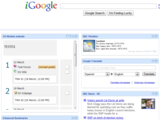
Fed up being force-fed a whole lot of stuff of no great interest to you in your university’s virtual learning environment? Want to view only the parts of most relevance to your own learning - and blend them in with your other interests such as news, weather and sports updates? The Open University is now moving closer to that vision with a series of "widgets" or "gadgets" which take parts of the OU VLE and make them available on other platforms.
The developments have been made possible with a grant from JISC for a project called DOULS (Distributed Open University Learning Systems). The first prototype gadget, built by project developer Jason Platts, makes the module planner from the Moodle module website available to students in iGoogle. Jason has built the authentication module which makes it possible for the gadget to communicate with Moodle. At the moment this is a one way flow of information from Moodle to the gadget, however future versions will enable updates to data held in Moodle via the gadgets.
Future gadgets planned for development are:
Forum Updates - showing latest updates to forums, blogs and wikis you’re subscribed to
Assessment Helper - prompting for when next assessments are due
Study Buddy - enabling students to connect with others who have similar interests
The idea behind all this is to allow users to work in the environments most comfortable to them and not to be forced to visit an institutional website all the time, which might not be configured in the way they want it. Learners will be able to create their own dashboard including updates to do with their formal learning as well as anything else they’re interested in. We’re also investigating the development of similar applications in Facebook and LinkedIn. All the code will be made available freely to other institutions.
An additional benefit is that we may be able to use the functionality of the other platforms to make possible something that can’t be done solely in the VLE.
Of course many students may prefer to visit the VLE in its entirety and they’ll still be able to do so. There are also possible reasons why institutions might not want to lose them entirely from that environment - such as them potentially missing out on guidance and support, news items or knowledge of new courses. However overall it has to be a good thing to give control to learners over exactly what they want to see and in which environment they want to see it. The VLE is not dead but merely fading away into the background.
Niall Sclater
.
Blog
.
<span class='date ' tip=''><i class='icon-time'></i> Aug 19, 2015 01:16am</span>
|
|
I’ve finally managed to install iBooks 2 and the example book "Life on Earth". This was a frustrating process that took two and a half hours of upgrades and downloads, requiring the right versions of iOS and iTunes with various reboots of both the PC and the iPad. Arguably I should have upgraded to iOS5 long ago but I didn’t when it was released because of allegations that it wasn’t robust.
On the first attempt to "read" the Life on Earth iBook the app hung and I had to reboot the iPad - again. On the second attempt it crashed during one of the interactives requiring me to start at the beginning.
When it worked it was an enjoyable experience with beautiful images, useful videos and informative interactives - and you can envisage the transformational effects this kind of experience will have for millions of learners in the very near future. There’s nothing that isn’t already done through applications on PCs or via web browsers but a few things make it inherently better on a tablet: portability, use of the touch screen for interaction and page turning, the book metaphor itself rather than the browser metaphor which frequently requires vertical scrolling, the feeling of immersiveness you get because it’s not within a browser window, and no need for internet connectivity once it’s downloaded.
My inclination was however to "play", looking for the next fun thing to do rather than to read the text. Presumably many learners, particularly those who’ve grown up without reading much, would act in the same way.
To be really useful in education on a massive scale a few things need to be sorted out with iBooks 2:
1. The bugs need to be fixed so the app actually works - or the entire slickness of the user experience is wrecked. It’s surprising that Apple released an app with such fanfare which falls over so easily (at least on my iPad).
2. Players need to be developed for web browsers, android tablets etc.
3. Authoring tools need to be developed for other platforms too so you’re not forced to buy a Mac.
4. You must be able to get hold of the books without going through the iTunes Store.
5. The iBooks 2 format needs to be as open as ePub. Fellow tweeters assure me that it is based on HTML5 and JavaScript but I’d be very surprised if these books work seamlessly as they don’t even work properly on Apple’s own app.
Given the incredible commercial success of tying in the iPad so closely to the iTunes store numbers 2 to 5 aren’t going to happen any time soon which leads me to think that an enhanced ePub-type competitor format which runs on and can be developed on all platforms, and distributed freely, is necessary.
Niall Sclater
.
Blog
.
<span class='date ' tip=''><i class='icon-time'></i> Aug 19, 2015 01:16am</span>
|
|
Ok I’m not exactly comparing like with like here but I am very interested in the potential of ebooks as an alternative way of structuring learning experiences - particularly where there is a large amount of reading involved.
With the growing penetration of tablet devices (ownership in the US doubled to 19% over last Christmas) ebooks now have enormous potential for providing learning opportunities. And with nearly a third of UK citizens already owning a smartphone, many of them may be prepared to study extensively from ebooks on smaller screens. Due to my deteriorating eyesight I’m not one of them; tablets are clearly more comfortable devices for extended periods of study so this post relates mainly to tablets.
While the information delivered through an ebook may be identical to that provided on a website, there are several attributes of ebooks which may make them more appealing to learners than accessing content in a VLE:
Learners can own an ebook - they can’t own their institution’s VLE
An ebook is a digital version of a familiar physical product that people have grown up with. Physical books cost money and the transition to paying for a digital copy may not be too painful but people don’t like to pay for access to websites, showing that they value ebooks more. This sense of ownership may encourage learners to engage more with the content of an ebook than a website.
Ebooks can be viewed offline
Once you’ve taken possession of your ebook onto your device you’re free to view it whenever you like which is particularly useful when travelling or away from internet access.
Ebooks are self-contained
The web is a confusing place with an overwhelming number of sites and pages. It’s easy to get distracted when using the web by hyperlinks and other applications.
Ebook readers on tablets take up the whole screen
A web browser has all sorts of tool bars, menus and icons which may distract the reader and provide a less immersive experience than reading an ebook on a tablet.
You know how much you’ve read and how much there is to go
By default an ebook clearly signposts how far through its content you are. Websites may not make this clear - and indeed can’t normally do this as precisely as ebooks due to the variable page lengths of the web.
Automatic pagination makes reading easier
Due to the variety of devices, browsers and configurations, the designer of a web page cannot produce content that will consistently fill the entire screen. Users have a more complex navigational process which may involve vertical scrolling as well as page turning. One of the key features of ebook reader software is the automatic repagination to suit the platform and user preferences such as font size.
Page turning is physically easier with an ebook on a tablet
The touch screen of a tablet or smartphone allows the user to move forwards and backwards between pages with a touch or swipe - a simpler and faster process than turning the page of a physical book and also much easier than using a mouse to navigate to and click on a particular part of a web page.
Far be it from me to suggest that the VLE is dead but given all the affordances of ebooks accessed on tablets it looks like much of the learning activity currently taking place in VLEs is heading to the ebook instead.
Niall Sclater
.
Blog
.
<span class='date ' tip=''><i class='icon-time'></i> Aug 19, 2015 01:15am</span>
|