Blogs
|
Jackson got his ‘school bag’ on again this morning. Everyday, it’s the same question.
"Daddy, can I go to school?
"No, Jackson, it’s not your turn yet. Next year is your turn."
"Later?" Jackson’s standard reply of faint optimism for everything he hopes is untrue.
"No, not later, honey. Next year."
"Tomorrow?"
"No, next year, darling." It pains me to say this, considering how meaningless a concept it is for a three-year-old.
"Next year later tomorrow?"
Sigh.
Jackson thinks everything his older sister does is the most remarkable, desirable thing one could ever aspire to. School, swimming class, homework, folding laundry, wearing dresses - it doesn’t matter.
Sometimes, in our haste to transform education and to point out the faults with the system, we forget that there are millions of Jacksons out there who think ‘school’ is the most awesome concept ever invented. Sometimes we forget that, for many, school is the best part of their day.
These days, I find it’s the way and the tone with which my son says the word, "Tomorrow?" that drives much of what I do as an educator, parent, and global citizen.
"Daddy, it’s my turn to do homework."
"Alright, Jackson, go ahead. Go do some homework."
"Yay! Homework, homework, homework!"
Royan Lee
.
Blog
.
<span class='date ' tip=''><i class='icon-time'></i> Aug 23, 2015 06:14pm</span>
|
|
The time was around four years ago. Jackson wasn’t born, we had not accomplished any of our many home renovations on our fixer-upper, and parenting was maybe a tad harder than it is now. Janet and I were trying to sleep in for once. Bleary-eyed, I slowly approached the kitchen to discover something that is in our Familylee Video Hall of Fame. I can think of a few million ways to use this clip of ours as a learning analogy.
Royan Lee
.
Blog
.
<span class='date ' tip=''><i class='icon-time'></i> Aug 23, 2015 06:13pm</span>
|
|
As my year teaching 107 12-year-olds English begins, the most important question I have made a concerted effort to answer for administration, colleagues, parents, students, and myself has been:
Why use an open environment (as opposed to a closed one such as Moodle) for social networking and blogging?
There is a long answer to this question that involves both pedagogical and logistical reasons, but my shortest answer to this question is always this perceived oxymoron:
Students need to learn how to be private online.
In my various forms of diagnostic assessment of adolescent and pre-adolescent students, it never fails to terrify me when I discover how little they have learned about digital literacy, online citizenship, and critical thinking on the web. It is doubly confusing to me since, in my experience, most young people find this topic supremely scintillating at the worst of times. They have a hunger to learn how to be literate online citizens. Why are we so afraid to teach it?
In a survey of my 107 grade 7 students, I discovered:
100% had chatted online many times.
95% had at least one email account.
60% had more than two email accounts.
30% had a Twitter account.
74% are active on Facebook.
Of the 26% that weren’t on Facebook, 80% said they would be if not for home computer restrictions.
In class discussions, it becomes apparent that students are relying mostly on one another to learn about their digital footprint. Adult facilitation seems to be limited to a very negative (and hypocritical) depiction of the internet, a demonization that one can’t help but fear becomes a self-fulfilling prophecy. Not unlike the kinds of myths that might develop in a grade 8 boys locker room about sex, some of the beliefs students have about social media are downright shocking.
I love Pernille Ripp’s mall analogy for online privacy (funny how malls often serve as great metaphors for many things). Call it just another case of our PLNs collective consciousness, because it was just after asking my own students the following questions that I read her post.
You’re able to walk through a mall in public and not:
Reveal your name to strangers
Have conflicts with people
Have temper tantrums
Swear out loud
Leave photos and video in the food court for people to take
Embarrass yourself by picking your nose
Right?
That really got their heads nodding with knowing grins.
So above you see our class slogan for online posting behavior. Remix, reuse, recycle. I find acronyms or ‘mantras’ very useful for paradigm reminders in the classroom.
3Ps of Online Privacy by Royan Lee is licensed under a Creative Commons Attribution-NonCommercial-ShareAlike 3.0 Unported License.
Based on a work at spicylearning.files.wordpress.com.
Royan Lee
.
Blog
.
<span class='date ' tip=''><i class='icon-time'></i> Aug 23, 2015 06:13pm</span>
|
|
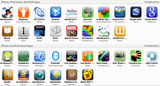
My class is lucky enough to have a bunch of iPads and iPod Touches this year. These are the apps I’m starting off with in our grade 7 english class:
Royan Lee
.
Blog
.
<span class='date ' tip=''><i class='icon-time'></i> Aug 23, 2015 06:13pm</span>
|
|
If I were to name the 2009-2010 school year, some appropriate ones may be Web 2.0 Melee, More Mobile Learning, or Internet on Steroids. It was one of the most rewarding years of my teaching career, but also one of the most dizzying. This occasional disorientation was brought about due to the sheer expansive nature of the internet. Although I likely will never go back to the closed ‘Web 1.5′ environment of something like Moodle, one thing we did sacrifice by going on our 2.0 exploration was a consistent centralized meeting place online.
Did you post it on Twitter or Edmodo, Mr. Lee?
Is it in our Docs or Gmail?
What happened to that Voicethread?
Yes, experimentation has its price, but it also has its rewards. Here are some criteria we developed to assess the quality of a Web 2.0 tool:
Is education a priority for them? Do they have special accounts and systems for teachers and students?
Is it fast, reliable, and uncrashy?
Can you embed work easily into other sites, particularly blogs?
Is it easy to share work with people outside the classroom (e.g. parents)?
Is the interface simple and intuitive?
Has it been free for a while, and does it seem as though it will be indefinitely?
Do they have, or are they at least exploring the development of, mobile apps?
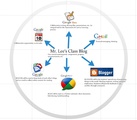
Based on this criteria, it’s not surprising then that the three Web 2.0 tools we tended to keep coming back to were Google Apps, Twitter, and WordPress.
This year, I’ve decided to (at least start the year off with) using Google Apps as the main tool in the toolbox. Although I like WordPress better than Blogger as a blogging app, and infinitely prefer Twitter to Buzz, I don’t want to make the same mistake of having an inordinate number of accounts. The plus of having the perfect app, we learned, is offset by the minus that is Web 2.0 ADHD. Here’s a visual of what I hope to get students involved in using:
Google Apps in the Classroom on Prezi
This will be the first time I will have experienced teaching Literacy to more than just my own homeroom class. Although I will miss the special relationships and learning that occur in a proper elementary class this year, I am excited by the prospect of teaching over a hundred students of one grade. I can’t wait to see what it’s like to soft-wall (there, it’s a verb) four different classes, and make them feel as though they are really part of one giant collaborative group.
As always, I welcome feedback or questions you have about my master plan:-)
Royan Lee
.
Blog
.
<span class='date ' tip=''><i class='icon-time'></i> Aug 23, 2015 06:13pm</span>
|
|
Being the pedantic amateur graphic designer that I am, my palms get sweaty when I think about how messy this post looks. The reason I’ve kept it this way is so you can see the journey, not just the non-existent end.
Originally posted Sept 2010.
Modified June 2011 (I have struckthrough ideas I’ve changed, and put in purple new ideas).
Modified Oct 2011 for iOS 5 update (I have struckthrough ideas I’ve changed, and put in green new ideas).
Modified (pink) May 2012 thanks to Bryan Hughes alerting me to Air Server.
Modified (orange) Sept 2012 thanks to Disp Recorder‘s release. Finally, a way to record your iPad screen in any app!
Modified (red) Jan 2013 thanks to Disp Recorder’s disappearance and other changes.
Modified (grey) Feb 2013 thanks to our class getting an Apple TV!
The Apple Fairy has come to your classroom and given you some iPads and/or iPod Touches to use for learning? You and your students sure are the lucky ones. I know what you’re thinking though: "So what now, technically speaking?" There are many different ways to set your iDevices up. Here is how I’ve done mine:
Create a school/class iTunes account. It’s so much more coherent to have a dedicated iTunes account that does not mingle with your personal one.
Dedicate one computer (ideally a Mac) to be the ‘mommy’ of the devices. Having personal apps/music/etc. mingle with your class ones is a recipe for confusion.
Purchase enough USB hubs for multiple-device syncing. They are made by about a million different manufacturers, are sold in every electronics or computer store, and are very inexpensive. Here’s the one I got. Forget the hubs. My macbook can’t sync more than three at once.
Sync each device individually for the first time and give each a unique name for identification purposes. I named our class devices ‘Hannah Montana’, ‘Justin Bieber’, ‘Harry Potter’, etc. It’s much better to name them ‘iPad 1′, ‘iPad 2′, etc.
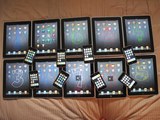
Use any drawing app to create number pictures (as you see in my photo above). Save them to the photo library of the device, then set them as wallpaper. Voila: internal labelling! This probably works better with primary students. My grade 7 students love organizing the apps themselves and changing wallpaper. Trying to label them this way is an invitation to mess it up. Let the kids do it.
Whenever possible, download and install apps on the ‘mommy’. This way, they will automatically get installed on all the devices the next time you sync.
Create a class GMAIL account to use for sending files, set the account up on all the devices, from any of the devices to wherever you need them to go. Students can learn to get into the habit of sharing and submitting work this way. Only problem with this is the blocking of ports in most schools. If you can find an email service that works (I haven’t yet), it’s such an important tool to have on the devices.
Create a class dropbox account to share files to view on the devices. Essential.
Finally, if you haven’t already updated your iOS to one which does not allow you to use jailbreakme.com, you may want to consider legally jailbreaking them for these reasons. Nah, forget this. Created more problems than anything.
Set up Find my iPad/Pod in SETTINGS >> MAIL, CONTACTS, CALENDARS >> ADD ACCOUNT >> MOBILE ME >> iCLOUD Then use your iTunes iCloud account. This has already saved me once. One thing I’ve noticed is that Find my iPhone acts funny when you make the switchover from MobileMe to iCloud. Luckily, I double checked after doing it and noticed that none of our devices were being tracked. If this happens to you, do this very strange thing: 1) Check at iCloud.com if the tracking is actually working; 2) If not, remove/sign out of the iCloud accounts on the device(s); 3) re-add the MobileMe account and click the Find My iPhone feature to ‘ON’; 4) Remove the MobileMe account (I know, weird); 5) re-add the iCloud account and click the Find My iPhone feature to ‘ON’.
Set up restrictions at SETTINGS >> GENERAL >> RESTRICTIONS. The ones I restrict in my class are app deletions, account changes, and explicit music/podcasts.
Create folders on the ‘mommy’ computer for syncing photos, images, etc. from computer to iDevice. Then, in iTunes sync, go to the Photos tab at the top and indicate which folder you want to sync with. I do it through iPhoto using specific albums. For example, iPad 4 is synced with an album in iPhoto also called iPad 4. Then, whenever I want to upload photos to iPad 4, I stick the images in the iPad 4 album first. Hope that makes sense:-)
So far, the only thing I am using iCloud syncing for is Find my iPad/iPod. This may change…
I’ve been looking for an easy way to mirror our iOS devices’ screens on our class computer/projector and finally found one that a) actually works; and b) is easy. See my screencast below:
Finally, with Disp Recorder’s release, there’s a way to record your iPad screen in any app! Here’s me trying it out for the first time (on my iPhone 4S, because it didn’t work well at all on my iPad 1). It doesn’t capture animation very well, but everything else ain’t too bad.
Oh no, Disp Recorder is gone, and I don’t know why!
Put wallpaper design apps (there are so many free ones) on your devices. This encourages students to use these wallpapers, rather than random, gross, and ridiculous ones they find from Safari.
Long ago I decided not to care about organizing the apps into folders or specific locations. It is impossible to control this with my middle school students, and I have learned that it is also unnecessary on a shared device.
Apple TV
It took me a long time to be convinced to request an Apple TV in my class. I didn’t see the need at the time, and, to be frank, I felt a bit guilty about getting more ‘toys’ in our classroom. There’s no question that there is a disproportionate amount of technology in classes; I didn’t want it any more exacerbated. Plus, we were using Air Server (as described above) - theoretically, an Apple TV alternative. Let’s just say I’ve changed my tune.
Apple TV is far better for me because the MacBook I was using for Air Server had a lot of difficulty coping with mirroring from a memory, processing, and graphics standpoint. Mirrors would frequently go caput, and my laptop would often go into what I call temper tantrum mode. With Apple TV, we have no such issues. It even has a brilliant password system where you can set a random four-digit code to appear every time someone new wants to mirror. This completely squashes the potential of folks outside the room playing pranks on our class (mirroring music or content from other parts of the building).
These days, at any given time, we can mirror anyone’s iOS device or laptop (thanks to Air Parrot), sound included. We don’t associate being in front of the room with necessarily being in front of the room. I’ve anecdotally observed that the students that most request to mirror their device to show their work or thinking happen to be students who I didn’t think felt comfortable presenting in class.
I was going to make an instructional video or sheet on setting it up, but it’s really the most googlable thing there is. In fact, it’s the extent to which it is ‘plug ‘n’ play that makes it so beautiful.
Here is our working list of class apps!
Royan Lee
.
Blog
.
<span class='date ' tip=''><i class='icon-time'></i> Aug 23, 2015 06:12pm</span>
|
|
CC licensed Flickr photo by Jack Dorsey
So I changed my Twitter name from @r_o_y_a_n to @royanlee. There was some pretty entertaining banter on the ol’ Twitter stream around, first, the absurdly-annoying-to-type nature of my original handle, and then my change, particularly lead by the mirthful Couros Brigade (@courosa and @gcouros). Here, my Twitterholics, is my explanation.
I first started my Twitter exploration in the spring of 09 thanks really to two tweeps, @danikabarker and @kentmanning. At the time, I wasn’t on Facebook (let alone Twitter), didn’t have an RSS feed, and knew as much about blogging as Your Uncle Joe.
I distinctly remember meeting Danika and being taken by her enthusiasm for technology. I was stunned when she informed me that Kent, a man I had never met, had written about me on his blog:
"And are you on Twitter, Royan?"
"Um, no, I don’t really know much about it."
"You should really check it out."
Check it out, I did. I made an account with the username @royan, then promptly forgot both what the password was, as well as which email address I used to create it (to this day, I have no idea how to be @royan, my preferred handle, again). Then, as I continued to traverse the Twitterverse and get my bearings, I went through what is I am sure an all too familiar stage in one’s Twiducation: Intrigue/Fear.
I really want to post, but who’s gonna read it?
Am I arrogant for thinking someone would be interested in any 140 characters I have to say?
Do I want my students, colleagues, administration, and school community to be able to find me on Twitter? Do I even want my family to?
What’s the point of all this?
There were really two main reasons I chose @r_o_y_a_n as my handle. First, I wanted the closest thing to @royan I could find, and thought I was being pretty darn clever with the underscores. Second, I wanted to preserve some anonymity, foolishly thinking that one’s Twitter username really had anything to do with how anonymous one is.
But here is the stage I am at with social media now:
I love it. It’s fun.
It’s one of many things I need to be the best professional I can be.
I don’t want to be anonymous. I want to be me, period. And I want to craft my online persona and Googlability so I have complete control over it.
Although your Facebook or Twitter identity tells the world an immense amount about you, it still isn’t really you. It’s a representation of who you are. This is partly why I have concerns when we exclusively use closed environments such as moodle in education. There is an element to it which is akin to learning how to drive a car using a video game.
A literate young person needs to understand how much control they really do have over their digital footprint, and then practice taking those steps with the help of teachers and peers. What if internet safety actually meant doing what the following Epic Fu episode suggests?
I was fairly surprised to discover how many of my beloved tweeps actually lamented the demise of my old carpal tunnel persona. Sorry guys, live with it, and stick with me. I ain’t changing it again:-)
Royan Lee
.
Blog
.
<span class='date ' tip=''><i class='icon-time'></i> Aug 23, 2015 06:12pm</span>
|
|
I received two emails this morning from a couple of last year’s students sharing dropbox files with the class. I wanted to share with all of you their respective gmail signatures (with names changed). I think they say a lot about kids today.
Email signature 1:
Jesse, a friend to many
Email signature 2:
Call Me, Text Me, Inbox Me, Message Me, I Don’t Really Care, Just Get Back To Me ;9
That is all.
Royan Lee
.
Blog
.
<span class='date ' tip=''><i class='icon-time'></i> Aug 23, 2015 06:12pm</span>
|
|
Royan Lee
.
Blog
.
<span class='date ' tip=''><i class='icon-time'></i> Aug 23, 2015 06:11pm</span>
|
|
I love this video by from the peeps at @epicfu. They don’t mention the word ‘education’ even once in it, but it’s as applicable as a 3M Post-it. It’s amazing how many parallels there are between the old Music Industry, Hollywood, and Education. (Please note that the video begins with a short ad.)
Royan Lee
.
Blog
.
<span class='date ' tip=''><i class='icon-time'></i> Aug 23, 2015 06:11pm</span>
|