Blogs
|
ABOUT THE AUTHOR
Ron McMillan is coauthor of four New York Times bestsellers, Change Anything, Crucial Conversations, Crucial Confrontations, and Influencer.
READ MORE
Dear Crucial Skills,
I’m the team leader of an increasingly dysfunctional team. Our tasks require a high degree of coordination and we often have to figure out what to do as we go. But we’re stuck in a pattern of arguing and disagreeing, and it derails our ability to get anything done.
Lately, our aggressive debates and defensiveness are dragging us down. Members seem to think it’s more important to be right and prove others wrong than it is to get our work done. Can you help?
Despairing
Dear Despairing,
Sometimes in our teams and relationships, we slip into bad habits. It’s hard to trace how these problems developed, but it’s easy to see the negative and sometimes hurtful outcomes these problems cause.
I consulted with an executive team that seems similar to the team you describe. In one of the first meetings I attended, a director shared his ideas about solving a problem. "I think we ought to do options ‘J,’ ‘K,’ ‘L,’ and ‘M’" he said.
Another director aggressively jumped in, "I disagree!" he said. "We’d be fools to do ‘M,’ we’ve got to do ‘P,’ not ‘M.’" A heated argument ensued.
Afterward, I spoke with the disagreeing director. He agreed with the other director about proceeding with options ‘J,’ ‘K,’ and ‘L.’" It was only option ‘M’ that he disagreed with. Imagine that. He agreed with three fourths of the other’s view, but the first words out of his mouth were, "I disagree!" This is the verbal and emotional equivalent of picking up a shield and drawing a sword. This response almost guarantees a fight. I’ve seen this same mistake made in personal relationships as well.
What’s needed to change your team’s behavior is a focus on purpose and the teammates’ agreement to use a few skills:
Share the facts first. You might say something like this: "I’ve noticed we seem to have more arguments and disagreements that lead to blockages rather than progress. For example . . ." Then share several specific examples that are obvious to everyone.
Propose a Mutual Purpose. "I strongly suggest we all operate toward this Mutual Purpose: We achieve our team results in a respectful, efficient way."
Define "respectful" as listening to each other, not labeling each other or each others’ ideas, and not interrupting each other. Give specific examples from recent team arguments. Such examples might include words like "stupid," "unworkable," and "ridiculous."
Define "efficient" as letting details pass that are unimportant and not getting "hooked" into arguments or debates that are unproductive. Say, "Each of our comments and responses should take us closer to solving a problem or building a productive option."
Explain that you shouldn’t expect perfection, but that you should actively make an effort to accomplish your Mutual Purpose.
Share the ABCs of response. These skills help teams create more productive behavioral patterns. Here’s how they work. When someone makes a statement, do not ignore the comment or respond with disagreement. Rather, respond with A, B, or C, as explained below.
The ABCs of Response
A- If you agree, say so. You might simply say, "Mike, I agree with you that . . ." If you agree with some of what was said, respond by identifying what you agree with. Consider the example used earlier of the disagreeing director. Instead of saying "I disagree," he should have said, "Mike, I agree that we should do ‘J,’ ‘K,’ and ‘L.’"
B- If you agree and want to add to it, build on their idea. "I agree we ought to do ‘J,’ ‘K,’ ‘L,’ and ‘M.’ I also think we should do ‘R.’"
C- If you disagree with what was said, don’t attack, criticize, or disagree. Rather, compare your opinion. This is often best done by first paraphrasing the other person’s idea, then sharing your own. By laying both ideas side-by-side, everyone can compare and contrast the two ideas. For example, "Mike, you think we should do ‘J,’ ‘K,’ ‘L,’ and ‘M.’ Is that right? I think we should do ‘R,’ ‘S,’ ‘T,’ and ‘V.’"
By responding to comments with the ABCs of Response, you acknowledge others’ comments and minimize defensiveness. With ideas out in the open and treated with respect, people can now compare, contrast, and build to get to the best solutions and the most effective decisions. We are now creating a dialogue and using it to get results and strengthen relationships.
Using the skills of creating a Mutual Purpose and the ABCs of Response, the executive team I worked with had what the CEO referred to as "an amazing metamorphosis." Within three meetings, with the CEO giving gentle reminders, the team became more disciplined and productive. Each team member reported the change as an improvement and said he or she did not want to go back to the former way of doing business.
As your team focuses on results in a way that strengthens relationships, you improve your effectiveness in the dialogue of today and pave the way for improving the dialogue of tomorrow.
All the best,
Ron
Related posts:
Violated Agreement
A Boss’s Drinking Problem
Responding to False Accusations
Joseph Grenny
.
Blog
.
<span class='date ' tip=''><i class='icon-time'></i> Jul 14, 2015 07:47am</span>
|
|
ABOUT THE EXPERT
Steve Willis is a Master Trainer and Vice President of Professional Services at VitalSmarts.
READ MORE
So it doesn’t happen all that often, but when it does it usually takes me by surprise. It’s every facilitator’s fear—the inappropriate comment. They come in lots of shapes and sizes, ranging from overly personal to highly offensive.
I remember a train-the-trainer session where a prospective trainer’s opening line was, "So Adam and Eve were in the garden." I thought for sure this was a joke. He got to the end and said, "And that’s how crucial conversations skills could have prevented original sin." Not the punch line I was expecting.
We all fear and dread over-shares and inappropriate comments, but what’s the best way to handle them in the moment? One thing that’s worked for me is to use a contrast of sorts: thank the person for being willing to share, and clarify what’s appropriate to share in this setting. What do you do in these types of situations?
Comment below to share your ideas.
Related posts:
From the Road: Mind the Gap
From the Road: Do You Know Where Your Participants Are?
From the Road: Insights From Just down the Street and around the Corner
Joseph Grenny
.
Blog
.
<span class='date ' tip=''><i class='icon-time'></i> Jul 14, 2015 07:47am</span>
|
|
Estimated reading time: 4 minutes 30 seconds.
As an Instructional Designer, it’s necessary to be able to wear many hats. Along with those many hats comes the need to learn new skills and techniques.
I’ve learned it’s necessary to look outside Learning & Development. This post is about some of the skills I’ve looked towards to inspire my work and help me develop a creative edge in my work.
No department works in a silo, which is why it’s important to explore different skills.
There are an infinite number of skills to learn and apply to Learning & Development. These are a few skills I’ve picked up and continue to work on which I find related to Instructional Design.
User Experience of the Learning Experience
My interest in Instructional Design began in web design, which has close ties to User Experience (UX).
Learning is an experience that you should take into consideration from start to finish, not just one part of the process. This holistic belief is like the beliefs of UX, and contain all those small parts such as UI. While UI is important, it’s just a small piece of the UX/LX.
User Experience is one of the most important skills to have. To be able to think about the entire experience and put yourself in the end users shoes is invaluable. I read anything I can get my hands on relating to current UX trends.
User Experience is so important to L&D that the term "Learning Experience" (LX) was coined around its thought processes. This is for good reason, you’re not designing instruction, not not even just training. You want to create an experience that accounts for the entire journey, and make it a wonderful experience. Our added goal is for the user to learn something during that experience.
Taking your job a step further to take responsibility for how the user begins to the final steps is necessary. Not only will you be more successful in your, job but you’ll create an experience for users where you’ve freed their energy for learning.
Wireframes and user stories are just two great parts of User Experience that Learning Experience designers can bring into their work.
This brings me to the next skill necessary for creating a great Learning Experience.
Make it Pretty With Graphic Design
While graphic design is a small parts of UX, I felt it important enough to put it on its own.
Visual design can affect so many things in learning. From how serious people take it to how clear the information is presented. Information design and graphic design go hand in hand.
Designing a Learning Experience is often visual. Beside writing expertise, an Instructional Designer must be able to present ideas in a visual form.
Visuals help cement the learning for a more memorable and clearer experience by the user.
Trying to simplify your performance support? Presenting things in a visual way can cut down on words and simplify the understanding you’re trying to provide. Performance support can almost always be more successful if presented visually.
Market Yourself
If you build it, they will come.
Unless you create compliance training, this statement couldn’t be further from the truth.
Even if you’re creating compliance training, it’s not a bad idea to give it positive twist through marketing techniques.
Marketing focuses on giving a product a positive image and make people want it. Marketing your courses, classes, etc is just as important as what goes into creating it.
No matter how well designed a learning experience is, if nobody ever sees it, that effort was wasted.
Where Do I Learn?
That’s an easy question to answer these days. You can learn about many of these topics free thanks to the myriad of free resources, from MOOCs to YouTube.
I was able to learn the basics of marketing by taking a free Coursera MOOC.
UX is a topic you’ll find in many places, even from everyday observations such as one at a restaurant (where does the restaurant experience even begin?). There are also many industry news web sites that have some great articles and insights from the pros.
The problem isn’t where to learn about these subjects, it’s how to decipher the good from the bad. This is something that can only come with experience.
What’s in it for me?
Diversity of knowledge. That’s the only reason needed. With diversity of knowledge comes creativity, more success in your work and thinking that reaches beyond the status quo.
Innovation also comes from diversity of knowledge. Things you wouldn’t put together become common, leading to even more creativity and innovation.
Sometimes it’s necessary to branch out into other industries and draw on the relations you see.
Learning & Development never works in a silo, even the science behind it never pertains only to learning. There are so many things that cross over, it’s our job to find those crossovers and make our field/work better and more valuable to the business.
Borrowing from other industries is a great way to keep innovating and creating the best environment for learning.
Go forth and learn
Think about how your job crosses over into various industries. I’d like to hear all the different crossovers you can think of. There are a few which I didn’t mention, and I’m sure there are many more which haven’t even crossed my mind.
Comment on this post with some of the skills you’ve found are important in the Learning & Development field.
If you haven’t already, go out and learn a new skill. Take a MOOC, learn a new piece of software that you don’t already use. It may surprise you how many ways you can find ways to use that knowledge.
You might also enjoy:
What’s My Development Process?
Touchscreen Toddler
Learning Experience As a User Experience
Nick Leffler
.
Blog
.
<span class='date ' tip=''><i class='icon-time'></i> Jul 14, 2015 07:47am</span>
|
|
ABOUT THE AUTHOR
David Maxfield is coauthor of two New York Times bestsellers, Change Anything and Influencer.
READ MORE
Dear Crucial Skills,
We are looking for meaningful ways to recognize our nursing staff in our busy, stressful ICU. In our last employee satisfaction survey, we scored low in "recognition."
We know from Influencer that external rewards aren’t always the best way to motivate people. We would like to find ways that would encourage staff to grow and have internal satisfaction for doing a great job with their patients, families, and other staff.
Other than external rewards, how can we meet our staff’s need for meaningful recognition?
Managing Motivation
Dear Managing,
Your question is relevant to every leader. It’s common for hardworking, productive, and dedicated staff to say they don’t get the recognition they deserve. If not corrected, this feeling can undermine their commitment, engagement, and performance. Leaders need a variety of ways to recognize performance and show appreciation.
1. Don’t resort to using money as a motivator. Personally, I like money. I endorse the view that, "Money may not buy happiness, but it sure makes misery more comfortable." The challenge is that money often plays the role of de-motivator. If you don’t think your pay is fair, then it’s hard to stay motivated. But, if you do think your pay is fair, then you stop thinking about it and its power to motivate fades. Leaders need to establish fair pay, but they shouldn’t rely on fair pay to motivate.
2. Use rewards in moderation and in combination. This is the guideline we introduce in our book, Influencer. Rewards work best when they a) aren’t so large that they become the only reason for acting; and b) are combined with personal and social motivators.
The merit badges scouts earn are a nice example. The badges themselves are just bits of cloth or tin. They are very moderate in value. But they work in combination with both personal and social motivation. They recognize hard work and a worthy accomplishment, something to be proud of—personal motivation. And they create an occasion for family and friends to cheer the scout’s success—social motivation.
When rewards are too large and not used in combination with personal and social motivators, then all eyes are on the rewards and the rules for winning them. You see people cheat and game the system. They may even lose track of the personal and social reasons for their actions.
Here is a scary example. A hospital had made rewards and punishments a big part of their hand-hygiene program. A nurse manager saw a nurse put her hand under a hand-sanitizer dispenser, but nothing came out. The dispenser was empty. The nurse continued into the patient’s room and began to work with the patient. When the manager pulled her aside the nurse said, "I did my part. It’s not my fault the dispenser isn’t working." This nurse was so focused on the rules, she failed to remember patient safety and the intrinsic reasons for having clean hands. That is the danger of rewards that aren’t used in moderation and in combination.
3. Make the invisible visible. This is a skill we teach in Crucial Confrontations and Crucial Accountability Training. Have you ever looked back at a tough day—a day spent coping with emergencies, interruptions, and switches in priorities—only to wonder what you’ve actually accomplished? This is the rat race, right? You know you’ve been running all day, but you aren’t sure you’ve gotten anywhere. Many of us experience this frustration, and I bet nurses who work in Intensive Care Units (ICUs) experience it more than most. Here’s why.
Patients who are in ICUs are among the sickest in the hospital. In fact, they are usually so sick that, even when they are healthy enough to be discharged, they don’t get sent home. Instead, they are sent to another unit in the hospital, one that deals with less critically ill patients. Often ICU nurses don’t get to see or experience the positive end to the patient’s story—the patient’s leaving the hospital and their happy families welcoming them home.
Work to fix this situation by creating ways for your ICU nurses to see and experience their accomplishments. I’ll suggest a couple of ideas, but I bet you and your staff can generate far more.
Involve your ICU nurses in post-discharge calls to patients. Most hospitals are now implementing some kind of post-discharge call to patients. Research shows these calls improve patient satisfaction, reduce medication-related problems, and result in fewer return visits to emergency rooms. These calls can also be a powerfully motivating source of feedback for nurses.
I’m not suggesting that your nurses have time to make these calls, though that would be great. Most hospitals already have specially trained staff who make these calls. Have the people making these calls meet with your nurses to share outcomes, or meet with the phone team yourself and then share outcomes with your ICU nurses. Create regular opportunities for your nurses to see the human impacts of their hard work.
Solicit feedback from patients’ family members. Often, ICU patients are so sick and sedated that they hardly remember their ICU experiences. But their family members sure do! Most are overwhelmingly grateful for the wonderful work ICU nurses perform and would be happy to share. Find ways to get family members’ feedback—solicit notes, ask family members to record a message that can be shared, or have family members attend a routine meeting.
Tighten links to the units that accept the patients you discharge. Involve staff from your internal customers—the step-down and medical-surgical units that take your patients when they no longer need to be in your ICU. Ask them to attend regular meetings, so they can share how they, their patients, and their patients’ families have been impacted by the work your ICU nurses perform.
4. Use crucial conversations to reduce de-motivators. Ask yourself whether there are leaders, physicians, or staff members whose actions undermine morale on your unit. Sometimes you can identify a handful of individuals who are rude, dismissive, or disruptive in ways that counter the recognition others provide. I’m not suggesting that these people should ever sugarcoat bad news or provide less than honest feedback. But you may ask them to be more constructive by focusing on facts, allowing room for dialogue, and showing respect.
I hope these ideas give you a few additional ways to recognize your staff. However, none of these can substitute for your own genuine appreciation for their work. Make sure you spend time rounding every day, noticing all the right things they are doing on the job, and removing barriers so they can do even more.
Please let me know what you try and how it works.
David
Related posts:
Motivating Others to Take Action
Before & After: I Felt Like a Nurse Again by Gaylen T.
How to Influence Accountability
Joseph Grenny
.
Blog
.
<span class='date ' tip=''><i class='icon-time'></i> Jul 14, 2015 07:47am</span>
|
|
Estimated reading time: 5 minutes.
I recently read a post about Fads in L&D from my good friend Con (aka @LearnKotch). On some of the points of this post I agreed, but others I think needed a bit deeper deconstruction and more seeking of meaning.
By this, I’m speaking about MOOCs. I recently wrote about my experience in a Coursera MOOC of which was my second experience, my first being over a year ago. My concern is about dismissing MOOCs as just another fad though. It’s not.
While I agree it’s not the latest greatest thing and going to change L&D forever. It does have a place in the wider scheme of education, from higher education, to corporate learning.
Sure MOOCs aren’t accepted by the average Joe at this point. That doesn’t mean it won’t have a profound effect on corporate learning further down the road.
Just because the average Joe has not accepted them, doesn’t mean they have no credibility in corporate learning. In fact, most learning activities in L&D haven’t proven themselves in corporate learning! At least not to the extent that gives them a clear dollar value.
Then again, things like UX don’t have a clear dollar value, but many could argue that the value a good UX provides is better than the best sales team on the planet.
I digress.
Good content is out there, curated and put into a format that can be used in corporate learning. Now if only the corporation would pull their heads out of you know where and use those resources.
A good MOOC could be researched by the L&D department and provided as an option (or requirement) to those deemed as requiring skills in that field.
Instead of taking a course on cultural competence, think about the true change that could occur in a MOOC requiring more thought, reflection, and attention.
MOOCs are for drop outs!
There’s the big problem of people dropping out of the MOOC. This isn’t a problem, it’s just the nature of the system. It’s there for people’s leisure, to get what they need from it, or figure out it’s not for them, so we leave.
That means great success in my mind! Significant amounts of time aren’t wasted. Rather than investing time and money into a class or eLearning, an employee can now test the waters.
Does this course help me in my job?
Do I have enough time to invest in this course?
Will my manager back me in taking time to take this course?
If a manager won’t back an employee, that’s not a company anyone should be working for! Answer this question: What happens if we don’t invest in their education and they stay?
MOOCs can be a valuable part of an employees education, and professional development. My employer is lucky because every MOOC I’ve taken has been in my time, but if it’s related to my job, there’s no reason my employer shouldn’t be paying for it.
So, I haven’t finished every MOOC I’ve signed up for and started. I test the waters, figure out if the teacher or content is for me, and if not then I can drop it without inflicting any damage on myself academically or financially. This simple fact is enough for me to call MOOCs one of the most successful experiments in my time.
a MOOC to me means free education to those who want it, if it doesn’t fit then you lose nothing. Nobody does. Attendance to the end means nothing, at all. So therefore there is no alarming rate of non-completions, it’s part of the territory and to be expected.
Something is wrong if completions are too high in fact! A lot of people are wasting a lot of time, and not getting what they need. There’s no way somebody can tell if they are going to finish a course without testing the material.
An inherent problem in the university system is that a lot of people are wasting a lot of time and money doing things they decide they don’t need, or don’t like. This huge problem is eliminated in the MOOC, you’re free to drop at any time, no loss.
As far as the current model not being sustainable, that’s not true. There isn’t even a single model to say that statement is true. The fact that there are various acronyms means there are many models.
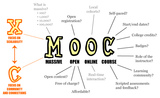
A xMOOC is different from a cMOOC. While I would agree that the xMOOC doesn’t have as successful of a pedagogical model as the cMOOC, it still has its place for certain material. Just like eLearning has a place for certain material, while blended classrooms is better for others.
Weaving their way to a company near you
MOOCs next big break-through will be in the corporate world. Most important things do break in the consumer world first and make their way to corporations. MOOCs are no different.
I know of at least one corporation here in the United States in the beginning stages of creating a company MOOC. That’s just the beginning stages though.
To take advantage of the wonderful resource of a MOOC, a company doesn’t have to create one. All the company needs to do is figure out how to use current public MOOCs.
A curated list of MOOCs an employee can take is not enough. They need to be included as part of a custom learning plan for each employee. There’s a MOOC out there that would fit into every type of employees professional development.
It’s up to the L&D department to figure out how to get the average Joe to benefit from the many MOOCs out there. If the average Joe isn’t benefiting from them, it’s not the MOOCs fault or average Joe’s fault.
Conclusion
MOOCs definitely have a long way to go as I’ve said before. They might be the best thing that’s ever happened to education. They could eventually be the best thing that’s happened in corporate learning also, that just hasn’t happened yet. I’d argue the reason for this is because of the slow-moving nature of the corporation (not to mention tendencies to shun change), no fault of the MOOC.
What do you think about the "fad" of the MOOC? Do you think it’s just a fad?
You might also enjoy:
MOOCs Have a Long Way To Go
Expand Your Skills
Nick Leffler
.
Blog
.
<span class='date ' tip=''><i class='icon-time'></i> Jul 14, 2015 07:46am</span>
|
|
Inspiration
Before any project can begin, there has to be some sort of inspiration for it. Nothing ever comes from nowhere.
Like Pablo Picasso always said:
Good artists copy, great artists steal.
My inspiration came from a combination of a template redesign panel at work and the org chart I created for a recent eLearning Heroes Challenge. I wanted to create something that I could touch and feel. I needed to play around with what it might look like.
The animation for the menu needed to be fluid and animations needed to go both ways, nothing jarring.
With that, I had a good basis for creating something that had sections defined by colors and fluid animation.
Logistics
I wanted the template to be unique, and lack all hints of Storyline. While I love Storyline and all that it can do, it is just a tool. I don’t believe a tool should dictate the design, nor should anybody be able to tell what tool a design was created in.
I also wanted to give the user the largest viewable space for content within the project. This means a great deal of white space, and full screen views for content that fit the full screen need.
This meant a menu that was not persistent, it vanished when not needed but was accessible within one click. It also meant text boxes limited in width therefor also limiting the amount of text possible on the screen.
Text box width limitations are important, it’s been proven that people read quicker and comprehend better when words across are limited. Another benefit these narrow text boxes allowed for was plenty of space for visuals that lent themselves to a project.
In section three of the project, I felt it would be a great opportunity to display how full screen content could fit into the template. It also gave me the opportunity to get creative and show how a story told with visuals and limited words could be more effective than just words.
Problems
Before I get into the details of how the template is set up, how I did it, and how to change it, it’s always wise to discuss the problems experienced and how they were overcome.
Menu On Top Layer
One problem I experienced was with the menu button and drop down. The problem didn’t arise until I began working on the full window contend and needed the menu button on top of everything.
Storyline has this odd little thing were master slide items are below the content of the slide by default. This meant that I couldn’t just put the menu button on the master slide and expect it to be on top at all times. It was below the full screen images which wouldn’t work at all, what if the user wanted to leave that section?
After a bit of searching, I found out that it was necessary to have the menu button in a layer, then called with a trigger. This trigger forced the menu layer to appear on top of everything, including my full screen images.
It took me a while to figure out how to do all this so it worked from all slides of the project. I ended up with the menu in it’s own layer and a trigger on the master slide showing that layer when the timeline started.
No Menu
The second problem was the intro slides into each section. The menu button didn’t need to show up on those slides.
To solve this problem, I had to create a second master slide with a blank sub master slide below that. This layer doesn’t contain any content at all, or any triggers, it’s just blank.
The four intro slides to each section use this special master slide, so if you want a slide without the menu button, you need to use this layout. I didn’t create any other layouts though. I assumed if you had content on a slide, the menu needs to be there.
Now that all these problems are resolved, down to the dirty stuff on how I did it, and why you should stick to the simplicity of the template (although you’re in no way required to).
Keeping it Simple
Menu
The most common piece you will want to edit first is the menu. It was designed to fit four sections, if you have more than this, you may want to re-design your content.
Each section is color coded within the colored number circle.
To edit the menu, you’ll need to head over to the slide masters. In the first slide master, you’ll find three layers, the menu button, menu, and menu out (this is to provide that seamless menu slide-out animation).
Open the menu layer and change the names as you please, after you’ve modified them be sure to also make the same modification in the menu-out layer. If you fail to make the same modification, the animation of the menu out once and item is clicked will be jarring and odd looking. Not even one single pixel can be off.
If you’d like to simplify the naming of menu items, you could set up four variable for each section and replace the text for each in the menu and menu-out layers to those variables. This way you’d just have to change the variable and the rest would be taken care of for you.
You’ll also notice that each menu item dims as they’re visited. I’ve created states for each menu item, that state is used if the complete variable for each section is true, meaning the user has completed that section.
Modification to when each section is complete should be done in each respective section.
That’s it for the menu! You’re ready to change the content!
Sections
Each section has a trigger that sets the section variable equal to the number section you’re on. If you add a slide, be sure to copy that trigger over. This way the menu knows where the user is, and where to send that user once the menu-out animation has played out.
There are various elements you can use on each slide, it’s up to you if you use them.
One element is the next and previous arrows. They are traditional navigation methods and don’t lend themselves to bouncing around and exploring the course, this is where the navigation dots come in.
Navigation dots (don’t know the actual UX term for those) are a great way to allow the user to go wherever they want in a section. It also tells them exactly how many slides they have in the section and how long they have to the end.
It’s not necessary to use both the arrows AND the dots, but it can’t hurt.
Once a user reaches the end of a section, an arrow is necessary even if you chose not use them as your main navigation method. With the last arrow, make it the color of the next section. this signifies to the user that they’re done here and moving onto a new section. The color theme will then change to the new color.
At the end of each section, make sure to add (or copy) the trigger to set the section complete, this will ensure the menu item is dimmed so the user knows they’ve been there, done that.
Full Screen Content
This is the most important piece to this template, and one that should be used much more than the text slides and other navigation buttons.
The menu will still be there for easy navigation between sections, but the user will be engrossed in a full screen story or scenario.
I created a sample of this in section three on the second page. Once the user entered the story, navigation outside of section navigation fails to exist until the end.
I set it so the user is marked as completing this section from the start, as there’s nothing worse than being forced to go through every detail. Only the user can determine if that content is required by them.
Again the colors are pulled into the story, but they make a difference (sweat the small stuff). Towards the end, the color changes to the next section color, signifying the end, and movement into the next section. This is cemented by the arrow that exists at the end providing easy navigation onwards.
Completion
That does it for setting up the template. I didn’t go into creating a whole bunch of quiz sections or anything as I’m not a big fan of quizzing, but I’m sure those could be put in if necessary.
I had fun making this template, and am glad people have been receptive to its simplicity and possible excessive white space (if that’s possible!). I’ll be making more templates and will use the eLearning Heroes Challenge as a jumping off point for creating them.
Download the template and see it in action on my portfolio.
You might also enjoy:
Using the ‘rescale project’ option in Captivate
Work from high to low and clean that audio up
To round-trip or not to round-trip
Nick Leffler
.
Blog
.
<span class='date ' tip=''><i class='icon-time'></i> Jul 14, 2015 07:46am</span>
|
|
ABOUT THE AUTHOR
Al Switzler is coauthor of four New York Times bestsellers, Change Anything, Crucial Conversations, Crucial Confrontations, and Influencer.
READ MORE
Dear Crucial Skills,
How do I deal with passive-aggressive behaviors like someone agreeing to do a task then "forgetting" to do it, dragging his or her feet, or deliberately doing it incorrectly so he or she won’t be asked to do it again?
Tired of Passive Agreement
Dear Tired,
If you live or work with or near other people, at some point other people will let you down—they’ll miss a deadline, fall short of a standard, or just do something wrong. So your question about dealing with this behavior is universal. I’ll offer a few suggestions that are more generic and then get specifically to the challenge you face.
1. Speak up. Some people hope that if they are patient, the problem will go away, even if the problem is reoccurring. They hope that time will cure the issue. While people are waiting and not speaking up, their silence is generally interpreted as acceptance or agreement.
My first bit of advice is to speak up. It might be that the task or assignment is harder than it need be. Speaking up can send a message that the task is important and that you want to make sure nothing gets in the way.
2. Speak up while keeping it safe. The key components of safety are Mutual Purpose and Mutual Respect. Remember to avoid jumping to conclusions or losing your cool. This step requires that you avoid showing on your face or by your tone of voice that you have held court in your head in advance and found the person guilty.
You want to convey that you’ve observed a gap and that you want to figure out what’s going on. The way you stated your question causes me to remind everyone to give the other person the benefit of the doubt before speaking up. Think: "Could this situation be more complicated than I assume?"
3. Speak up about the right topic. This step focuses on your specific problem. In Crucial Confrontations, we teach CPR, which stands for content, pattern, and relationship. CPR is a strategy to help you find the right issue. Talk about content if this is the first occurrence. For example, "JC, you agreed to have the report in by Tuesday at 2:00 p.m. and I didn’t receive it until Wednesday at noon. What happened?" The first and second times can be accidents, so you should talk about the content—the specific issue or behavior.
By the third time, the issue or behavior has become a pattern and you should address this pattern. For example, "JC, the last three weeks you’ve turned in the Tuesday report on Wednesday. What’s going on?" When JC says that the computer broke down yesterday, you can say, "I’m interested in what happened this time, but I’m more interested in the pattern of missing the deadline three weeks in a row." This allows you to then diagnose the motivation and ability issues that can get in the way and close the conversation by reaffirming the commitment to deliver the report. Follow up by asking if there are any other reasons why JC could not get the report in by 2:00 p.m. on Tuesday. Excellent performance begins with clear expectations.
And now to relationship. In your case, you need to have a relationship discussion. It might sound like this. "JC, you’ve committed to turn in your report by Tuesday at 2:00 p.m. each week and you’ve missed this deadline three out of five times. We’ve had several discussions and you’ve told me there was nothing getting in the way of you doing this. I’m now thinking that I can’t trust that when you make a commitment you will keep it. I’m not sure why this is happening, and it is certainly affecting our working relationship."
This is the time to discuss the possibility that JC is forgetting, dragging his feet, or simply trying to get the task reassigned. Based on JC’s response, you may have to start progressive discipline. And for those who are thinking that this is not quick or severe enough, I chose a topic that I thought could allow a bit of patience. Other performance gaps would require quicker, tougher responses.
Over the years, we’ve coached people in situations that lingered and festered. When we asked, "Have you spoken up?" they respond "Of course." "About what?" we ask. The answers too frequently reveal that they spoke up about the easy not the hard, about the simple not the complex, about the content not the pattern or relationship.
When you speak up about the right topic, you send a message that the task is important, that you are interested in finding any barriers that make it more difficult than it needs to be, and that it is so important that you’ll make sure the task will be completed. Sometimes, a relationship conversation will focus on the fact that you have to hold these conversations so frequently and you need to see high performance without repeated conversations.
In summary, make sure you do the first two steps, and then always talk about the right topic. When you do, you are more likely to find a lasting solution.
I wish you the best,Al
Related posts:
Holding People Accountable
Holding Clients Accountable
Holding a "Charmer" Accountable
Joseph Grenny
.
Blog
.
<span class='date ' tip=''><i class='icon-time'></i> Jul 14, 2015 07:46am</span>
|
|
Mobile for Performance
There’s plenty of discussion on how you can use mobile devices to improve performance. They’re quite powerful.
Learning & Development hasn’t discussed much about improving users performance inside a mobile app.
Apps within the organization are becoming the norm. If you don’t know of one, ask around, there’s a good chance something is being developed. When a user downloads and installs an internal app, how long does it take to augment their job performance.
We should be starting that discussion within our organization. How to best support new users use of internal apps. It’s unreasonable to expect users to use a new app that’s not consumer grade simple.
Users should get up to speed quick to support their performance. We shouldn’t bombard them with more training provided far from the point of need. Mobile help overlays build the foundation for mobile devices to support organizational requirements.
We should be advocating for the non-tech savvy. Simplify for those that don’t know how to do a specific task. For those that do know what to do, get out of the way and let them do their thing.
What They Are
I could try to describe what a mobile help overlay is in words, but that wouldn’t make sense. For the most part they’re visual, so that’s what will give you the best idea.
I’ve been collecting examples of Mobile Help Overlays on Pinterest.
Installed apps display a translucent overlay over the interface pointing out the most needed features and tasks. They should be simple, only the most important tasks pointed out, and they’re easy to dismiss.
There are other many types of mobile help within apps but I’m going to only discuss mobile help overlays. Other varieties can be cumbersome and need too much effort from the user.
In the UX world you will hear the term coach marks to describe mobile help overlays. The term coach mark doesn’t roll off the tongue or describe their purpose well.
Nielsen Normal Group explains other forms of in-app help, while giving some pointers on how best to use them.
Why They’re Great Performance Support
Mobile help overlays are a success in the consumer app market. While no hard evidence exists speaking for their success, those using them are happy with the method.
You won’t have a hard time finding apps in the consumer market which have implemented mobile help overlays. Internal apps need the same level of new user scaffolding.
But Apps Are Easy
It’s nice to live in a world where everything is easy and everyone knows how to use everything.
But that world doesn’t exist.
Every developer and UX designer thinks their app is simple and so intuitive that anybody could pick it up and start using it. Sure that exists for users who are tech savvy. For somebody like my dad though, it’s just not possible. Even the simplest task, the best instruction I give is torn apart by my dad as being complex and vague.
Unless the majority of your audience is tech savvy, there’s a chance users won’t know what to do. Worse, a user might be using an app wrong or not using it at all! If a user isn’t provided a scaffolded experience into the app they may never use the app to its fullest.
When the average user downloads an app with no clear direction on how to use it, what are they supposed to do? Sure they can fumble their way through it, but the most beginner user may not be willing to do that.
Performance support is the best method to get a user performing necessary tasks quick and with success. If the user is tech savvy and doesn’t want help, it’s easy to dismiss with a simple tap.
Traditional Methods
Traditional methods are cheap and easy to develop, they just aren’t successful and do not fit the ideal medium of delivery. Job aids for instance are large, built for the printed, and removed from the location the user must perform in. How do you get a job aid in the hands of an app user without burdening the user? Think about how they’re supposed to find help and use it.
The goal of performance support is to give just enough, just in time, in the right context then get out of the way. Traditional methods can only give you just enough, not the other two.
Traditional methods of training are self explanatory in their weakness (I hope). A user won’t remember training when the need arises to use the material. It doesn’t make sense to force a hunt for supporting documentation and extensive training to use an app only to forget.
Mobile Help Overlays Are Over Engineered
Mobile help overlays sound complicated and too much effort to put into an app. The bad news is that they aren’t as easy as a job aid, not by a long shot. They will need developer resources, planning, and more thought on the back end.
To say they’re over-engineered is wrong. This focuses only on the work required on behind the scene groups. Focus on the user, what makes their life easier? Work on the back end ensures the user has an easier, more successful experience within the app. It also saves users time which can add up beyond the time and cost of pre-work. It also saves the user from stress and lack of performance.
Help to Task
From introduction, to ramping up in an app, mobile help overlays need minimal separation between task and help. Users have minimal requirements to understand and begin using the app. When the user needs to do a new task within the app, instant help is available. No required training, no learning to forget. The user gets what they need, when they need it. Once the user is on their way to success, it’s out of their way for them to perform.
UX or L&D
While UX experts have a good handle on mobile help overlays in consumer apps, internal UX experts might not have them in mind. With research and planning, a learning experience designer is better equipped to understand user needs. They’ll help guide a simplistic scaffolded approach to performance within the app.
We Need Training!
Isn’t that how every good intention begins? You’re asked for training, get an idea of what’s desired, then please the customer with what’s expected. That’s where the danger lies. The expected is usually determined by those that know nothing about learning or the needs of a real user.
Go beyond the expected. Question the requirements and find out if training is the answer. For a mobile app, it most likely is not.
Any time somebody asks for training, you’re going to have to into a deeper analysis. If someone asks for training on a mobile app, you should be asking questions and analyzing.
Training is rarely the answer. How to use an app doesn’t belong in the head unless it got there with regular usage.
Performance support would a more successful strategy to improve behavior.
The goal is to make the user as successful as possible in as little time as possible. Think of all the wasted time looking for help, asking for help, and/or participating in unneeded training.
Conclusion
Performance support is a powerful tool, to get the correct material is a challenge. Do not underestimate its ability to provide all user needs for help and the ability for it to replace training completely.
Do you have any additions to mobile help overlays that could make it an even more successful method of performance support?
Think for a while on what other methods of supporting performance could be used that you find lie outside of the norm. There are many out there, mobile help overlays being just one.
You might also enjoy:
Mobile Performance Support - Make It Simple!
Stop Trying To Predict Mobile Users Needs
Challenges and Barriers to Mobile Learning in the Enterprise
Nick Leffler
.
Blog
.
<span class='date ' tip=''><i class='icon-time'></i> Jul 14, 2015 07:46am</span>
|
|
Last week, we announced the release of the second edition of Influencer: The New Science of Leading Change. For a sneak peak of the book, download the first chapter now.
This new edition includes:
New subtitle
Updated statistics, facts, and figures
New research and case studies from organizations like KIPP, Menlo Innovations, Fundación Paraguaya, and others
Skill applications gleaned from six years of Influencer Training
"Act Like An Influencer" stories: twenty-five vignette examples of real influencers
New focus on the three keys of influence: 1) Focus and measure, 2) Find vital behaviors, and 3) Engage all Six Sources of Influence
Now available in paperback, hardcover, and e-book
WIN A COPY: Enter our drawing to win one of twenty-five copies of Influencer by watching Joseph Grenny discuss the principles of influence at our local TEDX event. To enter, watch the video, leave a comment, and share with others. (One entry per action taken. Winners will be selected and announced June 5.)
Related posts:
Special Announcement: Introducing the Second Edition of our Bestselling Book, Influencer: The New Science of Leading Change
August Newsletter Drawing Winner!
Influencer Institute: Introducing the Influencer Institute—And a Call to Action!
Joseph Grenny
.
Blog
.
<span class='date ' tip=''><i class='icon-time'></i> Jul 14, 2015 07:45am</span>
|
|
About a month ago I saw a question from the eLearning Guild asking for people’s input on what learning will look like in 2024. Since that day I’ve been thinking about it and meaning to write down my thoughts.
There has since been a discussion on the topic, and several others who wrote down their thoughts.
Here are my thoughts on what learning will look like in 2024. I also hope to see some comments on where you think learning will look like.
Reality
In reality not much will change in 10 years. There will still be a few organizations on the cutting edge of learning who will work with how people learn instead of forcing it. That number of organizations who "get it" may grow a small amount, but still be the minority.
Most organizations will still try to control how, when, and where learning happens. The fight will still remain against how learning occurs. Learning & Development departments will be stuck in formal learning, tracking the wrong data through an outdated LMS.
Ideally
Learning & Development will be working with how people learn. This is contrary to what happens today, but this shift will catch on. It will occur but I say ideally because in a perfect world it would occur within the next 10 years.
Few organization learning departments will be controlling learning to track participation through an LMS.
Working with how people learn in reality is the only logical step in how learning will look in 2024 to me. There are many moving parts to working with how people learn though. A great shift will occur to performance support and social learning. Also, courses will be limited, more viable solutions will be developed for the majority of learning.
The foundation of how learning will look in 2024 exists in whole today, it just hasn’t been adopted. Leaders who have the best chance of making these changes first need to have visibility to the possibilities.
As those in charge are introduced to how people learn, they’ll be forced to put in place solutions to solve the problem. With this happening, the ideal will soon become the reality.
xAPI
The last part of where I think learning will move towards the year 2024 is the experience API (xAPI). Within 10 years time cutting edge organizations will figure out how to use xAPI.
xAPI will track activities within an organization and show what people do, and what their preferences are. Of course more will have to be learned in L&D to analyze and draw information from the Big Data that xAPI can provide.
Rather than throwing xAPI at a problem, organizations will learn how to create a plan for what they want to do with xAPI. Only after the plan is created will an organization move towards implementation.
Mobile
There are still so many questions surrounding mobile, and so many misconceptions. In 10 years time mobile will be the primary access point for users to learn what they need for their job. They’ll do it at the point of need by searching for what they need and receiving accurate results. Once the needed topic is found by search or by location, it’ll be as simple as glancing at their device to do their job.
Organization learning departments will learn that it’s not the ideal tool to apply old learning methods to. The determination will be that performance support is the ideal application for mobile.
Of course this is an idealized story of how mobile will work in 10 years, but it is the direction organizations should and will need to go in. This is how I see mobile in 2024 in an ideal world.
See You In The Future
The foundation exists to what learning will look like in 2024. Some organizations are even there or have a plan in place to get there already.
As the message spreads, doing the same old thing will no longer suffice. Organizations will figure out what they’re doing isn’t working and be forced to change. This will all happen as the workforce changes and employees demand a better way to be better at their job. Future employees will demand their time is not wasted on required courses only to be forgotten, or were not necessary in the first place.
What do you think learning will look like in the year 2024? I know I am excited to see where things go, and I’m excited to be on the forefront of whatever does happen.
You might also enjoy:
Empower Employees With A Wiki
Generation Mobile
Recipe For Disaster
Nick Leffler
.
Blog
.
<span class='date ' tip=''><i class='icon-time'></i> Jul 14, 2015 07:45am</span>
|