Blogs
|
Articulate Storyline tool is a weapon choice for the developer who wishes to develop out of the box eLearning course.It gives the power to develop interactive animations, apply effects, and add characters to the slide and many more. In this blog, I am going to discuss about adding zoom in effect to an object. This effect is especially effective when you want to highlight the particular part of an object. Let’s see how to zoom an object using Articulate Storyline
If we want to zoom a picture,we usually look for the optionZoom Picture,which will zoom the whole picture.But if what if you want to zoom a particular part of a picture.
We will see how it works by following these steps.
Step 1: Go to Insert TAB.
Step 2: After clicking on the insert tab, Click on the Zoom Region button. Add a zoom effect to the slide or picture.
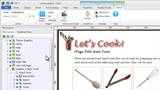
Step 3: In the image below, you can see a green rectangle; the area covered under the rectangle can be zoomed.
Step 4: Now I am selecting a particular part of an image that needs to be zoomed.
After selecting the requiredarea, once we need to check the alignment on the TimeLine. Because to set when the zooming has to begin, is it from the middle of the slide or from the beginning.
If the object is alignedin the middle of the timeline as shown in the below image,the original size is displayed and when the when timeline reaches to the zoom area, the selected area of the object will be zoomed. Zooming time can be set in the timelines. Once the set time is elapsed, the object will zoom out to its original size.
So depends on client requirements we need to align our object intothe Timeline. This is all about about the zooming feature in Articulate Storyline.
Try this and let me know your feedback.
Related PostsRapid E-learning through Storyline Tool: 5 Infographics Sharing Key FeaturesHow to Combine Your Adobe Captivate Projects Into Single Course?Articulate Storyline - A Developer’s Play Tool
RK Prasad
.
Blog
.
<span class='date ' tip=''><i class='icon-time'></i> Jul 15, 2015 09:09am</span>
|
|
Lectora Inspire V11 Tutorial: Using the Design Ribbon in Lectora V11 e-Learning Software
This Lectora Inspire V11 Tutorial presents how the Design Ribbon in Lectora V11 e-Learning software can help you jump-start e-Learning course creation in just a few simple steps.
The post Lectora Inspire V11 Tutorial: Using the Design Ribbon in Lectora V11 e-Learning Software appeared first on VivaeLearning: The Best Free Video Tutorials Online.
Viva eLearning Blog
.
Blog
.
<span class='date ' tip=''><i class='icon-time'></i> Jul 15, 2015 09:09am</span>
|
|
As a training manager, you have to keep the records of your learners’ details, courses assigned to each of them, score sheets, grade reports, issue of certificates, details of registration and limiting access to users.
This will be quite simple for an organization having 5-10 people, but it will be a hectic process for an organization having hundreds of workers. In this scenario, the best way to do this work is to maintain a Learning Management System (LMS).
An LMS is a software application designed to plan, implement and track learning content. It helps in integrating all training administration activities under one platform. It is used to automate the administration, tracking and reporting of learning programs. But, these versatile and powerful software applications can do much more than these activities. Here is an info-graphic which shares some points which help manage LMSs.
Hope you find this post useful. Please do share your views.
Related Posts10 Proven Tips for Efficient LMS Administration - An InfographicHow LMS Helps The Training Managers?A Clear Proof that Moodle is Very Intuitive
RK Prasad
.
Blog
.
<span class='date ' tip=''><i class='icon-time'></i> Jul 15, 2015 09:09am</span>
|
|
Camtasia Studio 8 Tutorial: Zooming - The Often Misunderstood Half-Holy Grail of Screencasting Quality
This Camtasia Studio 8 Tutorial covers the following topics:
0:00 — Intro
0:20 — Misconception #1: Zooming in a screen video is like zooming with a camera
0:35 — Misconception #2: Video is made of moving images
1:20 — Misconception #3: Sharing full size screen video is best
2:15 — Wrap-up / feedback
The post Camtasia Studio 8 Tutorial: Zooming - The Often Misunderstood Half-Holy Grail of Screencasting Quality appeared first on VivaeLearning: The Best Free Video Tutorials Online.
Viva eLearning Blog
.
Blog
.
<span class='date ' tip=''><i class='icon-time'></i> Jul 15, 2015 09:08am</span>
|
|
Organizations worldwide are managing their operations with online tools - SAP, HRIS Workday, Service Tools and many more. These tools help global organizations align and sync their operations worldwide with just a click.
But, these are not so simple to be adopted by employees. It needs a cultural shift.
There are 4 strategies to effectively train employees in a short time.
1. The Why Viral Video
Now, do I have to work with one more software? This is the nightmare of many employees. To help them overcome this hurdle, we need to:
Educate them on "why" this software
Tell them how it helps perform their jobs easily
Explain them how it gives them more free time to do what is important
This should be achieved with a "fun" video using cartoons and storytelling method. It should not be in a serious tone. People should connect with the video and look forward to learning about the tool. The video should not be more than 2-3 minutes.
2. Quick Job Aid
Even though employees are learning about the software, they will feel comfortable if they have 2-3 page handouts on how to perform the steps.
These handouts should contain single line instructions with screenshots. They make the learner feel that the steps are very simple and motivate them to learn the software.
The job aids should have standard icons to visually connect with the learner.
3. "How to Videos"
Software simulations are effective tools to train employees. These simulations help learners see and perform the task.
Create videos that show the step-by-step procedure to perform a task.
Develop videos on Frequently Asked Questions (FAQs).
Use music instead of audio.
Show key messages as tips.
4. Make it Global
As most of the software applications are intended for global audience, it is important to have these trainings translated into multiple languages. Some tips to save money and time in making them global.
"Why" viral videos should be translated with audio, into various languages, and we should not compromise on this as it is a key motivator.
Job-aids should be translated with screenshots and tips in different languages.
"How" videos - just change the screen-shots in various languages. As there is no audio, it helps save money and time.
These are 4 strategies to train your employees effectively. Please do share your thoughts.
Related Posts4 Smart Instructional Design Strategies for Product TrainingInstructional Design Strategies for Developing Online Compliance Training ProgramsDesigning Healthcare Training Courses with Articulate Storyline
RK Prasad
.
Blog
.
<span class='date ' tip=''><i class='icon-time'></i> Jul 15, 2015 09:08am</span>
|
|
Lectora Inspire V11 Tutorial: Create Interactivity Using Actions in Lectora Inspire V11
This Lectora Inspire V11 Tutorial presents how to add interactivity to your Lectora e-Learning courses with the use of actions in Lectora Inspire V11 e-Learning software. No programming required!
The post Lectora Inspire V11 Tutorial: Create Interactivity Using Actions in Lectora Inspire V11 appeared first on VivaeLearning: The Best Free Video Tutorials Online.
Viva eLearning Blog
.
Blog
.
<span class='date ' tip=''><i class='icon-time'></i> Jul 15, 2015 09:08am</span>
|
|
Boston CanvasCon Canvas LMS User Group Conference
Boston CanvasCon is the first event of its kind to bring together Canvas-enthusiasts and newcomers who teach with Canvas. We're here to find common ground, to support each other in improving educational outcomes, and to learn to better use technology to engage our students, whether adult, traditional or K-12.
Tracks for faculty bring you back to why you love teaching in the first place. We help you integrate technology better in the classroom, in ways that make sense for you and your students. Learn hands-on Canvas skills to make you a Canvas master. Gain confidence if your school has just moved to Canvas. Tracks will focus on learning the tools, teaching effectiveness, design thinking, and the coolest tech.
Sessions at Boston CanvasCon include:
Universal Design in Canvas: Tools That Work
Beth Ritter-Guth, Director of Instructional Design and Director of American Honors, Union County College
Canvas and the Case Method: Canvas at HBS
Paul Craig, Associate Director, Learning Technology Services, Educational Technology Services, HBS IT
Andy Hyde, Instructional Designer, Educational Technology Services, HBS IT
Jeanne Po, Director, Learning Technologies and Instructional Design Services, Educational Technology Services, HBS IT
Can We Use Canvas for This?
Molly Bonnard, Courseware Services Manager, University of Pennsylvania
Teaching Mega-Courses with Canvas
Larry Bouthillier, Instructor in Computer Science, Harvard Extension School.
Chiropractic Course Design: Making Sure Your Course is in Alignment
Jean Marrapodi, Ph.D, Citizen's Bank and formerly, The New England College of Business
"You're Speakin' My Language"
Kate Hill, Director of Online Learning, Cincinnati Christian University
Register-Early Bird Until June 26
This post was first published on eLearning Industry.
eLearning Industry
.
Blog
.
<span class='date ' tip=''><i class='icon-time'></i> Jul 15, 2015 09:08am</span>
|
|
Compliance training is all about educating employees and making them aware of the rules, policies and work ethics that they need to follow in their working environment to avoid huge penalties. However,in many cases, employees don’t show interest in completing compliance course because they include legal terminology which is usually boring.
We should make sure that the courses are easy to understand, engaging and interactive, especially when we deliver compliance training through eLearning which is self-paced.So, how do we make sure that the courses are engaging?In this blog, I would like to share 4 ways of making compliance courses interesting.
1. Use scenarios to generate interest
Compliance training can be made effective by adding scenarios, which closely mirror the situations that the participantsare likely to come across in their jobs. These situations are those which might take place between the participant and his/her superiors, colleagues, clients and other people.
Each question based on a scenario should have three to four options from which the participants must choose one that they deem correct. You need to provide ample feedback as to why a particular option is right or wrong, thereby providing additional opportunities for participants to deepen their understanding of the law or policy.
2. Include gamified elements to generate excitement
Gamification is a good way to make boring content interesting. In case the content has various terms that need to be memorized or has regulations that are categorized under different sections of a law, which is important for employees to learn, this method can be useful.
Gamification can be both challenging and at the same time rewarding for the learner, as he is awarded points for every correct response. This instills confidence in him and provides the motivation to score the minimum passing cutoff.
3. Assessments to reinforce and track learning
Assessments are essential for a compliance program to ensure that the mandatory completion is documented. They must be designed in a way that they challenge participants to apply what they have learnt. They should cover all kinds of situations that participants may come across during their jobs.
They should be challenging and make the participants assess the situation before making an appropriate decision. Feedback should be given for both correct and wrong answers. Explain why a particular choice is correct and why the others are wrong.
4. Provide multiple learning paths
A course should be appealing to both novice and experienced employees. Having a linear course where modules need to be completed one after the other in a prescribed sequence would make the training rigid and inflexible for the participants. It would not be appropriate to make experienced employees to sit through a module that is very basic. They can directly take the advanced level content, followed by an assessment. And, on successful completion they should be allowed to move to the next module.
This results in effective learning, as we are taking the experience of the participants into consideration.It also helps avoid the tedium of explaining what they already know. This raises interest levels among them to take the course and learn new policies, if any.
So, this is how you can create engaging eLearning courses on compliance training for your employees. Do share if you have used any other interesting ways and wish to add to the list.
Related PostsCreative Ways to Present Click on Tab Interactivity in E-learning Courses - An InfographicChanging Face of Pharmaceutical Sector and How it Effects TrainingType of Training Required for Channel Partners
RK Prasad
.
Blog
.
<span class='date ' tip=''><i class='icon-time'></i> Jul 15, 2015 09:08am</span>
|
|
Welcome to today’s blog post. Instructional design is a unique profession that requires a variety of skills to achieve mastery. I still remember my initial days as instructional designer, not able to figure out the why and what of the things I was made to do. People used to think I do content writing, and back then, I didn’t have many points on my side to contradict this opinion. It is with time and experience that I studied the science behind Instructional Design. In this blog post series, I would like to share my views and experiences that may be helpful to the new wanderers of this massive domain. In this first post, I would like to discuss about one of the biggest fears novice Instructional Designers face, the fear of Subject Matter Expert. Here’s a simple ABC approach to get rid of the SME phobia and make your life easier.
A: Understand the Role of an SME
It is very important that you clearly understand the role of an SME in eLearning. If we observe closely, SME is another stakeholder working in parallel with Instructional Designers to develop better learning. We all have one favorite lecturer/professor during our school/college days. What made him special? Is it only the deep subject knowledge that differentiates him from others? In most cases, it is the teaching methodology that separates one trainer from another. Some trainers go an extra mile trying to find out more interesting and effective ways to teach the content and that grabs our attention and enables better understanding. We instructional designers are not trained particularly on any subject and often work on developing eLearning courses on a variety of content that we are not aware of. The subject- matter expert’s role here is to help us understand the content. SME is a knowledge hub looking for best ways to transfer it, and we are the people who lay the path for it.
B: Get to Know Your SME
It is essential for an ID to build a good bonding with the SME. Knowing your SME upfront helps you in all stages of development. For example, if your SME is new to eLearning, it is your responsibility to take him through the basics of eLearning before proceeding to avoid any disturbances later on. This is really important. There are several instances where an SME approves the storyboard and then makes a lot of changes once the course is developed. Why does this happen? In most cases, the SME is not clearly aware of the storyboard and the things to review in it and hence expects a huge variation in the course from the storyboard which doesn’t happen. The storyboard is the screenplay document for the course, which stands as a final documentation for visualization of the output. This should be properly conveyed to the SME before taking any approvals. Knowing your SME and keeping him informed at every step of the process enables smooth completion of the eLearning course development.
C: Ask the Right/Wrong Questions
During content analysis, there will be many instances where we are in doubt. But, when it comes to listing the queries to ask the SME, very few questions pop out. Why is it? This is because we tend to strike out many questions that cross our mind considering them silly. This assumption will make us pay the price later. The subject-matter expert doesn’t expect you to have deep subject knowledge or understand every element of the content. He is aware that you are acting as a consultant to suggest the best possible way to present his content to the learner. Therefore, there is no such thing as silly/wrong questions. The SME will not be judging you on the questions that you ask, but will only help you understand the content better so that you can design the eLearning course more effectively.
Finally, we should remember that in eLearning, SME is the person that is familiar with "What is to be taught", whereas Instructional Designer is the person that defines "How it is to be taught". Hence, mutual exchange of expertise and knowledge will benefit the Instructional Designer and the SME in achieving their common goal, which is creating better learning.
Is your SME unpredictable?
Is he unclear about what he wants? Have you thought if the problem lies with you?
What are the problems you have faced with an SME?
Please share your experiences in the comments section below. Happy reading!!
Related Posts4 Effective Ways of Presenting Scenarios in E-learning CoursesSMEs Bust the 5 Biggest Myths of Instructional DesignDon’t Let eLearning Initiatives Fail - How?
RK Prasad
.
Blog
.
<span class='date ' tip=''><i class='icon-time'></i> Jul 15, 2015 09:08am</span>
|
|
How To Use 4 Basic Learning Methods In eLearning
There are many differences between learning children and learning adults. The Andragogy, the science of teaching adults, brings to the table principles of building competencies that are hard to implement in schools, such as self-motivation, goal orientation, ability to share experiences, and others. These differences were well described on Educational Technology and Mobile Learning website here.
I will not discuss these differences in this article. I would like, however, to share with you some ideas on using 4 learning methods, which are usually considered as basic in kids-related learning, in an eLearning environment.
Workbook
Workbook is a space where activities are organized for practicing things. In each workbook you are given a structured material that helps you master a subject as you are usually guided from easy to difficult exercises deliberately, influencing your competencies. Workbook is an interactive tool - its main purpose is not to transfer knowledge, but to practice it through exercises. You are doing this in a kinesthetic way; you fill in the blanks, draw, erase, cut and paste, place stickers, etc. The workbook is also well-designed, with all golden rules of information architecture (contrast, flow, hierarchy, unity, proximity, whitespace, etc.) taken into account. It is not only educative, but also fun to use.
How we can transfer the workbook idea to eLearning courses taken by adults? Here are some tips:
Create an eLearning course mostly based on exercises (limit plain knowledge transfer to minimum).
Build an easy-to-difficult practicing path based on consequent steps of building competency.
Propose highly interactive (yet easy to use and well explained) exercises.
Make it visually appealing and fun - astonish trainees with every single screen!
As an option - go outside of the eLearning environment:
Add to your eLearning course printable exercises,
Ask trainees to complete these exercises in a "pencil-and-paper" manner, and
Provide them with self-evaluation tools, as you won’t be able to check results automatically.
Tour
Visiting places allow kids to build context around information and facts they learn. There are several places that can be visited: historical sites (castles, battlegrounds), biosphere sites (botanical gardens, forests, mountains), various museums, etc. These tours can be a great experience when combined with multisensory learning, social learning (learning with and from colleagues), storytelling (by a guide or a teacher), and by-the-way learning. Kids usually summarize such tours, write essays regarding their findings, or use their reflections for further learning activities. Tours also break day-to-day routines, which brings more energy and motivation into the learning process.
Is it possible to transfer the best features of tours to an eLearning environment for adults? Well - for example, we can:
Create a virtual tour around recommended places on the web, providing additional material about the subject.
Ask eLearners to do something related to the subject (e.g. to perform a mystery shopper task while learning customer service routines: play the role of a customer and call to customer service line, or visit the customer service desk with a complaint); and then, to reflect on this activity,
Tell eLearners a story and ask them to go somewhere where this story will be contextualized - ask them to disconnect from their computer and the eLearning course, and reflect on something based on observation.
Ask eLearners to summarize their findings or reflections on the aforementioned activities and share them with colleagues, supervisor, or trainer.
We can also ask eLearners to suggest the destination and formula of such a tour, which will support the training process. The reflection on that itself can be a great intellectual task, which will reinforce the learning goals.
Repetition
Repetition is another learning method which is quite often associated with teaching kids. Repeating mathematical formulas, manual routines, or how to write letters is one of the most popular techniques. According to Hermann Ebbinghaus' Forgetting Curve theory, all people have to repeat in order to remember things and routines. If we do not do this, the vast majority of new information will disappear during the first 24 hours of the learning process. We can reinforce the effects of repetition by providing some additional "boosting events" after the training, which will maximize long-term retrieval of information. Here you can find very interesting material on this, published on Learning Solutions Magazine.
How we can stimulate the repetition process in our eLearning courses? Let’s try the following approaches:
Divide your eLearning course into several parts and have breaks taken between them (even three days); for each part, create booster quizzes that repeat key information from all former parts.
Repeat critical information throughout your eLearning course by using various methods: Tell stories, summarize, provide exercises and quizzes; at the end, provide a test so that you can not only check whether eLearners have acquired new competencies, but also give them a chance to repeat once again.
Extract critical information that influences the learning goals and send it to eLearners via email or text messages in a day, a week, and a month after the eLearning course is completed.
Provide to eLearners alternate learning media - let them print out cheat-sheets, check-lists, visuals, mind-maps, etc.; every additional stimulus can help boosting retention.
Note-taking
Taking notes helps remembering key thoughts, insights, and information provided by other learning methods like lectures, presentations, discussions, etc. This learning technique is widely used in formal learning processes delivered in schools. While taking notes we usually put information into our personal context by paraphrasing it, arranging it in our own structure, or connecting it with our own experiences. Note-taking is an active (kinesthetic) process which reinforces memory. Notes are being taken in various forms - as stand-alone texts, as notes on a margin of the publication, as marking the most important parts of the material, etc. We also see a growing popularity of visual note-taking, which represents the subject by pictograms placed in a visual structure.
How to stimulate taking notes in your eLearner course? Here are some ideas which might help:
Add options for taking notes or marking fragments of the material.
Ask eLearners at the end of your eLearning course to create a note on the subject in any form (text, mind-map, visual note) and email it to their trainer, mentor, or manager.
Summarize every module of your eLearning course with a note (or a mind-map) to be printed-out by eLearners.
Prepare a summary in a form of a non-completed visual note (or mind-map) and ask eLearners to print it out and fill in missing parts.
Ask eLearners to write an email with one key message for each module and email it to their trainer, manager, or mentor.
As you can see, there are a lot of possibilities of using very basic learning methods in your eLearning courses. Many of these ideas are, in fact, available outside of a course; thus, they need to be integrated into it. Also, proper engagement of a trainer, manager, or mentor is necessary in order to create a successful learning method for teaching adults in an eLearning environment.
I invite you to follow the Learning Battle Cards on Pinterest, where you can find many interesting infographics about 100+ learning methods (4 of which were mentioned above). You can find it here.
This post was first published on eLearning Industry.
eLearning Industry
.
Blog
.
<span class='date ' tip=''><i class='icon-time'></i> Jul 15, 2015 09:08am</span>
|