Blogs
|
There are hundreds of web tools and apps that are available for digital storytelling. Picture A Story is one them and this tool can be added to your favorites list. This is a tool to create your own digital stories by adding different elements and recording your voice over it.
First, you start by choosing your genre from adventure, fairy tales, comedy, horror, western .., then choose your background, drag and drop your characters on the scene, add as many props as you like. You can also play with their sizes. When you are done with this, you writer your story and then record your voice by clicking on "record story" button. Here, you need to allow the tool to use the computer’s microphone. If you are happy with your story, now you are ready to share it via mail.
Some ideas to use this tool:
A great way to define different genres to the students.
Each group can pick up a different genre, and they can rewrite the same story according to that.
Students create their unique stories using this tool, then we can create some activities around their stories.
We can choose the genre and give a story starter to the students and ask them write accordingly.
This tool is great for generating creative ideas, practice speaking and writing skills.
Ozge Karaoglu
.
Blog
.
<span class='date ' tip=''><i class='icon-time'></i> Jul 16, 2015 08:55am</span>
|
|
In my role, I get to visit each of the clusters I work with and see what is happening in individual schools. This gives me the chance to see a lot of creative and interesting ideas in action. I have visited six out of the nine clusters I work with so far this year and, as there is too much to write about for one blog post, I thought I’d put together a series of blog posts to reflect on some of the things I have seen.The first in the series focuses on special needs.
Working with special needs
There are two schools within my clusters that are involved in special needs; one focuses on behavioural issues with primary aged students and the other deals with visual impairment across all ages. Personally, I have learned a great deal from my involvement with these schools.
Behavioural issues and ICT
The school that caters for those with behavioural problems has found the use of ICT to be transformational within the school. This is a school where kids come to because they need a break from the mainstream and often have a strong dislike for school. The normal ‘chalk and talk’ does not work for these kids.
Use of interactive whiteboards
They have found that interactive whiteboards have been a valuable tool due to their visual and kinaesthetic nature which suits the learning styles of these kids. I saw these in use in every classroom in the school with both teachers and students using them. There were a range of activities being demonstrated on these boards and you could see that they did hook in many of the students. As someone who is never sure which side of the interactive whiteboard debate I am on, I could see that here was a purposeful use for them.
Websites to hook kids into learning
They have found a number of websites to be really useful for developing kids confidence as they can see proof of their improvement over time:
http://tutpup.com
Kids complete with other kids around the world and in their own classroom on maths and other drill type of questions. They can also see their own progress as they complete levels. (I’ve previously blogged about this site)
http://braingrade.com
Brain development exercises and games where kids can see graphs of their progress. My brain is the size of a grape after playing the first couple of games. Hmmmmm
http://readwritethink.org/student_mat/index.asp
This is another of my favourites and I saw kids using this site to build a scene and then write about it without any encouragement needed from the adult in the room. The link I have included above will talk you to all the digital learning objects available on the site. The teachers said this was a very motivating site for students.
Blogging
The school have set up blogs for each class in the school and have found this may make the difference between a student particpating or not participating in completing work. They often ask if their work will go on the blog and if the answer is yes, they show a far greater enthusiasm for their work and will perserve to get it completed.
Visual impairment and ICT
Making online content accessible for all
I have learned a great deal about accessibility issues for those with low vision when using websites that has changed the way I put content online. I have previously blogged about this with an entire post dedicated to making online content accessbile.
Digital library for assessment
What I have found really interesting is the recognition within the school of the power of capturing information in a digital form. The school are building a library of video footage of children exibiting certain behaviours so as to create an assessment bank that teachers can access to help diagnose children with visual impairments correctly. They have used Voicethread as part of this process with teachers, assessors and parents able to leave comments around the side of the video clip to help deepen the understanding of the context and diagnosis for that child.
Digital evidence of key competencies
All staff across the nationwide school are also being asked to use digital evidence to build a profile of what each key competency ‘looks like’ within their context. Staff collect video clips and photos to show different ways children with visual impairments demonstrate key competencies. The plan from here is to widen this out so that these examples give details on how the skills being demonstrated were developed and then what the next steps are from that point. They plan to turn this into a rich repository showing all stages of development for each key competency in their own context that teachers can use to measure progress of children against. I think this is an idea that could easily be replicated in any school setting.
These are just some great ideas that I came across. I will share some more useful observations in my next post.
Suzie Vesper
.
Blog
.
<span class='date ' tip=''><i class='icon-time'></i> Jul 16, 2015 08:54am</span>
|
|
Treasures Website
Treasures is a reading/language-arts resource specifically designed to help teachers teach by providing engaging activities for students at all levels. The content is designed to help teachers save time and keep students motivated and focused.
What do you think of Treasures?
Patricia Donaghy
.
Blog
.
<span class='date ' tip=''><i class='icon-time'></i> Jul 16, 2015 08:54am</span>
|
|
Offline+Web is a cool app that lets you back up your favorite web pages to your phone to read it later offline. With this app, you can now back up, organize and share all the web pages you’d like to be able to consult at all times and in all places.
There are many other apps that you can use in this way. They are great for surfing on a webpage with limited or no internet at all. It’s great to have it on the phone if you are travelling a lot.
Ozge Karaoglu
.
Blog
.
<span class='date ' tip=''><i class='icon-time'></i> Jul 16, 2015 08:54am</span>
|
|
The second blog post in the series of ideas from clusters is half written but it is taking a back seat while I just share a few fun and educational games I’ve been playing.
I followed a link on Twitter which took me to a directory of free flash games and there was an educational category. I had a go at playing quite a few of them and here are some of my favourites. Clicking on the link will take you to the site to play the game.
Numeracy
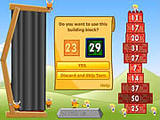
Tower blaster - probably my favourite game I played. Very strategic - have to get the blocks in correct order before computer team.
Click here to play this game
Maths Power - have to choose numbers to make given answers. I’m not very good at this one! Can’t scan the numbers fast enough and get panicky with the countdown. I’m not going to share my score
Click here to play this game
Literacy
Could see the kids loving this one but I am hopeless at games involving mixed up letters. Still others will do better than me I expect.
Spiderman 2 - Web of Words
Click here to play this game
A very simple game to teach young children to match uppercase and lower case letters with Pooh Bear.
Pooh’s Match ‘n’ Munch
Click here to play this game
Other subjects
This one looks to have been designed for med students and involves cutting open a knee for surgery but I could see older kids being fasinated as they learn how to perform the knee surgery. High level comprehension exercise with a real life context.
Click here to play this game
Brain Safari - a variety of problem solving games
Click here to play this game
Music game - learn the notes and their position on the keyboard.
Click here to play this game
Treasure Dive typing game - type the words on the sharks before they reach you.
Click here to play this game
There are more on the site and I didn’t play them all so you could go and try some more out.
http://www.y8.com/tags/Educational/1
Suzie Vesper
.
Blog
.
<span class='date ' tip=''><i class='icon-time'></i> Jul 16, 2015 08:53am</span>
|
|
Here are my favorite posts from March!! Enjoy exploring!!
Teleprompter in the Classroom: Learn how to use an online prompter in class.
Vocabulary Practice With Word Hippo: Such a fruitful dictionary tool!
Create Text Activities With Textivate: Create various and many different type of text activities.
Create Online Flyers: Do you need online flyers? Here is the post for you to read!! Create your flyers in less than a minute!!
Create Customizable QR Codes: Looking for good looking QR codes? Then, this post is just for you!!
Create Interactive Quizzes With YouTube Videos: Use 5 different YouTube videos and questions about them in transitions. Click to learn more!
Animated Videos With Wideo: A new tool for creating your own animations!
Practice Grammar With Technology: A list of web based tools to learn and practice grammar.
Poetry With Technology: A neat list of web based tools and applications to let our children write their poems.
Creative Writing With WordTamer: Learn how to write stories by exploring the funfair on WordTamer!
and yay, I am nominated for ELtons 2013!!
Ozge Karaoglu
.
Blog
.
<span class='date ' tip=''><i class='icon-time'></i> Jul 16, 2015 08:53am</span>
|
|
RSSinclude Website
RSSinclude is an RSS reader widget that lets you display text and images from RSS feeds. When creating a new RSSbox you decide on which type of layout and which RSS feeds to use. Convert RSS to HTML, Javascript or PHP. Include RSS on Facebook.
What do you think of RSSinclude?
Patricia Donaghy
.
Blog
.
<span class='date ' tip=''><i class='icon-time'></i> Jul 16, 2015 08:52am</span>
|
|
Introduction
I was approached recently by Karen Schweitzer as she wanted to be a guest blogger on this blog. She picked a topic that she thought teachers would find useful - information on social networking sites that we can use as educators. Thanks to Karen for approaching me about posting and sharing her knowledge below.
20 Social Networking Sites for Teachers - by Karen Schweitzer
It has never been easier for teachers to network online. The web hosts thousands of online communities and forums for teachers, administrators, librarians, and other educators. Here are 20 social networking sites that are particularly popular among teachers.
TeachAde - TeachAde is the first social networking site created specifically for teachers. The site combines social networking with teacher resources to create a useful online tool for educators.
The Apple - This site is a free social networking community for current and future teachers. Special features include message boards, lesson plans, videos, and up-to-date news.
Classroom 2.0 - This online community for educators has become a place for teachers to come together and share information about web 2.0 tools and other education technology. Classroom 2.0 also offers live webinars and online events.
NextGen Teachers - Teachers can network with one another and discuss new ways of educating and learning on this social networking site.
The English Companion - The English Companion is an online community for English teachers who want to meet new people, network, and share ideas.
We the Teachers - This education search engine and online community can be used to find other teachers and network. We the Teachers is also a good place to share lesson plans and resources.
TeacherLingo - TeacherLingo is an online blogging platform for educators. Teachers can start their own blogs or network with other teachers through forums and comment sections.
Google Teacher Community - This Google Discussion Group keeps teachers in the loop on Google’s K-12 education initiatives. It also serves as a forum for teachers to ask questions, share ideas, and discuss hot topics in education.
Applebatch - Abblebatch is a K-12 teacher community. Teachers can find jobs, build their network, and share education resources.
TeachersRecess - TeachersRecess is a free social network with many useful resources. Teachers can communicate online, share lesson plans, get news, publish a personal blog, and buy or sell teaching tools.
PBS Teachers Connect - PBS Teachers Connect is a place for site members to meet up and share ideas. The site also provides a wide range of teaching resources for the classroom.
ProTeacher Community - This online community was created for K-8 teachers who want to communicate and network with each other. ProTeacher offers blogs, forums, and chat capability.
ClassScene - Designed specifically for schools, ClassScene is an online repository/community for photos, videos, and more. The site can also be used to generate revenue and collaborate with the school community.
Education World - Education World is an enormous site with thousands of resources for educators. Teachers can use it to ask questions and network.
Tapped In - Since 1997, Tapped In has served as an online meeting place for K-12 teachers, administrators, and librarians. Thousands of educators gather on this site to share stories, ideas, lesson plans, and resources.
Teacher Focus - Teacher Focus is an online community/forum for teachers. The site also offers lesson plans, news, and other education-related resources.
Edublogs - Edublogs is more of a blogging platform than a social networking site. Nevertheless, it is a great way to connect and interact with other teachers.
Diigo - This section of Diigo hosts nearly 5,000 bookmarks for educators. Teachers can go here to discover and share education-related articles.
Twitter - Twitter wasn’t designed specifically for educators, but it is a good place to network with teachers, students, and parents.
Delicious - The largest and most popular social bookmarking site on the web, Delicious is an excellent place to find and share online bookmarks with other teachers.
Guest post from Karen Schweitzer, the About.com Guide to Business School. Karen also writes about accredited online colleges for OnlineColleges.net.
Suzie Vesper
.
Blog
.
<span class='date ' tip=''><i class='icon-time'></i> Jul 16, 2015 08:52am</span>
|
|
I will be leaving tomorrow for IATEFL conference in Liverpool. I will be co-presenting a session called "Break the Ice - Warm up the Class" on Wednesday. I am looking forward to meeting some of you there!!
and of course, I will back in five days with news posts and series!!
Ozge Karaoglu
.
Blog
.
<span class='date ' tip=''><i class='icon-time'></i> Jul 16, 2015 08:52am</span>
|
|
ABCya Website
ABCya provides educational kids computer games and activities for elementary students to learn on the web. All educational games are modeled from primary grade lessons and enhanced to provide an interactive way for children to learn. Grade level lessons incorporate areas such as math and language arts while introducing basic computer skills.
What do you think of ABCya?
Patricia Donaghy
.
Blog
.
<span class='date ' tip=''><i class='icon-time'></i> Jul 16, 2015 08:51am</span>
|