Blogs
|
Having a background in language coaching, I tend to keep a close eye on the latest global trends in language learning. After a period of little innovation in the space, there is definitely a new wave of language learning startups hitting the market.
Live video lessons, the hot trend from seven years ago that proved to be little more than a flash in the pan, certainly had a chilling effect for edtech entrepreneurs and investors in the language learning space.
Today language learning technology is once again on the upswing, powered by mobile devices as well as better broadband and mobile coverage. This leads to the following five key trends in language learning I see for the coming years.
Mobile
Mobile is the rocket fuel for the new wave of language learning products. Smartphones and mobile Internet made it possible to add bite-sized lessons and learning sprints to the daily routine of commuters. From serious approaches based on curated web content, like Voxy or Lingua.ly, to more playful approaches like MindSnacks and Duolingo, mobile is THE learning environment to conquer in the language space.
But not only smartphones power the mobile trend. Feature phones are still playing an important role in developing countries, and services like EduMe come up with audio and SMS based services that reach and serve these users.
Personalized and Adaptive
One-size-fits-all educational content for language learning will become a thing of the past. Learners today want content tailored to their interest and needs. Again, Voxy being one of the early movers in this space, adding an educational layer to news articles and pop culture.
Another important factor is adaptiveness when it comes to the learning path. Language learners are not alike, have different levels at the start and will continue to learn differently throughout the program. Therefore, language learning products need to adapt to the progress of each individual learner, from reinforcing weak points to accelerating topics that are known already or mastered quickly.
Constant Feedback
Learners want to know where they are on their learning path at any moment, not at the end of the month, or after they completed a text or exam.
Language learning startups, like busuu.com and Duolingo for instance, that implement a learning path into their products early on make it easy for learners to visualize their current level.
The next step, I imagine, will be quick assessments that evaluate the level more precisely. A model for such a feature could be Smarterer (acquired by Pluralsight), which evaluates the skills of tech workers based on 10 questions.
Faster Results
Based on personalized learning content, an adaptive learning path and constant feedback, language learners will expect faster results. Overall, our society is being constantly trained for instant gratification thanks to Google, Amazon and other web services that get us answers, solutions or services right away.
Startups like Lingvist are working on language learning curricula that will lead users through their learning path the most efficient way. In the case of Lingvist, the startup promises to teach a learner French in just 200 hours.
Live and On-Demand
Yes, live lessons will also make a comeback in the language learning space. The difference today is that both technology and infrastructure can handle video and audio connections between tutors and students with ease. And with more and more tutors coming online and searching for ways to earn money teaching languages, the problem of scaling a 24/7 live lesson service will settle down the line, as well.
Edtech startups outside of the language learning space have already built working platforms for on-demand tutoring, with InstaEDU (acquired by Chegg) being the most successful one. In the community / language exchange space busuu.com with its millions of users someone is probably also able to find a language partner on-demand.
These impromptu sessions will most likely last under 15 minutes. I doubt that learners will schedule an entire tutoring session spontaneously, as such a setting requires preparation from both sides. On-demand sessions work well for Q&A and quick help on a specific problem which could be an interesting service or additional feature for test and exam prep.
Picture License Some rights reserved by Photomatt28
Edukwest
.
Blog
.
<span class='date ' tip=''><i class='icon-time'></i> Jul 16, 2015 01:26pm</span>
|
|
The Globe University-Sioux Falls library has changed its layout to better provide services to students and staff. Most libraries today, both public and academic, place the service desk in the middle of the library. This give the library a more contemporary feel and puts the librarian in the center of the activity. Students have said that the library feels more open.
Business management student Jescika Johannsen enjoys the new setup in the campus library
The services available to you, however, have not changed. Among these are unlimited double-sided printing, computers, books, newspapers and DVDs.
National Library Week’s theme was "unlimited possibilities." Globe celebrated each day that week with games, quizzes, treats and more.
That same week, in celebration of National Poetry Month, students created one big collaborative poem about" Springtime in Sioux Falls." Each person added one line to the progressive poem.
For this quarter’s Globe Gallery, veterinary technology student Amber Smidt generously brought examples of her artwork for display. If you are interested in bringing some examples of your artistic skills, please come by and speak with Campus Librarian David Bradford. The art can be something you created many years ago; it just needs to be something that you made.
On a table in the student commons are magazines available for anyone to take home. Periodically the library removes older issues of journals from the collection, such as the Journal of the American Veterinary Association, Massage Magazine, and Fortune. Please take any that you wish!
Written by David Bradford, Campus Librarian
The post Globe University-Sioux Falls Campus Library Gets a Makeover appeared first on Globe University Blog.
Globe University & Minnesota School of Business
.
Blog
.
<span class='date ' tip=''><i class='icon-time'></i> Jul 16, 2015 01:26pm</span>
|
|
Courtesy e-Learning Infographics
Jason Rhode
.
Blog
.
<span class='date ' tip=''><i class='icon-time'></i> Jul 16, 2015 01:26pm</span>
|
|
Open English, an online English school that covers the Latin American market, announced its entrance into the U.S. market, targeting its Hispanic population.
Founded in 2006, Open English has over 300.000 students across 20 countries and raised $120 million in venture capital. With the expansion, Open English aims to target the fastest growing minority in the United States. According to research by Pew Hispanic Center, 68% of Hispanic immigrant adults don’t speak sufficient English.
Open English saw natural growth via word-of-mouth and is now launching a TV ad campaign across ten channels in Southern Florida. The startup is known for its entertaining and successful TV ads in Latin America which feature Open English founder Andres Moreno.
Further Reading
Open English Says "Hello." To US Hispanics | PR Newswire
Open English sets out to conquer U.S. Hispanic market | Miami Herald
Hispanic Nativity Shift | PewResearchCenter
Links
openenglish.com
Edukwest
.
Blog
.
<span class='date ' tip=''><i class='icon-time'></i> Jul 16, 2015 01:25pm</span>
|
|
The winner of Winter Quarter Library Research Award is Robin Erickson. We interviewed Robin about his Globe-La Crosse experience and to ask him what tips he could pass along to his fellow students on receiving an A on a research paper.
Robin Erickson wins Winter Quarter Library Research Award winner
Robin is an information technology degree candidate and working towards his bachelor of science. He is on track to graduate in March 2017. He said the reason he went back to school was so that he could get a better job with his employer.
Retiring from the military was the catalyst to get Robin back in school.
"I thought that it was finally time to get my education started," Robin said. "I chose Globe because I liked the fact that it has small class sizes, and the instructors work in the field that they are teaching."
For the award-winning library research paper Robin wrote, he let us know a little background on how he picked his topic.
"In my Applied Ethics class, I chose to write about video surveillance," Robin said.
One of Robin’s hobbies is researching the use of surveillance and data mining.
"I’m proud of the fact that my writing skills are getting better. I haven’t had a college writing class prior to writing this paper," he said.
His advice to his fellow students on how to write an A paper is as follows.
"Choose a topic that you are passionate about, if possible. Take your time gathering your resources. Get started on the paper as soon as you can. Keep your paper focused on your thesis and don’t be inclined to sway from it. You will also want to have more than one person proofread your paper."
Very good advice from one of our students here at Globe University-La Crosse.
The post Student Spotlight: IT Student and Library Research Award Winner appeared first on Globe University Blog.
Globe University & Minnesota School of Business
.
Blog
.
<span class='date ' tip=''><i class='icon-time'></i> Jul 16, 2015 01:25pm</span>
|
|
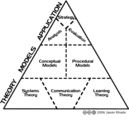
I drafted the following comparison of instructional design theory versus instructional design models and developed the accompanying hierarchy of instructional design back in 2006 as part of one of my comprehensive examination responses for my Ph.D. I’m sharing here it on my blog at this time for my students and others who may find the commentary and diagram comparing ID theory versus ID models helpful.
Brief Overview of Instructional Design Theory
Analysis of a complex concept such as instructional design theory begins with defining key terms used. Instruction can refer to "any activity that is intended to foster learning" (Goodyear, 1997, p. 86), whereas design focuses on improving the quality of subsequent creations (Smith & Ragan, 2005) while considering the many factors that may affect or be affected by the implementation.
A theory is simply "an organized set of statements that allow us to explain, predict, or control events" (Smith & Ragan, 2005, p. 23). Another, more expansive definition of a theory is "an organized set of propositions that are syntactically and semantically integrated" (Snelbecker, 1999, p. 33). Instructional design theory is drawn from an assortment of abstract communication, systems, and learning theories (Richey, 1986) which form a basis for practical models for instructional design and development.
Many scholars have attempted at providing succinct definitions of instructional design theory (Merrill, Drake, Lacy, & Pratt, 1996; Reigeluth, 1999; Richey, 1986). Reigeluth (1999) defines instructional design theory broadly as, "A theory that offers explicit guidance on how to better help people learn and develop" (p. 5). In its most basic form, ID theory is simply a collection of assumptions that specific approaches to ID are built upon. ID theories describe instructional methods and situations for proper use and define how complex methods can be broken into component methods (Reigeluth, 1999).
Hierarchy of Instructional Design
ID theory is build upon the adoption of one or more procedural and conceptual models (Richey, 1986). The resulting theory enfolds the beliefs concerning general systems theory, communication theory, and learning theory. Conceptual models of instruction are built upon such theoretical foundations, upon which specific ID models are applied to real-life educational challenges. The figure above depicts this hierarchy of ID formation as described by Richey (1986) and Smith and Ragan (2005).
As Reigeluth (1999) notes, ID theory is not synonymous with learning theory, ID process, or curriculum theory. However, ID theory is inextricably connected to each. Learning theory is predominantly descriptive, serving to describe how learning takes place. ID process details the procedures that the instructional designer or educator ought to use when planning and preparing the instruction. Curriculum theory is based on a set of values and offers suggestions for methods of instruction. ID theory surpasses all of these individual viewpoints and aims to answer the questions of both "what" and "how" in a proposed educational experience.
Numerous working definitions of ID exist, many of which exude similar connotations. ID is defined as, "The development of learning experiences and environments which promote the acquisition of specific knowledge and skill by students" (Merrill et al., 1996). In a similar vein, Smith and Ragan (2005) define ID as, "The systematic and reflective process of translating principles of learning and instruction into plans for instructional materials, activities, information resources, and evaluation" (p. 4). Richey’s definition (1986) is quite detailed, referring to ID as "The science of creating detailed specifications for the development, evaluation, and maintenance of situations which facilitate the learning of both large and small units of subject matter" (p. 9).
Recently, even the term "instructional design" is being examined and compared to an alternative of "learning design" (Gibson, 2006; Ip, 2006; Taylor, 2006). While some consider the terms to be synonymous, the latter more closely aligns with contemporary constructivist views of the roles of the instructor and learners. Throughout this paper the term "instructional design" (ID) will be used inclusively to refer to the processes of creating a blueprint for successful learning experiences, whether they be more self-paced and instructivist or student-centered and constructivist.
When considering ID theory, one must acknowledge the personnel who take theory and apply it to the design of learning: the instructional designers. The role of the instructional designer is crucial to student success (Liu et al., 2005). Yet, what is the role of the instructional designer? This is a question that has been raised in many professional and collegial venues, with the debate as divided today as ever before (Klein, 2006; Spector, 2006a, 2006b; Wissing, 2006). The International Board of Standards for Training, Performance and Instruction (IBSTPI) has taken on the monumental task of identifying and compiling the competencies for someone involved in the many diverse tasks of ID ("Instructional design competencies", n.d.).
In reality, the role of instructional designer is multifaceted, requiring a unique and varied skill set. The instructional designer has been referred to as an engineer (Smith & Ragan, 2005), creative scientist (Richey, 1986), and project manager (Mager, 1997), making every effort to create a blueprint for the further development and implementation of the learning initiative. The instructional designer recognizes the difference between the design processes and products (Glaser, 1971), forming a structure that future development and implementation to be built upon.
Yet, even with the tasks of an instructional designer defined, because ID is such a complex practice, there are countless ways whereby a learning program can come to fruition. Hence the need for ID models!
Instructional Design Models versus Theory
Instructional design (ID), also referred to in the literature as "systematic instructional planning" (Kemp, 1985) is an umbrella phrase used to refer to many differing aspects of the design of educational experiences. ID is often used to refer in general terms instructional systems development (ISD). Numerous ISD models exist, all of which typically refer to the phases of analysis, design, development, implementation, and evaluation of instruction. Today much indeterminism and ambiguity exists with regards to the use of the terms ID and ISD. Yet, a clear distinction does exist between ID and ISD. Whereas ISD models include a "major emphasis on front-end analysis, implementation strategies including train-the-trainer, maintenance of the instruction, and external or summative evaluation" (Dick, 1997, p. 364), ID models generally focus upon the steps necessary to transform a goal statement to instruction that is ready for development and implementation. Models are valuable because they serve as a visual representation of the relationships among various components of the ISD process.
Instructional design endeavors to guarantee that a learning activity is developed according to specifications. It culminates in a framework outlining how instruction should be developed given the outputs of various design tasks (K. A. Conrad & TrainingLinks, 2000). A number of principles underlie this framework (Spector, 2001), which accounts for the varied and increasing approaches being used to design instruction today.
A host of ID models exist that aid in depicting the complex and interwoven tasks necessary in order to design quality learning experiences. The true value of an ID model is not in providing a concrete order whereby effective instructional development takes place, but rather in providing a "meaningful organizing framework within which development activities can be described, discussed, actualized, and assessed" (Spector & Muraida, 1997, p. 61). ID models generally tend to simply modify and elaborate upon a basic problem-solving model tailored to meet the needs of the educational endeavor (Smith & Ragan, 2005).
References
Conrad, K. A., & TrainingLinks. (2000). Instructional design for web-based training. Amherst, MA: HRD Press.
Dick, W. (1997). A model for the systematic design of instruction. In R. D. Tennyson, F. Schott, N. Steel & S. Dykstra (Eds.), Instructional design: International perspectives. Volume 1: Theory, research, and models. Mahwah, NJ: Lawrence Erlbaum Associates.
Dick, W., & Carey, L. (1996). The systematic design of instruction (4th ed.). New York: Harper Collins.
Gibson, D. (2006, April 10). Instruction design verse learning design [Msg 11]. Message posted to ITFORUM, archived at http://listserv.uga.edu/archives/itforum.html
Glaser, R. (1971). The design of instruction. In M. D. Merrill (Ed.), Instructional design: Readings (pp. 18-37). Englewood Cliffs, NJ: Prentice-Hall.
Goodyear, P. (1997). Instructional design environments: Methods and tools for the design of complex instructional systems. In S. Dijkstra, N. Seel, F. Schott & R. D. Tennyson (Eds.), Instructional design: International perspectives (Vol. 2, pp. 83-111). Mahwah, NJ: Lawrence Erlbaum Associates.
Instructional design competencies. International Board of Standards for Training, Performance and Instruction. (n.d.). Retrieved February 3, 2006, from http://www.ibstpi.org/instructional-designer-competencies/
Ip, A. (2006, April 10). Instruction design verse learning design [Msg 6]. Message posted to ITFORUM, archived at http://listserv.uga.edu/archives/itforum.html
Kemp, J. E. (1985). The instructional design process. New York: Harper & Row.
Klein, J. D. (2006, April 20). You’re an instructional tech, yes [Msg 12]. Message posted to ITFORUM, archived at http://listserv.uga.edu/archives/itforum.html
Liu, X., Bonk, C. J., Magjuka, R. J., Lee, S.-h., & Su, B. (2005). Exploring four dimensions of online instructor roles: A program level case study. Journal of Asynchronous Learning Networks, 9(4), 29-48.
Mager, R. F. (1997). Making instruction work (2nd ed.). Atlanta, GA: CEP Press.
Merrill, M. D., Drake, L., Lacy, M. J., & Pratt, J. (1996). Reclaiming instructional design. Educational Technology & Society, 36(5), 5-7.
Reigeluth, C. M. (1999). What is instructional-design theory and how is it changing? In C. M. Reigeluth (Ed.), Instructional-design theories and models: A new paradigm of instructional theory (Vol. 2). Mahwah, NJ: Lawrence Erlbaum Associates.
Richey, R. C. (1986). The theoretical and conceptual bases of instructional design. New York: Nichols.
Smith, P. L., & Ragan, T. J. (2005). Instructional design (3rd ed.). Hoboken, NJ: John Wiley & Sons.
Snelbecker, G. E. (1999). Some thoughts about theories, perfection, and instruction. In C. M. Reigeluth (Ed.), Instructional-design theories and models: A new paradigm of instructional theory (Vol. 2, pp. 31-50). Mahwah, NJ: Lawrence Erlbaum Associates.
Spector, J. M. (2006a, April 20). You’re an instructional tech, yes [Msg 3]. Message posted to ITFORUM, archived at http://listserv.uga.edu/archives/itforum.html
Spector, J. M. (2006b, April 20). You’re an instructional tech, yes [Msg 15]. Message posted to ITFORUM, archived at http://listserv.uga.edu/archives/itforum.html
Spector, J. M., & Muraida, D. J. (1997). Automating instructional design. In S. Dijkstra, N. Seel, F. Schott & R. D. Tennyson (Eds.), Instructional design: International perspectives (Vol. 2, pp. 59-81). Mahwah, NJ: Lawrence Erlbaum Associates.
Taylor, M. (2006, April 11). Instruction design verse learning design [Msg 16]. Message posted to ITFORUM, archived at http://listserv.uga.edu/archives/itforum.html
Wissing, G. (2006, April 20). You’re an instructional tech, yes [Msg 11]. Message posted to ITFORUM, archived at http://listserv.uga.edu/archives/itforum.html
Jason Rhode
.
Blog
.
<span class='date ' tip=''><i class='icon-time'></i> Jul 16, 2015 01:25pm</span>
|
|
Marketing expert and professional speaker Terra Fletcher spoke with students in Nicole Virant’s Internet Marketing course, sharing her expertise on using employees as brand ambassadors. Students enjoyed her personal style which included getting to know each of them and tailoring her topic around some of the shared goals the students had.
Terra Fletcher, image courtesy of www.terralfletcher.com
Turning employees into brand ambassadors was a topic that related well to the course content and connected with students in the classroom. Fletcher was able to share four key elements:
How to encourage employee brand advocacy
How to leverage existing relationships
How to use influencers to extend the reach of your message
How to create and deliver a finely-tuned elevator speech
"I learned about branding and different methods for developing and maintaining relationships with your customer. I also learned how to improve morale of employees," shared Lee Collar, a business student.
To date, Fletcher has been one of the best guest speakers that the business program at Globe University-Green Bay has been able to host. She shared a wealth of information and stories that students will be able to put into action.
"I liked that it was interactive, the book references and the real-life examples that were used," said Jane Frisch, business student.
Want to Know More About Terra Fletcher?
Terra L. Fletcher is founder and president of Fletcher Consulting. She is an adjunct professor and was awarded Entrepreneur of the Year in 2012 by the Shawano Country Chamber of Commerce. Fletcher focuses on marketing holistically, the entire image and communication plan of a company. She encourages companies to consider who their target is. She helps find influencers, and works with the business to build "real"ationships that lead to "real"sults. Fletcher specializes in finding the psychographics, values and motives of customers and helps her clients understand how to get more just like them through internet marketing, website optimization and social media.
The post Fireball! Fletcher Brings Passion Into the Internet Marketing Classroom appeared first on Globe University Blog.
Globe University & Minnesota School of Business
.
Blog
.
<span class='date ' tip=''><i class='icon-time'></i> Jul 16, 2015 01:25pm</span>
|
|
Education technology startups that want to take part in the Intel Education Accelerator have to apply to the program until May 22nd.
Intel’s accelerator program starts on August 3 and ends with a demo day on December 2.
Interested applicants can come from all verticals within the education technology market, must be for-profits and already have a working beta product.
They can score investment of up to $100,000, split into an initial $ 50,000 for six percent in equity and $50,000 in a convertible note at the end of the program.
The program is hosted at Intel’s partner for the accelerator program, GSVlabs, in Silicon Valley, which means that participants need to be flexible to relocate.
Further Reading
Intel® Education Accelerator
Edukwest
.
Blog
.
<span class='date ' tip=''><i class='icon-time'></i> Jul 16, 2015 01:25pm</span>
|
|
Online teaching presents a unique set of challenges that require clear definition of faculty performance. Research shows that specific strategies can support and enhance the teaching and learning process. In this online workshop offered 2/14/14 for NIU faculty, we examined and discussed best practices that will promote successful online experiences including planning and management, teaching techniques, and assessing and evaluating students. Participants discovered different ways to facilitate these strategies during all phases of an online course. Special thanks to Angela Velez-Solic and Jeff Geronimo for their ideas and contributions to the workshop! The workshop archive may be viewed below.
The following is a quick list of the tips discussed in greater depth during the workshop archive.
If You’re New to Online Teaching
Try using different kinds of online technologies in your current face-to-face or blended courses first, so you can get a good idea of how you might later use the technology to teach completely online.
If you haven’t taught the course face-to-face, try teaching it that way first so you can fully understand the course components and student needs. Along the way, you’ll see what works and what doesn’t, and you might be able to have a solid idea of how to approach the same class in a fully online environment.
Discuss and network with colleagues who have experience teaching online. They will be more than likely be willing to share with you some of their own tips and best practices, especially if these colleagues teach in your same subject area.
Tips for Design
Rethink your syllabus. Create a loop-hole free syllabus and consider creating a syllabus quiz to make sure students know exactly what is expected of them.
Organize your course content. You might decide to structure your course in weekly folders or by topic or theme.
Avoid useless clicking. Put as much content in one place as possible, but also be mindful of how everything is structured so that you and your students avoid any unnecessary clicking.
Save files in PDF. Converting your documents to PDF makes them more accessible to students, and is much smaller in terms of file size. When converting to PDF, remember to keep the source files in a safe place.
Create a Start Here area to orient your learners to your course. This would be a good place to put information about navigating the online course and any resources for tech support
Design less and teach more. It’s definitely NOT a good idea to try to design, develop, and teach a course at the same time. (tell short story) Ultimately, try to make sure the course is as fully developed as possible before the start of the semester, so that you can focus on the more important aspect - teaching the course.
Rethink your course content. Just because you’re teaching a course online, you don’t need to create all course materials from scratch. Consider using open educational resources like YouTube videos, TED talks, and more.
Embed media within your course whenever possible instead of linking. From a learner’s perspective, it’s just easier to be able to see and view the content within the course without having to click on multiple links to open in new windows.
Tips for Delivery
Plan your delivery. Use announcements weekly and save them in a file for easy access especially if you teach the same course multiple times. Save "general" discussion responses in a document, so you don’t have to repeat yourself all the time.
Run from the email monster. Being tied to email or feeling compelled to answer emails is a very real nightmare for many online faculty. Instead, try the following: hold virtual office hours using Adobe Connect or Blackboard Collaborate; subscribe to discussion forums/threads; create announcements in advance and post-date them; try Remind101 or Google Voice for text messages
Rethink email. set a realistic time schedule; set up email access on your mobile device; encourage other avenues of communication
Move beyond PowerPoint. Consider alternatives to PowerPoint slides. You can add audio narration to PowerPoint, record face-to-face lectures for later viewing, or perhaps record a screencast.
Consider live online sessions. You do certainly have the option use live online sessions for delivering content and facilitate live online discussions. In your online course, you could choose to have live online sessions scheduled periodically throughout your course in which you could require students to login at the scheduled time from either their computer or mobile device to participate in a live class meeting where you could present content as well as facilitate a variety of different types of discussions.
Develop your "presence". Consider other ways where you can demonstrate your teaching and social presence in the course, such as recording video or making other frequent communications within the course.
Tips for Assessment
Rethink your grading strategies. Use grading criteria and rubrics for all assignments and discussions; incorporate more low-stakes quizzes with multiple attempts; provide feedback, and allow students to revise assignments; try project-based learning - all assignments are part of the final project.
Consider different grading methods. Download all submissions at once from LMS and annotate with MS Word; use inline grading feature in Blackboard; convert assignments to PDF and annotate (options for grading from mobile device); use rubrics or audio/video feedback
Give and receive feedback. Save samples of phrases and feedback and copy/paste as appropriate to save time; provide informal opportunities for course feedback; use LMS survey tool, PollEverywhere, reflection journals; ask for feedback mid-point and end of course.
Summary and Best Practices
Take baby steps. Don’t plunge so deeply into the online course environment and expect everything to be perfect.
Limit the amount of technology if you’re brand new. The technology should not drive or direct the teaching and learning process - it should support this process.
Explore different strategies and approaches. See what works for you and your teaching style.
Don’t overwhelm yourself of your students. Make sure the course is as easy to navigate as possible, provide clear expectations, and make sure that the overall design of the course makes for a positive course experience for everyone.
For archives of other online workshops offered by NIU Faculty Development and Instructional Design Center, visit our YouTube channel. Those seeking to design a new online course in Blackboard may find the workshop archive, Designing Exemplary Online Courses in Blackboard, to be of particular help.
Jason Rhode
.
Blog
.
<span class='date ' tip=''><i class='icon-time'></i> Jul 16, 2015 01:24pm</span>
|
|
Although it’s been around for more than 20 years, we’re still learning the dos and don’ts of email etiquette.
We’ve all received an email that - although silent save for the sound of a mouse click - screamed so loudly to our sense of common courtesy that we wanted to fire back with a combination of all caps and angry emoticons.
Workplace email blunders are so common that this post could have been twice as long. But just like emails shouldn’t be mistaken for a great American novel, we’ll keep this to 11 of the worst offenders.
1. Non-descriptive subject lines
Emails titled "Hi" might have been fine as a teenager on AOL, but in a professional work setting, non-descriptive subject lines are not quite up to par. Your recipients will most likely prioritize opening their emails based on the subject lines alone, so you have a lot of competition in getting your email to the top of the list.
2. Forwarding chain emails
Speaking of AOL, remember when chain emails were a thing? It should go without saying that spamming your coworkers with forwarded emails (however hilarious they may be) is a big no-no. It wastes their time and decreases your credibility in the process.
3. Not giving a proper greeting
We don’t talk to people without greeting them first, so we shouldn’t make that mistake in email. Judith Kallos, email etiquette expert, warns us that an email without proper greetings and closings can come off as terse and demanding.
4. Being tone deaf
Much like a choir member who can’t quite hit the high notes, being tone deaf in email can easily misrepresent the sender’s intentions. Since we can’t rely on body language and vocal inflections to convey meaning, our words and punctuation must be chosen carefully to make sure nothing gets misinterpreted.
5. Using abbreviations
Using abbreviations might be fine to use if you’re texting a friend that "ur going 2 B late," but there is no place for that kind of informal shorthand in a professional email. Even spelling words out, such as "appointment" instead of "appt," shows recipients that you’re not using shortcuts to rush the email along.
6. Using all caps
All caps is the equivalent to shouting, so unless you would shout your email to someone in person, you should not use all caps. If you want to emphasize a certain word or point, opt instead to use less aggressive options, such as italics or bold.
7. Spelling and grammatical errors
Spellcheck is one of the greatest inventions of the digital era. It gives us virtually no excuse to send an email off laden with errors that could potentially undermine our credibility. If your email service has no integrated spellcheck, copy and paste it into a Word doc and use the spellcheck there.
8. Playing fast and loose with "Reply All"
There is a time and a place for "Reply All," and that time and place includes everyone on the "To" list being interested in or needing the information you’re sending them. Many people make the dreaded mistake of hitting "Reply All" instead of "Reply," causing information meant to be seen by one set of eyes seen by dozens.
9. Sending potentially incriminating emails
We really have no control what someone decides to do after receiving our email. Whether their intentions are good or otherwise, they could forward it onto our higher-ups and inadvertently get us into trouble. The best thing to do is to simply avoid putting anything in writing that we would not want coming back to bite.
10. Writing novel-length emails
As mentioned in the introduction, emails are meant to be read fairly quickly. People are busy; they don’t have time to drop everything and read an inbox full of 700-word emails when they get to work in the morning. Don’t make the mistake of getting carried away in a long-winded, stream-of-consciousness style email that could have had been downsized to a few concise sentences.
11. Overbearing email signatures
Just like your email should be clear and to the point, so should your signature. Using multiple graphics and logos (that won’t always convert and instead render as attachments), larger-than-life font sizes, too much contact information and maybe even a few motivational quotes can look messy and unprofessional.
The post 11 Terrible Workplace Email Blunders appeared first on Globe University Blog.
Globe University & Minnesota School of Business
.
Blog
.
<span class='date ' tip=''><i class='icon-time'></i> Jul 16, 2015 01:24pm</span>
|