Blogs
|
Source: CollegeStats.org
Jason Rhode
.
Blog
.
<span class='date ' tip=''><i class='icon-time'></i> Jul 16, 2015 02:07pm</span>
|
|
My friend has a son who is an exceptional musician, and was recently accepted to one of the most prestigious college music programs in the country. The other weekend my friend went to visit his son, who took him to the music lab to show his dad what he was learning about the science of harmonization, and how music that sounds spontaneous is actually the result of complex scientific principles.
[dfads params='groups=2593&limit=1&orderby=random']
Like any parent would be, my friend is immensely proud of his son. And, like any good parent would be, he wonders how his son will take what he learns in school and translate that to a lucrative career—or at least one that pays the bills, and opens even the possibility of supporting my friend’s hoped-for future grandchildren.
It’s a scary thing if you've invested a significant amount of money in an education other people label "useless". But as someone who has hired people for a long time now, I don’t believe any degree is "useless".
If I can’t see the value of someone who understands the science of harmonization could bring to my organization, then I am doing a poor job as a hiring manager. And I’m missing the chance to bring some outside of the box thinking and potential for innovation into my business.
That said, it’s still the job candidate's responsibility to find a way to demonstrate how their education has increased their ability to think critically and bring a fresh perspective.
Job Training vs. Education
The infamous "underwater basket weaving degree" doesn’t exist. Next to that, art history might be the most dismissed major, at least in pop culture. However, art history is defined as "the study of art in its historical development and context". Remove the word art, and think of that sentence in a different way. If someone can understand historical development and context, they can surely be taught the more practical aspects of most jobs.
Our tendency to conflate job training and education is a mistake. If we really believe in the power of the free market and creative destruction, than by definition most jobs people get trained for are in the process of becoming obsolete.
People do need to be trained to do whatever it is they are going to do for a living, but they also need to know how to think critically, observe and understand patterns, and be forward thinking - among many other things. If they don’t know how to do those things not only will the workforce leave them behind, but the companies that hire them will eventually be left behind as well.
Those qualities can be developed in a variety of places, but a liberal arts degree is one of those places. And, as Walter Isaacson said in this post, we do need engineers and computer scientists, but we also need people who understand what it means to be human.
Uphill Climb
All of that aside, if you are someone with a degree that others may dismiss, and you aren’t becoming a curator or a musician, you face an uphill climb. Hiring managers are short on time and long on candidates, and it’s on you to show how your education impacted the way you think, not just what you know--because, for the vast majority of professions, how you think is more important than what you know.
That’s true for any recent college grad, but it’s especially true if you just spent a significant amount of money on a degree that others don’t always view favorably. Finding ways to demonstrate your value, critical thinking skills, and entrepreneurial drive is not easy, but it is easier than it used to be. Write a blog, design an app, start a nonprofit—do something that shows you are more than just a piece of paper and that what you learned actually gave you a skill set that others may find valuable.
The only thing useless is accepting a paradigm that doesn't have to be true.
Picture License Some rights reserved by quinn.anya
Edukwest
.
Blog
.
<span class='date ' tip=''><i class='icon-time'></i> Jul 16, 2015 02:07pm</span>
|
|
Learn how to design online sessions that students can fully participate from a mobile device using the Blackboard Collaborate mobile app. During this online workshop offered 2/28/2013 we explored the features available of the Blackboard Collaborate mobile app for iOS for students to participate during a live online session and see the student experience participating from a mobile device. We also offered tips for designing web conferencing sessions that maximize the features of Blackboard Collaborate mobile, offering the best possible collaborative learning experience for students. | view podcast in iTunes | view mp4
For links to archives of other online workshops offered by NIU Faculty Development and Instructional Design Center, visit our YouTube channel
Jason Rhode
.
Blog
.
<span class='date ' tip=''><i class='icon-time'></i> Jul 16, 2015 02:07pm</span>
|
|
As part of his project Scholas Occurentes Pope Francis announced the launch of Scholas Labs last week.
Scholas Labs is a four-month edtech accelerator program which offers support with fundraising, mentorship and product tests in the Scholas network. The accelerator is supported by several tech companies like Microsoft, Google and Grupo Telecom.
In September Pope Francis launched Scholas.Social, a global, multi-religious and multi-cultural network that aims to connect schools through collaboration, encounter and shared interest.
Scholas Occurentes is based on the task to create an online platform that would transform the way students learn. It is modelled after two projects he ran as Archbishop of Buenos Aires.
Further Reading
Startup Accelerator Scholas.Labs Announced by Pope Francis | Inquistr
Nasce Scholas Labs, l’incubatore di startup del Papa | Wired
Pope Francis launches Global Online School Network Scholas.Social | EDUKWEST
Links
scholaslabs.org
Edukwest
.
Blog
.
<span class='date ' tip=''><i class='icon-time'></i> Jul 16, 2015 02:06pm</span>
|
|
Courtesy OnlineCollege.org
Jason Rhode
.
Blog
.
<span class='date ' tip=''><i class='icon-time'></i> Jul 16, 2015 02:06pm</span>
|
|
McGraw-Hill Education announced a partnership with Cerego, a provider of memory management tools. Under the partnership the companies will work on adaptive language learning products for K-12 students.
The first world languages program to be powered by Cerego is "Asi se dice" for the Spanish market, becoming available for classroom use beginning in Fall 2015.
Last month, Cerego announced a partnership with MOOC platform edcast to add personalized and adaptive learning features to online courses.
Cerego’s technology joins McGraw-Hill’s other adaptive learning products ALEKS and LearnSmart. The latter has been developed by Danish edtech startup area9 which McGraw-Hill Education acquired in February 2014.
Further Reading
McGraw-Hill Education Teams with Cerego to Power Adaptive Learning Experiences to Help K-12 Students Learn World Languages More Effectively | PR Newswire
Live from TransformingEDU 2015: EdCast and Cerego Partner to Create a Comprehensive MOOC Solution for Universities, Companies and Organizations | PRWeb
HEDLINE: McGraw-Hill Education acquires Area9, David Levin new CEO | EDUKWEST
Links
mheonline.com/ceregodemo
Edukwest
.
Blog
.
<span class='date ' tip=''><i class='icon-time'></i> Jul 16, 2015 02:06pm</span>
|
|
Renaissance Learning announced the acquisition of UClass, a cloud storage and content management platform that allows school districts to upload their entire curricula.
Founded in 2012, UClass was used by 5,000 schools at the time of the acquisition having uploaded some 16 million items, including lesson plans, videos and games. It will now be integrated into Renaissance Learning’s suite of assessment and analytics tools with the team staying on board.
According to Jack Lynch, CEO of Renaissance Learning, the acquisition complements the company’s offerings.
Renaissance Learning made headlines in March of last year when it got acquired by private equity firm Hellman and Friedman for $1.1 billion. The acquisition came less than a month after Google Capital had put $40 million into the company at a valuation of $1 billion.
Renaissance Learning covers one third of US schools and is present in 60 countries with around 20 million students using the offerings at a cost of $5 per student.
Further Reading
Renaissance Learning Acquires UClass, Bridges K12 Assessment and Instruction | PR Newswire
HEDLINE: Renaissance Learning acquired for $1.1 billion | EDUKWEST
Links
uclass.io
Edukwest
.
Blog
.
<span class='date ' tip=''><i class='icon-time'></i> Jul 16, 2015 02:05pm</span>
|
|
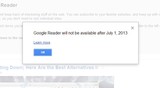
By now, you likely may have already heard of the announcement from Google that Google Reader will be shut down as of July 1, 2013. Since the announcement, there has been much commotion online from loyal Google Reader users expressing their disappointment in Google for "pulling the plug" on yet another service that had many education uses. I thought I’d use this opportunity to reflect on my own use of Google Reader and RSS to this point, reevaluate what steps I will take moving forward to transition to a new solution for reading and sharing news online, and share the steps I have since taken to begin my transition away from Google Reader.
How I Use RSS Today
I began using Google Reader back in 2005 when it was first released as a Google Labs experimental project. At the outset, Google Reader was my sole solution for subscribing to blogs and also for setting-up and following Google Alerts for topic-specific news headlines. Over the years, as Google allowed through APIs for other services to access and manipulate RSS contents, I began to try other RSS aggregators and apps, most recently Reader, Flipboard, and Mr. Reader, that provided a better overall user experience (better UI, more sharing features, mobile-optimized, etc.).
Yet, Google Reader remained my central hub for news and information online. Subscribing to blogs and other news sites in Google Reader, it became the primary source for me to read and share news with others. I would star articles, search through my subscriptions for articles I had previously read, and share articles from Google Reader to other social media services using tools like Buffer. In fact, if you follow me on Twitter, the vast majority of the links that I’ve shared over the years came directly from Google Reader. the most compelling use of Google Reader.
Google Reader had become the "plumbing" for my online consumption and sharing of news and resources with others. While I was using other apps to manage my Google Reader subscriptions, read articles, etc., I was able to seamlessly move from one app to the other to read and share news as it happened, with the services I used syncing through Google Reader.
Why I Chose Feedly
While there are indeed many different options for subscribing to and consuming news content today, what I was looking for most was a great experience on my smart phone, tablet, and desktop computer which all would synchronize so that I could continue to move from one to the other as desired. I find that today I primarily read my news on my iPad, but also at times my iPhone when my iPad isn’t handy.
In my searching, I came across Feedly’s promise for a seamless transition for Google Reader users to it’s Google Reader clone, Normandy. In addition, I saw that Feedly already had mobile and tablet apps along with a desktop browser plugin that would all synchronize my activity for now over Google Reader, and eventually its new cloud-based synchronization platform Normandy. That was enough to convince me….I decided to give Feedly a try!
Thus far, the experience has indeed been seamless and I recommend that those looking for a replacement to Google Reader definitely try Feedly.
Getting Started with Feedly
If you already have a Google Reader account, getting setup on Feedly is simply…just login with your Google account that you used for Google Reader. I’d recommend then taking this brief guided tour as well as viewing the following tutorial to get an understanding for how Feedly is similar, yet different from Google Reader.
I viewed both, and in no time I felt right at home in the Feedly mobile app as well as browser interface. I was able to setup my Pocket (used for saving select articles for reading later) and Buffer (used for time-delayed sharing on Twitter) accounts within to easily share to either of those services directly from within Feedly.
In short, so far I am very pleased with Feedly and do hope that Feedly takes advantage of the opportunity created by Google Reader’s demise to grow their features and API integrations with other services. Only time will tell…
Have you tried Feedly? If so, what has been your experience thus far? Or, if you are considering a different news reading tool, which one and why? Leave a comment with your thoughts!
Jason Rhode
.
Blog
.
<span class='date ' tip=''><i class='icon-time'></i> Jul 16, 2015 02:05pm</span>
|
|
Instructure has raised a $40 million Series E led by Insight Venture Partners with participation of Bessemer Venture Partners and EPIC Ventures.
The venture round brings the total raised by Instructure to around $90 million and it will be the last before the planned IPO later this year.
The investment will go into the launch of Instructure’s new business facing product called Bridge, a corporate learning and engagement platform. At launch CLEARLINK, OpenTable and Oregon State University are using the product.
Since its launch in 2011, Instructure’s Canvas LMS has been used by over 18 million students and teachers from more than 1,200 universities, colleges and K-12 school districts across the globe. With Bridge, Instructure aims to create a similar success in the corporate market.
Further Reading
Instructure Secures $40 Million in a Pre-IPO Series E Round | PR Newswire
On The Way To An IPO, Education Technology Startup Instructure Is Close To Raising A Big New Round | TechCrunch
Education tech startup Instructure has raised $40 million | Business Insider
Instructure Expands in Corporate Market With New Funding | Inside Higher Ed
Links
getbridge.com
Edukwest
.
Blog
.
<span class='date ' tip=''><i class='icon-time'></i> Jul 16, 2015 02:04pm</span>
|
|
For quite some time, I have been frustrated with the lack of options within Blackboard for customizing the entry point of the course. While an instructor can set any tool or content area to be the default entry point in a course, there’s only so much that can be done in a Blackboard content area or page using the current built-in functionality. When Blackboard introduced the "Home Page" as the new default entry point, students were given access to a variety of information streams when logging into the course. However, these information modules are still primarily system driven and can not be easily customized or new modules setup by the instructor. With a few further customizations, the Home Page could become a much more useful tool.
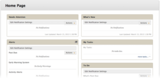
For years, the Announcements page was the default entry point in Blackboard. With the release of Blackboard Learn 9, the Home Page was added which includes various information modules for the user, such as: Needs Attention, What’s New, My Tasks, Alerts, etc.
Home Page in Blackboard Learn
While the Home Page tool was a step in the right direction, it is still very restricted and falls short in allowing faculty to customize at the level in which it can be a true "Communication Dashboard" for the course. I’ve shared this feedback with Blackboard product developers at BbWorld and the Blackboard Idea Exchange over the past nearly 2 years, but since I’ve yet to see my suggestions implemented, I’m sharing them here as well so that perhaps others can echo the value of such a feature enhancement.
What follows is my rationale for why I’ve desired a more instructor-customizable communication dashboard as the entry point for a Blackboard course as well as a sample of my "homemade" solution. In future posts, I’ll then share more specifics for how to create a customized communication dashboard in Blackboard and incorporate a variety of different information sources within the dashboard.
Needs
In my teaching, I’m often introducing in-service teachers to new technology tools and practices that they can apply into K-12 classroom teaching. My students and I use 3rd party blog, sms, calendar, and other tools in addition to Blackboard and I would like to be able to provide information about accessing these tools as well as streams of information from them in a single communication portal. Basically, I’ve simply been looking for a customizable and yet visually appealing area within Blackboard where different information sources can be embedded. In particular, these are the tools that I use and want to easily share with my students:
Latest Blog Posts - During the course, my students and I each setup and post to individual 3rd party blogs. Even though my students are instructed to subscribe via RSS to my blog as well as the blogs of their classmates, I want to display clickable titles of the last several posts from my blog.
Course Calendar - While Blackboard’s Calendar is greatly improving with the release of the new Blackboard Calendar in Service Pack 11, up until this point, the built-in calendar hasn’t been acceptable and I create a Google Calendar for each class. I would like for a version of that calendar for the upcoming 7 days to be embedded and viewable by my students.
Texting List Sign-up - In my teaching, I use Remind101.com and encourage my student to opt-in to my texting news list powered by Remind101. I would like to provide the information for signing-up to join the texting list.
Course Podcast Player - I’ve setup a podcast for my course and would like to embed a player so that right from the course entry page, students can listen to the most recent episodes of the podcast. I’ve previously shared steps for how I setup my podcast using Dropbox.
Class Blogs - The students in the course each setup their own blogs and post to throughout the course. I would like to include links for each of my students’ blogs.
Instructor’s Tweets - Twitter is another important communication means used during the course. I would like at the outset of the course to include a Twitter widget displaying the latest tweets from the instructor, with the widget to be changed after Twitter is introduced to students and they begin tweeting, to display latest tweets using a course hashtag.
Dashboard
With a little HTML and CSS know-how, I’ve gone ahead and created this course communication dashboard that I now use in my Blackboard courses. It includes the communication streams and information sources that I want my students to see when they login to my Blackboard course. Students have commented on how helpful having such a communication dashboard available upon entry to the course has been and as a result, I’ve continued to include my homemade version in the courses I teach.
The dashboard is a simple html page (more details to be shared in a future post how to setup) set as the default entry point for the course. For this particular course I’ve shared, the dashboard contains the following information items:
Class Photo Roster - Students were requested to provide a digital portrait during the first week of the course. These photos are displayed along with their preferred first name to be used during the course.
Announcements - Latest several course announcements, also posted and sent via email using the Announcements tool in the course, are displayed for students.
Latest on Dr. J’s Blog - Utilizing a simple javascript RSS embed utility, Feed2JS, an embedded script that displays the latest 5 blog post titles from my blog that students can click on to go directly to those latest posts.
Course Calendar - Google Calendar I’ve setup for the course.
News & Reminders - Details for how students can sign-up to opt into our course texting group.
Course Podcast - Embeddable player using BigContact to play the latest episodes of the course podcast.
iTunes U - Details for how students can sign-up to try the iTunes U version of the course being made available as an experimental trial during the course.
Class Blogs - List of all class members’ blogs.
Tweets from Dr. J - Instructor’s tweets, to be adjusted later in the course to instead display most recent tweets using course hashtag
Ideal Solution
This "homemade" dashboard I’ve created isn’t ideal, but it is closer to my ideal course entry point than the current Home Page tool in Blackboard. It’s conceivable that Blackboard could develop a customizable dashboard, based on the Home Page tool but redesigned, which could take the information modules already in the Home Page and build in additional flexibility of the layout (2 columns, 3 columns, 1 wide column & 2 narrow columns, etc.) as well as include module types where faculty could embed various other information sources, images, scripts, or HTML.
Students could still perhaps add other personalized modules, but the instructor should have much more flexibility in how the Home Page is formatted and be able to embed other types of content or information streams. I envision this communication dashboard being much more instructor-driven than the current Home Page tool, affording the instructor the ability to develop "social presence" within the course by featuring at the login page the various communication streams for the course. I hope this solution will eventually be considered by Blackboard Product Development and I welcome any opportunity to provide further input.
What entry point do you use for your Blackboard course, the Home Page, Announcements, or something else? What features would you like to see in an ideal course entry point? Leave a comment with your suggestions!
Jason Rhode
.
Blog
.
<span class='date ' tip=''><i class='icon-time'></i> Jul 16, 2015 02:04pm</span>
|