Blogs
|
There are some fundamental principles that are important to pedagogy, if not actually good pedagogy, when building an elearning resource.The metaphor is the construction of a building. What’s listed here is about the composition of the cement between the bricks.I leave the intricate fabric of brick and foundation - the individual subject pedagogy - to other discussion.Myth, method and madnessSelect the right mediaMore meaningful mediaSimple text supports instructionSpell-check all textFonts of knowledgeCharter for diagrams and graphsThe art of using visual objectsBeware dead or morphed external linksProvide links to all required pluginsMyth, method and madness Elearning is complex. Digging up any idea that pedagogy can be applied easily to building elearning resources unearths bones of contention. Such is the endowment of the instructional designer, or teacher who embarks on the task of making elearning material.With any new medium in the hands of a designer, the tendency to construct philosophies from scratch is too tempting. Ambitious though this approach may be, I think that it is unwise.Considering the time usually allocated to preparing elearning material, it is unlikely to be efficient. It is especially wasteful given the time that’s needed to prepare effective elearning resources.Fortunately, much of what assists learning can also be applied to elearning.return to menuSelect the right media Podcasting an interview may be more appropriate than displaying a text transcript. Choosing to video it might be even better especially if the interviewee is performing an action, such as explaining how to take cuttings from a woody plant in horticulture. Selecting appropriate media to fit the purpose is often vital to successful elearning.Michael Hanley, in his post Podcast Authoring: Understanding and Remembering, describes explicitly the difficulties encountered when a designer is forced to use an elearning medium that’s clearly unsuitable for the content that’s to be delivered. If you have the choice, choose your media wisely.return to menuMore meaningful media Interaction and feedback, in whatever form they take, are key tools in elearning. The opportunity to make use of them should be exploited whenever possible. It is helpful to remember this when considering the use of a long and detailed video or podcast as part of a module. Interactivity may not be optimal with such media length unless a stepped series of clips is used.For instance, interaction over key points can be inserted as breaks in a sequence of related video clips. Such treatment permits timely and specific feedback. It would be far superior to a long video followed by an interactive session covering all the points.return to menuSimple text supports instructionWriting effective elearning text is a skill. Writers are sometimes advised to use the simplest and shortest words they can. But often that’s just too simplistic. Editing a draft may well be a more practical plan - culling redundancies and replacing long and perhaps complex words with simpler more common equivalents.Getting meaning across unequivocally is an acquired skill. It takes a lot of practice. A frequent mistake is stringing complex sentences together in paragraphs that are far too long.Cathy Moore recommends using Flesch Reading Ease as an indicator tool, rather than a disciplined approach. It is worthwhile on large bodies of text. It can also assist a writer who is new to resource writing. The key lies in conveying necessary meaning by simple language in concise sentences within short paragraphs but not so briefly as to be ambiguous.Acronyms or abbreviations are best annotated frequently throughout the text, giving precise meanings where appropriate. Another helpful ploy is to annotate all new and required vocabulary relevant to the subject. Glossing can assist with this provided it’s unobtrusive.return to menuSpell-check all text and text insertionsThe introduction of typos and misspelt words occurs more often while editing and making insertions than at any other time during the writing process. It pays to leave thorough spellchecking to the last stage before text is finalised in a resource.As well, labels and instruction bubbles such as those on images and diagrams should be carefully spellchecked. Nothing is more likely to create distrust of online learning than obvious typos or misspellings.return to menuFonts of knowledgeType size and style of font were discussion points among web designers in the 1990s and even early this century. Research and dogged experience has shown that reading from the screen tends to be harder on the eye than reading from other media.Serif fonts tend to require a larger type size for the same ease of reading. Even so, some readers find that serif fonts lend an uneasy busyness to a block of text.It has become common practice to use plain sans-serif fonts.return to menuCharter for diagrams and graphsA writer can do disservice to the elearner by not considering the conventions used in the discipline of the subject. Being creative by displaying a graph that contravenes convention may be smart on a billboard.When it comes to teaching, subject-associated conventions should all be adhered to. This applies especially to charts, graphs and their attendant labels and codes. Nothing new here.return to menuThe art of using visual objectsIn the 1960s, my Art teacher told me that garish colour is seldom effective unless used for a special purpose. The same applies to colour used in an elearning resource. Constant use of primary colours can convey undue business and be tiring to look at. Natural colours are often effective as are soft pastel colours.Colour, as much as design and form, should have an accord that contributes to the whole. But there is also an art in the design and placement of visual objects. If unsure, seek advice from an experienced designer, well trained in the use of colour.You can’t go far wrong to follow the advice of Tom Kuhlmann.He has good tips on avoiding visual design mistakes including the use of inappropriate fonts, on designing great looking charts, and on directing where the learner looks.return to menuBeware dead or morphed external linksLinks to external resources have a half-life since sites have a habit of either disappearing or being relocated.A relocated site may not necessarily be accessible from the old link address. Many designers follow a policy that all links must follow closed loops within the resource itself. But if it is required that external links be provided, vigilant automatic link-checking provides some help in alerting when a replacement address in a link may be needed.Avoiding learner distress through failed or inappropriate external links is difficult. A practice of providing several links to related resource materials, not on the same site, can give some ease with this. Links still have to be checked regularly, however, using a link checker or equivalent process.The problem becomes even more critical if the resource is delivered on a DVD or CD. Any updating with replacement link destinations on such resources is not possible unless the links point to an editable page held on an accessible web server. Such a provision can make fixing malfunctioning links much easier in more ways than one.None of these measures gives any indication if the content of a page changes so that it’s no longer relevant to the original intent. It comes back to manually checking the links for content relevance. Learner feedback can provide alerts with this, but they are seldom timely or frequent enough to be practicable.return to menuProvide links to all required pluginsIn fairness to the online learner, notice of requirement of plugins and links to those should be given in an appropriate part of the introduction to the elearning module. Any other special requirements important to the resource, such as required computer specifications for their use, should be announced clearly on the same page. related posts - >> ( 11 ) ( 10 ) ( 9 ) ( 8 ) ( 7 ) ( 6 ) ( 5 ) ( 4 ) ( 3 ) ( 2 ) ( 1 )
Ken Allan
.
Blog
.
<span class='date ' tip=''><i class='icon-time'></i> Jul 20, 2015 09:04am</span>
|
|
As we move to a model where learners have options in terms of how they learn, there is a new role for assessment in diagnosing how best to support an individual learner. This new role should not be confused with computerized adaptive testing, which has been used for years to give examinees different assessment items... Read More ›
Classroom Aid
.
Blog
.
<span class='date ' tip=''><i class='icon-time'></i> Jul 20, 2015 09:04am</span>
|
|
October26th, 1:00pm ETSpace isLimitedReserve Your Webinar Seat Now At:http://www.rapidintake.com/free-tools/ As a trainingdeveloper, you're no stranger to budget cuts. Companies everywhere are turningto e-learning and mobile learning as a solution to improve performance whilecutting costs. But how do you create engaging, high-quality content for youronline training courses? How can you make simple adjustments to images andrecordings without having to spend thousands of dollars on a suite of products?In thiscomplimentary webinar, learn about 16 different free tools that can help youwith your media creation and revision. Edit videos and vector graphics, mixaudio tracks, sharpen your images, and record tutorials; all without spending adime. Tools covered will include:• JayCut• Video Spin• The Aviary Suite of Tools• Audacity• GIMP• Jing• Kuler• Inkscape• More Thepresenter will show all 16 tools and give a brief description on how they canbe leveraged to create professional-quality assets for your online trainingcourses.
Debbie Richards
.
Blog
.
<span class='date ' tip=''><i class='icon-time'></i> Jul 20, 2015 09:03am</span>
|
|
CARe Europe is an International network which serves professionals, service users and organizations to promote the transition from institutional to community-based and recovery-based care in the field of social care and welfare services. CARe Europe is active in 17 different … Continue reading →
Eliademy
.
Blog
.
<span class='date ' tip=''><i class='icon-time'></i> Jul 20, 2015 09:03am</span>
|
|
The paperback of THE NEW DIGITAL AGE: Transforming Nations, Businesses, and Our Lives (Vintage) by Google Executive Chairman Eric Schmidt and Google Ideas Director Jared Cohen hit the bestseller lists in March. But the issues the authors discuss have not lost their currency since then. From digital surveillance by the U.S. government, to Twitter troubles in Turkey,... Read More ›
Classroom Aid
.
Blog
.
<span class='date ' tip=''><i class='icon-time'></i> Jul 20, 2015 09:02am</span>
|
|
SlideSharkis a free app that allows mobile professionals & educators to view and showPowerPoint® presentations on the iPad®.If you're an iPad user, you may have noticed that there isn't a PowerPoint orMicrosoft® Office app for viewingPowerPoint files available in the App Store. In their absence, mobileprofessionals & educators have had to come up with "workarounds"that end up falling short. With SlideShark, you can easily and reliably convert PowerPoint into ahigh fidelity iPad-optimized format that keeps animations, fonts, colors, andgraphics intact. That way you can view and show PowerPoints on the iPad the waythey were meant to be seen.Check it out: https://www.slideshark.com/default.aspx
Debbie Richards
.
Blog
.
<span class='date ' tip=''><i class='icon-time'></i> Jul 20, 2015 09:02am</span>
|
|
Sometimes I feel like Winnie-the-Pooh when I try something different in a blog post. Being a bit like his venture with a balloon, such trials can be launched into cyberspace, leaving me suspended in mid-air.Nothing to do except hang about and wait and see.It can turn into one of those things that numbs the mind with a nauseating tedium. It can be quite a while before anyone comes out to have a look. First one or two, then a dozen or sometimes more.There are times I get the impression that, perhaps, just perhaps, they suspect something. That I’m not really a ‘legitimate’ after all. I think on the pros and cons of letting go the balloon. There’s no parachute when you post, you know. It just floats up and stays there and you’ve just got to hang on and wait.These are the times when I’ve felt that maybe I should have blogged and posted under a disguise. Of course, no guise would be truly effective, just like Pooh’s small-black-cloud-in-the-sky idea wasn’t.There have also been some unexpected adventures that surprised me with the yield brought forth by a seemingly bearbrained idea. Hmmm. That, I guess, is the secret of having great adventures.Have plenty of bearbrained ideas.You never can tell with Bs.
Ken Allan
.
Blog
.
<span class='date ' tip=''><i class='icon-time'></i> Jul 20, 2015 09:02am</span>
|
|
Since 2007, StartUP Foundation has been actively involved in growing the startup ecosystem in Bulgaria. By making partners with other organizations and business to make sure their joined efforts are making a difference in the Bulgarian society. Nowadays, StartUP is going to … Continue reading →
Eliademy
.
Blog
.
<span class='date ' tip=''><i class='icon-time'></i> Jul 20, 2015 09:01am</span>
|
|
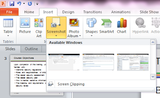
Did you know that there is a screen capture tool built into Office 2010? Access the tool in any Office application (Word, Excel etc.) by clicking the Insert ribbon and then clicking Screenshot. Available Windows will allow you to capture a screenshot of an entire window you already have openScreen Clipping option will let you draw a box around an area so you can pick and choose your screenshot area
Debbie Richards
.
Blog
.
<span class='date ' tip=''><i class='icon-time'></i> Jul 20, 2015 09:01am</span>
|
|
Learning Registry a framework to facilitate the exchange of data to share resources, as well as information about how those resources are used by educators in diverse learning environments across the Web. Led by Dept. of Ed, White House as well as numerous other government agencies and marketplace providers. The Learning Registry provides a platform... Read More ›
Classroom Aid
.
Blog
.
<span class='date ' tip=''><i class='icon-time'></i> Jul 20, 2015 09:01am</span>
|