Blogs
|
With so many options for programming and coding on tablets, I am in a constant cycle of learning, evaluating, and deciding how I will use an app in class. This is not only a challenge of finding the time to learn; it also is a challenge to organize the information so I can remember it when I need it. Beyond this, I want to find ways to easily share this information and my process.
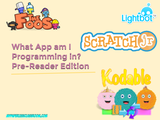
I enjoy a good flowchart, especially the ones in Wired. There is something to be said about logic and poetry and flowcharts, but I haven’t figured out what it is yet. When I read about the Think Kit Tools in the Paper App, I had to give them a try. I made a simple chart off the top of my head "What app am I using?." I got the hang of the tools pretty quickly and I was amusing myself as I thought about the differences between the coding apps I regularly use.
I tweeted it out a couple times to see if I could get Vicky Sedgwick and Brian Briggs’ feedback on it. And Brian suggested turning the image into a thinglink.
This first sketch began as a learning exercise, but it got me thinking about the decisions teachers make about the tools we use. I started a Google Doc and shared it with several teachers to see if we could pool our process for making choices about the program and platforms we use.
Even after just an hour I was amazed at the depth of possibilities. If I needed another dissertation project, this would be an awesome one. Here are some trends that surfaced quickly:
1. You don’t choose what you don’t know. Therefore, learning a wider range of tools, can give you more options, but only if you know the options that come with each tool.
2. Our platforms make a great number of decisions for us. The environment we teach in, from local politics all the ay down to wifi and devices can "set the menu"
3. If you want learning that reaches "past the tech" you have to set goals and a context that support that.
4. There will always be more tools to learn. This cannot be discouraging; this must be affirming. The tools of tomorrow will be even better than the tools we have now. If want to be sure this is the case? help to develop those tools.
Jeffrey Bradbury
.
Blog
.
<span class='date ' tip=''><i class='icon-time'></i> Jul 23, 2015 06:18am</span>
|
|
The TechEducator Podcast is a weekly round table discussion about current topics in educational technology. For more information, please visit www.techeducatorpodcast.com.
Many great ways to participate in the TechEducator Podcast.
TechEducatorPodcast.com
Follow us Live on Video: http://www.TeacherCast.tv
Leave a Voice Mail: http://www.TeacherCast.net/voicemail
Email: feedback@Teachercast.net
Twitter: @TechEdShow (http://www.twitter.com/techedshow)
Hashtag: #TechEducator
Hosts:
Jeff Bradbury - TeacherCast.net - @TeacherCast
Jeff Herb - InstructionalTechTalk.com - @InstTechTalk
Sam Patterson - MyPaperlessClassroom.com - @SamPatue
Chris Nesi - Education the Nesi Way - @MrNesi
David Saunders @DesignSaunders
Josh Gauthier @mrgfactoftheday
About our Guests:
Kurt Wismer
https://sites.google.com/site/geo4edu/
Kurt Wismer: Kurt teaches Business, Marketing and IT for the North Fond du Lac School District. In addition, he is a Google Certified Teacher and Google Education Trainer. Kurt uses technology throughout his curriculum to create durable learning experiences that are both rigorous and transformative to prepare his students for success in an ever changing world. He has lead technology groups and provided considerable training and support as they implemented a 1:1 environment. In 2014, Kurt was honored as the Wisconsin K-12 Outstanding Business Education Teacher. Kurt has a master’s degree in Career and Technical Education from UW-Stout and is an adjunct teacher for UW-Oshkosh. Currently, he serves as the marketing director for WEBIT (Wisconsin Educators of Business and IT). Kurt is also part of EdTech Sages, LLC, an educational technology training and consulting group.
Show Information
Mapping with google mooc https://mapping.withgoogle.com/
http://googletreks.org/
Google My Maps http://mymaps.google.com
Google Tour Builder https://tourbuilder.withgoogle.com/#create
Share the Love
If you enjoyed the show, please rate it on iTunes and write a brief review. That would help tremendously in getting the word out and raising the visibility of the show.
Please join the TechEducator Podcast LIVE every Sunday night at 7:00 P.M. EST on http://www.TeacherCast.tv
Learn How To Launch Your Very Own Podcast!
Are you interested in learning how to podcast? Do you want to share podcasting with your students or perhaps create a podcast from your own home? Jeff is available for one-on-one consulting to help you learn how to bring your podcasting ideas to life.
Email: info@teachercast.net
Voice Mail: http://www.TeacherCast.net/voicemail
Check out our Educators Guide to Podcasting today! | Video | Slideshare Presentation
Please contact TeacherCast with any Questions or to become a guest on the show
Host: Jeff Bradbury @TeacherCast
Email: info@teachercast.net
Voice Mail: http://www.TeacherCast.net/voicemail
YouTube: http://www.TeacherCast.net/YouTube
iTunes: http://www.TeacherCast.net/iTunes
View LIVE Professional Development from TeacherCast
Watch LIVE: http://www.TeacherCast.tv | Broadcasting Schedule (http://www.teachercast.net/showcal)
TeacherCast Broadcasting Community: http://www.TeacherCast.net/broadcastingcommunity
Invite TeacherCast to Speak or Broadcast at your conference
Jeff Bradbury (@TeacherCast) is available as a Keynote Speaker, Presenter, or to Broadcast your conference LIVE!
Check out more TeacherCast Educational Broadcasting Network Shows
TeacherCast Podcast (http://www.teachercast.net/education/teachercast-broadcasting/)
TeacherCast App Spotlight (http://www.teachercast.net/education/teachercast-broadcasting/the-teachercast-app-spotlight/)
Educational Podcasting Today (http://www.educationalpodcasting.today)
The TechEducator Podcast (http://www.techeducatorpodcast.com)
Jeffrey Bradbury
.
Blog
.
<span class='date ' tip=''><i class='icon-time'></i> Jul 23, 2015 06:18am</span>
|
|
The TechEducator Podcast is a weekly round table discussion about current topics in educational technology. For more information, please visit www.techeducatorpodcast.com.
Many great ways to participate in the TechEducator Podcast.
TechEducatorPodcast.com
Follow us Live on Video: http://www.TeacherCast.tv
Leave a Voice Mail: http://www.TeacherCast.net/voicemail
Email: feedback@Teachercast.net
Twitter: @TechEdShow (http://www.twitter.com/techedshow)
Hashtag: #TechEducator
Hosts:
Jeff Bradbury - TeacherCast.net - @TeacherCast
Jeff Herb - InstructionalTechTalk.com - @InstTechTalk
Sam Patterson - MyPaperlessClassroom.com - @SamPatue
Chris Nesi - Education the Nesi Way - @MrNesi
David Saunders @DesignSaunders
Josh Gauthier @mrgfactoftheday
About our Guests:
Matt Harris
ASCD Emerging Leader, works in Singapore in an international, 2016 chair of ISTE, board of ISTE//http://www.iste.org/about/board-of-directors/board-member-bios?ID=326307&ContentID=25
ISTE Website Edtech hub
Lee Green
Doug Robertson
@TheWeirdTeacher
http://hestheweirdteacher.blogspot.com/
Show Information
When Is ISTE? / What Is ISTE?
How To Prepare For ISTE?
What To Bring To The Conference?
What Sessions Should You Visit While At ISTE?
Advice For Walking The Conference Floor?
Parties . . . Parties . . . Parties
Things To See and Do in Philly
What Do You Do When Attacked By A Puppet
EduCelebrities and EduCrushes
Share the Love
If you enjoyed the show, please rate it on iTunes and write a brief review. That would help tremendously in getting the word out and raising the visibility of the show.
Please join the TechEducator Podcast LIVE every Sunday night at 7:00 P.M. EST on http://www.TeacherCast.tv
Learn How To Launch Your Very Own Podcast!
Are you interested in learning how to podcast? Do you want to share podcasting with your students or perhaps create a podcast from your own home? Jeff is available for one-on-one consulting to help you learn how to bring your podcasting ideas to life.
Email: info@teachercast.net
Voice Mail: http://www.TeacherCast.net/voicemail
Check out our Educators Guide to Podcasting today! | Video | Slideshare Presentation
Please contact TeacherCast with any Questions or to become a guest on the show
Host: Jeff Bradbury @TeacherCast
Email: info@teachercast.net
Voice Mail: http://www.TeacherCast.net/voicemail
YouTube: http://www.TeacherCast.net/YouTube
iTunes: http://www.TeacherCast.net/iTunes
View LIVE Professional Development from TeacherCast
Watch LIVE: http://www.TeacherCast.tv | Broadcasting Schedule (http://www.teachercast.net/showcal)
TeacherCast Broadcasting Community: http://www.TeacherCast.net/broadcastingcommunity
Invite TeacherCast to Speak or Broadcast at your conference
Jeff Bradbury (@TeacherCast) is available as a Keynote Speaker, Presenter, or to Broadcast your conference LIVE!
Check out more TeacherCast Educational Broadcasting Network Shows
TeacherCast Podcast (http://www.teachercast.net/education/teachercast-broadcasting/)
TeacherCast App Spotlight (http://www.teachercast.net/education/teachercast-broadcasting/the-teachercast-app-spotlight/)
Educational Podcasting Today (http://www.educationalpodcasting.today)
The TechEducator Podcast (http://www.techeducatorpodcast.com)
Jeffrey Bradbury
.
Blog
.
<span class='date ' tip=''><i class='icon-time'></i> Jul 23, 2015 06:17am</span>
|
|
I believe in the power of play in education and the last 2 years spent teaching tech in grades K-5 have really cemented the belief that there are at least 9 app features that should be considered before it enters the classroom environment. I clearly see how well-designed playful lessons support student empowerment and knowledge creation.
What does this have to do with App features? when you see my list of must haves you will see I am looking for ways to build more play int learning and make the time with tablets more seamlessly social.
There are so many places where you can learn about play, reward, engagement, and how it relates to gaming. If you are looking for someone to make you a believer, check out Jane Mcgonigal.
Once the power of play is visible, the challenge is getting the learning goals met, harnessing the energy of discovery and play, while also keeping the environment social. Luckily this is not a challenge teachers have to meet alone.
I got the chance to meet Evan Sosnik and Deena Minwalla from Co.Lab "an accelerator that works with startups leveraging the power of digital games to build transformative educational technologies for PK-12 students and teachers." from About Us.
Some of the transformative technologies Co.lab has supported and developed include Nearpod, The Foos, and Timbuktu.
In a conversation with Grant Hosford from Codespark, creator of The Foos I learned so much about how leveled programming apps that focus on sequence can support literacy skill acquisition.I love the way that mobile education is developing, and when I talk with other teachers and we dream big about what the classroom apps of tomorrow will do.
I love the way that mobile education is developing, and when I talk with other teachers and we dream big about what the classroom apps of tomorrow will do. Here are a collection of what we hope for in the apps of the future.
1. That the apps we use in the classroom are optimized for classroom workflow and assessment.
It needs to be easy to see how students are responding to a challenge and record that data for use in formative and summative assessments. We need to be able to quickly connect app-based work to the grade book.
2. More apps have an active "Pair work" mode designed to interact with 4 hands.
While the consumer model is one screen per person, in education we are often facing limited devices, or we may want students to work in pairs. Apps for young students need a "4 hands" mode.
3. Allow students to interact in digital space, like Minecraftedu.
The world of MinecraftEDu is a compelling social space. If we are training the kids to be digital citizens, let’s get them to share digital space with others and educate them into responsible us of those spaces.
4. Cross platform and web availability.
As a teacher, I want my students to be able to electively extend their learning at home. I love working on tools available in multiple platforms because it promotes student access.
Here are 9 suggestions for #EdTech App Developers to help them get their apps into our classroomsClick To Tweet
5. Teacher dashboard that connects with LMS/ SIS.
This relates to the first point, but the more the app can connect with the daily work of the school, the better. I would like to be able to set up a class directly from my sis, and assign homework and share progress directly in the LMS. Some apps and LMS tools give most of the tool away for free, but sell this connecting piece. That is a right place to locate the value, since the institution will be amking the purchase, have them pay for the tools they need.
6. Single sign on
Students and teachers are in demand more than ever to have application that work together. A Great example of this are websites that allow users to sign in using their Gmail or Facebook logins. This allows students to memorize a single password and be able to use it across many platforms.
7. Guidelines for meaningful learning both at home and in a classroom, what can parents and teachers do to support learning and reflection.
Apps are great, but when we have a one page guide to helping kids learn with apps it is really easy to send that hope and turn parents into partners.
8. Pricing models and purchasing options that make it easy for schools or parents to support the app developer and secure ongoing availability of the app or service.
Teachers love free apps, but what we love more is the ability to use an app and count on it to be there. Please consider offering options to support the app, or buy a class set of licenses for another class or school.
9. Industry standard to share/save/export/ or archive student work and progress in the app.
Save your progress and share it with another student is pretty common in class. Sometimes it takes the shape of passing your paper to the next person over. When we are working on devices we need more simple ways to share with others in our class.
Jeffrey Bradbury
.
Blog
.
<span class='date ' tip=''><i class='icon-time'></i> Jul 23, 2015 06:17am</span>
|
|
From June 28-July 1, 2015, more than 20,000 educators will be learning, networking, and partying at the ISTE conference in Philadelphia Pa. With all of the great events happening this weekend, the question always comes up…. "Who Should I be Following?" The TechEducator Podcast has just the answer and we have compiled 28 AMAZING teachers, administrators, and educational leaders that have been helpful to us that we would like you to meet and scratch off your EduCrush Bingo card. When you meet one of them… please take a moment and share that you learned about them from TeacherCast!
We would like to thank David Saunders for creating this awesome InfoGraphic for us this year. Catch David LIVE on Monday at the Bloggers Cafe for the LIVE TechEducator Podcast from 8-12. Do you know awesome educators that didn’t make this list? Please leave them in our comments section below!
Embed This Info Graphic on YOUR website today!
<a href="http://www.teachercast.net/iste" target="_blank"><img class=" size-full wp-image-21098 aligncenter" src="http://www.teachercast.net/wp-content/uploads/2015/06/twitter-follows-final.jpg" alt="Who To Follow on Twitter" width="1280″ height="2400″ /></a>
TeacherCast LIVE from ISTE2015
Don’t forget to check out TeacherCast LIVE from ISTE all this week from these great locations
Live Online: TeacherCast.tv
Monday 8-12: Bloggers Cafe
Tuesday 8-12: Room PCC 103BC
Tuesday 1-5: Microsoft EDU Booth 2800
Wednesday 8-12: Bloggers Cafe
Jeffrey Bradbury
.
Blog
.
<span class='date ' tip=''><i class='icon-time'></i> Jul 23, 2015 06:17am</span>
|
|
From June 29-July 1 the Educational Technology world will be centered around the ISTE Conference happening in Philadelphia. With hundreds of venders and more than 20,000 educators in attendance the question always comes up… "Who Should I meet at ISTE?" TeacherCast is proud to announce the ISTE2015 EdTech Companies that are a MUST to meet up with during the conference this year. As you meet them, please make sure to tell them that you heard about them from TeacherCast!
We would like to thank David Saunders for creating this awesome InfoGraphic for us this year. Catch David LIVE on Monday at the Bloggers Cafe for the LIVE TechEducator Podcast from 8-12. Do you know edtech companies that didn’t make this list? Please leave them in our comments section below!
Embed This Info Graphic on YOUR website today!
<a href="http://www.teachercast.net/iste" target="_blank"><img class="aligncenter size-full wp-image-21104″ src="http://www.teachercast.net/wp-content/uploads/2015/06/2015-ISTE-EdTech-Companies.png" alt="2015 ISTE EdTech Companies" width="1200″ height="5143″ /></a>
TeacherCast LIVE from ISTE2015
Don’t forget to check out TeacherCast LIVE from ISTE all this week from these great locations
Live Online: TeacherCast.tv
Monday 8-12: Bloggers Cafe
Tuesday 8-12: Room PCC 103BC
Tuesday 1-5: Microsoft EDU Booth 2800
Wednesday 8-12: Bloggers Cafe
Jeffrey Bradbury
.
Blog
.
<span class='date ' tip=''><i class='icon-time'></i> Jul 23, 2015 06:17am</span>
|
|
Jeff sits down with Jack West to discuss why Hapara is the perfect tool for any school district wishing to properly and effectively manage their GAfE environment.
About Hapara
Hapara is a Māori word for dawn or daybreak. Teacher Dashboard was first conceptualized by a pioneering group of educators and developers working together to serve an under privileged population of students in Auckland, New Zealand.
The tools were built in a collaborative fashion to solve the knowledge management challenges teachers face when going all in with Google Apps. The Hapara team has grown significantly since the inception and now has team members in New Zealand, California, Boulder, Colorado and Washington DC.
Hapara’s exclusive focus on K12 education solutions for Google Apps has won the team several awards including the New York City Gap App Challenge Best Administrative App, the Texas Association of School Administrators iZone Award, and a Gates Foundation Literacy Challenge Prize.
Links of interest
http://www.Hapara.com
https://www.facebook.com/pages/Hapara/242919002543124
https://twitter.com/hapara_team
https://plus.google.com/u/0/105010971601195484607/posts
Share the Love
If you enjoyed the show, please rate us on iTunes and write a brief review. That would help tremendously in getting the word out and raising the visibility of the show.
Please join the TechEducator Podcast LIVE every Sunday night at 7:00 P.M. EST on http://www.TeacherCast.tv
Learn How To Launch Your Very Own Podcast!
Are you interested in learning how to podcast? Do you want to share podcasting with your students or perhaps create a podcast from your own home? Jeff is available for one-on-one consulting to help you learn how to bring your podcasting ideas to life.
Email: info@teachercast.net
Voice Mail: http://www.TeacherCast.net/voicemail
Check out our Educators Guide to Podcasting today! | Video | Slideshare Presentation
Please contact to become a guest on the show
Host: Jeff Bradbury @TeacherCast
Email: info@teachercast.net
Voice Mail: http://www.TeacherCast.net/voicemail
YouTube: http://www.TeacherCast.net/YouTube
iTunes: http://www.TeacherCast.net/iTunes
View LIVE Professional Development from TeacherCast
Watch LIVE: http://www.TeacherCast.tv | Broadcasting Schedule (http://www.teachercast.net/showcal)
TeacherCast Broadcasting Community: http://www.TeacherCast.net/broadcastingcommunity
Invite TeacherCast to Speak or Broadcast at your conference
Jeff Bradbury (@TeacherCast) is available as a Keynote Speaker, Presenter, or to Broadcast your conference LIVE!
Check out more TeacherCast Educational Broadcasting Network Shows
TeacherCast Podcast (http://www.teachercast.net/education/teachercast-broadcasting/)
TeacherCast App Spotlight (http://www.teachercast.net/education/teachercast-broadcasting/the-teachercast-app-spotlight/)
Educational Podcasting Today (http://www.educationalpodcasting.today)
The TechEducator Podcast (http://www.techeducatorpodcast.com)
Jeffrey Bradbury
.
Blog
.
<span class='date ' tip=''><i class='icon-time'></i> Jul 23, 2015 06:17am</span>
|
|
Are you hearing the buzz about GAFE (Google Apps for Education) and Apple tools and wondering which direction to go? In this ISTE 2015 panel discussion, we bring together Apple Distinguished Educators and Google Certified Teachers to discuss how you can incorporate the best of both worlds in your learning environment.
Panelists
Jenny Grabeic
Jenny’s love of technology as a young child blossomed into a passion for teaching with technology. Her passion is inspiring students and teachers while supporting them in building creative projects that utilize mobile devices, web tools and apps. Selected as an Apple Distinguished Educator in 2013, Jenny has spent four years working primarily with iPads in education. She began her teaching career as a third grade teacher, but is currently Director of Technology at a K-12 school in Charlotte, NC, Jenny has had the privilege of leading a one-to-one iPad/Mac rollout with students, faculty and staff. Find her on Twitter: @techgirljenny and at jennygrabiec.com
Jaime Casap
Jaime is the Chief Education Evangelist at Google, Inc.Jaimeevangelizes the power and potential of the web, technology, and Google tools as enabling and supporting capabilities in pursuit of creating powerful learning models. In eight years at Google,Jaimewas part of the original team that launched Google Apps for universities, launched Google Apps into K12, and helped get Chromebooks off the ground and into schools. Today he is responsible for working across all internal teams that impact education, and he works with educational organizations around the world, helping them find ways to improve the quality of education through the use of technology. Born and raised as a first generation American to a single mother on welfare in Hell’s Kitchen, New York,Jaimeunderstands and appreciates the power education has on changing the destiny of a family in just one generation. In addition to his role at Google, Jaime serves on the Arizona Science Foundation Board of Directors, on the Board of Directors for New Global Citizens, and serves in advisory roles to dozens of organizations focused on improving education. Jaime is a Faculty Associate at Arizona State University, where he teaches guest lectures.
Jeffrey Bradbury
Jeffrey Bradbury, author of Kidblog: An Introduction to Blogging With Your Students, is the creator of TeacherCast.net, TeacherCast University, and Educational Podcasting Today, is an ASCD Emerging Leader, Google Certified Teacher, Google Education Trainer, PBS Learning Media Digital Innovator, speaker, writer, broadcaster, consultant and educational media specialist. He is currently the Coordinator for Technology Integration for the Westwood Regional School District in New Jersey. In 2012, Jeff was recognized as one of top 50 educators using social media at the first ever Bammy Awards and has been nominated twice in the category of Innovator of the Year. Jeff has Keynoted for the Pearson Authentic Learning Conference, EdTechNJ and most recently at Columbia Universities Teacher College.
Additionally the TeacherCast Educational Broadcasting Network has served educational conventions worldwide by providing on site live broadcasting to thousands of educators each week. Jeff is the host of the TeacherCast Podcast, Educational Podcasting Today and the TechEducator Podcast. Jeff earned his Bachelor’s and Master’s Degree from West Chester University in Pennsylvania. In his free time, Jeff enjoys teaching, broadcasting, playing violin, conducting, and spending time with his wife Jennifer and their one year old triplets.
Discussion Questions
What is a digital learning experience?
Are the principals of digital learning the same for all ages?
How do we design meaningful digital learning experiences for our youngest students?
On the other end of the spectrum, describe a powerful and meaningful digital learning experience for high school and higher ed.
Describe a model "Digital Learning Lesson" and include specifically the tools of your "native" platform.
What is next in learning? How will how we learn change in the short and long term?
What resources do you recommend for teachers on your platform?
Thank You For Your Podcast Reviews
Are you enjoying the TeacherCast Network, please share your thoughts with the world by commenting on iTunes today. I enjoy reading and sharing your comments on the podcast each week.
Ask Me Your Podcasting or WordPress Question
Are you interested in starting your own podcast? Do you need help creating an awesome WordPress website? I am available for 1:1 consulting. Please visit my homepage and I will help you launch your personal brand today!
Contact Me
Host: Jeff Bradbury @TeacherCast
Email: info@teachercast.net
Voice Mail: http://www.TeacherCast.net/voicemail
YouTube: http://www.TeacherCast.net/YouTube
iTunes: http://www.TeacherCast.net/iTunes
Check Out More TeacherCast Programming
TeacherCast Podcast (http://www.teachercast.net/tcp)
TeacherCast App Spotlight (http://www.teachercast.net/appspotlight)
Educational Podcasting Today (http://www.educationalpodcasting.today)
The TechEducator Podcast (http://www.techeducatorpodcast.com)
View LIVE Professional Development from TeacherCast
Watch LIVE: http://www.TeacherCast.tv | Broadcasting Schedule (http://www.teachercast.net/showcal)
TeacherCast Broadcasting Community: http://www.TeacherCast.net/broadcastingcommunity
Need a Presenter?
Jeff Bradbury (@TeacherCast) is available as a Keynote Speaker, Presenter, or to Broadcast your conference LIVE!
Jeffrey Bradbury
.
Blog
.
<span class='date ' tip=''><i class='icon-time'></i> Jul 23, 2015 06:16am</span>
|
|
Jeff sits down with Renaud Boisjoly to discuss how Studyo is being used worldwide by teachers and students to organize and manage their daily schedules.
About Studyo
Who we are and what we do
Studyo is a school planner (agenda) adapted to rota)ng day or block schedules and which puts the student at the center of their task and study planning. It displays the day with each class periods presented in a familiar layout all of which can be imported from the school’s administra)ve systems. Studyo allows both teachers and students to enter assignments, exams and ac)vi)es directly linked to each period. Students are ac)ve in the management of when they work on each task, making this tool very different from a simple calendar.
The problem
School today is very different than it was even a few years ago. A huge transforma)on is happening to replace paper with digital tools, which has led to the explosion of companies focusing on EdTech. And with the extra flexibility schools gain from the great quan)ty of plaGorms available, they are also paying the price. More complexity in managing all the tasks and tools. Students and teachers need new and beIer tools than the previously used paper planner.
Why Studyo
At Studyo we’ve built a modern mobile school planner based on our great experience in educa)on. Studyo connects to exis)ng administra)on tools such as Powerschool, Blackboard or others, to create a perfect experience for teachers and students at the beginning of the year. They pick their courses and can start sharing tasks and get the full benefits of the planner in instants.Studyo perfectly adapts to the demanding schedule structures of schools (no two week is the same because of 9 or 12 day cycles to name just two). And because teachers need to share links to various online resources, Studyo allows just this, to push and communicate informa)on to students directly. And with this ability, we now see the poten)al for Studyo to become a full collabora)on and communica)on environment, connec)ng online tools to the school planner, and it’S daily dashboard for students and teachers. As this channel, it ressembles Slack, but for classrooms instead of workgroups.
Why now
We have validated this over a year with 9 private schools, in Montreal and Quebec City, because they are the first to adopt mobile programs for students, seeing the benefits and living the challenges. Now that our first beta year is over, each of these schools and their 3,400 students are renewing for the coming year. Studyo will also be used by more schools, reaching a total of 55 for 2015-16, including a complete school board (Eastern Townships SB) and our first private school in New York City (St-Francis Prep). 82% of schools in North America are forecasted to implement student device programs over the next 2 years, and we expect our growth to match these project’s growth. Our pipeline of schools, and this expected growth rate are pu`ng us in line to reach 250 schools within the next 18 months, for a total of 125,000 students.
Key features:
Familiar Day/Period layout adapted to the school’s particular schedule
Tasks appear within each period
Teachers can assign tasks to students instantly
Timeline tasks view helps students organize work
Automatic set-up takes a few seconds for students and teachers
Links of interest
Web: www.studyo.co
Twitter: @StudyoCo
Facebook: facebook.com/studyoco
Email: info@studyo.co
YouTube Toturials: http://bit.ly/studyotutorials
About our Guest
Renaud Boisjoly
Renaud Boisjoly has over 30 years of experience in the IT world 19 of which he spent at Apple Education working with educators to help them leverage digital tools to engage students. His experience led him to help design and implement some of Canada’s largest student device programs.
He is now CEO of Intuitic Inc, the company behind Studyo, a school planner for mobile devices, a fast-growing solution for students, used in many student device programs and which was part of the FounderFuel start-up accelerator in 2015.
Share the Love
If you enjoyed the show, please rate us on iTunes and write a brief review. That would help tremendously in getting the word out and raising the visibility of the show.
Please join the TechEducator Podcast LIVE every Sunday night at 7:00 P.M. EST on http://www.TeacherCast.tv
Learn How To Launch Your Very Own Podcast!
Are you interested in learning how to podcast? Do you want to share podcasting with your students or perhaps create a podcast from your own home? Jeff is available for one-on-one consulting to help you learn how to bring your podcasting ideas to life.
Email: info@teachercast.net
Voice Mail: http://www.TeacherCast.net/voicemail
Check out our Educators Guide to Podcasting today! | Video | Slideshare Presentation
Please contact to become a guest on the show
Host: Jeff Bradbury @TeacherCast
Email: info@teachercast.net
Voice Mail: http://www.TeacherCast.net/voicemail
YouTube: http://www.TeacherCast.net/YouTube
iTunes: http://www.TeacherCast.net/iTunes
View LIVE Professional Development from TeacherCast
Watch LIVE: http://www.TeacherCast.tv | Broadcasting Schedule (http://www.teachercast.net/showcal)
TeacherCast Broadcasting Community: http://www.TeacherCast.net/broadcastingcommunity
Invite TeacherCast to Speak or Broadcast at your conference
Jeff Bradbury (@TeacherCast) is available as a Keynote Speaker, Presenter, or to Broadcast your conference LIVE!
Check out more TeacherCast Educational Broadcasting Network Shows
TeacherCast Podcast (http://www.teachercast.net/education/teachercast-broadcasting/)
TeacherCast App Spotlight (http://www.teachercast.net/education/teachercast-broadcasting/the-teachercast-app-spotlight/)
Educational Podcasting Today (http://www.educationalpodcasting.today)
The TechEducator Podcast (http://www.techeducatorpodcast.com)
Jeffrey Bradbury
.
Blog
.
<span class='date ' tip=''><i class='icon-time'></i> Jul 23, 2015 06:16am</span>
|
|
This year at ISTE 2015, I had the pleasure of reuniting with Tim Ridgway from Califone. For the last 4 years, Tim has brought some AMAZING products to the TeacherCast theater and this year was certainly no exception.
For the last 3 years, I have created over 300 audio and video broadcasts using Califone headphones. My "trademark" podcasting setup has included Califone’s NC500TFC Headphones line of headphones which are not only very clear to listen to, but VERY comfortable. The fact that the connecting wire is detachable has saved me several times when the babies have been sitting on my lap trying to rip them off my head.
Why Califone?
Why is Califone an important company to get to know in your school district? Standardized testing has forced schools and decision makers to completely rethink the way students are taught. Additionally, many of these tests require students to respond to audio prompts. The products found on Califone are not only capable of being implemented in your school across all devices, but they are able to be used time and time again… year after year.
Check out Califone at these great locations
Website: http://www.califone.com
Facebook: https://www.facebook.com/califoneinternational
Twitter: https://twitter.com/califone
YouTube: https://www.youtube.com/user/CalifoneNews
Google+: https://plus.google.com/117178030240624714421/posts
Pinterest: https://www.pinterest.com/califone/
Products mentioned in this interview
E3T Earbuds: http://www.califone.com/products/e3.php
Spec Sheet: http://www.califone.com/pdf/spec_sheets/E3T_Spec.pdf
TPT Tablet: http://www.califone.com/products/tpt.php
Spec Sheet: http://www.califone.com/pdf/spec_sheets/TPT_Spec.pdf
Portable PA System: http://www.califone.com/products/pa419.php
Spec Sheet: http://www.califone.com/pdf/spec_sheets/PA419-02_Spec.pdf
KB4 Wireless Keyboard: http://www.califone.com/products/kb4.php
Spec Sheet: http://www.califone.com/pdf/spec_sheets/KB4_Spec.pdf
3066BKT Headset: http://www.califone.com/products/3066.php
Spec Sheet: http://www.califone.com/pdf/spec_sheets/3066BKT_Spec.pdf
Share the Love
If you enjoyed the show, please rate us on iTunes and write a brief review. That would help tremendously in getting the word out and raising the visibility of the show.
Please join the TechEducator Podcast LIVE every Sunday night at 7:00 P.M. EST on http://www.TeacherCast.tv
Learn How To Launch Your Very Own Podcast!
Are you interested in learning how to podcast? Do you want to share podcasting with your students or perhaps create a podcast from your own home? Jeff is available for one-on-one consulting to help you learn how to bring your podcasting ideas to life.
Email: info@teachercast.net
Voice Mail: http://www.TeacherCast.net/voicemail
Check out our Educators Guide to Podcasting today! | Video | Slideshare Presentation
Please contact to become a guest on the show
Host: Jeff Bradbury @TeacherCast
Email: info@teachercast.net
Voice Mail: http://www.TeacherCast.net/voicemail
YouTube: http://www.TeacherCast.net/YouTube
iTunes: http://www.TeacherCast.net/iTunes
View LIVE Professional Development from TeacherCast
Watch LIVE: http://www.TeacherCast.tv | Broadcasting Schedule (http://www.teachercast.net/showcal)
TeacherCast Broadcasting Community: http://www.TeacherCast.net/broadcastingcommunity
Invite TeacherCast to Speak or Broadcast at your conference
Jeff Bradbury (@TeacherCast) is available as a Keynote Speaker, Presenter, or to Broadcast your conference LIVE!
Check out more TeacherCast Educational Broadcasting Network Shows
TeacherCast Podcast (http://www.teachercast.net/education/teachercast-broadcasting/)
TeacherCast App Spotlight (http://www.teachercast.net/education/teachercast-broadcasting/the-teachercast-app-spotlight/)
Educational Podcasting Today (http://www.educationalpodcasting.today)
The TechEducator Podcast (http://www.techeducatorpodcast.com)
Jeffrey Bradbury
.
Blog
.
<span class='date ' tip=''><i class='icon-time'></i> Jul 23, 2015 06:16am</span>
|