Blogs
|
Today we look at QR Codes or Quick Response codes and how to create one and utilize them in education
Pablo Diaz
.
Blog
.
<span class='date ' tip=''><i class='icon-time'></i> Jul 23, 2015 10:48am</span>
|
|
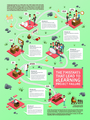
The first step to avoiding eLearning project mistakes is recognizing them in the first place. We've identified the seven most common mistakes that undermine eLearning projects. Most of them can be surprisingly difficult to detect -- until they've managed to put your project over budget or past deadline. They can make your life miserable, but only if you let them. Take a look at these seven project landmines, then download our "Training Executive's eLearning Playbook" white paper to learn how to avoid them.
Re-Thinking the Business of Learning Blog
.
Blog
.
<span class='date ' tip=''><i class='icon-time'></i> Jul 23, 2015 10:48am</span>
|
|
Are you having a hard time blogging? I know I did when I first started out. Over the years, blogging has evolved, and many new platforms and tools have b
Source: www.quicksprout.com
See on Scoop.it - InformationCommunication (ICT)
Mr Kirsch's ICT Class Blog
.
Blog
.
<span class='date ' tip=''><i class='icon-time'></i> Jul 23, 2015 10:48am</span>
|
|
Don’t have a student response system in your classroom, try polleverywhere.com with your computers, mobile devices and cell phones for free
Pablo Diaz
.
Blog
.
<span class='date ' tip=''><i class='icon-time'></i> Jul 23, 2015 10:48am</span>
|
|
Use an about.me page for yourself as an online business card or information center or you can utilize it so your students can create an information page
Pablo Diaz
.
Blog
.
<span class='date ' tip=''><i class='icon-time'></i> Jul 23, 2015 10:48am</span>
|
|
Sharing photos online of our kids is practically irresistible. But what about when those kids are teenagers and adults? Will those shots of little Zoe’s bath still live on the Internet? And what about pics kids post of themselves?
Source: www.att.com
See on Scoop.it - FootprintDigital
Mr Kirsch's ICT Class Blog
.
Blog
.
<span class='date ' tip=''><i class='icon-time'></i> Jul 23, 2015 10:48am</span>
|
|
Part 1 of a 2 part series on converting text to speech. We look at a Google Chrome Plug-in and a website called QR Voice
Pablo Diaz
.
Blog
.
<span class='date ' tip=''><i class='icon-time'></i> Jul 23, 2015 10:47am</span>
|
|
Students are now digital citizens. Their digital footprint, which is updated on a daily basis, will have a major impact on their future.
Source: blog.learn2earn.org
See on Scoop.it - FootprintDigital
Mr Kirsch's ICT Class Blog
.
Blog
.
<span class='date ' tip=''><i class='icon-time'></i> Jul 23, 2015 10:47am</span>
|
|
Transform your mobile device into an e-book, and read anywhere. With an integrated dictionary and a word-list manager make the best out of your reading sessions without spending any money in other devices. Picture this: a student needs to read a tale in English. He’ll need the book, a dictionary and a notebook to write down the words he’d previously looked up. Anything more? Sure! A comfortable space, some school stuff (pens, markers…), a lamp and some silence, to say the least. Can’t we ease things up? Of course yes, through the use of mobile devices. Now picture this other scene: the same student switches on his mobile, runs a reader application, loads a previously downloaded book, and starts reading. Everything is on his palm. He goes through the pages, finding words he doesn’t understand. He long-taps on them, and a built-in dictionary pops up to show their meaning and pronounce them. The word is automatically saved in a list, which can be shared with other applications for further review, or can be printed directly from the mobile. The student does all that with just one finger. Anyplace, anytime, with no restrictions.Now, let’s do some magic in our mobiles to set things up. First of all, download and install these Android based applications:FBReader and its TTS engine (text to speech): https://play.google.com/store/search?q=fbreaderColordict and whatever thesaurus you’re interested in: https://play.google.com/store/search?q=colordictSecond, bookmark the following URL: www.gutenberg.org, you’ll need it to freely download books.And third, let’s get started. Have a look at the following video (remember you can see it in full screen, and pause it for the details). Enjoy!
Adoni Sanz
.
Blog
.
<span class='date ' tip=''><i class='icon-time'></i> Jul 23, 2015 10:47am</span>
|
|
Introduced is Text to Voice, an add-on for the Firefox web browser and also Announcify which allows you to turn any website into audio file. This works much like a book on CD would work, the website reads your selected website out loud
Pablo Diaz
.
Blog
.
<span class='date ' tip=''><i class='icon-time'></i> Jul 23, 2015 10:47am</span>
|