Blogs
|
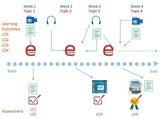
This week we have a large delegation with us from OU China. Palitha Edirisingha has put together a fantastic programme, Terese Bird is doing a great job behind the scenes on the technical side of things, including recording the sessions and Ming Nie has been translating. Yesterday we ran a 7Cs of Learning Design workshop with them. We concentrated on four activities: the course features card pack, tools to capture, communicate and collaborate, the course map and the storyboard. In the course of doing this I made some revisions to the storyboard, which I think help make the linking between the learning outcomes and the assessment elements clearer. Figure 1 shows the new version.
The storyboard is a temporal sequence of activities. The learning outcomes are listed on the left-hand side. Across the top the time dimension is listed, in this case in weeks, along with the topics that are covered. The e-tivities are listed in the middle. Above them any content or resources drawn on are indicated. In e-tivity one the students watch a video, read a document and listen to a podcast. In e-tivity two then listen to two podcasts and read a document. In e-tivity three they relisten to one of the podcasts, watch a video and read a document. Below the e-tivities are the student outputs are listed. In week one they write a document, in week two they produce a blog post and in week 4 they do a group presentation. Formative feedback is provided on the document, their peers peer crtique their blog post and summative feedback is provided on the group presentation. Finally, at the bottom the learning outcomes for each assessment element are listed, to ensure constructive alignment (Biggs 1999).
References
Biggs, J. (1999). "What the student does: teaching for enhanced learning." Higher Education Research & Development 18(1): 57-75.
e4Innovation
.
Blog
.
<span class='date ' tip=''><i class='icon-time'></i> Jul 23, 2015 11:58am</span>
|
|
Are you are a subject matter expert (SME) with years of experience, interested in creating and selling your own online training? Online course development has many aspects that can seem daunting at first. But have no fear! The perceived barriers around what you need in order to be successful are often more myth than obstacle.
To create great online courses, do I…
Need a formal degree in instructional design?
A good understanding of what your audience does and does not understand about your subject matter, and how to best convey that information to your audience is critical to the success of the course. After a decade or more of experience in the field, mentoring colleagues and managing teams, you most likely have expert knowledge of how the audience for your course thinks and what they need. A formal instructional design degree would be fantastic and could help polish and perfect your understanding of learning strategies—but it cannot replace what is most important: your experience and your ability to effectively communicate that experience to your audience.
Need to be developer or have extensive knowledge of technology?
Course development with 360training’s LCMS can be super quick and fun. All you need is a good internet connection to create challenging, interactive, and engaging courses for your learners. Say goodbye to back-end coding and scripts! In addition, because our systems interconnect, you do not have to worry about how you are going to save out your course and in what format, or how you are going to get that course to your learners. Just click a button and your course is available for learners in your own organization or for sale to learners around the world!
To create a thriving online training business, do I…
Need heaps of money?
Start up your elearning career without investing a dime and earn cash for courses. Try out our freemium packages and create exciting elearning and share it with the world. While you can upgrade and get your own storefront if you want, you can also just create courses and have 360training and our network of VARs sell them for you. No money is required to get started.
Need to be a marketing or social media expert?
If you partner with 360training, we will market and sell your courses as if they were our own. 360training enjoys a trusted position in elearning industry, and your courses will receive the same advantages as any other courses in our library. Our goal is to make sure learners have access to the best workforce courses in the industry—and your course could be a part of that.
Make a difference in the world. Create a course today!
—Shazia Wajid and the 360 Authoring Team
360training
.
Blog
.
<span class='date ' tip=''><i class='icon-time'></i> Jul 23, 2015 11:58am</span>
|
|
One of my favorite and most challenging assignments for my students is the demographics project that covers quite a few chapters in both my regular government class as well as my college classes.
I’ll forgo the in depth explanation since it is included in the rubric and the instructions.
Students research a swing state in the guise of a presidential adviser. They are to set up specific counties in which their candidate will visit or give speeches. They are also to research the demographic trends and realities of that county or region of the state so that their candidate says the right thing to the right degree.
I’ve also included a wonderful scrip that you can add to google forms so that once you grade your groups, Google will immediately email the completed form to you and to your students (they’ll have to enter it in the form prior to the presentation). I added a text box under each multiple choice section of the rubric so I could more full explain to my students why I chose to give them 4/6 points.
Finally, I’ve added a lengthy description to the rubric so I wouldn’t have to post two items. You can separate the two if you wish.
1) Rubric and instructions
2) Here are the instructions on how to create a self mailing Google Doc.
3) Here’s an example without audio (he presented in class and answered questions as well).
I’ll be uploading a few more entertaining more in depth projects shortly.Filed under: Government/Civics, In The Classroom, Technology Tagged: American Government, bnhs, college government, cooper, cooper demographics, demographics, demographics project, dual credit government, google, google script, script, US Government
Thrasymakos
.
Blog
.
<span class='date ' tip=''><i class='icon-time'></i> Jul 23, 2015 11:57am</span>
|
|
Mike Keppell and I have had a workshop accepted for the EDEN conference in Oslo next week. The workshop will combine elements of the 7Cs of Learning Design framework and the principles for designing Technology-Enhanced Learning spaces developed as part of the Spaces for Knowledge Generation project that Mike was involved with. The workshop will give participants the chance to explore the following elements of the 7Cs framework: Course Features, Tools to Capture, Communicate and Collaborate, Course Map, and the Storyboard. In addition, there will be an exercise using the SKG principles of design, which are:
Aesthetics - pleasure (recognition of symmetry, harmony, simplicity and fitness for purpose)
Affordances - the characteristics of the environment
Blending - a mix of f-t-f and technologies
Comfort - a space that creates a physical and mental sense of ease
Equity - considering the needs of cultural and physical differences
Flow - the state of mind of the leaner when totally engaged with the learning process
Repurposing - the potential for multiple use of the space
Unfortunately Mike isn’t able to make the conference, hope I can do his work justice!
EDEN 2013 Learning Design and Designing TEL spaces workshop from Grainne Conole
e4Innovation
.
Blog
.
<span class='date ' tip=''><i class='icon-time'></i> Jul 23, 2015 11:57am</span>
|
|
Have you been thinking about authoring an elearning course (Life as a 360 Author), but are having a hard time getting a sense of how much content to create to end up with about an hour of seat time?
The following provides broad high-level guidance for authors, subject matter experts, and instructional designers when planning an online course. Note that these are guidelines only. Design for actual courses should reflect learner needs with respect to course objectives.
1 HOUR OF SEAT TIME
5,000-7,500 WORDS | 45-50 MINUTES INSTRUCTION | 10-15 MINUTES ASSESSMENT
5-10 learning objectives, and per learning objective:
500-750 words (¾ - 1½ typed pages) 4-6 minutes of spoken audio
2-4 presentation slides + 1-3 context-rich interactive exercises or examples
3 assessment questions
CHECKLIST
LEARNING OBJECTIVES
Learning objectives are measurable/demonstrable via an assessment in an online course.
Learning objectives reflect real world requirements, taking into account regulatory, industry, and instructor objectives.
To the extent possible, learning objectives represent practical, meaningful tasks from the learner’s perspective.
Near the beginning of each lesson, learning objectives are presented conversationally in terms of benefits to the learner, or "WIIFMs" (what’s in it for me).
During the WIIFM presentation, learning objectives may be combined and condensed for the learner, but all learning objectives for the lesson are covered in the WIIFMs.
ORGANIZATION, STRUCTURE, AND MODULARITY
Course content is broken into easily consumed, logically organized chunks: Modules (≈ 2-4 hours in length), Lessons (≈ 45-60 minutes in length), Topics (≈ 15-20 minutes in length), Slides (≈ 20 seconds - 8 minutes in length)
The name of each module, lesson, topic, and slide is unique and clearly indicates the content covered.
"Special issues" that might be appropriate for some audiences and not for others are pulled out as separate topics, lessons, or modules, as appropriate.
CONTENT & WRITING STYLE
Content is accurate.
Content is complete and appropriate, given the target audience, learning objectives, and stated regulatory requirements.
Thought progression is logical and organized.
Writing level is appropriate for the audience. For a general audience, readability should be 8th grade or less on the Flesch-Kincaid scale.
Use of jargon is relatively limited and appropriate for the audience.
Writing sounds natural when read aloud.
Writing is error-free, in terms of spelling and grammar.
Content has not been plagiarized.
VISUAL SUPPORT
Every presentation slide has a visual.
Visuals strongly support comprehension and retention of the material being taught, making good use of diagrams, tables, photos, and video, as well as call-outs of key points, tips, or hints.
If the visual is not instructional, it reinforces a mood or theme and complements the instructional message of the slide.
Visuals are of good quality and have a consistent look and feel.
Author has the legal right to use the visuals within the course.
CASE STUDIES (WITHIN THE COURSE)
Case studies and real world examples are included for every major skill or key application point.
Case studies and real world examples illustrate important causal chains of events.
Commentary related to the study or example provides feedback not only on what happened and why, but recommended approaches for similar situations.
Unless the case is completely in the public domain, all names used in the case study or example have been changed.
If the case study or real world example is presented as an activity, the student is given the opportunity to explore multiple approaches and receive coaching feedback on each.
INTERACTIVE EXERCISES (WITHIN THE COURSE)
There is at least 1 activity or interactive exercise per learning objective. All exercises tie back to learning objectives.
Exercises create an active learning experience. The learner views no more than 500 words of presented content before being asked to meaningfully interact in some way.
Every exercise meets at least 1 of the following criteria: Clarifies learner understanding (corrects common errors), deepens learner understanding (extends presentation), demonstrates real-world application (allows learner to apply material to a scenario).
Every exercise provides meaningful feedback. Feedback provides indication as to the correctness of the learner’s response ("Good!" "Careful…" etc.). If correct, feedback briefly reinforces the concept and its importance. If incorrect, or not the best choice, feedback provides an explanation, taking advantage of the teaching moment.
ASSESSMENT QUESTIONS
All assessment questions tie back to specific learning objectives.
At least 3 questions per learning objective have been developed. Within these question sets, wording and scenarios differ to the point of not being immediately recognizable to the learner, but the underlying target knowledge or skill being assessed is the same.
An appropriate overall mix of questions has been developed. Assessment questions target the situations learners are likely to encounter 80% of the time in the real world and to which they will need to be able to respond appropriately. In most cases, no more than 25% of the assessment questions target rote responses such as definitions, identification, labeling, listing or categorization. The remaining questions involve real-world situations or scenarios in which the learner is asked to apply what has been learned.
Questions are valid. Content is correct, unambiguous, without logic errors, and adequately assesses mastery of the learning objective it targets.
Questions are well-formed. Question setup does not give away the answer. If answer choices are provided, choices are reasonably plausible and reflect common learner errors and misconceptions.
Question feedback provides meaningful guidance.
Happy course creation!
- Laura and the 360 Authoring team.
360training
.
Blog
.
<span class='date ' tip=''><i class='icon-time'></i> Jul 23, 2015 11:57am</span>
|
|
Google Docs Cheat Sheet
Mr Kirsch's ICT Class Blog
.
Blog
.
<span class='date ' tip=''><i class='icon-time'></i> Jul 23, 2015 11:57am</span>
|
|
This is from a handout I pass to my students in class during our federalism unit. Because gay marriage is such a "hot" topic here in Texas, I decided to combine federalism with this partifular topic. Students are always asked to use well measured responses to the questions offered in class. This one turned out particularly well. As with all things, I picked up some ideas here and some there…so the following can’t be claimed as my work in total, though I also can’t name who helped me along the way.
However, I ended up Skyping with a class in Missouri to complete this unit. Once I ran into an instructor on Twitter (@MattEasley whose ideas and help were invaluable and completed this assignment in a way I couldn’t have alone) that was open to this project, we teamed up pulled off an interstate gay marriage conversation. LOVE IT! He’s a great guy to follow on Twitter.
Federalism: A Tug of War
The following exercise is designed to provide a better understanding of the very unique dynamic that exists in the American government between state/local government and the national government. Since conception, the United States has struggled with Imperium in Imperio (ie. Sovereignty within sovereignty…AKA federalism), or the sharing of power between different levels of government. This is an ever changing relationship of power & policy between the state governments and the national government. It is best characterized as a strained cooperation, or possibly a tug of war. Below you’ll find a list of events, people or court cases - by indicating which way each of these affected power relationships between state and national governments, you can get a sense of how federalism has changed over time in the United States.
Finally, in the coming days I will give you a fictitious gay marriage situation in which I want you to argue either for or against using, as evidence, the information you gathered from the below data. You will align each event somewhere in between the "state" side or the "national" side in as far as the event helped one side in the "tug of war" known as federalism. This will be done on a separate "poster". You will also give a two or three sentence explanation of each event and why it is aligned where it is. On the final day, you will place your entire poster on the board at the front of the room showing where your group stands on the fictitious situation with accompanying reasons.
State 3———2———-1—— -NEUTRAL——-1———-2———3 National
U.S Constitution of 1787
Article I Section 8
Article I Section 9
5th Amendment "Due Process Clause"
9th Amendment
10th Amendment
14th Amendment Section 1
Federalist 51
Marbury v Madison
McCulloch v Maryland
Gibbons v Ogden
U.S. v Corolene Products Footnote 4
Loving v Virginia
D.O.M.A.
Answer these questions for each of the entries:
In what specific way does your document, faction, event or Constitutional language relate to federalism and gay marriage?
What is the net impact of your topic in terms of federalism (where would you put it?)
What are the top 3 placements or arguments for your position on gay marriage? Explain in detail.
Filed under: Government/Civics, In The Classroom Tagged: American Government, civics, government, high school, high school civics, high school government, humanities, political philsophy, US Government
Thrasymakos
.
Blog
.
<span class='date ' tip=''><i class='icon-time'></i> Jul 23, 2015 11:57am</span>
|
|
Learning can be challenging. The anxiety and stress associated with time crunches, work pressure, and information overload can pose huge barriers to learning. As course developers, we have a lot of responsibility on our shoulders. We don’t merely have to create courses, but we need to maintain learner’s interest in the online courses that we make, serve them with useful information, and are easy for them to consume—all at the same time. Below are some tips for maintaining learner attention in online training.
Start with a warm welcome
There is no better icebreaker in a course than a good opening. Surprise your learners with useful quotes, a welcoming interactivity, or perhaps a pre-assessment get them involved right from the beginning.
Sprinkle in interesting facts
Having a fun or novelty factor in the learning can help perk interest, while providing variety and a refreshing "mini-break." The information should be valuable and relevant to the key topic—but provide the sort of interesting nugget you might relay to a colleague during a coffee break, or to a family member at the end of the day. Surprising statistics, fun facts, and "did you know" call-outs can all work very well here.
Go beyond just providing content—present it
Don’t feed your learners unending miles of text. The way most audiences consume media and information has changed dramatically in the past twenty years. Long blocks of text can be daunting for certain readers—and even the avid readers in your audience will value a nicely laid-out page that’s easy to scan, with visuals that support or enhance the text.
On the text side:
Keep your course content as concise as possible. Remember that your learners may be under time pressure both from your course and from their other obligations at work or at home. Don’t tempt them to multi-task by taking too long to get to the point.
Use bulleted points or numbered lists, where appropriate, to help learners skim. This formatting can also help emphasize your key points. Visual callouts or pull quotes for key points can also help here.
While you could theoretically put the equivalent of pages of text on a single screen and have the user scroll, this can often lead to the learner perception that the course contains an insurmountable mountain of material to process. In general, it is better to offer up short "easily consumable" chunks of content. Taking it step by step, the learner’s perception shifts to feeling that the work is more manageable, even though the total amount of content is the same.
On the visual side:
Where possible, use images to reinforce the meaning of the text and make it easier for learners to understand it and identify key points.
Where that is not possible, use mood-setting visuals to increase the immediacy of your message and keep your courses alive and colorful.
Provide Variety
Everyone needs variety in life and elearning is no different.
Vary the pace of the course, following heavy content with activities or lighter content.
Spice up your elearning with varied templates and interactions. A scenario or periodic review game can keep learners from falling into a rut of "just listening"—and possibly zoning out. The active participation helps focus attention and increase the retention of the content. Too hard to create these? Not at all. There are many tools on the market that can help you—though, of course, we are huge fans of our own! You can create a professional looking activity or game with a few clicks with 360training’s templates.
Help learners learn—and add value to your online courses. Try out one of these attention-keeping tips today!
—Shazia Wajid and the 360 Authoring Team
360training
.
Blog
.
<span class='date ' tip=''><i class='icon-time'></i> Jul 23, 2015 11:56am</span>
|
|
EFQUEL are running an interesting project at the moment, namely 12 weeks of blog posts looking at MOOCs and quality. There have already been some great inputs, particularly from MOOC pioneers like Stephen Downes and Dave Cormier. This week it is my turn. I focused on describing a new classification scheme for MOOCs. Comments welcome!
e4Innovation
.
Blog
.
<span class='date ' tip=''><i class='icon-time'></i> Jul 23, 2015 11:56am</span>
|
|
This activity is similar to the "Hobbes Game" in that it makes friends into enemies…and I SOOOO enjoy that :) However, there are lots of moving pieces which can make this a complicated task. Once you get the jist of the game…it really does become an exciting and fun way to teach several government related topics.
I’d love to give credit where it is due, but I have no idea who published the original documents. They were given to me by a teacher friend many years ago. I used white out to change the maps and assignment to fit my college student’s needs years ago. At one point, I did tidy up the maps and created some nicer looking ones, but I couldn’t find them today. When I do, I’ll upload them and replace the dingier ones below.
The video tutorial covers much the same ground as the written stuff below. If you want to take a look at the worksheets as you read or listen to the directions…they can be found below.
To begin, students sign up for a unique set of demographics. They are to "fight" for their demographic set in an upcoming school district/city/state redistricting event. So, for example, if they sign up for "BL-D" it does not mean that they are a Blue Ethnic, low income, Democrat. It means they are fighting/advocating for new district boundaries to favor that particular group. They are advisers, in effect. On the maps, each set of demographics "R$Bl" represents one neighborhood if you’re using this as a city. Each "R$Bl" set is a ‘city’ if you are using this map as a state.
Take a look at the general map (map 1) and you will find all ethnic, income, and political "neighborhoods" drawn on to the city/state map. This all inclusive map is then split into three separate maps. One will focus on the income characteristics of the region, another on the political characteristics, and another on the ethnic characteristics. So the aforementioned BL-D will lobby for districts where Blue are the majority on the ethnic map (along with other Blues), he will lobby for low income families districts (along with other low income advocates in class), and he will lobby for the Democratic party to gain districts (along with other Democrat advocates in class). If you’ll read the instruction PDF you’ll get a clearer picture, but, needless to say, since no two people have the same demographics…everyone in class is a potential enemy. They may team up on one map and back-stab each other on the next map. Allegiances are horribly difficult to maintain.
I spend about 30 minutes on each map and give the various factions a chance to make some sort of partial allegiances as they draw out "hoped for" districts. Since they’ll be voting as a class for the districts on the final map, they will need to either make friends or "trade votes" (ie. Republicans will need to vote with other Republicans even if their income or ethnic demographics don’t match up). On the 3rd or 4th day, we hold a general vote to establish districts. To do this, I project the general map on a white board. I allow any student to come up to the board and draw a single district. All the other students check to see how this district will either "crack" or "pack" their people. Majority vote rules.
Students get one point for each demographic that is the majority in that district. So, if the final map has 7 Democratic district (where Democrats are the majority party in seven different districts…ie. there are more Democrats than Republicans or Independents) then each Democrat in class gets 7 points. If there are four districts where middle income is the majority faction, then every student with "middle income" as the demographic they are fighting for gets 4 points and so on.
Once the "council" passes district #1, we move on to district #2. Like the Supreme Court Cases we cover (Baker v Carr, etc.) , no overlapping districts are allowed, similarly populated districts must be established (about 9 neighborhoods per district), and district boundaries must stay within the city/state boundaries (no really crazy ‘earmuff’ or ‘lincoln on a vaccuum’ district lines).
At the end of the activity, the student with the most points gets a 100 and all other students get a grade based on that 100. So if the most points is 11 then that students gets a 100. Each individual demographic point (based on the top students grade) is with 9 points (ie. 11 demographic points times 9 grade points equals a 99). If another student have 8 demographic points then their grade (8 demographic points times 9 grade points equals a 72) and so on. I do offer extra credit assignments for the students that really get blown out of the water in this activity.
In areas where there are no "R"s, I suggest to Republicans that they trade their vote to the Dems or Indies for support on other parts of the map.
GerrymanderingACTIVITYinstructions
GerrymanderingACTIVITYsignupSHEET_1
GerrymanderingACTIVITYpoliticalREDONE
GerrymanderingACTIVITYethnicREDONE
GerrymanderingACTIVITYincomeREDONE
I have students who played this game close to a decade ago who still remember how fun it was. It was also a nice introduction to the Machiavellian realities of politics and government.Filed under: Government/Civics, In The Classroom
Thrasymakos
.
Blog
.
<span class='date ' tip=''><i class='icon-time'></i> Jul 23, 2015 11:56am</span>
|