Blogs
|
These thoughts are in response to Darren Draper's post at the Tech and Learning Blog. I served a mission for my church in Russia for two years. Before I got there I studied the language for at least 8 hours each day for seven weeks. You can imagine how well I thought I spoke when I left for Russia. When I got there, I realzed that I spoke horribly. However, after about six months in the mothellrland, speaking russian as much as possible, I could take care of myself pretty well. After finishing my two years, I arrived. I could tell jokes in Russian. I could make plays on words. I was able to do this because I spoke the language. I learned by doing something.In schools many teachers expect students to learn by sitting and getting.There is one place that can and should be a place at schools that students can learn by doing: the library.The library could be renamed the learning by doing lab. If students want to learn about something, they should be able to do it in the library.The media specialists who work in the library would be leaders of controlled chaos. They are there to help the students learn by doing. When they do that, the students will be in charge of their learning and the media specialists would be their guides. Perhaps the best thing about the library is that they don't have a class or a curriculum that they must follow like teachers do. They can reach out to every curriculum and every class at the school. They can provide the tools for those curriculums to help the students learn by doing. The media specialist should have a working knowledge of all the curriculums in the school so she can be a resource to help teachers. Have a Good Life.
Jethro Jones
.
Blog
.
<span class='date ' tip=''><i class='icon-time'></i> Aug 20, 2015 08:20am</span>
|
|
What is the focus of our schools? What do we talk about most in our schools? Who do we think about the most in our schools? According to "The Equity Project" the focus is clearly on teachers and their salary:The Equity Project (TEP) Charter School believes that teacher quality is the most important factor in achieving educational equity for low income students. Spurred by this belief, TEP reallocates its public funds by making an unprecedented investment in attracting and retaining great teachers. Plus an annual bonus of up to $25,000.They further explain that they have refined what will make them a great school:"These redefined expectations are unified by one principle: student achievement is maximized when teachers have the time and support to constantly improve their craft."Don't get me wrong. I am all for teachers getting paid more, and I fully support giving them the time they need to "improve their craft". But TEP is going focusing on the wrong thing. This is something I have believed for a long time. The focus of every school should be on the learning of students in the building. Anything else is a waste of time. Schools do not exist to provide adults with a job, a career, or a calling. Schools exist so that kids can learn. If kids don't learn, it doesn't matter how much money teachers make. If kids don't learn, it doesn't matter how much professional development the teachers receive, or how much they observe their peers. How can you make sure students learn?By focusing on student learning!TEP says that student achievement is important, and they better show that the low-income students they service do indeed get higher scores if they want all $6 million donated for a school building. The problem is that you don't focus on student learning by focusing nearly completely on your teachers.Here are my questions for The Equity Project:1. What do you want your students to learn?2. How are you going to know if they learned it?3. What are you going to do (in a systematic, timely way) when they don't learn it?Without the answers to these questions, we don't know how this or any school will do, regardless of how much other stuff they may claim will "save" education.As it so often happens, while I was writing this, I saw this BLOGPOST from Harvard Education Publishing, which sums it up much more eloquently than I do. Have a Good Life.
Jethro Jones
.
Blog
.
<span class='date ' tip=''><i class='icon-time'></i> Aug 20, 2015 08:19am</span>
|
|
This last week we had a retreat that filled our brains to capacity. Kelly Dumont did most of the work, and he did a great job. As far as training like this goes, we had a ton of information to process. We spent a lot of time learning about tools we need to be using for the school year. That was the information overload. We could have continued the retreat into this week with all the stuff we needed to do, but I think one week was enough. There is still a lot to get done before the school year starts. To break things up, we invited some expert voices to Skype in and talk to us about educational technology, libraries, and branding. This was, in my opinion, the best part about the retreat. It was really neat to hear from those who have been doing this for a while, and many of their words sparked a discussion that we probably would not have had. I think that I have a great team. They are going to be wonderful. All four of us (hopefully soon to be five of us) have strong opinions, but we are able to disagree without holding a grudge (or at least, that is my perception, and I hope it is right). During the week, we did "About Me" presentations which I think helped us get to know each other. The time was also very loose, so we could do what we wanted to and spend some time seeing what we were really like. I think both those things contributed to our great discussions.One of the biggest challenges we face in education is giving teachers time to think. We don't do that nearly often enough, and it is a vital key to their continual learning. We had time this week to think, discuss, and learn. That is what made the week a success.There were many topics that were left unvisited and incomplete. We still need to figure out a Responsible Use Policy for students and employees. We still need to take a stance on copyright. We still need to figure how we will support social media. We also need to prepare our presentation for New Teacher Orientation. And I am sure there are other things we still need to do. The good news is that I think we can do this now. I think that we have worked together enough to have our ideas mostly in sync. What I mean is, one or two or three of us can write some of these policies and make tentative decisions knowing where the others are going to have problems. One person wants facebook completely blocked, while another wants to use it as a tool in the classroom. I think this retreat was great. We are all heading the same general direction, and I think that is important.Have a Good Life.
Jethro Jones
.
Blog
.
<span class='date ' tip=''><i class='icon-time'></i> Aug 20, 2015 08:19am</span>
|
|
I'm no doctor, but life experience has taught me this much, at least:1. Spend the night outside when it is cold.2. Make sure it is rainy, too.3. Sleep poorly.4. Get in line with 44,999 of your closest friends (many of whom also spent the night outside).5. Huddle in a small enclosed space with live flu strains floating around."People started arriving as early as Friday night to get into line -- bringing food, blankets and umbrellas. Some arrived around 6 a.m. -- an hour before the clinics opened -- only to learn they were too late."Story from KSL: http://www.ksl.com/?nid=148&sid=8430943
Jethro Jones
.
Blog
.
<span class='date ' tip=''><i class='icon-time'></i> Aug 20, 2015 08:19am</span>
|
|
Right now I am listening to the director of IT in my district, Scot McCombs, talk about the issues we are dealing with by being a new school district, implementing a new grade book, dealing with new positions and ways of doing things. Needless to say, there are some growing pains. There is nothing wrong with that.Scot has told these people that they can come and talk to him, and he is serious about that. I have felt that way since day 1, and I have talked to him as much as I have felt I needed to. My philosophy is "What's the worst thing he can do? Say, 'No.'" Oh, scary!One of my favorite things about my job is that I can disagree with my supervisors without fear that I will be reprimanded or shunned for disagreeing.As far as culture goes, this is why I am happy at my job. I feel that my opinion is important and that I will be listened to. I think that most people in the district would agree.
Jethro Jones
.
Blog
.
<span class='date ' tip=''><i class='icon-time'></i> Aug 20, 2015 08:19am</span>
|
|
Sending this post to Blogger from Reader for the first time. Hopefully, it works out OK.This article on The Apple Blog (below) caught my attention today. New way of checking out books to students in libraries? New way of taking attendance? New way of paying for lunch? Throw an RFID chip on a student ID card and there are a lot of applications. Kids could complete most transactions at school through their ID card. Put the chip on library books, hardware, PE clothes, and you are in business. I wonder how much the chips would cost....Have a Good Life.iCarte Turns the iPhone Into an RFID Reader: "Earlier, we reported that the next generation of iPhone might have an RFID (Radio Frequency Identification) reader built in, if rumors prove true. Well, there’s no need to wait that long, if near-field communications (NFC) is what you’ve got a hankerin’ for. Wireless Dynamics has announced a device called the iCarte that will add both RFID and NFC capabilities to the iPhone.The device adds functionality to the iPhone via the dock connector, to which it connects without adding too much bulk or without being too much of an eyesore. In fact, it looks like the iCarte’s designers went out of their way to make sure the add-on looks like it’s a natural extension of the iPhone itself, rather than an apparent third-party accessory. A chip embedded in the iCarte turns your iPhone into a portable electronic wallet, able to process contactless payments. It can also transmit any information it receives directly to enterprise databases using Wi-Fi or 3G network connections, so that orders and purchases can be automatically input into your company’s home server. Of course, in order to use the iCarte, you’ll need to be using iPhone OS 3.0, since only the latest major software update supports dock accessory connectivity.The iCarte also has a mini-USB port to allow for pass-through charging and syncing, so you won’t have to constantly remove and replace the device, and it comes in both black and white in case fashion is a concern of yours. To be clear, while Wireless Dynamics does talk about business applications, it looks like the iCarte’s functionality is aimed primarily at people on the consumer end of the retail equation:iCarte has an embedded smart-chip that can be configured as debit, credit, pre-paid and loyalty cards, for secure contactless transactions. iCarte can also read NFC Smart Posters, download or upload electronic coupons, tickets or receipts. iCarte is ideal for iPhone users who want to use their iPhones for fast and secure contactless payments, transit payments, loyalty rewards, checking balances, top-up, discovering new services from smart posters or kiosks and exchanging information with other NFC phones.The official website for the iCarte is suspiciously devoid of information regarding an official release date or pricing for the receiver, although it does offer contact info if you’re interested in finding out more about the tech. Presumably a companion iPhone application would be required for programming in payment card information, checking balances, etc. but as of yet no such app is available via the iTunes store. "
Jethro Jones
.
Blog
.
<span class='date ' tip=''><i class='icon-time'></i> Aug 20, 2015 08:19am</span>
|
|
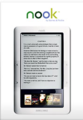
Click image for source from B&N.comI am extremely fascinated by eBook readers, and if money were not an issue, I would own every brand just to have the best one.Since so much of my impression of the new reader from Barnes & Noble is based on the actual experience using it, I have to say up front that it is mind-numbingly slow! The video below shows how much it lags and it is ridiculous. I recorded it with my iPhone so excuse the awkward aspect ratio and unsteady hand.The nook does have some great features that I do really like.First, the touchscreen down below is pretty nice. It adds an extra dimension for navigation and is more intuitive than the Kindle navigation. It makes sense to have that as the navigation. The problem you run into is that the touchscreen makes you think that the reading screen should be touchscreen, too, but it is not. Again, however, the innovative controls are nearly ruined by the laggy software (at least, I assume it is a software issue). You can see in the video when I look up a word that it is very difficult to navigate to the correct word.Second, I really like that you can have wi-fi and 3G. From the demo unit, it looked like the nook takes whatever is available. Which means that I could not find a way to turn off the the 3G, but the wi-fi was on the whole time. It will be interesting to see how Barnes & Nobles' plan of allowing full-book previews in the store on B&N's wi-fi network. The real benefit to that is people will be seen reading nooks out in public, which is typically good for business.One of the small annoyances that jumped out to me was opening a book. When I open a book, I expect to be able to start reading it. That is not the case. Opening a book takes you to an overview of the book. You need one more "click" to get through to the actual content. The overview page appears to be where you would lend the book, but I can't verify that since the demo unit didn't have that option, which I was really looking forward to using, as it is probably the most compelling reason to get a nook.As far as for education, I think that this will be a pretty good device. Sharing books is good. I just hope that the lag goes away with some future updates. I can handle some lag in the beginning, but it has to be cleared up soon.Any questions I didn't answer? What do you still want to know?Have a Good Life.
Jethro Jones
.
Blog
.
<span class='date ' tip=''><i class='icon-time'></i> Aug 20, 2015 08:19am</span>
|
|
I saw this weekend that the American Association of School Librarians voted to make the official title of "The people who work in the part of the school that checks out books, equipment; who strive to be instructional leaders; who do things that aren't in their job description but do them because they are asked; who are information specialists; who are teachers; and who are program administrators" to "School Librarians". Here's the link to the ALA press release.In the Library Media Listserv provided by the Utah Education Network, there were many differing viewpoints on what this really meant. "'Disappointed' doesn't begin to express how I feel about the AASL leadership...AASL hasn't done any favor for the profession by taking a step backwards," said one prominent professional. Another replied, "I would like to say I feel most proud when I tell someone I am a librarian."Someone else said, "I detest the term media specialist."Another shared a story of calling a school and asking for the Media Specialist, then, after a moment of silence on the other end of the line, said the magic word, "Librarian," after which the call was immediately transferred. Obviously, this is a point about which "School Librarians" feel very strongly. Thankfully, the idea that a title is not the fight anyone should be fighting was brought up. One person suggested the title doesn't matter if there isn't money to fund the program. Another person emphasized that the title doesn't matter if people still don't know what they do. Since I have taken this position in our new school district, I have learned A LOT about what librarians do and don't do. How did I learn that? I went to the libraries and saw what they were doing. And therein lies the problem. Let me put it this way: It makes sense for me to know what a director does by seeing the film he created. It makes sense for me to know what a coach does by seeing his team play on the field. However, I don't want to have to go to the Oval Office every day to see what the president is doing. I want him to tell me what he is doing. In the same way, I want the librarian to tell me what she is doing. There are too many people that have incorrect perceptions of what the librarian does. It doesn't matter what the title is, it only matters what people think the title means. Librarians, get your message out there. Have a Good Life.
Jethro Jones
.
Blog
.
<span class='date ' tip=''><i class='icon-time'></i> Aug 20, 2015 08:19am</span>
|
|
There are a lot of posts and articles about the iPad, which is understandable. However, I feel that all of the stories have overlooked one important trend: total cost of ownership.Let me set this up.When the Apple Remote was introduced, it was Apple's first app available through the App Store. It set a precedent in the minds of everyone who would visit the Store from that point on: If Apple is giving an app away, why should I pay for other apps? Obviously, things changed, and many people have purchased apps, but the trend for almost all apps has been a downward spiral, getting very close to, if not hitting "Free".Apple tried to counteract this downward trend by introducing other apps that cost money, though they could have just as easily been free. For example, they released the Keynote Remote at $0.99 to show developers that they could stand firm on pricing. While they didn't market it that way, that was the distinct impression that I had. Many others have written about this, so I'll leave the setup and talk about the iPad. Apple has again set the standard and the developers will follow suit. They have priced the iWork apps at $9.99. I expect that most apps that are designed for the iPad are going to cost at least $9.99. There will of course be free apps, and there will be cheaper apps, but Apple is telling developers and consumers that developing a quality app is expensive, and they are setting the bar. I am predicting that based on Apple's iWork suite selling for $9.99 each, the average cost of apps on the iPad store will be higher than the current ~$2.50. I predict it will close to double that amount.By the way, there is an app that says that I have spent around $255 on apps. That is pretty reasonable. I have found some great deals on apps using this web site.Have a Good Life.
Jethro Jones
.
Blog
.
<span class='date ' tip=''><i class='icon-time'></i> Aug 20, 2015 08:18am</span>
|
|
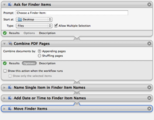
Twitter Version: Create an automator workflow that gets files from Finder and combines them to a single PDF.I got this hint from the comments on MacOSxhints.com while trying to merge PDFs for a class I am teaching. I scanned in a few pages from a book, and the scanner created separate PDF files. For my students, I knew it would be easier if they were one PDF, so I wanted to merge them. According to this article, you can do that in Preview, which is fine, except that there is no way to save them as one file. So, I read this in one of the comments: The simplest (and least expensive) way is to create a 2-step Automator application that containds the following automator steps:1: Ask for Finder Items (allow multiple selection) - to select the images/pdf files2. New PDF From Images or2: Combine PDF PagesThis will save a single file with all your desired scanned images into one file.---D. BrownstoneSo, I did that, and it worked perfectly. Here is my revised workflow:You'll see that I added a couple steps:Name Single Item in Finder Item NamesAdd Date or Time to Finder Item NamesMove Finder ItemsThese three actions will rename the new combined file to a name I chose ("Combined PDF" in this case), append a date and time to the beginning of the filename, and move it to my desktop: "2010-o4-29 Combined PDF.pdf"Alternatively, if you don't want it to always be named "Combined PDF" you can check the box "Show this action when the workflow runs" (in Options on the "Name Single Item in Finder Item Names" action) and it will prompt you for a new name every time you run this workflow. If you have Snow Leopard and you want to make this even cooler, you can create a new Service in Automator instead of a workflow, and then at the top of the service workflow, choose service receives selected "PDF files" in "any application" and the rest will be the same. (Although, don't tell the services workflow to show the action when the workflow runs because it won't.) Now, you can just create a shortcut that combines selected PDFs. Have a Good Life.
Jethro Jones
.
Blog
.
<span class='date ' tip=''><i class='icon-time'></i> Aug 20, 2015 08:18am</span>
|