Blogs
|
Many people do New Year's Resolutions this time of year, but I have always thought that the reason those never stick is because people wait until a new year and then pile everything and decide they are going to change something about themselves. When I want to change something, I try to do it right away. If I don't do it, it must be because I don't really want to.My wife does this thing where she creates a word of the year to help guide her thoughts and dreams for each new year. She makes goals that she will think of when she sees or hears that word. I like this idea.Now that I have completed my Masters program in Educational Leadership, I can breathe. Recently, the desire to make the rest of my life more balanced has been weighing heavily on me. When you are in a graduate level program, it is pretty difficult to find time for much of anything that is not related to school. As Mrs. P. said once, homework follows you everywhere. Every time you think of something, homework is associated with it. The dentist has finally pulled that piece of gauze out of my mouth and, while there is that strange feeling of a void, it is refreshing and feels marvelous. The pain and frustration are over (for the time being). I have let other areas of my life slip by the wayside, and although my relationships with my wife and two beautiful daughters (one born 6 weeks before my first class and the other at the half-way point) have not slipped too much, there is much that needs fixing.So, for 2009, I am going to have a word that will help guide my life and bring me to better balance. The word is муха (pronounced moohkha). It means fly in Russian, as in the bug, not the verb.I chose the word that means fly because when I want something, I want it now. I need to teach myself to do things in little parts. The fly in the picture above is supposedly only 1.5 mm long. That is pretty small. It will be a reminder of how I can accomplish big things by focusing on small sections individually. I can't do everything all at once, but I can do a little bit each day. As I do that, I will not only fulfill my goals, but I will become a better person.There are four areas of my life that I need to keep balanced:FaithFamilyWorkLearningWhat I want to do is work on every part in little increments. Anything more than that would be detrimental to my sanity.Faith - Those who know me personally know that this is the most important thing in my life. It doesn't always show, though. The fact that I chose a Russian word is symbolic to me. I know Russian because I served a mission for my church in Russia, in Siberia, no less. It was almost the best two years of my life (I subscribe to my father's positive adage that the last two years of my life have been the best two years of my life, and it is true, by the way). The Russian word will remind me that not only did I have a great experience there, I don't need my spirituality to slacken because I am not completely and totally focused on that. Most of the things that I need to improve in this area really are little things that should not be difficult, but somehow they are.While I was on the mission, I kept a journal every single day. I could not have done anything better than that. This year, I want start transferring all those journal entries to a digital format. The current plan is to do blog posts for each day from my mission. It took me two years to fill those seven books, so I don't expect that it will take any less than two years to complete the task of transferring them. Little steps. Those two years gave me an immense amount of spiritual growth, and I think a way to keep growing is to catalogue those experiences with a little more wisdom and maturity to find the really important things.Family - My daughters need their daddy. My wife needs her husband. Having been gone nearly all the time it seems for the last two and a half years, I have let these amazing people slide to the background. This last semester I realized how important they are to me. In the summer, I was gone almost every day from sun up to sun down. I had my internship and classes, and meetings for work (and that dreaded "H" word). I rarely saw them. For the last four months with very few exceptions, I have come home and played with the girls. I have let Staci do her thing, for the most part. This has made our relationship better, the girls are happy, and I am happy. I am going to make sure that when the girls are awake, I am there for them, as much as I can be. I am going to focus on time in smaller segments. I will spend three minutes helping Katya with her physical therapy or speech therapy, or anything else she needs. I am going to give my emotional Cali the time and attention that she needs (I am sure those teenage years with her with seem like an eternity).Staci wants to go on more creative and interesting dates, and I am going to work hard to make sure we do that. Babysitting volunteers can sign up in the comments.Work - I am so busy at work. It is great, but I hate being so busy that I don't ever have time to do everything. I have started using the Tasks feature in my Gmail account since it is always open. That has and will continue to help me to break things down in small chunks and get things done. I have missed a lot of opportunities to apply for administrative jobs, and this year, I want to take small steps to make sure that I don't miss those opportunities this year. That includes things like creating a good resume, searching for openings in different places, and being prepared to make things happen when the time is right. The important thing here is just doing a little bit each week to improve my situation. I think I can do it.As far as teaching goes, it is my current job, and I better excel if I want a shot at moving into a better position. So, I am going to spend more time creating good, effective lessons that will help my students succeed. I'm not devoting a hundred hours to this, but when I plan a lesson, I will take just a little more time and think those ideas through a little bit more before I commit to any plans.Learning - I really debated whether I wanted this to be last or third. I would say that learning is my hobby. I love learning about anything.When I was in college I was a taking a web design class where I was learning how to write HTML and CSS code for designing web pages. My brother George did not understand why I was taking that class. I said that I felt that the Internet would be an important part of all our lives in the future, and I wanted to understand better how it worked. I figured it would only help me. He said that it was like everyone having a car. He said that there will be "internet mechanics" who will work on our Internet for us. Mostly, this is correct. Since I took that class in 2005, the Internet has changed a lot. Anyone can create a Web site that is much better looking than one that I could design. You could make 50 web pages before I could design one. Nonetheless, I feel that I learned valuable knowledge in that class. It helps me virtually every day. It taught me to think in a different way which has become very valuable in work and at home. Honestly, I think it has made me more optimistic: I believe there is a solution to every problem.This year, I want to learn how to write applications. I have never done anything like this, but I am very interested in it. Ever since Apple qnnounced that anyone could develop applications for the iPhone, ideas have been hanging out like an old college friend who could never decide on a major. I doubt that I will ever make any money developing software, but if I can improve my students' educational experience through a program that I write, I will be a happy camper.I hope that this year, I can learn some new things, be a better husband and father, and improve in ways that I feel deep inside are very important.Have a Good Life.Photo Credit: Equilibrium by Robert F. on Flickr.
Jethro Jones
.
Blog
.
<span class='date ' tip=''><i class='icon-time'></i> Aug 20, 2015 08:22am</span>
|
|
About a month ago, I set up my computer to record the outside of a window at our school to see if kids were vandalizing another teacher's bird feeders. There were a couple storms that weekend in the valley, and I got some pretty sweet film of it. The clouds moving across the valley are beautiful.Have a Good Life.
Jethro Jones
.
Blog
.
<span class='date ' tip=''><i class='icon-time'></i> Aug 20, 2015 08:22am</span>
|
|
A couple months ago, I decided that I should sell some of the books that I had for my Masters program. Many of the books are really quite good, but I doubt that I will read many of them again. Ironically, it seemed that the best books were the ones I happened to find in a library, and they are the books I felt I should actually buy, but never did. I have always hated buying textbooks. I actually don't really like buying any books. I feel like it is mostly a waste of money, when I can just get them at a library for free. I am an English teacher and I do love reading, but there aren't many books that I buy that I read more than once (and sometimes I don't even read them).I have a program called Delicious Library 2. It is basically a fancy-schmancy way to organize your books and other possessions. There are two killer features that make it a totally worthwhile purchase:Barcode ScanningOne-click listing on Amazon.comWhen you put a barcode up to your iSight (or any other webcam) Delicious Library searches Amazon.com for the item. If it finds it, then it downloads all the information for it from Amazon, without any input from you. It includes recommendations, retail price, current price (the lowest used price on Amazon) and other information. If Library cannot find your item on Amazon.com, it searches other amazon sites until it finds it. There have been a couple times that it has not been able to find my item, but it is pretty rare. In the event that it doesn't find it, I can go find it myself, and drag the address into Delicious Library, and it will create an item based on that web site. Very slick.Once I have all the information about my item, I can see if it is worthwhile for me to try and sell it. For example, the book "Getting to Yes" has a new price of about $10, but the lowest used price is just under $6. A book by one of my professors has a list price of about $20, but is currently selling on Amazon for $27. That is one that I certainly want to list. To list an item, all I do is right-click it or hit Shift+$ and it lists the item on Amazon. I still have to go through all the condition and setting-the-price stuff on Amazon, but it is very easy. Way easier than listing on Half.com, which is what I used to use. There are a lot of other neat things about this program, but I these two features have made it very easy for me to sell 7 of my college textbooks that I probably won't ever read. Have a Good Life.
Jethro Jones
.
Blog
.
<span class='date ' tip=''><i class='icon-time'></i> Aug 20, 2015 08:22am</span>
|
|
Acer is offering a 30-day trial of a desktop and a notebook to K12 schools. They are offering these trials, with the hopes that the schools that try them will purchase labs for their schools. I signed up and within a week, I got a call from their sales department and by the end of the week, I had the notebook I ordered in my hot little hands.The notebook is the Acer Aspire One Netbook. These are the specs:• Intel® Atom™ Processor N270 (512KB L2 cache, 1.60GHz, 533MHz FSB)• Genuine Windows® XP Home Edition• 1GB DDR2 533 SDRAM• 160GB hard drive• Multi-in-one card reader• SD Card reader• 8.9" WSVGA (1024 x 600) TFT display, Acer CrystalBrite Technology• Intel® Graphics Media Accelerator 950• 802.11b/g WLAN, 10/100 LAN, webcamI was actually surprised that they sent this to me, because it looks like their best model. It has the same processor speed of our Dell notebook that we bought a few years ago, but this model has a built-in webcam, and a multi-in-one card reader.SoftwareSo far, this computer is awesome. I really like it. Windows XP does have its drawbacks, but it is pretty responsive and with the addition of PortableApps, it is even better. PortableApps are portable, free, open-source programs that are intended to be used on small flash drives. They keep all your data and history and everything on the stick, so that you can pretty much use them on any Windows computer. They are designed to be lightweight, easy on the resources, and fast. So far, they have delivered. I downloaded the non-portable version of Firefox 3 and it ran much slower than the portable version. There was a noticable difference.The netbook comes with an eRecovery program which will reset the computer to the factory default. As much as I have needed to reformat my other PCs in the past, this is a great feature, one that I am sure other companies have as well, but that I have never used. It works (I tried it, just for fun). Other than that, it comes with the standard schtick for XP computers.I downloaded iTunes on it, and that ran pretty slow. The videos were choppy. We went for a little drive yesterday and set it up for the girls to watch a movie. After downloading VLC and using that to watch it, the video was smooth and the audio was just fine. VLC allows you to turn the volume up to 200%, which is a good thing because the speakers are pretty weak. It is not bad if you are alone, but as I was trying to watch a YouTube video with my two girls screaming to be able to play with the computer, it just wasn't even close. They were too quiet and too tinny.HardwareThere are two things that I really don't like about it. First, the mouse buttons are on either side of the trackpad. Wicked annoying. The redeeming quality for the trackpad is that it has a flavor of my MacBook Pro's multi-touch trackpad. I can two-scroll, tap and drag, and right-click, all on the trackpad, without having to touch the buttons. It is still pretty fickle when it wants to wrk, and that is kind of annoying. I have gotten very used to not having any mouse buttons and I am surprised how much I like my freedom from buttons.The second big hardware/design flaw is that down near the hinge on the screen and the base, there are two sharp points on each side. Not cool. I catch my pants, fingers, and blankets on those all the time.The keyboard rocks! I thought that it would be very hard to get used to, but it is just the right size, the keys hit just right, and it feels very comfortable considering its small size. The webcam is not perfect, but it is good enough for a quick Gmail video chat, but I don't think the computer would handle much more advanced video conferencing. HD YouTube videos don't play well on here, so video conferencing would really take a toll.I did record some video in Windows Movie Maker of my daughters playing around, and it worked fine, so I think the camera would be good for most uses.I wonder if I could upgrade the RAM to 2GB and if that would make a difference.When the 30-day trial period is over, I have the option to buy the netbook for only $199. That is a great deal for a great computer. If you have the opportunity to sign up for the seed program, you really should go for it. In the next couple days, I hope to get a post up about using this as a 1-1 device, a purpose for which I think it is almost perfectly suited.Have a Good Life.
Jethro Jones
.
Blog
.
<span class='date ' tip=''><i class='icon-time'></i> Aug 20, 2015 08:21am</span>
|
|
My wife has been having pain in her jaw for the last week or so, and the only way I could convince her to go see the doctor is if I came home from work and went with her. She scheduled an appointment for a day that I don't want to miss from work. So, I decided that I would take advantage of the Document Camera that we have and have a little fun at the same time.
I recorded myself teaching the students about persuasive writing while I taught it in the morning classes. That way, when I left, the substitute could just press play and I would be able to sleep at night knowing that my students got the information I need them to. This video is just the beginning part. The rest of the videos will be posted online soon enough. I am actually pretty excited because it will be fun to be able to use this again next year for a refresher course for me. The students responded very well to it. I almost want to do this every day. I could just record my direct instruction, and then I wouldn't have to repeat myself so much every day. Also, it ensures that all my students get the same message. Even though I may be sick of hearing myself over and over again at the end of the day, it will be new to my students each period, and I won't have to do anything different to keep myself from getting bored. This is one thing that I want all my students to understand completely, and it is really good for them all to hear the exact same thing and see it done the exact same way. Have a Good Life.
Jethro Jones
.
Blog
.
<span class='date ' tip=''><i class='icon-time'></i> Aug 20, 2015 08:21am</span>
|
|
I really like the show "24" and being a geek, I always notice the geeky things that are cool in that show. One of the things that I want is to be able to say to someone, "Send the file to my computer" and have them able to actually do it. That would be awesome. Well, I found out how to do that. It is a little program called Dropcopy. Below is a video I made showing how it works.
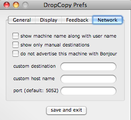
On my MacBook Pro, I only have one account, and on the iMac, I have two accounts, one for me and one for my wife. To get it to transfer to the iMac properly, I had to manually set up both accounts, which wasn't that hard because I just had to put in the IP addresses for the iMac (same IP addresses, obviously) and give the different accounts nicknames, which isn't actually necessary. From my iMac to the MacBook Pro, it worked flawlessly, and saw the computer without any additional setup. It seems to transfer faster than using Finder to transfer files (though I don't think it is any faster), and certainly faster than a thumb drive. Also, it is super easy. Just drag and drop a file. The Preferences pane does give some additional options, which I think are useful and pretty self-explanatory, so I will just show some screenshots. If you have any questions, just leave a comment. Another neat feature is that you can send short text messages to the other computers. I imagine that in a school setting, this would be pretty neat.That is much faster than finding my hall passes, or a piece of paper, and writing out the same note. And, it is much less of a disruption when the kid comes into class. But, imagine if you use it to collaborate with your teachers. The department chair has a curriculum that she needs everyone to have, but she forgot to send it out. In no time, the other teachers would have the file sent to them, and they would be able to access it. It would be faster and easier than email. I use Apple Remote Desktop all the time, and this little program would make it very easy to send files for people to install. For example, trying to download Smart Technologies software (for Smartboards and our Clickers) is a total pain. With this, I can easily send files to people so that they can install the updates, instead of going through the ridiculous sign-in process via the SmartTech Website.Have a Good Life.
Jethro Jones
.
Blog
.
<span class='date ' tip=''><i class='icon-time'></i> Aug 20, 2015 08:21am</span>
|
|
I just finished putting the finishing touches on my presentation page for the UCET 2009 conference. Friday and Saturday, I will be presenting about the iPod Touch in the Language Arts 7 classroom. I hope the presentation goes over well. The plan is to let people experiment with the iPods and ask questions. I hope that it works out well and people are not bored to tears. That would stink! Take a look at the page and feel free to tell me what you think. Have a Good Life.
Jethro Jones
.
Blog
.
<span class='date ' tip=''><i class='icon-time'></i> Aug 20, 2015 08:21am</span>
|
|
One of my teachers had a problem with her computer. She complained to me in a creative way, which I don't mind. Here it is:This is from Xtranormal.com, where the tagline is "If you can type, you can make movies."Have a Good Life.
Jethro Jones
.
Blog
.
<span class='date ' tip=''><i class='icon-time'></i> Aug 20, 2015 08:21am</span>
|
|
The end of the year is fast approaching. I think it is good to reflect on what I have done so far, and what I want to do next year.Some things I did this year:Students made moviesStudents made clicker quizzesRecorded video of lessons for students to watchWhat I want to do next year:Record more videosUse the computers on a more consistent basisUse the clickers as formative assessmentMaking movies wasn't really new to me this year, and it was pretty simple, since I feel comfortable doing it. Clicker quizzes were not new either, as I started doing that last year. It was new for me to create the videos of my lessons. It was really beneficial to try that because it was difficult to figure out to do that best. I still haven't figured it so, it is a work in progress. For next year, I want to spend more time working on that. It is not there, yet, and I think that I can make those videos more interesting and more focused on learning things, and not just focused on recording that class period.Next year I want to use the computers as more than just word processing. I want to incorporate Google Forms and give the students surveys and have them respond to things in that format.Perhaps the biggest thing is I want to do next year is use the clickers as a formative assessment, instead of just summative, end-of-unit assessments. I will still use them for Rise and Stretch like I do now, but adding the extra element would be good because we would use a lot more batteries. Essentially, the clickers would be on all day long. As I teach a concept, the students would respond to questions that I ask that are embedded in the lesson. They would be able to show me right away whether they got the concept I was teaching or not.The problem with this is that I don't teach a lot of concepts in Language Arts. Much of it is stuff they already know, but just need to refine. It would be difficult and time consuming to come up with all this stuff. But, since we do Rise and Stretch and have a different concept they need to know for each week, it would be beneficial to have a "New Concept Day" or something like that, so that they could learn a concept. These are the lessons that I would want kids to make up. Then, they could use that to help them when they need a review.Atomiclearning.com has taught me a lot this year also. I think the most important thing it has taught me is that I need to make screencasts for students and teachers that are more exciting. I have started doing that already, and I really enjoy making screencasts.Have a Good Life.
Jethro Jones
.
Blog
.
<span class='date ' tip=''><i class='icon-time'></i> Aug 20, 2015 08:20am</span>
|
|
I have been lucky enough to be able to teach many other teachers and students on a variety of topics. A friend and I were recently talking about how people from different generations learn. He mentioned that younger people (like our students) want to dive in and figure things out. Older people (like teachers) want to be told step-by-step how to do things.When I teach adults and students alike, I adapt my teaching method to whatever seems most comfortable for them. When I teach students, I usually let them play with things and only show or demonstrate when they get stuck. So far, my students have enjoyed this.Last year, when I did TechnoThursdays, I usually had to go more step-by-step with the adults who came and needed help, which is why I used the wikispace to help them see the step-by-step directions. TechnoThursdays were the ideal setup. I would create a wiki with directions of what we were going to do. Then I would talk to the teachers and walk those who needed it through that web page.Technology makes that possible. It allows everyone to be on their own page when it comes to learning. They can go slow or they can go fast. This year, I have made many screencasts that show how to do different things with our transition to Google Apps for Education email accounts. The screencasts allow the teachers to view the needed material, often without any audio, and as many times as they personally need. Some people just need to know that a certain functionality exists, and they will do the rest on their own. I am not doing TechnoThursdays this year because I do that in one technology-themed faculty meeting each month. Allowing everyone to go at a speed that is comfortable to them has made those meetings much more effective. It gives people permission to go above and beyond what I am teaching.The Aloha Team at my school went one step beyond my lesson about blogging on our school web site. They made their own wiki and their own blogs and those blogs are linked on this wiki. Their next step is to create an RSS feed that feeds right on to that page (a challenge for next year). That is something that could not have happened if I did not let them go at their own pace--a vital key to any learning situation.I think about when I teach in other settings where technology is not available, the learners have no opportunity to go at their own speed. The instructor determines the speed, and they must conform to it. There is no other choice.Understanding the ways that my students and other adults learn has helped me figure out how I learn the best. I like a mixture of what I give my students and what I give adults. I like the structure of an actual class, but I like being able to go at my own pace. Since I have finished my Masters degree, I have been able to focus more on what I want to learn, when I want to learn it. Using Twitter has also helped me gain more information than I could ever imagine.
Jethro Jones
.
Blog
.
<span class='date ' tip=''><i class='icon-time'></i> Aug 20, 2015 08:20am</span>
|