Blogs
|
I love sites which can make my teaching life easier.SPELLINGCITY helps your students learn / memorize words by focussing on spelling, pronunciation and contextualisation.http://www.spellingcity.com/First, you add the words you wish to memorize. Then, the site generates sentences with those words so that you can learn it. You can then, click the TEST button to hear the words and test your spelling or choose one of the GAMES available.An example:1. I created a list of words related to MONEY 2.Once you click spelling test, you can hear the isolated word and then the word in a sentence for to type the correct spelling. LISTENING AND WRITING practice.3. Games you can use to practise VOCABULARY, WRITING and SPELLINGHOW TO USE THE SITE IN CLASSWith an IWB In the last 15-20 minutes of class, elicit the new words learned that day from students while you insert the word in Spellincity. Sts can dictate the spelling as teacher types in the words. Then, all we have to do is click spelling test and start using the practice exercises the site generates. You can also, assign a specific student to keep a record of the new words throughout the class and then use the list close to the end of the class to generate exercises.Another alternative is to use the practice exercises at the beginning of the following class for revision.
Ana Maria Menezes
.
Blog
.
<span class='date ' tip=''><i class='icon-time'></i> Aug 26, 2015 10:39pm</span>
|
|
Have some extra time at the beginning of the year and wish to learn from professionals worldwide?The ELETRONIC VILLAGE ONLINE , every year in Jan - Feb, offers free sessions for teachers where they can participate in discussions and virtual workshops.These are the sessions for EVO2011Becoming a WebheadRe-playing Process DramaDigital StorytellingPLEs and PLNs for Lifelong Learning CompetenciesCreating Vocabulary ActivitiesMultiliteracies for Social Networking and Collaborative Learning EnvironmentsVillage- Language Learning and Community Building in Second LifeMentoring TESOLPodcasts for EFL /ESL classroomReflectiion and Practice: Virtual EducationSessions start on January 10th, however you can register as of January 3rd. To register (for free) all you have to do is click on one of the links above and follow the instructions.I'll be co-moderating the Digital Storytelling session along with other great teachers. HOPE to "see" many of you at EVO.
Ana Maria Menezes
.
Blog
.
<span class='date ' tip=''><i class='icon-time'></i> Aug 26, 2015 10:39pm</span>
|
|
I intend to use this site in class to practise or revise vocabulary learned in class . Great to be used in IWBs.http://www.spellingcity.com/ I'm going to synchronise my audioboo account with a posterous blog and use it to record my students in class, reading dialogues and stories they have created. I can use my iphone or a laptop for the recording and it's published in posterous automatically.http://audioboo.fm/ I'll be using screencasts to record feedback for my students (correcting their work) and to record grammar explanations for revision purposes. EXAMPLEhttp://screenr.com I'd like to have my students create their own comic strips with the content learned that day.http://writecomics.com/With English Attack I intend to have my students learn new vocabulary and expressions from movie snippets.I'll use the IWB or take students to the lab.http://www.english-attack.com/beta-preview At the beginning or end of class, I'll have students listen and try to fill the gaps of songs on the IWB.http://www.lyricstraining.com/ I'll have the students add written texts and images for projects on this interactive wall.http://www.stixy.com/I'll create glogster posters to create study guides to help my students study before tests. EXAMPLEhttp://glogster.com I'll be using Memorize Now to help my students memorize dialogues or expressions.http://memorizenow.com/ At the lab, students will be asked to create joint stories or dialogues using target structure or vocabulary and then send me the link.http://typewith.me/
Ana Maria Menezes
.
Blog
.
<span class='date ' tip=''><i class='icon-time'></i> Aug 26, 2015 10:38pm</span>
|
|
Everyday while surfing the net (twitter, facebook, edmodo, blogs) I bookmark sites I find interesting (with diigo) and then when I have time to explore them I share them in LIFE FEAST.These are the sites I've selected for this week's post:KIDS' FABLES- A site with fables written by children. The site is perfect for developing a project where students are invited to create their own fables. There's a page with guidelines which can help students create their own story. The site suggests a fable contest where the best fables are submitted to Kidsfables.com to be considered for publication. As an extension, you can record your students reading the fables (using AUDIOBOO) and publish them in a class blog.TIME 10 QUESTIONS - another great inspiration for projects. This is a collection of videos where celebrities are asked 10 questions. You can ask students to predict the questions which will be asked and then watch the video for checking. You can also ask students to pretend they are going to interview someone famous, create the 10 questions and then roleplay the interview with a classmate pretending to be the celebrity. The interviews can be recorded with a digital camera and then published in youtube and/or a class blog. Students can even vote for the best interview.DIGITAL DIALECTS - The Digital Dialects website features free to use interactive game for learning languages (English, French, Italian, Russian, Japanese and many others.) SMORIES -these are stories read by kids. The site can be used for listening and reading comprehension (as many of the stories are subtitled) or you can use this as an inspiration for a writing project where students create a story, record themselves reading it and submit the video to Smories.com.EBOOK EXCHANGE- if you have a kindle or nook, this is a place where you can lend and borrow e-books. The fee you pay for borrowing or lending is sent to charity. MESSAGEHOP- great tool for storytelling.MY EXAMPLE FOLDING STORY - Start a story, fold the paper and pass. Sounds familiar? Well, you can do the same online. A group storytelling game.
Ana Maria Menezes
.
Blog
.
<span class='date ' tip=''><i class='icon-time'></i> Aug 26, 2015 10:38pm</span>
|
|
I had a breast tumor detected in 2009 and as a cancer survivor I was delighted to hear about a tool that can help all women detect breast tumors more efficiently and less painfully than normal mamographies. Completely bald opening a giftAt the same time, it's shocking to see how little do politicians and other powerful men regard the health of women. You see, the approval of a more efficient screener and less expensive machine can disturb the "pockets" of many powerful manufacterers. This presentation by Dr. Deborah Rhodesis is both informative and important to ALL WOMEN. Let's hope it doesn't take ong (5 or more years) for us to have the possiblity of having this powerful tool to help us take care of our health.
Ana Maria Menezes
.
Blog
.
<span class='date ' tip=''><i class='icon-time'></i> Aug 26, 2015 10:38pm</span>
|
|
Great tool to be used to help students debate a topic. You can create an argument, state your reasons and then invite people to share their views. The site provides you with the embed code for publishing.Check out an argument I've started:To participale, just click REPLY.HOW TO USE THE SITE WITH STUDENTS?Post an argument in a class blog and have students participate either from home or at the school computer lab.Start an argument, invite people around the world to share their views and then in class (with the IWB) show the discussion and invite students to share their opinions about the statement.Found the tool thanks to Ozge and her wonderful blog .
Ana Maria Menezes
.
Blog
.
<span class='date ' tip=''><i class='icon-time'></i> Aug 26, 2015 10:37pm</span>
|
|
Let's imagine you want to share a list of videos with your students in an interesting way.Well, I guess, YOUCUBE could be your choice. You can easily enter 6 Youtube URLs, and then click share your cube to grab the link to it.This is a YOUCUBE I've created with 6 videos I like very much. Hope you like my selection.
Ana Maria Menezes
.
Blog
.
<span class='date ' tip=''><i class='icon-time'></i> Aug 26, 2015 10:37pm</span>
|
|
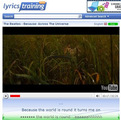
LYRICS TRAINING is a wonderful site to practise listening and spelling. It has a wide variety of songs you can choose to complete the gaps from the lyrics. There are 3 levels; the higher the level the more gaps you have to complete.The good news is that you can create your own song activity with a video clip you select from youtube, paste the lyrics and synchronize it with the video. It's quite simple really. This is an activity I've created for the song BECAUSE by "the Beatles" from the film "Across the Universe".If you want to learn how to make your own SONG ACTIVITY to use with your students, watch the TUTORIAL below.
Ana Maria Menezes
.
Blog
.
<span class='date ' tip=''><i class='icon-time'></i> Aug 26, 2015 10:37pm</span>
|
|
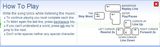
I had an idea for a project to develop this semester with my Intermediate students.I intend to use 5 songs by "The Beatles" from the film Across the Universe as a warmer activity every other week. The activities have been devised at http://lyricstraining.com and I'll use the IWB to ask different students to come to the keyboard to try to complete the gaps from the lyrics with everyone's help. This way students will have listening and spelling practise. After we're done, I'll play the whole song again for us to sing (pronunciation practice).I'll save the song videos from YOutube as favourites so that I can easily use the songs at the beginning of classes, as background for writing activities, to inspire brainstorming, and so on. Playing the same songs at different times, I believe they will memorize them.During the semester, I expect some student will mention the songs come from the film "Across the Universe" and I believe they will naturally ask to watch the whole film in class. If my predictions don't come true, I'll tell them about the film and suggest we watch it. The film is not appropriate for younger students, therefore it's important to watch it to see if you find it acceptable for your group.The Song Activities I plan to use:BecauseAll you need is love I want to hold your hand Strawberry Fields foreverLet it be These are the controls which you need to use in LYRICSTRAINING to repeat the lines, skip words, rewind and so on.This is a TUTORIAL to show you how to make your own song activity.
Ana Maria Menezes
.
Blog
.
<span class='date ' tip=''><i class='icon-time'></i> Aug 26, 2015 10:36pm</span>
|
|
This week, I trained new teachers how to make lessons for the Promethean IWBs we have at school.There are several features you can use and one of them is hiding/showing. A friend of mine , Rita, sent me a message yesterday asking for help because she wants to prepare an activity where she hides images behind numbers.This is a tutorial I've made to show her how to do it. http://screencast.com/t/7z7IwU0vPoOThe same software can be used in other IWBs, all you have to do is download the free version of ACTIVINSPIRE from http://www.prometheanplanet.com/en-gb/support/
Ana Maria Menezes
.
Blog
.
<span class='date ' tip=''><i class='icon-time'></i> Aug 26, 2015 10:36pm</span>
|