Blogs
|
I've always liked WALLWISHER, however, due to the limit of characters you can type on the sticky notes, if you want your students to write lengthy texts then Wallwisher won't work. I had been looking for a similar tool with more space for writing.STIXY serves the purpose. You can create a wall where several people can collaborate and share notes (long texts), photos, links and documents.Stixy: For Flexible Online Creation Collaboration and Sharing via kwoutWatch the TUTORIAL to learn more.Project developed by a colleague of mine, Polyana Vida, where students described their bedrooms.
Ana Maria Menezes
.
Blog
.
<span class='date ' tip=''><i class='icon-time'></i> Aug 26, 2015 10:49pm</span>
|
|
A dense talk (by Sir Ken Robinson) made visually simple by the medium of animation.Can't we do the same in our classes, change the way we present, involve our students senses and minds?A MUST-WATCH.
Ana Maria Menezes
.
Blog
.
<span class='date ' tip=''><i class='icon-time'></i> Aug 26, 2015 10:49pm</span>
|
|
Simple and useful tool for teachers and students. Let's imagine you want your students to carry out a research by finding bits of information from different websites. We all know how distracting surfing the net is, and here comes in FUR.LY. With FUR.LY , you add the URLs you wish your students to use and grab one URL generated by the site which guides students through the suggested sites.To test, I grabbed some interesting sites to develop writing I had bookmarked previously and generated a FUR.LY Url to share via twitter.http://fur.ly/2hr7This is how it looks, you can see the page navigator at the top.
Ana Maria Menezes
.
Blog
.
<span class='date ' tip=''><i class='icon-time'></i> Aug 26, 2015 10:48pm</span>
|
|
This is a simple tutorial to show my trainees how to use Showbeyond to develop projects with their students. With Showbeyond, you add the images you want, record the narration for each image and then share it with the world.A colleague of mine, told me she wanted to develop a project with daily routine and I guess a great tool they could use is SHOWBEYOND. This is my sample story.
Ana Maria Menezes
.
Blog
.
<span class='date ' tip=''><i class='icon-time'></i> Aug 26, 2015 10:48pm</span>
|
|
Want to send e-mails, text messages and voice messages to a group of friends?Want to set up chat rooms and conference calls for your group?Want to share files so that other group members can collaborate with you?You can do all of this and more using WIGGIO. I've just learned about it via a tweet from @ShellTerrell and would love to start testing it. The possibilities are great for groups you can create for friends, family, co-workers, your students , all in one place.Watch the TUTORIAL and learn more about it.http://www.youtube.com/watch?v=k63qSH5cwsk&feature=related
Ana Maria Menezes
.
Blog
.
<span class='date ' tip=''><i class='icon-time'></i> Aug 26, 2015 10:48pm</span>
|
|
Sharing a project developed by a friend and a Cultura EDtech member, Roberta Righetto. She invited her beginner students to create their own monsters , write a description , recorded each student and shared the project in a glog.Grammar topic: it's got ..... / Vocabulary topic: parts of the body.
Ana Maria Menezes
.
Blog
.
<span class='date ' tip=''><i class='icon-time'></i> Aug 26, 2015 10:47pm</span>
|
|
The first time I heard about LYRICS TRAINING was a few weeks ago via Roberta Righetto. I bookmarked it but didn't try it out until some days ago after watching Russell Stannard's fantastic tutorial. First, you choose the language you want to practise (Portuguese, English, Spanish, French, German) then you select the song, the level (easy, medium and expert)and finally start completing the gaps as you listen to the song. The idea is pretty simple, however it's great fun listening, watching the video clip and trying to understand the missing word. An additional feature is the way you can control the song, if you type the wrong word it doesn't accept and the song stops, to listen to that part of the song again all you have to do is clik ENTER. You listen again and again until you get the word right and the song continues. Let me tell you a secret: I had SO MUCH FUN, I ended up trying 3 or 4 songs just for the fun of it.Wonderful LISTENING and SPELLING practice. Students can try it out at home,or you can use it in class as warmer on an IWB by showing it to the whole class and asking different students to use the keyboard to complete the gaps.This is a little tutorial I've created to show to students.
Ana Maria Menezes
.
Blog
.
<span class='date ' tip=''><i class='icon-time'></i> Aug 26, 2015 10:47pm</span>
|
|
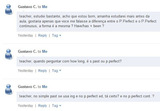
I feel thrilled when my students use our Edmodo group to ask me questions about content. It's proof they've accepted it as a powerful communication tool. Yesterday, a student of mine sent me his doubts about S.Past, Present Perfect and Present Perfect Continuous. He sent me his questions in Portuguese, nevertheless, I liked the fact he called for help.So, how can I help him? If I don't want to wait until next class and talk to him face to face (and I believe he doesn't either) I need to answer him as quickly as I can. Traditionally, I would type in a written explanation which would be quite long, I imagine. So which tool could I use? I thought of sending him a video message where he could see me and hear me but then I wouldn't have the written sentences to show him the different tenses. I then remembered SKETCHCAST , a great tool I've posted previously.This is the answer I sent him today. The tool is incredibly easy to use, no downloads, all you need is your microphone and internet connection. Then you can send your explanation via e-mail or grab the embed for publishing. Learn more about SKETCHCAST with Russell Stannard's tutorial.
Ana Maria Menezes
.
Blog
.
<span class='date ' tip=''><i class='icon-time'></i> Aug 26, 2015 10:46pm</span>
|
|
This last week, I learned about http://www.alexsclass.com , a perfect example of meaningful technology integration. Very beautiful work being developed, I wish I could be a student in this class. :)This same teacher, Alex, used PURPLEMASH to have students create drawings and a newpaper based on the content they were studying. http://www.alexsclass.com/tag/purplemash/purplemash via kwoutWatch this video to learn more about PURPLEMASHI haven't explored it yet and will be posting about my trials this coming week.
Ana Maria Menezes
.
Blog
.
<span class='date ' tip=''><i class='icon-time'></i> Aug 26, 2015 10:46pm</span>
|
|
Found out about ENGLISH ATTACK via facebook yesterday.Another fantastic site to suggest to our students. ENGLISH ATTACK, has a selection of movie snippets which students can learn from. First, they pre-teach some vocabulary (words + definitions) necessary for the understanding of the scene, then you watch the scene and move on to the interactive exercises (very cool!).If you have an Interactive White Board in class, you can use it as a whole class activity. You can also take students to the school lab to work with a selected scene or a scene of their choice.
Ana Maria Menezes
.
Blog
.
<span class='date ' tip=''><i class='icon-time'></i> Aug 26, 2015 10:46pm</span>
|