Blogs
|
Google Apps has finally made the difference. And with its offline applications your productivity will boost incredibly. Go on reading…Google Apps is a bunch of office-like applications, as docs, slides or sheets. If you have a Google account then you can go directly to drive.google.com and sign in. It's free!Even though its functionality can look scarce in comparison with other applications, as OpenOffice, there are plenty of advantages to make the shift:Integrated tools: research, dictionary...Easy way to embed links, images, citations, graphs...Compatibility across Google apps.Compatibility across multiple devices (I'm writing this article using my mobile device while I'm lying on my towel tanning under the sun).Offline working mode.The offline functionality option has been, in my opinion, the key to beat Google’s competence. To enable it go to Chrome Web Store and look for offline apps. Install docs, sheets and slides (you could also install Gmail, Drive, Calendar, Drawings…). From this moment on you can create,view and edit documents/slides/... using your Chrome browser. Offline applications are gathered inside a new icon on the bottom bar. Next time you go online Chrome will synchronise everything automatically. In the meanwhile your data will be saved to your computer.As you can see it's a great way to work while going to the school by train, when at the beach... You don't have to worry any more about saving your work, taking your memory sticks with you, or even fear of losing your data.
Adoni Sanz
.
Blog
.
<span class='date ' tip=''><i class='icon-time'></i> Dec 03, 2015 11:24pm</span>
|
|
You mightn't know there’s a colourful spectrum of web fonts available for free and supported by Google. Pick them for your blog, website, Google Docs texts or even for keeping them in your laptop for other uses.There’s not much to say about this splendid project. You can check the website at https://www.google.com/fonts and roam about. Teaching this method to your students will empower them to give a personal touch to their blogs, sites and documents.The site gives you the option to review any font, bookmark and obtain the correspondent HTML code to be inserted inside your pages. You can also get a speed impact measure, so you can know the loading time associated with them.To use it in your blog just insert two lines of code provided by the page after selecting the font: the HTML code and the CSS one.For the HTML code: click on edit and insert your code before the HEAD tag.For the CSS code: go to Template/advanced/add css and paste it.How to use them? I usually write my posts on Google Docs, so I do all the formating there (fonts, bullets, pictures, colors…) and then copy&paste it into Blogger. Obviously the chosen fonts have to be inserted in both places (Docs and Bloggers). If not it could happen that you see them but others don’t.
Adoni Sanz
.
Blog
.
<span class='date ' tip=''><i class='icon-time'></i> Dec 03, 2015 11:23pm</span>
|
|
With just 13 posts I’ve been paid over 1000 visits. Thank you all!This blog was started as a way to communicate specific information to certain students. With The reading corner I began my path as a blogger, and I realized it could be interesting to transmit my knowledge about technology and education to other people.All the posts published here are based on day-to-day school experience and personal research. If you need any help about a specific topic or you’d like to collaborate with me don’t hesitate to drop a line! If you like this blog subscribe! If you like a post share it! Your friends could find it of value too!Thank you for your support!andonisanz.com
Adoni Sanz
.
Blog
.
<span class='date ' tip=''><i class='icon-time'></i> Dec 03, 2015 11:23pm</span>
|
|
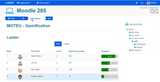
Gamification. Let’s get down to work!Simply said: the application of game elements in a system to better engage its participants. That is, you don’t transform your lessons into games, but you introduce game elements to ensure engagement.ELEMENTSThe most commented elements to be used are the PBL triad: points, badges and leaderboards:Points: valuable units you earn when doing certain things. They have to be connected to rewards, like real points for your grade. Years ago I enrolled in a course inside a Moodle platform. Each action (as checking links, commenting in a forum, submitting documents, etc) was rewarded with points , and with them badges were earned.PRO: students can see their participation is rewarded.CON: doing actions just for earning points.Badges: representation of achievement. They give some social status.PRO: the proud and effort of achieving one.CON: discrimination and categorization inside classroom. Leaderboards: take the previous two and make an ordered list from top to down to know who’s winning.PRO: knowing where you are, competitivity, bragging rights.CON: creating a gap too big in classroom’s social structure; lazy students giving up.xxxThere are more elements to be used:Progress bars, maps, and the like: to know where you are in the process.Easter eggs: strategically placed items to be found so you attract students to specific places.Random/sudden rewards: the more time you invest in the system, the bigger likelihood to obtain a random prize.Unlocking elements: keys opening treasure chests. Finish a task to unlock the next one.Webquests.Feedback: behaviour infused elements in your system.Storytelling: wrap up a boring lesson inside a story.Avatars:I believe these help in entering the magic circle, which is the locked environment where the game is played and its rules are naturally followed by students. Level-ups: similar to pokemon evolution. After assimilating some new abilities you get transformed into something more powerful. Certificates of achievement: similar to badges.Checklists of accomplishment: similar to progress bars.GAMESI’ve already said gamification doesn’t deal with game design, but that can be useful when designing our lessons. Three features are to be taken in count:Player’s journey:Onboarding: tinny tutorials to help students start. New knowledge is given as new rules are introduced, so first-time long explanations are avoided. Participants just know what they need.Scaffolding: progressive levels of difficulty.Paths to mastery: the road to students’ skill growth.Balance: equilibrating the rules so plummeting and rocketing are avoided.Experience creation: it has to be as real as it can. That way the magic circle gets stronger.THE GAMIFIED LESSONIf we put everything in place our gamified lesson will have these features:Onboarding.Scaffolding.Social.Multifeedback.Map.Exchangeable rewards.Gamification also deals with psychology: self determination, player models, engagement loops, progression loops, motivation, etc. Also with player types: killers, achievers, socializers and explorers. A lot to say about the previous, but it’s not this article’s point. You can find several MOOCs on gamification:I’ve personally done these two. There are good teachers, explain everything in a straightforward manner and the contents are really of great value. Check them! Coursera, by Kevin Werbach (@kwerb).Iversity, by Victor Manrique (@VictorManriqueY).There’s another one I can’t comment about:Openlearning.HOW TO’S: MOODLEThere’s an LMS which includes some features for gamification and that’s Moodle:Badges: PBL model, included in version 2.5.Points: try Level up!, a plugin design to score points as you get involved in different activities.Conditional elements: Progress bars: you have an ad-hoc plugin, or you can devise your own. Create several progress bar images (as photograms). Put each in a label, hide them and make them appear consecutively as tasks are being finished. Students will see just one bar changing its state (as in an animation film). Something similar is the lesson objectives module.Maps: it’s the same as in progress bars. You can open Photoshop or a layer based editing software, load a rectangular landscape (LOTR style) and a hero on another layer. Save the picture several times with the hero appearing in different spots of the landscape. Use those pictures as photograms.Random rewards: use the restrict access option. Quick example: create a hidden label with a treasure picture. Program it to appear at some time. Students will see the treasure as if it were random. With activity completion students can gather the treasure clicking on the check box.Easter eggs: tell your students some eggs have to be found. Place them in spots you want your students to go to. When clicking use a similar strategy as in random rewards.Element unlocking: use restrict access. Onboarding: place knowledge pills in hidden labels and make them appear as students go on accomplishing tasks.Activity completion: control how activities are accomplished (by seeing them, by obtaining a grade or by submitting them). It’s embedded in the system, so just activate it to get it in motion.Checklist: There’s an interesting plugin called Checklist to help students control their activities.Level-ups: make a level change label appear after finalizing some task.Games: even though gamification is not about games per se you can introduce some to reinforce the use of your glossaries (e.g through classic games as Hangman, Crosswords, etc.)Social: forums and chats.AESTHETICSThis is a term I repeat over and over. A gamified lesson can lose power if it looks dull. To spice it up a little bit you can use these tricks:Use graphical labels instead of mere text.Decorate your course page with icons and images.Use dynamic and full of images resources as videos, presentations or animations: issuu, slideshare, pininterest, easel.ly, ted-ed, khan academy, phet, visual.ly, prezi. Check my Symbaloo boards (#1, #2) for more information.Consider embedding resources in labels on the course page instead of just placing the links. That gives it more color, but it also overloads it.
Adoni Sanz
.
Blog
.
<span class='date ' tip=''><i class='icon-time'></i> Dec 03, 2015 11:21pm</span>
|
|
In the digital era of Education, Learning Management Systems are delineating themselves as good allies for the teaching practice, providing a canvas to place contents, PLE curating tools, a secure environment to work in, different collaboration modes, activity control systems and several ways of assessment.But, what LMS would suit you best? That depends on your needs, your audience, your digital abilities, the LMS’s complexity and your budget. There are multiple options, as Moodle, Edmodo or Google Classroom, among many others. This article is going to focus on the free edition of Google Apps. During the last years they have been put to an enhancement process, and, nowadays, they can be effectively used for educational purposes. To do so, they have to be synergistically constellated to create a consistent and coherent system. If you aren’t familiar with them (or don’t know how to use them), have a look at Google’s documentation: http://learn.googleapps.com/home Go on reading the full article in EDTECHREVIEW.IN
Adoni Sanz
.
Blog
.
<span class='date ' tip=''><i class='icon-time'></i> Dec 03, 2015 11:20pm</span>
|
|
I gave a presentation about how to effectively gamify your Moodle in the Moodle MOOT (Bilbao, Basque Country SPAIN) held on the 19th of June, 2015.The Slide document, videos and the rest of materials have been published in my personal webpage (andonisanz.com). Also here: http://www.slideshare.net/andonisanz/moodle-gamificationFor more information about the event: mooteu.moodlemoot.netWhat happened in Twitter: https://twitter.com/search?q=%23mooteu15Some mentions:
Adoni Sanz
.
Blog
.
<span class='date ' tip=''><i class='icon-time'></i> Dec 03, 2015 11:20pm</span>
|
|
Gamification has several definitions, but a simple one would be: it is to apply game elements (items, rules, goals, rewards…) to non game contexts in order to improve the outcomes, engagement and diversion of the participants.Seeming a buzzword nowadays, as it is indeed, it has been widely used in several fields for many years, and, for sure, you’ve been a target of it anytime during your life, or, even more, you’ve used it unconsciously. For example, rewards given to children in exchange of good grades; points earned at the gas station; collectible yogurt glasses; or badges earned in forums.Being a general philosophy, it can be tricky to get the use of it in Education. On the one hand, the educational world and its actors differ from others. There are plenty of emerging and growing technological systems, that not always let gamification fit in. Teachers lack handbooks to clearly know how to start up the process, and many of them don’t have a technological profile. And, finally, gamification has multiple stages to be considered (analysis, design, implementation, measurement and readjustment).Go on reading at:http://edtechreview.in/research/2055-guide-gamification-in-education
Adoni Sanz
.
Blog
.
<span class='date ' tip=''><i class='icon-time'></i> Dec 03, 2015 11:19pm</span>
|
|
I’m proud to announce that on the 13th of November 2015 I’ll be giving a presentation at the Gamification World Congress in Barcelona. Only 6 papers have been selected worldwide, and mine is among them: "the Haidei framework", an educational framework where the educational curriculum, visible thinking and gamification are integrated.Information about the event:From 10th to 13th November 2015 the fourth annual Gamification World Congress will be held in Barcelona (Spain), four days of international content featuring the best projects and top experts in the world.Over 100 globally-renowned speakers have already spoken at Gamification World Congress, including the likes of Richard Bartle, Mario Herger, Andrzej Marczewski, Tom Chatfield, Kevin Werbach, An Coppens, Brian Burke, Bart Briers and Thijs de Vries. And this next event will boast an even greater international repercussion than ever.Gamification has become a powerful tool to engage students to learn in a different and funnier way. gEducation, the educational Workshop from Gamification World Congress aims to become a forum for educators, researchers and practitioners in the area of Education Innovation that are interested in how gamification is changing the future of education and how gamification can be used to improve the learning process, engage students, etc. Further of cases studies, gEducation believe that Gamification is a line of research that is becoming more important and essential to improve techniques of creation, monitoring, measuring, and improvement of gamified systems.https://gamification.world/congress/gwc-2015/geducation
Adoni Sanz
.
Blog
.
<span class='date ' tip=''><i class='icon-time'></i> Dec 03, 2015 11:19pm</span>
|
|
For all the people who have asked me about the presentation's materials (#haideiframework) I used at the Gamification World Congress 2015 held in Barcelona, you can find them in my personal site:www.andonisanz.comThe Haidei framework is a flexible approach to integrate pedagogy, gamification and technology.Don't hesitate to contact me!
Adoni Sanz
.
Blog
.
<span class='date ' tip=''><i class='icon-time'></i> Dec 03, 2015 11:19pm</span>
|
|
Image courtesy of Wikipedia
Larry Zwier shares some thoughts about his upcoming webinar, Making Good Tests. Larry is a series consultant for Q: Skills for Success, the author of Inside Reading 2, and an Associate Director at Michigan State University (East Lansing, Michigan, USA), where many of his duties involve making tests, administering them, and evaluating their effectiveness.
Students often talk about test anxiety. Some say they freeze up and can’t show what they really know because they’re "not good at taking tests." Teachers may experience their own form of test anxiety. A teacher may feel completely confident in handling a classroom, presenting material, directing students in individual and group work, and so on, yet that same teacher may freeze up when assessment time rolls around. On February 6, I’ll present a webinar about getting past that freeze-up stage and writing good tests.
Specifically, I’ll make reference to using material from OUP’s series, Q: Skills for Success. I know that series intimately. I am one of the series consultants, and I was in on the discussions from the very start about what Q should be and how it should play in the classroom. Part of that "classroom role" aspect involves testing. How should we assess whether students are understanding the passages (reading or listening), picking up the vocabulary, and developing the language skills we practice? What feedback can we give students that will boost their performance in the future?
In the first part of the webinar, I’ll tell participants how to take advantage of testing materials already prepared for Q by Oxford University Press. These come in various packages - via CD and online - and I’ll explain how to get them and use them. In the second part of the webinar, I’ll approach a somewhat tougher topic: How to write good tests on your own.
Of course, testing is a huge topic and we could spend dozens of hours discussing it. I’m going to keep the webinar basic and practical. Issues I’ll address include:
What’s my testing goal (fluency/accuracy, syntax/lexis, main ideas/details, etc.)?
What are the stakes?
What format will work best in my classroom circumstances?
How can I identify good points to test in a reading / listening passage
I’m a teacher, not a cognitive scientist. How can I know whether a test is good?
I look forward to the webinar—a great chance for me to interact with colleagues from around the world.Filed under: Exams & Testing Tagged: Assessment, Designing good tests, Lawrence Zwier, Q Skills for Success, Test anxiety, Test development, Test preparation, Testing, Testing goals, Webinar
Oxford University Press ELT blog
.
Blog
.
<span class='date ' tip=''><i class='icon-time'></i> Dec 03, 2015 11:18pm</span>
|