Blogs
|
Happy New Year from the Roundup! We'll be back to our regular posting shortly (with a few changes to ring in the new year). For now, I hope everyone's semester and year is off to a great start! See you soon!-Mike
Michael Karlin
.
Blog
.
<span class='date ' tip=''><i class='icon-time'></i> Dec 04, 2015 02:05am</span>
|
|
The folks over at Dell were kind enough to send me one of their new, 13" Chromebooks for review from the education/classroom perspective. If you’re not familiar with a Chromebook, imagine a laptop that runs on a web-based Google operating system, instead of the traditional Windows or Mac operating system. You can find out more about the new Chromebook on our Review's page.
Michael Karlin
.
Blog
.
<span class='date ' tip=''><i class='icon-time'></i> Dec 04, 2015 02:05am</span>
|
|
myON is an online, interactive, digital library with over 10,000 books for pre-K to 12th grade students. Teachers can use myON to assign books, encourage reading, and assess student growth. Plus, students can find books based on their own personal interests and ability levels, and they have a large collection of Spanish reading materials as well. You can find out more on our Review's Page.
Michael Karlin
.
Blog
.
<span class='date ' tip=''><i class='icon-time'></i> Dec 04, 2015 02:05am</span>
|
|
Today’s review focuses on ADVANCEfeedback™ from the educational technology and consulting company Insight Education Group. ADVANCEfeedback™ is a cloud-based platform that allows for teachers to easily upload videos of themselves teaching for reflection, feedback, sharing, or for informal and formal evaluation purposes. Find out more on our Review's Page.
Michael Karlin
.
Blog
.
<span class='date ' tip=''><i class='icon-time'></i> Dec 04, 2015 02:05am</span>
|
|
Gamedesk is an organization that has a ton of avenues for exploration. Not only do they design educational games for iOS and Android, but they've also created a space for research, training, interactive simulations and role-playing, and much more. If you've never check them out, I highly recommend it. Find our review of their two new apps, Geomoto and Pangean, on our review page.
Michael Karlin
.
Blog
.
<span class='date ' tip=''><i class='icon-time'></i> Dec 04, 2015 02:05am</span>
|
|
Let me preface this post with a confession about my fan love for classic Sci Fi films.
The story of George Taylor from Planet of the Apes. tells us how underestimating or judging a culture at face value can lead to missteps and frustration when it comes to being an agent for change. Near the beginn
ing of the film, George was convinced that he could take over the planet, because the first sentient beings he encountered were primitive & "simple." As he sardonically cracks:
Taylor makes an assumption without knowing who is truly in control of the planet & its culture
Alas, poor George ends up finding himself in this situation.
Then ultimately coming to this conclusion:
Of course at moment George made his initial assessment, he didn’t know what he was truly dealing with.
Making assumptions about the culture of the organization you when you’re attempting any change effort can result in the worst sort of initiative sabotage. It’s important that we instead really understand the culture of the groups we are working with and then plan accordingly.
Instead of judging & then blurting out our judgments about group culture like George, we should carefully observe the culture of the organization we work with, then start to make an assessment of whether that change will be possible and with what level or nature of effort.
I have a few grounding questions that I’m learning to ask to assess company culture. These questions attempt to go beyond evaluating the explicit mission & values. The answers can be indicators as to whether you’re going to have an uphill battle when it comes to making change happen.
I’ll be examining these questions in more detail in the future.
1) Who is successful, who succeeds? Who does not thrive or fails?
The plants that flourish can tell you a lot about the soil they grow from.
What personality traits and behaviors are encouraged in the company’s environment? This includes ones that are explicitly and implicitly encouraged? If over time you notice that people who agree vs. constructively provide alternative suggestions tend to succeed in the eyes of leadership, this may be an indicator that the group has a fear-motivated culture or is highly dependent on a those at the top for decision making. Also, when making change proposals, you might want to determine the best ways to introduce or couch the change on multiple levels, with executive leadership, management, and staff.
2) How does management interact with their direct reports? How do the staff perceive & react to their management? How is information presented? What is the general tone?
What is the tone of communications not just outward & official messaging, but everyday communication in email? Peer to peer or leader to subordinate and vice versa? Do people from varied levels of the company including front-line workers feel comfortable speaking up in town-halls? What kinds of questions are they bringing to leaders? Is sharing at all levels ‘guarded?’
Is humor appropriate to incorporate in presentations? If so how much? Use of humor can be difficult with cultures who are very formal. It might be helpful to observe how humor is used by leaders and influencers first.
3) What are the prevalent company attitudes and behaviors based on structure or hierarchy?
Is the organization top down oriented? Per the observations mentioned in the previous question about how management & staff interact with each other - observe if the culture is primarily based on a top down hierarchy or does it lean towards being a flat one where people on multiple levels of the organization are empowered to make most decisions? Be wary that there are some groups that claim that they are ‘flat’ when the underlying culture really operates on hierarchical principles. More, is there a cult of personality built around the company leadership? It could be that you will have to first court management and leadership in your organization. Change may not happen unless the leadership approves, and sadly, if Leadership is not decisive or open to other ideas outside of their own fold, change is going to be challenging and slow because in a top-down oriented hierarchy it’s always the boss or higher ups that come up with the best ideas, and rarely the employees. It’s a culture of deciders and doers.
Top-down management presumes that only the boss has the right answers. It vests power in the hands of people with titles and demands unquestioning compliance from people without them. From article "What Great Bosses Know About Top Down Management"
It’s important for leaders to note that Millennial and Generation C employees entering the workforce are easily frustrated with communication in organizations with strict hierarchy. I am eager to see the influence that younger leaders may have on the cultures of the organizations they work in.
Hierarchy is almost necessary in large organizations, and strict hierarchy impacts the speed of change without decisive and empowering leadership chain. I’m very interested in finding stories that demonstrate where innovation and change thrives in hierarchical cultures. Regardless of what type of culture you are dealing with, don’t make George’s mistake and underestimate the nature of that culture and it’s possible impact.
Additional Reading:
Comparison of Both Flat and Hierarchical Organizations
Millennials Can’t See Your Badge - Hierarchy Gap
Understanding Generation C: The Youtube Generation (Google)
Two Common Mistakes of Milennials at Work (HBR)
Natalie Laderas-Kilkenny
.
Blog
.
<span class='date ' tip=''><i class='icon-time'></i> Dec 04, 2015 02:04am</span>
|
|
I recently read through IDEO’s Tom & David Kelley’s book Creative Confidence, and I found a great deal of inspiration for helping build buy in for my designs and proposals. I also was able to add to my collaboration tool kit, as the book also presents stories and collaborative processes that can help kick start creativity on any team.
We have all worked on initiatives where we were so rushed that it felt if we built out our case logically and spelled out the benefits to our audience, they would naturally accept the change… or so we thought. But as we’ve found time and time again, "If you build it, they will come" often proves to be one of the most ineffective product launching strategies.
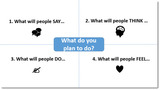
IDEO’s approach to design and change initiatives is a human-centered one that examines potential reactions to any sort of new product, object, service or change. The Empathy Map tool presents a simple start at mapping and envisioning how people will react to what you’re putting in front of them whether it is a user interface to a purchasing tool or an ice-cream scoop.
The Empathy Map asks four questions in regard to your change, product, or initiative:
What will people say?
What will people think?
What will people do?
What will people feel?
Ask these questions to think out how your audience will receive or react to your initiative or change.
Normally, you would put these questions up on a white board or pieces of chart paper and have your team write their answers to these questions on Post-It notes, but I work in virtual teams, so I created a PowerPoint version (see Resources below). These questions can help you sort through possible reactions and prioritize the ones that you should address. Then start making a plan for how you will address those.
In my example PowerPoint, I included the simple example of sending out a survey. Everyone loves taking surveys right? After listing a few audience reactions, thoughts, and feelings, I made an initial attempt at addressing those that I’ve seen in the past. What I appreciate about this approach is that is a little more thorough. It allows you to separate and methodically map these reactions vs. coming up with the most ‘scary’ ones and reacting solely to those.
Resources:
IDEO’s Design Tool Kit
Empathy Map SAMPLE
Natalie Laderas-Kilkenny
.
Blog
.
<span class='date ' tip=''><i class='icon-time'></i> Dec 04, 2015 02:04am</span>
|
|
Let me preface this post with the admission that I am not a professionally trained web designer. I have had experience designing web-based learning materials and have knowledge and exposure to Usability and User Experience (UX). Some of the past organizations I have worked for held UX as a primary goal in producing good products. I am still very committed to learning how to provide the most user-friendly solutions to the content I deliver. Happier users are more productive workers.
DESIGN QUESTIONS:
Should website links to external sites open in new windows?
If so, how do you differentiate links on a site to external pages to links that point back (internally) to the site?
I wanted to do some research on the questions above to help provide answers but also to solve a problem I am facing with a website I have inherited. This site, which I vaguely referenced this site in a previous post, needs a major overhaul starting with a card sort, but the immediate need is to update some of the more visited pages with current information.
The site was created as a hub to connect learners with other content both within and outside of the site. Therefore,the site is linked to both internal and external resources and each page has multiple links. Sometimes dozens of links.* Returning to the two questions above, I found the camp somewhat divided on opening in a new browser:
YES, open in a new window
"Browser tabs have changed everything" UX Movement (2012)
"If links are used as a reference" Problog Design (2007)
NO, do NOT open in a new window
"Opening in new browser is like the vacuum cleaner salesman dumping the bag on your carpet and not cleaning it up." - Nielsen (1999)
Users will close the window themselves if the want to. - Smashing Magazine (2008)
After reading the advice and developer discussions on the sites above as well as additional resources, I’ve come to the conclusion that I will continue to keep external pointing links pointed to opening in new browsers, because they are reference to content outside of our own. I’m also leaning to proposal #1 below to help guide or teach users where to go.
My proposed solutions to fixing the page content would be as follows:
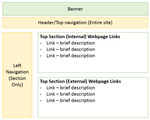
Train users where to expect internal pointing links vs. external pointing links. If possible keep the internal pointing links together in 1 section at the top of the page. Links that point to an external site are kept in a second section. There are no explicit instructions that warn users, but eventually repeat users learn that anything they click at the top of the page points to the same site, but links on the bottom half are external links. They start to expect the behavior.
Give the users a choice. Have the current link open in the same browser, but provide an icon that allows them to open in a new browser. While this seems like the politest option, from a web developers perspective it is the most labor intensive. Also, it will me you will have to update links in two places.
Proposed temporary solution to web page design.
* I have to resist the desire to say that such hub sites are NOT helpful to users because their architecture is often not based on personal user experiences.
Natalie Laderas-Kilkenny
.
Blog
.
<span class='date ' tip=''><i class='icon-time'></i> Dec 04, 2015 02:03am</span>
|
|
MGM Casino near walkway to NY NY - My colleague and I have had to send each other photos of our location to find each other. "Which Starbucks are you at?"
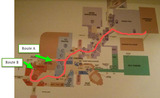
The last time I was at MGM Grand Hotel was in the 80’s as a child, I remember riding the elevator with the comedy legend Dom Deluise. Today, this hotel seems even more massive and maze-like. I am trying very hard not to get overwhelmed by the Casino environment. Only my first day here at Dev Learn 2015, and my colleague and I have had to text pictures to each other to locate each other. We made the mistake of agreeing to meet by the Starbucks, and of course there are three in the hotel. I finally took a photo of the hotel map and drew a path to the conference area! But I may have to make visual breadcrumbs/associations still to mark my path.
Topics of interest at Dev Learn 2015 - Day 1 (Wednesday, Sept. 30)
Can you imagine these are just the topics of interest for me on the first day only:
We Don’t Own Social in the Workplace
Mobile Learning Innovations
How Caterpillar Uses Bite-sized Learning to Close the Skills Gap
Navigating Today’s Learning Metaverse
Story Hero: Create Comics and Motion Comics Interactions with Storyline
Unpacking Badge Analytics: What Metadata Can Tell Us
Fast, Easy and Cheap: How to Use WordPress as a LMS
Everyone Everywhere: How to Create and Deploy Multi-device Learning Content
Building Bite-sized Learning in a Traditional Training World
Microlearning Video on a Shoestring
Digital Badges and the Future of Learning
And… just because of the title… Where to Look for the Purple Squirrel
Speaking of Rodents, with all the candy, toffee apples, cupcakes, fatty breads, high living and gluttony-inducing things around me… I couldn’t help but think that Templeton the Rat would have a great time here… at least in the dumpsters.
Natalie Laderas-Kilkenny
.
Blog
.
<span class='date ' tip=''><i class='icon-time'></i> Dec 04, 2015 02:03am</span>
|
|
SESSION: Story Hero: Create Comics and Motion Comics Interactions with Storyline
PRESENTER: Michael Sheyahshe
Remember to become aware…How we read comic books
Comicbook style interactions, using animations. Place more emphasis on the story.
Comics: create interest, focuses on story points. Visually communicate ideas and grab your attention.
What Panels do….
Allow you to storyboard content.
Reference - Scott McCloud’s icons hierarchy.
http://blog.visualmotive.com/2009/understanding-comics-with-scott-mccloud/
Comics -> Distance = Time.
Closer = less time.
Tripping the Z-axis. Translation perceived depth. Simple example = shadow.
Comixology is a great app. Provides examples of how to execute.
https://www.comixology.com/
Execution recommendations:
Keep animation simple. Simple line motion animation can provide a powerful effect. Remember distance = time.
Create your comic layout/ and fill out the panels. Similar to how Prezi works with the zoom feature.
Cool - can embed videos in a panel!
Put panels on separate layers.
Pause each panel and place the timing on the timeline for the layer/panel.
You can add a motion path.
Add click interactivity to view next panel or layers. BRILLIANT!!!
Speaker Sheyahshe <YouTube? Channel>
Possible other resources:
Articulate article - Comic style designs in Courses
https://community.articulate.com/discussions/building-better-courses/comic-style-designs-in-courses
Natalie Laderas-Kilkenny
.
Blog
.
<span class='date ' tip=''><i class='icon-time'></i> Dec 04, 2015 02:03am</span>
|