Blogs
|
I had the honor of speaking at #TASSPSW2015 in Austin today. Below you will find the resources I shared and ways to keep abreast of our new product introductions and other developments from me and from Choose2Matter. […]
The post Resources From @AngelaMaiers at #TASSPSW2015 appeared first on Angela Maiers.
Angela Maiers
.
Blog
.
<span class='date ' tip=''><i class='icon-time'></i> Jul 16, 2015 09:06am</span>
|
|
I had the honor of speaking at #TEPSA15 in Austin today. Below you will find the resources I shared and ways to keep abreast of developments from me and from Choose2Matter. I look forward to continuing the […]
The post Resources shared at #TEPSA15 appeared first on Angela Maiers.
Angela Maiers
.
Blog
.
<span class='date ' tip=''><i class='icon-time'></i> Jul 16, 2015 09:06am</span>
|
|
Microsoft Safety Scanner Webstie
The Microsoft Safety Scanner is security tool that provides on-demand scanning and helps remove viruses, spyware, and other malicious software. It works with your existing antivirus software.
What do you think of Microsoft Safety Scanner?
Patricia Donaghy
.
Blog
.
<span class='date ' tip=''><i class='icon-time'></i> Jul 16, 2015 09:04am</span>
|
|
If you like creating animated videos, here comes a new web tool. That is Wideo!
They are still trying Beta, but it is still cool animating videos with it. When you sign up, you go to you storyboard where you will be creating your videos. By clicking on the circle on the left hand corner, you can add backgrounds, objects, characters, text and sound to your animation. You can make the objects animate and change their sizes by clicking on them. You can preview what you have done on your timeline at the bottom of the page or you can see the scenes separately and change their places. When you finish, you can publish your video on different social networking websites or get the link.
How can we use it in education? Here are some ideas:
Students can animate the dialogues that they have written.
Students can be assigned to create short stories.
Students can create animated cards for birthdays or New Year’s time.
Students can create party invitations using different characters and styles.
I really like this tool and hopefully, they will add more features in near future.
Ozge Karaoglu
.
Blog
.
<span class='date ' tip=''><i class='icon-time'></i> Jul 16, 2015 09:04am</span>
|
|
I was visiting this blog by Michelle Morley and enjoyed her post on making visual representations of class rules and publishing them on Slideshare. I have done a similar thing around values in a school where children explored different images I had collected to see how messages can be conveyed in pictures and then planned and photographed their own scene to depict a value. This is the class rules example that Michelle had on her blog:
Our Classroom Agreements
View SlideShare presentation or Upload your own. (tags: agreements students)
Only geeks that are interested in CSS and hex codes read below
Yesterday, I spent some time working on the design of the Learning@School conference site - I changed the header to stretch right across the page and I changed the navigation menu colours and design. I couldn’t figure out which elements of design the different hex codes in the code were referring to. I first of all used a handy Firefox extension called Firebug to help me ‘inspect’ different sections of the page to tell me the code that was behind them. Then I needed to be able to do a search by the hex code so that I could find out what colour it was referring to. Once again, I turned to the wonderful Colour Lover site for a solution. You can do a palette search by hex code and you can even add a Colour Lover hex code search to your Firefox browser search options. Color Schemer Online Version 2 is also another good option when searching by hex code. Then I sampled the colour codes from the header image by running it through the Image Palette Generator and changed the template to hex codes that matched with this image. The whole process would have been a LOT quicker if I knew all about CSS!!
Authored by suzievesper. Hosted by Edublogs.
Suzie Vesper
.
Blog
.
<span class='date ' tip=''><i class='icon-time'></i> Jul 16, 2015 09:04am</span>
|
|
I had mentioned about how to integrate QR codes in our education in this post. I see them as the easiest and a fun way of integrating mobile technologies in the classroom.
There are many QR code generators around the web. Today, I would like to introduce you Unitag. This one is just like the rest of the QR codes where you can create your own QR code from a link, text, sms, geolocation or a calendar. However, Unitag gives you the chance to customize your QR code freely. There are many templates that you can choose to use, you can play with the colors of the code or the background. You can replace the QR code’s colour with a picture or you can create shaded colours. You can play with different looks of your code. You can even add a logo in the middle or you can use the ones that are already on Unitag. You can also change the eyes of the code. (the shapes that are in the corners of the code) When you are done, you can download or share it via different social networks.
Don’t forget to use a QR reader to read what is hidden in code! Enjoy the limitless and fun activities that you can create with and for your students.
Ozge Karaoglu
.
Blog
.
<span class='date ' tip=''><i class='icon-time'></i> Jul 16, 2015 09:03am</span>
|
|
openWYSIWYG Website
openWYSIWYG is a WYSIWYG editor, packed with every rich-text editing feature you need, that can be used in web-based applications and forms. Compatible with most browsers including: IE 5.5+, Firefox 1.0+, Mozilla 1.3+ and Netscape 7+.
What do you think of openWYSIWYG?
Patricia Donaghy
.
Blog
.
<span class='date ' tip=''><i class='icon-time'></i> Jul 16, 2015 09:03am</span>
|
|
I was playing through Twitter and took a second to check out the Flickr blog. Interestingly, there was a post about National Library of New Zealand becoming the 16th institution to become part of The Commons of Flickr. Historic images are now available from the National Library of NZ on Flickr. The title of the blog post, Sweet Suxteen, takes a gentle poke at the kiwi accent. Here is a video from the blog post that introduces exactly what this means:
I had a look at some of the images and was struck by how rugged New Zealand once looked. There are some beautiful photos here. These would be an interesting resource when comparing changes to the New Zealand countryside from the past to today. I was also interested in the photos of some of the ships that sailed around New Zealand in the 1880s. It would have been amazing to see a harbour filled with boats such as these.
I was looking at one wide angled image and noticed that there was a link to where the image was stored on the Timeframes website. The image there was zoomable so you could really investigate the finer details within the image. I think it is great to see more of New Zealand’s heritage being made available through the web.
Authored by suzievesper. Hosted by Edublogs.
Suzie Vesper
.
Blog
.
<span class='date ' tip=''><i class='icon-time'></i> Jul 16, 2015 09:02am</span>
|
|
If you are looking for a new tool to create animations with your learners, here is SketchStar for you! It is colorful, fully customizable, and suitable to all level from kindergarten to high graders.
After signing up, go to your dashboard, you can now add backgrounds, choose objects from the library and drag and drop them on your frame. You can use your brush to draw pictures using spray, paint or shapes. You can change the colors of the objects clone, flip or delete them. When you are done with your first frame, add another one and go on creating your animation. You can also adjust the time for each of your frame. You can share your animation online with others.
How to use this tool in education? Here are some ideas:
Ask your students to create an animation of a story that they have just read.
Students can create animations of the vocabulary that they have learnt.
Create your animations to describe a topic or use it as an introduction to a new unit.
Create an animation and ask students to dub it in class.
Ask students to write the story of the animation that they have watched.
Students can create their unique animations on a topic and you vote for the best one in class.
Enjoy and stay tuned for more tools on animations!
Ozge Karaoglu
.
Blog
.
<span class='date ' tip=''><i class='icon-time'></i> Jul 16, 2015 09:01am</span>
|
|
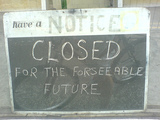
One Monday morning, I went to run a workshop at Wellington College for a group of teachers on a range of web 2.0 tools. I opened up my http://learningweb2.wikispaces.com site and during the course of the morning went to go to where I have all my blog collections so that I could pull up secondary school examples. On my ‘Finding blogs’ page I was in for a nasty shock - all of the feeds that I had aggregated using a tool called RSS Mixer were no longer there. When I visited the site, there was a message that it had closed down 15 days earlier taking all my feed collections with it! I had spent quite a long time putting these together so this was obviously not the best news!! I have messaged them on Twitter but so far have heard nothing back.
One of the tools I talked about when at the workshop was a favourite I had picked up from Lenva called CircaVie from AOL. I received an email today from Mark Callagher who organised the workshop to say that there was a message on the site saying it is closing on the 15th January. I head there tonight and sure enough this is the case. There is a similar tool out there called ‘Our Story‘ which I hope I can use instead but I am starting to feel as if the ground is not that solid anymore beneath the web 2.0 movement.
Basically, a lot of these sites are starting to look rather less than stable - even with larger companies like AOL behind them. I wonder how many more will topple with the credit crisis in full swing. Or would these have pinged out of existence without the current financial climate. This is one of the definite drawbacks to using web 2.0 tools - you can’t be sure that they will still be running next month!
Just to top off all of this bad news, the announcement has been made that VoiceThread is no longer allowing multiple logins at the same time on the same account. Say goodbye to the ability to have kids logged into a single account using the sub identiies to switch to a different picture at the same time as other kids. Now you will need to have multiple accounts for them to log in with to have them working on a VoiceThread at the same time.
Hmmm….lucky that Christmas is coming up to cheer everyone up :-) To make up for this bah humbug post I will do something extremely upbeat before Christmas (now I just have to figure out what!)
Do you know of any other online tools that are closing up shop? Do you think this is directly related to the financial crisis?
Flickr image by Gaetan Lee
Authored by suzievesper. Hosted by Edublogs.
Suzie Vesper
.
Blog
.
<span class='date ' tip=''><i class='icon-time'></i> Jul 16, 2015 09:01am</span>
|