Blogs
|
By Angie Mellor
Police Sergeant and Adjunct Instructor of Criminal Justice, Bob Nordby knows a thing or two about the skills his students need in their future careers. That’s why he created a latent fingerprint activity for his Criminal Investigations class at Globe University-La Crosse.
"The class was preparing for a large project at the end of the quarter where they will need to process a crime scene and this is one of the skills that they will have to use," Nordby said.
The students began by watching a video and an in-class demonstration of lifting latent fingerprints. Nordby also emphasized the importance of fingerprints at a crime scene. "They were shown how to compare fingerprints and analyze how fingerprints can identify a person individually by characteristics and marks."
Following instruction, students had to practice "lifting" three fingerprints off of items. The students then compared their prints against a "criminal database" they created in an earlier class after they fingerprinted each other.
"The last part of the assignment was to post a photo of their prints and determine who committed the crime through analysis and comparison," Nordby said.
Nordby summarized the activity in seven steps. "The students learned how to fingerprint a person, dust for latent fingerprints, why fingerprints are important, how to "lift" prints, how to analyze and compare fingerprints, how to document their findings for a court of law, and how to think creatively when problems arise."
One Criminal Justice student noted, "I love doing these types of activities rather than lectures every night." Nordby agreed that the hand’s-on experience was very beneficial for his students.
"The goal was to give the students actual experience that was part of the assigned reading," he said. "By having a practice exercise, the students develop a connection from what they have read to how they can apply the material."
The post Students Discover "Who Dunnit" Through Fingerprint Exercise appeared first on Globe University Blog.
Globe University & Minnesota School of Business
.
Blog
.
<span class='date ' tip=''><i class='icon-time'></i> Jul 16, 2015 12:58pm</span>
|
|
Commencement speech of Patricia Behrendt, accounting graduate, Globe University - Wausau campus
"Congratulations graduates!
Today we are the superheroes of the story, donning gowns and mortar boards instead of a cape or disguise like Superman, but superheroes nonetheless. Embrace it, own it, and make it matter.
Patricia Behrendt speaknig at the Wausau campus commencement ceremony
The definition of a superhero is someone who uses their knowledge and natural abilities to improve the world, thus giving others the courage and inspiration to do the same. We have spent our time as students perfecting our abilities and knowledge, which in time will seem like the easy part. We have also dealt with whatever personal kryptonite or villains that were put in our path.
In reality, none of us will ever leap a tall building in a single bound, or bend steel in our bare hands. Rarely is any one person put in a position to save the world or to alter the destiny of humanity. But we can always return that lost wallet with the contents intact, or tell the truth when it matters, and stand our ground when it’s so much easier to just walk away.
We all have a hero inside of us, sometimes we just need a boost of confidence or someone to help us unleash it, to whisper in our ear and say, ‘Go for it! You can do it, you will be successful.’
For many of us the voices whispering these words to us are those of our mentors, teachers, and trusty sidekicks. Look around, your sidekicks are the people sharing this moment with you. Not only witnessing the conclusion of this journey, but welcoming the new beginning it creates.
My sidekicks along this incredible journey have been:
My mom who continues to teach me perseverance,
My dad for teaching me kindness,
My sister for reminding me to stay fabulous,
My brother for proving anything can be turned into something else,
My niece and nephews for reminding me to make time for fun, and one in particular for helping with my homework when I needed it,
And finally, my children, Julia and Lauren, who inspire me every day to become a better version of myself.
In my opinion and circumstances, sidekicks are the most valuable part of the process. Without mine, I would have been lost before even getting started.
Patricia Behrendt channeling her inner super hero
In the end, superheroes inspire us to discover our strengths and use them to benefit others. They are made by the paths they choose, not the powers they are graced with.
Batman said it best when he said ‘It’s not who I am underneath, but what I do that defines me.’
I hope you leave here today, channel your inner superhero, and go on to do many great things…
A cape and tights are not required."
The post Globe Graduate: Find Your Inner Superhero appeared first on Globe University Blog.
Globe University & Minnesota School of Business
.
Blog
.
<span class='date ' tip=''><i class='icon-time'></i> Jul 16, 2015 12:57pm</span>
|
|
Examples of visual design are everywhere around you! As a student in #ETT511, each week you will take a photo of at least 1 example of visual design that you come across in your everyday life. Post the photo to Instagram using hashtag #etraeyespy and include in the description why in your opinion the visual design you’ve photographed is either effective or not.
To receive full credit, a minimum of 1 photo each week with brief description should be posted to Instagram with hashtag #etraeyespy. Follow hashtag #etraeyespy to see the visual design examples your classmates "spy" and comment on the ones that you find most interesting.
Jason Rhode
.
Blog
.
<span class='date ' tip=''><i class='icon-time'></i> Jul 16, 2015 12:57pm</span>
|
|
Financial Aid Manager Elizabeth Augustine and Academic Coordinator Kirsten Wichern at Feeding South Dakota
On Friday, June 19th, Globe University-Sioux Falls completed their sixth annual Community Service Day. Twelve faculty and staff members from campus volunteered at Feeding South Dakota, the local food pantry.
Upon arrival at Feeding South Dakota, we were given a tour of the facilities. Food is sorted into categories, making the experience similar to grocery shopping. Hot-commodity items usually include meats and pastries donated by local stores and restaurants.
Staff and faculty worked for two hours sorting donated items into assigned categories, including cereals, canned goods, canned fruits and vegetables, and boxed items. The food was then sorted into boxes that are shipped out to other facilities around South Dakota. Teamwork was definitely a necessity, as well as communication!
"It was such a humbling and rewarding experience to serve our community and our Community Service Day was no exception. To see the thousands of donated food items and to be a part of helping get these supplies out to those in need, is an experience I will never forget." said Financial Aid Manager Elizabeth Augustine.
Globe University staff and faculty members at Feeding South Dakota in Sioux Falls.
"What I loved about helping Feeding South Dakota sort and package the food was not only do you realize what a generous, giving community you are a part of as you dig through the vast amount of donated goods, but as you begin to sort and package them, you also get to see a tangible accomplishment and realize how many people this will directly affect." said Director of Career Services Ann Kolbrek.
We were able to sort through several tons of food in the short time we were there. We were very proud of our accomplishment and impressed with the staff at Feeding South Dakota for their hard work and dedication!
Thank you to Feeding South Dakota for hosting our Community Service Day. We learned a lot about this valuable resource in our community and we are grateful for the time you let us spend there!
The post Globe University-Sioux Falls Spends Community Service Day at Feeding South Dakota appeared first on Globe University Blog.
Globe University & Minnesota School of Business
.
Blog
.
<span class='date ' tip=''><i class='icon-time'></i> Jul 16, 2015 12:57pm</span>
|
|
Why should you consider blogging as an educator? Check out this article discussing the importance of teacher bloggers and offering blogging suggestions for teachers.
http://www.teachhub.com/importance-teacher-bloggers
Jason Rhode
.
Blog
.
<span class='date ' tip=''><i class='icon-time'></i> Jul 16, 2015 12:57pm</span>
|
|
Sometimes a new job is just what the doctor ordered. Kayle Nieuwenhuis, a March 2014 graduate of the medical assistant program , had been working as a certified medical assistant for over a year and half when she decided it was time for a move- quite literally. As she began her search for a new job in a new city she turned to her experience at Globe University-Madison West.
Kayle Nieuwenhuis on her first day at ProHealth
I excelled at Globe University more than I could have imagined," says Kayle. Her quest to become a medical assistant began with an externship in the Neurology department at Meriter Hospital. Some of the major skills she learned from her externship were EMG’s, lumbar punctures, Botox injections for chronic migraines, and the many other CMA duties while working with physicians on "the floor."
When asked about her education experience at Globe University-Madison West, she stated that "being hired through my externship was such a compliment to myself and my teachers! The level of support I received from the faculty is unlike any other. I truly believe their support and my hard work helped me achieve employment before graduation."
Like many people, Kayle was planning on moving to a different city at some point and was seeking assistance with her job search and updating her resume. Her advice to graduates in a similar situation is "after graduation remember to go back and work with the faculty and the career services department". So with a resume and cover letter updated, a few applications, a lot patience and hard work, Kayle was hired!
In her new role, Kayle will be working at ProHealth Care in the Waukesha Family Residency Program. She will be working with medical students achieving their Doctorate in Family Medicine. Kayle had some parting words for current students.
"From your school work all the way to the workforce, be passionate. Employers see that and it pays off, quite literally!", says Kayle. We wish the very best of luck to Kayle and hope she continues her passion and drive as a certified medical assistant at ProHealth.
The post Graduate on the Move: Job Searching in a New City appeared first on Globe University Blog.
Globe University & Minnesota School of Business
.
Blog
.
<span class='date ' tip=''><i class='icon-time'></i> Jul 16, 2015 12:57pm</span>
|
|
As you look to build your own personal learning network, here’s a great collection of technology blogs specifically geared toward education that you might find of interest:
http://www.onlinedegrees.org/top-100-technology-blogs-for-teachers
~ Dr. J
Jason Rhode
.
Blog
.
<span class='date ' tip=''><i class='icon-time'></i> Jul 16, 2015 12:56pm</span>
|
|
The faculty of Globe University-Wausau is pleased to name Marjorie Hanna of the veterinary technology program as one of the Spring Quarter 2015 students of the quarter.
At GU-Wausau, GPA isn’t considered in any way in the selection of the Student of the Quarter. Instead, this award is meant to recognize hard work, attendance, attitude, professionalism, and exemplification of Globe’s We Care philosophy.
Marjorie exemplifies all of these qualities on a regular basis.
Marjorie said, "Yay, I passed pharm, and now I have bearded dragons!"
"I’ve gotten to know Marjorie well," said Nora Craven, campus librarian. "She worked with me in the library, and I could always count on her to be there and ready to work. She would tackle any project with a smile, no matter what the project was! Marjorie faces her challenges with a sense of humor, and she demonstrates a positive attitude on campus."
"When Marjorie first started working in the library, she was hesitant about working with the reptile pets," Nora continued. "But she dealt with her concerns and became a great caretaker for them, and even a fan. She made it a goal to get bearded dragons for herself when she passed pharmacology."
Marjorie takes her studies at Globe University-Wausau seriously. She is committed to fulfilling her life-long dream of starting a non-profit to rescue abused horses and pair them with abused children to allow both to heal.
Marjorie Hanna with Bankrupt
"This dream started for me when I was twelve," said Marjorie. "I showed a Clydesdale named Bankrupt at the Fond du Lac county fair. This opportunity helped me find direction and kept me out of trouble. Because of my experience, I plan to name my non-profit Bankrupt’s Safe Haven."
Marjorie is halfway through the veterinary technology program, and is excited about the future. "Globe has made my dream a soon-to-be reality," she said. "Down every hallway is an amazing librarian, teacher or staff member willing to help in any way possible. Even if they are not teaching your courses, they will reach out to you. When I was ready to give up once, a medical assistant teacher gave me a pep talk. Thanks to the amazing staff at Globe, I have stayed focused on my goal and now am halfway to it."
For the entire summer quarter, Marjorie will enjoy a designated parking spot, complete with her name and photo on the sign. "I am flattered that I was picked as student of the quarter," Marjorie said, "But all the credit needs to be given to the hard working teachers and staff at Globe for always being there to help no matter what. You are all so wonderful and make the learning setting perfect for students like me to succeed in classes. Thank you all."
The post Celebrating Another Student of the Quarter! appeared first on Globe University Blog.
Globe University & Minnesota School of Business
.
Blog
.
<span class='date ' tip=''><i class='icon-time'></i> Jul 16, 2015 12:56pm</span>
|
|
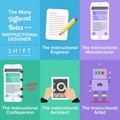
Click here to enlarge | Source: e-Learning Infographics
The Instructional Designers’ Roles Infographic shows that the instructional designer is part engineer, part architect, part artist, and part craftsman. It definitely entails a lot of flexibility or the ability to balance roles. What other roles would you suggest be added to this diagram? Feel free to leave a comment with your ideas!
Here are a few other resources related to instructional design that you might find helpful.
7 Steps To Become an Instructional Designer
How To Get A Job As An Instructional Designer
What Does An Instructional Designer Do? Infographic
What an Instructional Designer Does? 3 Myths Revealed
Is it necessary for an Instructional Designer to be a Subject Matter Expert?
The Role of an Instructional Designer as Project Manager
Jason Rhode
.
Blog
.
<span class='date ' tip=''><i class='icon-time'></i> Jul 16, 2015 12:56pm</span>
|
|
As I’ve previously shared, I was excited to learn that my online course, ETT 510: Instructional Media and Technology, has received the distinction as a Blackboard Catalyst Exemplary Course for 2013. Here’s a brief course tour I’ve prepared to be included with other Blackboard Exemplary Course Award-winning courses that showcases a few of the highlights of this course.
For those interested, below I’ve included more details about this course and the elements that the reviewers of my course agreed were exemplary.
About the Course Design
This course, ETT 510: Instructional Media & Technology, happens to be a required first-semester course for in-service teachers pursuing a Master’s Degree in Instructional Technology with a K-12 tech specialist endorsement. While I had taught this subject matter previously, this happened to be the first opportunity for me to teach this course at NIU and I would be the first instructor to teach this course in the online, accelerated format in Blackboard at NIU.
While students in this course attended a face-to-face orientation at the beginning of this course, the remainder of the course was fully-online. As such, the course was designed as a fully-online course with interaction and collaboration, assessment, and learner support elements designed for a fully-online learning experience for students. Course objectives were written in measurable outcomes, easily located throughout the course, and made available in a variety of areas in the course (within the syllabus and each individual learning unit). Notable areas of the course demonstrating exemplary course design elements included:
Welcome - Start Here
The course entry point was a content area with an item that provides students with easy access to course description, objectives, orientation, getting started tips, online synchronous meeting dates/times, as well as contact information for course instructor and online support specialist who would serve as primary student support contact throughout the cohort program.
Your Classmates
In an effort to promote the building of an online learning community, photos of each student were taken at initial face-to-face orientation and made available as a cohort photo directory students can view within the "Your Classmates" area of the course or download as 1-page PDF, also available within "Your Classmates". These instructor-posted student photos turned out to be extremely helpful in developing social presence, especially given the fact that NIU has not yet enabled the cloud profiles feature in Blackboard.
Units
The course was organized into Units, with objectives for each unit included in the description of each unit folder as well as within the folder. Each unit contained an introduction and welcome to the unit from the instructor, overview, objectives, readings and resources, activities and assignments, and tips for success. In short, everything students needed for the unit could be accessed from within the unit folder. Units were made available to students in sequence on the day the unit began. Units were listed in reverse chronological order so that the current unit is available at the top of the page (this reduced the need for excessive scrolling). This same reverse-chronological ordering of items was carried through the Discussions area as well for consistency sake.
Readings
The readings and other instructional content items were organized by unit and available for the entire course in the "Readings" area of the course. All readings and instructional videos were made available to students at the beginning of the course for students who wished to work ahead on their readings. A CourseSmart e-textbook was used along with numerous visual and auditory elements.
Calendar
A link to the Calendar tool was included in the course menu, as it contains due dates and links to all course activities and assignments. Due dates were assigned to all assignments in Blackboard so they were automatically listed in the Calendar.
Interaction and Collaboration
Both interaction and collaboration were important components purposely designed and developed throughout this course. Utilizing a constructivist approach, plentiful opportunities for synchronous and asynchronous interaction were designed that promote critical reflection and other higher order thinking skills. Synchronous online class meetings conducted via Adobe Connect included activities that benefited from real-time interactions and facilitated "rapid response" communication.
Communication activities throughout the course were designed to help build a sense of community among learners. Student-to-student interactions were required as part of the course, with quality expectations and rubric explaining evaluation criteria provided and students are encouraged to initiate communication with the instructor. The instructor actively participated in communication, including providing timely and detailed feedback to students. Notable areas of the course demonstrating exemplary interaction and collaboration elements include:
Announcements
I used communication tools, including Announcements, to provide course updates, reminders, special announcements, etc. I recorded a weekly introduction to the unit and embedded in an Announcement posted at the beginning of the unit as well as included within the unit folder. In addition to using Blackboard’s Announcement, Email, and Discussion tools for interacting with students, I also used a Remind101 texting list that all students joined for sending reminders and news items.
Click image above to enlarge
Discussions
Participation in asynchronous discussion was required during units 1-8. During each graded unit discussion forum, students chose from among several discussion questions to post an initial response to. Forums were "post-first" so that students were not able to see the posts of their classmates until after them posted their initial response, promoting original thinking. Students were then required to respond to a minimum of two other classmates during the forum who didn’t already have two other responses.
My Journal
At the conclusion of each unit, students reflected on their learning journey during the unit and posted a reflection to their online journal in Blackboard. This journal was where students documented in their reflections any "aha" moments they had as well as poignant comments from the discussion, readings and resources, or any other takeaways. The journal was especially helpful to students when they wrote their Self-Assessment Paper near the end of the course. Students had the option to journal using either text or video.
Groups
Collaboration was a key to this course, with groups of 3-4 students each formed during unit 1. Students then worked with their group throughout the remainder of the course to research and give a presentation introducing an assigned instructional design model as well as to prepare a three-phased instructional design document. Groups had access to all group collaboration tools in Blackboard as well as an Adobe Connect room for their group.
Assessment
A wide variety of assessments were incorporated into this course, including discussions, blogs, journals, group research project and presentation, and group instructional design document assignments, providing students with a diverse assortment of online assessment experiences to demonstrate their competence in meted stated outcomes. Assessments included were designed to mimic authentic instructional design environments, requiring higher order thinking including synthesis of concepts, analysis, and problem solving. Many self-assessment opportunities were provided through weekly self-assessment journals and Self-Assessment Reflection Paper where students reflected on their own learning progress and received constructive, meaningful feedback from the instructor.
Within the "Assignments" content area, all assignment instructions were provided for students to view at any time during the course. In addition to interactive rubrics used for grading all discussions, journals, blogs, and assignments, rubrics were included in the description of each assignment. Assignments were deployed within the "Activities and Assignments" folder within the corresponding unit folder in which it is due, resulting not only in all required information for a given activity easily accessibly to students at the point and time needed, but assignments only available for students to complete when the corresponding unit folder is available to students in Blackboard.
Adaptive release rules were used to control the availability of all Blackboard tools used (discussions, blogs, assignments, etc.) reducing cognitive overload as students could not submit assignments until the week in which the assignment was due. Students did however have access to the rubrics and all instructions and expectations from the beginning of the course within the "Assignments" menu item.
Learner Support
Students in this course, as members of a cohort program, were fortunate to have an Online Support Specialist assigned to them who was their primary personal support conduct for the duration of their program. Despite the fact that this highly available support staff member was available, a variety of other learner support elements were incorporated into the course design, including:
Your Instructor
The "Your Instructor" menu item included contact information for the instructor, in multiple forms of communication, including phone, text, email, and Twitter. Also included were details including expected response time for email replies, instructor’s role explained, etc.
Click image above to enlarge
Learner Support
The "Learner Support" area of the course included clearly labeled tutorial materials explaining how to navigate the LMS and the specific course. Video tutorials by the instructor were captioned and fully accessible. Links to additional tutorial materials, such as Blackboard Help Manual for Students as well as Blackboard Tutorials for Students, and included to support multiple learning modalities: audio, visual, and text based. Links were included to mobile apps that students would use during the course. Contact information for NIU’s 24/7 Helpdesk were included. Technical accessibility issues were addressed with course materials using standard formats to ensure accessibility and videos all streamed directly from YouTube.
Overview
The "Overview" area of the course, while containing the syllabus and other general course overview information items, included numerous additional learner support items as well as links to institutional policies, materials, and forms of relevant learner success. Included were links to institutional services, such as the library and writing center, clearly labeled and easy to find.
Overview > Feedback
Student feedback was important in guiding future iterations of this course. Students had the opportunity to give feedback to the instructor regarding course design and course content both during course delivery and after course completion. Through the Mid-Course Feedback Survey (Unit 5) and End-of-Course Feedback Survey (Unit 10) students participated anonymously in course evaluation. There was also a "Glitches" discussion forum where you can report any typos, broken link, or other error in the course.
Exemplary Practices
The top three "stand-out practices" self-identified in this course include:
Weekly Unit Introduction YouTube Videos
To promote increased sense of instructor presence in this course, I recorded and posted unit introduction videos each week that introduced key concepts and activities for the upcoming unit as well as wrapped-up the previous unit discussions and activities. These videos recorded on YouTube were embedded as the first items within the Units content folders as well as within Announcements, automatically emailed to students when posted in Blackboard. Videos were also made available via an instructor-created YouTube playlist that students could access via their mobile device outside of Blackboard.
These YouTube videos from me were all recorded using using YouTube’s built-in webcam recording capabilities as well as captioned with YouTube’s built-in captioning feature. A tutorial demonstrating how the instructor recorded and captioned videos is available here.
In addition to the YouTube videos all being captioned with caption viewable by clicking the "CC" button in the embedded player, a downloadable PDF version of the transcript was attached to the videos posted in the Unit folders.
Video Participation Option for Discussions and Reflection Journal Activities
In the graded asynchronous discussions for Units 6-8 as well as weekly self-assessment reflection journals, students were given the option of participating using the Video Everywhere feature in Blackboard instead of the traditional text format. For an example, see the Unit 6 Discussion Forum. The instructor recorded and posted a screencast tutorial demonstrating how to post a video discussion response in Blackboard and denoted forums with video response options by including a video icon and instructions within the description of the selected forums. Several students did opt for participating in video and shared very positive feedback concerning the experience.
Media Exploration Activities Posted to Assignment Blog
To introduce students to emerging instructional media tools as well as provide them an opportunity to produce simple materials following principles of good visual design and production, Media Exploration Activities were assigned throughout the course where students explored a variety of web-based media tools which have direct instructional media application, creating a sample of each of the following instructional media: survey, edited image, multimedia poster, word cloud, flow chart, digital pinboard, and screencast.
For each media tool explored, students created a sample instructional media item, following principles of good visual design and production, using the tool as well as shared a summary of their experience exploring the tool (such as what features they tried, what they liked best about the tool, what surprised them, etc.). For each activity, an assignment blog was setup where students posted their sample media item created and summary of their experience. Like the rest of the assignments in the course, Media Exploration blog posts were graded using a rubric and feedback provided to students.
For examples of other award-winning online courses, see the 2013 course tour videos.
I’m in the process of preparing a poster presentation for BbWorld 2014 and will share that here as well later in July.
Jason Rhode
.
Blog
.
<span class='date ' tip=''><i class='icon-time'></i> Jul 16, 2015 12:55pm</span>
|