Blogs
|
When you train employees, you give them tons of information to absorb, which can be tiresome. Fortunately, by improving employees’ intrinsic motivation, you can help them learn training content better. Psychology gives us a look into how to improve motivation, and it all comes down to a combination of video training and emotion.
According to a study published in the journal Psychology of Sport and Exercise, video learning helps improve a person’s emotions, which in turn elevates motivation.
Studying motivation
Researchers studied 210 volunteers by introducing them to a series of conditions involving music and video components. During the experiments, researchers monitored participants’ emotional states and motivational levels. The results indicated that music in particular impacted emotion and thus motivation. However, video also boosted intrinsic motivation, though most strongly when played in conjunction with music.
Using results to improve training programs
While the study primarily emphasized the effectiveness of using video and music in sports to increase athlete motivation, the psychology is also useful in the workplace. The study indicated that combining music and video elements improved intrinsic motivation best. Therefore, a company employee training program should make use of both. Fortunately, eLearning courseware uses video and music components to provide employees with a training option that’s engaging and triggers their motivational centers. Here are some important characteristics of eLearning content produced by ej4:
Videos are short (less than 10 minutes long).
Though ej4′s videos feature music, the melodies do not distract from the course’s content. The information employees learn is the most important part of training, so ej4 places priority on content and uses multimedia elements such as music as a supportive quality.
The videos allow companies to design a rewarding training program. Once an employee watches the quick video, he or she can put the newfound information into practice. This reinforces the sense of achievement an employee had when motivated.
If your company wants to harness video learning to improve motivation in work training, check out ej4′s vast library of off-the-shelf content or learn more about how a custom solution might be the right fit for your company. For more information, contact our sales team.
The post Training With the Help of Psychology appeared first on .
ej4 Blog
.
Blog
.
<span class='date ' tip=''><i class='icon-time'></i> Jul 27, 2015 10:49am</span>
|
|
Whether you’ve held a high post for 10 years or you’re a newly anointed leader for your company, there are always going to be tough decisions headed your way, and if you’re not careful, mistakes will follow.
And while you can’t outrun failure completely, you can learn to avoid the bigger potholes with better knowledge and training.
For more on the biggest leadership snares, check out our new video, "Top Leadership Traps."
Like what you see? Get more leadership advice from our Leadership Curriculum today with a 15-day trial of Thinkzoom.
Start Your Free Trial Today
The post New Video: Top Leadership Traps appeared first on .
ej4 Blog
.
Blog
.
<span class='date ' tip=''><i class='icon-time'></i> Jul 27, 2015 10:49am</span>
|
|
If your company is redesigning a training program or building one from the ground up, you may not be sure what your next move should be. You have to decide what strategies you want to use and the tools you should implement to accomplish your goals. Fortunately, training an employee isn’t much different from educating someone. For this reason, you can turn to various learning strategies that have been part of the education industry for years. Today we’ll analyze synchronous and asynchronous eLearning approaches and which will work best for your company.
Synchronous
A synchronous teaching (or in your case, training) structure has both the educator and the student working together at the same time. For a business, this would mean that the trainer (often times an HR representative or a seasoned employee) would present the materials directly to their peers. You might share eLearning courseware videos then discuss the content. Employees can pose questions directly to the presenter and even complete additional activities. According to a study published in EDUCAUSE, synchronous learning models can be more psychologically engaging because students get immediate gratification. If they have a question, it can be answered right away.
Asynchronous learning allows employees to train at their desks.
Asynchronous
This model of educating has the teacher and student work separately. Instead of a presenter showing training videos and answering questions, the videos themselves become the instructor. Employees can watch eLearning courseware content from their desks and work at their own pace. This model also frees up your employees to do other things. The study indicated that while the asynchronous model may cause learners to feel isolated, it helps them focus more on the course content and improves their ability to process information. If you place these outcomes on the top of your priority list, building your training program with the asynchronous structure could fit your company goals best.
Assessing the options
Both models of eLearning are conducive to the use of video training tools. The synchronous model allows you to train several employees at once and answer questions during the session. The asynchronous system supports content focus but lacks a one-on-one connection. Some companies opt to mix the two. Perhaps employees watch training videos on their own, but meet up during the week to talk to other new employees and a trainer to work through questions. When done with care, blending the two models can give employees the best of both learning options.
Videos used for eLearning are an important element for both teaching styles.
For more about how you can include videos in your program, contact the knowledgeable sales staff at ej4 and they’ll help you find the best tools for your company.
The post Synchronous vs. Asynchronous eLearning for Business Training Programs appeared first on .
ej4 Blog
.
Blog
.
<span class='date ' tip=''><i class='icon-time'></i> Jul 27, 2015 10:49am</span>
|
|
Thanksgiving is just around the corner, so many of your employees are probably thinking about the places they’ll go and the turkey they’ll eat rather than the work they must finish. Even once the season of giving thanks ends, another festive time follows. As such, the next couple months could be a bit unfocused in your office. While you probably want to revel in the coming holidays, you also know that keeping employees engaged will help them stay diligent at work.
Here are some strategies for maintaining productivity while enjoying the holiday season:
Reinstate Goals
With so much to look forward to during November and December, employees may lose sight of company goals. However, you can help them get excited for work by revising goals. For instance, if you want to hit a certain sales number for the year, let your team know where they stand. Simply knowing their proximity to the goal could help them make the final push. You can also have each person write personal goals they want to accomplish during the holidays - this gives them direction during work hours.
"A good leader identifies the skills of his or her team and assigns each member a task suited to those abilities."
Put Skills to Use
A good leader identifies the skills of his or her team and assigns each member a task suited to those abilities. This method of assigning work to your employees not only takes advantage of the skills available, but also motivates people. Most individuals prefer to spend their time doing something they’re good at. Fortunately, many companies are already doing this. According to the Society for Human Resource Management’s 2014 Employee Job Satisfaction and Engagement Survey, 70 percent of people feel they have adequate opportunities to use their skills at work. Is your company among that majority or do you have some work to do?
Avoid Scrooge-like Behaviors
In "A Christmas Carol," Ebenezer Scrooge kept his employee in a cold office on Christmas Eve. He hated the holidays, and his attitude upset those around him. While the holidays may be distracting, you can use festive energy to keep employees working hard. Rather than pretend the world isn’t celebrating, bring the excitement to the office. You can hold a holiday-themed contest in which the most productive person gets a prize. The company could also host a potluck Thanksgiving meal. Doing so makes people more willing to put forth extra effort and encourages socialization, which makes the office a more lively and inviting place.
In the SHRM survey, 73 percent of employees said they were satisfied with their relationships with their co-workers. A healthy social environment contributes to overall employee happiness, so accommodate it during the holidays.
The post Improving Employee Engagement Over The Holidays appeared first on .
ej4 Blog
.
Blog
.
<span class='date ' tip=''><i class='icon-time'></i> Jul 27, 2015 10:49am</span>
|
|
Everyone likes to feel that they’ve done a good job or are appreciated, and that’s especially true when it comes to work. Employees who are praised are more motivated to put effort into their jobs. In fact, according to a Gallup poll that was published in the book "How Full is Your Bucket?," the No. 1 reason employees leave their jobs is because they don’t feel appreciated. What’s more, the survey revealed that 65 percent of Americans did not receive recognition for their work.
"The No. 1 reason employees leave their jobs is because they don’t feel appreciated."
That statistic may be daunting, but your company doesn’t have to follow the trend. The Thanksgiving season is all about being grateful for the things you have and expressing that gratitude. You can uphold the spirit of the holiday in the workplace by showing your employees just how much you appreciate all they do to make your company successful. Here are a few ways to genuinely express thanks this November:
Praise specific work
While saying "You do so much great work" is a nice way to praise your employees, your gratitude for their skills and effort will come across as more meaningful if it’s specific. Think of a time when your employees shined and highlight those instances. For example, if someone prevented an error that would have caused you to start a project over, you can say "Thank you so much for your diligence and attention to detail. Because of your keen eye, we avoided a disaster." By pointing out a specific event, you can highlight your employees’ unique strengths. When you do, they may gain confidence, and could feel empowered to use their skills more in the future.
Be flexible
Nothing ruins morale like having to trudge through work during the holidays. People want to be at home with family, not in the office. While your company may not close until Thanksgiving, the days before should feel more festive. You can show your employees you care, and say thanks for their hard work, by offering flexibility. Perhaps people can work from home more during the holidays, or work during off hours (start early to leave early). That way, you allow your employees to prioritize loved ones during the Thanksgiving season.
Offer public praise
Some employees get embarrassed by public praise, but sharing their job well done with others shows you truly appreciated it. Consider writing a newsletter about the outstanding individual, or shooting out a company-wide email. You can also offer accolades quickly in a meeting.
Have fun
Holiday parties make the office a fun work environment. Consider hosting a Thanksgiving event that gets everyone excited. You can also use a party to recognize outstanding employees.
The post How to Show Genuine Appreciation During Thanksgiving appeared first on .
ej4 Blog
.
Blog
.
<span class='date ' tip=''><i class='icon-time'></i> Jul 27, 2015 10:48am</span>
|
|
While training employees at your company, you may have noticed that some grasp concepts better than others. It’s true that people do process information at different paces, but the issue could also be that your old training program didn’t cater to numerous learning styles. This theory posits that, while everyone can learn the same information, the way they do differs. Some people best understand a concept when it’s presented using images while others prefer hearing it.
No matter how your employees learn best (and you likely have a variety of learning styles represented among your staff), you can train each individual effectively. Here’s a look at how to incorporate different learning styles into your employee video training program:
"No one learning style is superior to another."
Know the styles
Depending on which model you look at, there are three to seven learning styles. We’ll focus on the three major ones.
Visual: Visual learners process information that’s image-based more easily than other sensory interactions. Showing them a graph rather than reading numbers will be most effective for helping them grasp a concept. As such, your eLearning courseware should use plenty of visual stimuli. Fortunately, videos are optimized for visual learners.
Auditory: These kinds of learners understand information fastest when it’s read or spoken aloud. They pick up on subtle sound clues, like inflection and pitch. For this reason, auditory learners enjoy listening to speakers rather than reading a textbook. Video training is also good for auditory learners, as many eLearning courseware programs include a person who presents information.
Kinesthetic: Don’t stop at showing your employees a video: offer them hands-on training. Kinesthetic learners best understand knowledge after they’ve applied it.
According to a report by the California Journal of Science Education, no one learning style is superior to another. Anyone can master the training you provide, just in their own way.
Develop a program
Seeking eLearning courseware that caters to visual and auditory learners and coupling it with hands-on applications will create a training program that suits all your employees’ needs.
To learn more about how eLearning can improve your company’s training model, contact our sales staff.
The post Catering to Different Learning Styles in Your Corporate Training Program appeared first on .
ej4 Blog
.
Blog
.
<span class='date ' tip=''><i class='icon-time'></i> Jul 27, 2015 10:48am</span>
|
|
As you’ve trained employees on job-related skills, you’ve probably encountered a couple of outcomes: Some may get bored and zone out, others could appear interested and then fail to integrate their new knowledge into their performance, and a few could leave the training and excel at work. Ideally, you want most (if not all) of your employees to find the path to a solid learning experience. How do you achieve that outcome? Studies suggest a number of methods, though the one you choose comes down to your company’s needs.
According to a study published in Sage journals, interaction is one of the key factors in developing good learning outcomes when using digital tools. It just so happens that video games are a very interactive platform, and they hold some clues for designing a training program that keeps your employees engaged and uses modern eLearning courseware tools.
The same strategies that make video games fun could help you teach your employees.
Covert guidance
Many video games are designed to teach players a skill set they'll use later in the story. For instance, a player might have to fight a low-level monster with certain skills. Defeating that monster teaches the player a strategy for beating that monster, even if the process doesn't feel like an education. Later in the level, the player may encounter a boss monster with similar skills. The player already knows how to defeat it thanks to the smaller obstacles he or she faced. While the boss is more challenging than the low-level monster, knowledge of the tools needed for winning are what matter.
Breaking this down, the strategy of teaching players is easy to apply to eLearning. You'll need a couple of things: example problems and real-life scenarios. Look for eLearning videos that teach a certain skill and offer examples. For instance, the video might display something like "What Susan should do if she's dealing with a tough client." The video will give employees an example of what to do, providing them with the skills they needs to handle the situation in real life (facing tough clients can be akin to fighting a boss in a game).
Achievement as motivation
When you accomplish something, your brain releases dopamine, a feel-good chemical. This is called reward, and it's a feeling your brain wants to experience again. So, your mind analyzes how to obtain the reward and yearns to go through the steps that brought it that satisfaction. Games make use of this system by adding achievements. For instance, you might get points for completing a goal.
Your eLearning program can use reward to inspire employees too. Consider giving some form of recognition for finishing training videos. The sense of reward could help motivate employees to watch more videos.
Using game mechanics to develop an integrative and engaging training program requires eLearning courseware. You can get a free trial of Thinkzoom to see what those videos could be like.
The post eLearning Inspired by Game Design appeared first on .
ej4 Blog
.
Blog
.
<span class='date ' tip=''><i class='icon-time'></i> Jul 27, 2015 10:48am</span>
|
|
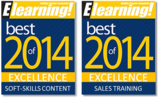
The winners of the 2014 Best of eLearning! Awards were just announced and ej4 is very excited to be going home with two Award of Excellence plaques in the following categories!
With over 3,000 votes cast on nearly 89 different vendors in 27 categories by readers of Elearning Magazine, this ballot honors the best-in-class developers and technology in the eLearning industry.
Thank you so much to all the voters for recognizing ej4 in this year’s awards show!
As we roll into the new year, we’ll take these honors with us as we continue on as the performance improvement leader for companies worldwide.
Check out our award-winning content today with a 15-day trial of Thinkzoom.
Start Your Free Trial Today
The post ej4 Selected as Best of eLearning! 2014 Winner appeared first on .
ej4 Blog
.
Blog
.
<span class='date ' tip=''><i class='icon-time'></i> Jul 27, 2015 10:48am</span>
|
|
Path-goal theory is a system of leadership that emphasizes the setting and achieving of goals. Leaders use a path-goal approach because it’s designed to increase employee motivation, empower team members and boost productivity. While this method is generally reserved for strengthening leaders, you can apply it to your company’s training program - if path-goal theory can produce all those benefits, it’s certainly welcome in a training setting. Here’s a look at the theory’s four chief formats and how you can apply them to your eLearning courseware and training program:
Achievement
Leaders who use the achievement approach set high goals or standards for their employees to meet. For this approach to be successful, leaders must demonstrate confidence in their team’s ability to overcome challenges, otherwise the high expectations could cause too much stress. When it comes to employee training programs, set the bar high. Create a list of goals you want employees to achieve and a time frame in which they should get them done. For instance, you might note that your team has a week to watch all their assigned eLearning courseware and that they’ll have to have a meeting about what they learned at the end of that time. Make sure you express that this is an achievable goal, even if it seems like a short deadline.
Leadership tactics can apply to company training
Directive
The directive approach outlines specific goals for now and into the future. You might tell employees what you hope their training will accomplish down the road. For instance, watching eLearning videos about workplace safety could make the office a better place in which to work. Lay out how each video contributes to that overarching goal and what you expect employees to do after their training to support said goal.
Participative
When you use participative path-goal theory, you offer your employees a way to interact with your (or, in this case, their) training program. Have them leave suggestions, comment on videos or provide feedback in general. You may find they really like the course videos but wish they had more opportunities to put the information they learned into practice.
Supportive
Sometimes leaders need to step back to support their employees. Training naturally falls into the realm of support, as such programs are meant to help employees develop their work-related skills. Make sure everyone can access the videos they must watch and has the assistance they need to put newly acquired skills into practice.
Numerous studies have tried to determine how effective path-goal theory is. One study published in Administrative Science Quarterly noted that path-goal theory "shows promise." Using the model in your training program may help you figure out whether it works for you. You can learn more about eLearning courseware and how you can use it along with path-goal theory for training purposes by contacting our sales team.
The post Applying Path-Goal Theory to Corporate Training appeared first on .
ej4 Blog
.
Blog
.
<span class='date ' tip=''><i class='icon-time'></i> Jul 27, 2015 10:48am</span>
|
|
Taking on eLearning for business is a step toward a modern and effective training program, but poor implementation can negate the benefits of digital tools. Companies that want to use eLearning courseware should take time before purchasing a subscription to think about what they need and how they’ll introduce new training tools. Furthermore, they must consider how they’ll ensure the program satisfies employees needs. Here are some factors companies must consider before getting the ball rolling:
Create a List of Goals
Writing a set of goals for your new eLearning-driven training program will help you select the right tools. You should also identify what was not working in your last program to figure out what you’ll need to change in this next one. Meet with others in your company to brainstorm together. A few goals might include:
Improve employee learning outcomes.
Help employees retain training knowledge longer.
Decrease the time it takes to onboard new staff.
Reduce training spending.
Increase convenience of the training program.
Use your goals as guidelines when developing your training program.
Plan a budget when restructuring your employee training program.
Write and Approve a Budget
All companies would like to reduce overhead costs, but you won’t be able to do so if you don’t track and plan your spending. What’s more, the budget you create likely must be approved before you can go ahead and purchase eLearning courseware. Consider what you’re spending now on training and how much of that money goes to various categories, such as paying staff or covering material costs. Then, see where you can save when switching over to eLearning. For instance, you can use off-the-shelf content, which is ready to go and covers a wide variety of topics, because it’s an affordable option. What’s more, because eLearning videos contain the content you’ll present employees, you may not need your staff to spend their time doing the training. Of course, you can follow up video-watching sessions with in-person collaborative meetings in which employees discuss what they learned.
Consider Employee Satisfaction
Training programs are designed for employees, so it’s important that they are satisfied with your work. As the theory goes, happy employees work more efficiently. According to a study published in the journal Computers and Education, employee satisfaction is made up of several elements: learner computer anxiety, eLearning course flexibility, instructor attitude toward eLearning, perceived usefulness of the training, quality of the eLearning courseware, perceived ease of use and diversity in assessments. Meet those needs by choosing a high-quality eLearning provider that makes flexible training tools. Then implement that courseware into your training program in a way that’s easy to use and provides content that’s relevant.
You can get an idea of what eLearning courseware will be like by signing up for a free trial of Thinkzoom.
The post How to Prepare Your Company for eLearning Training Tools appeared first on .
ej4 Blog
.
Blog
.
<span class='date ' tip=''><i class='icon-time'></i> Jul 27, 2015 10:48am</span>
|