Blogs
|
Learning TRENDS by Elliott Masie - July 29, 2015.#882 - Updates on Learning, Business & Technology.56,962 Readers - www.masie.com - twitter: emasie - The MASIE Center.Host: Learning 2015 - Nov 1 to 4 - 789 Colleagues Now Registered!
1. Sitzprobe - Putting it Together.2. Elliott Video on Learning Design.3. Badges for Learning Interest, Too.
1. Sitzprobe - Putting it Together: The other day I went to Williamstown, MA for a Sitzprobe.
Ok, you are probably thinking that it is a medical exam. But, it is a theatrical event that is key in the production of a new musical.
MASIE Productions is supporting the development of a new musical, Unknown Solider, which is being produced at the Williamstown Theater Festival. The Sitzprobe is the day when the orchestra musicians and the singer/actors come together for the first time. Each group has been rehearsing independently, but on the day of the Sitzprobe, they came together in a rehearsal hall and the fullness of the show started to come together.
As we do theatrical productions, I am continually reminded of the relationships between that world and the learning production world. Instructional design and delivery has much preparation, diagnosis and material polishing, but we often skip the key moments in the production process - where it all fits together.
As the Sitzprobe progressed, there were perhaps a hundred small or even medium changes to the music, pacing and dramatic delivery. Imagine if we were to apply the same rigor as we add content, context, slides, learner activity, assessment and engagement to a class or eLearning module.
A Wikipedia Definition: Sitzprobe is a German term used in opera and musical theatre to describe a seated rehearsal—the literal translation of Sitzprobe—where the singers sing with the orchestra, focusing attention on integrating the two groups. It is often the first rehearsal where the orchestra and singers rehearse together.
2. Elliott Video on Learning Design: Here is a 10 minute video about our Learning Design Process for Learning 2015. We get many questions from folks about how the content, context and engagement come together, so I thought it would be helpful to put together a video on our process: http://www.learning2015.com/index.php/item/learning-2015-design-video.html
3. Badges for Learning Interest, Too: Badges are often discussed as indicators of skills, accomplishments or experience. We can also include "Learning Interests" as a possible badge. Imagine if you were learning a new language or working on a certification, such as Project Management. It would be cool to have a badge that would tell your colleagues about your learning interests and goals. I would guess that many would have some helpful perspectives or even ask you if you wanted to practice Spanish over lunch. Let’s expand our Badging Models.
Yours in learning,
Elliott MasieHost, Learning 2015
MASIE Center Seminars, Events and Services:- Membership in The Learning CONSORTIUM- Learning 2015 - Nov 1 - 4 - Orlando, Florida.
Info and Registration: http://www.masie.com - twitter: emasie
Elliott Massie
.
Blog
.
<span class='date ' tip=''><i class='icon-time'></i> Aug 19, 2015 06:28am</span>
|
|
Learning TRENDS by Elliott Masie - August 3, 2015.#883 - Updates on Learning, Business & Technology.56,968 Readers - www.masie.com - twitter: emasie - The MASIE Center.Host: Learning 2015 - Nov 1 to 4 - 789 Colleagues Now Registered!
1. Learning Pursuits: Challenges, Engagement & Gamification Experiment.2. Daily Readiness Check?3. 155 Learning Stories & Coloring Ad!
1. Learning Pursuits: Challenges, Engagement & Gamification Experiment! We are very excited to announce the development of our Learning Pursuits experiment - a mixture of engagement technology, game elements and colleague to colleague networking. We will launch Learning Pursuits for every participant at our upcoming Learning 2015 event in Orlando (Nov 1 to 4).
Imagine 1,600 colleagues - occasionally using their mobile devices to take part in challenges that will include: * Digital Beacon technology to locate learning resources & subject matter experts.* User micro-video production.* Fun augmented reality images.* QR Codes to unlock key challenges.* Learning-Related Trivia Questions.* Time based challenges, engagement strategies and competitive elements.
Learning Pursuits will blend learning targeted activities, along with high fun elements, to experiment with the role of Gamification as a strategy to assist with engagement and colleague collaboration. In addition, Learning Pursuits will be live and engaging as we all head to EPCOT for our 25th Anniversary Celebration. While at EPCOT, participants will be invited to use a combination of photo, geo-location, video and trivia challenges for some cool prizes. As this is an experiment, we will also explore the opportunities, challenges and design aha’s for blending Gamification and Learning.
See our Learning Pursuits announcement: http://www.learning2015.com/pursuits
2. Daily Readiness Check? What if there was a simple, quick "Readiness" check that many employees might do every day.
I had a colleague who was a surgeon and he played an XBox game each day before surgery to give himself feedback on his eye/hand coordination that morning.
What if we had quick "readiness" checks that would give us feedback on our alertness, sharpness, physical or even emotional readiness to do key or hard tasks that day? Ah, let’s do that check before I do a difficult employee review or evaluation. It might trigger a self-awareness that I need to focus before taking on a task.
Love to hear about some dream "Daily Readiness Checks" that you wish were out there. Send a note to emasie@masie.com
3. 155 Learning Stories & Coloring Ad: As our design process for Learning 2015 proceeds, here are some new resources:
* 155 Learning Stories & Activities Slotted: Check out the current (and expanding) list of 155 learning stories, discussions and activities at Learning 2015 - http://www.learning2015.com/sessions* Color Our Learning World Ad: In the theme of Coloring and Learning, we have created a color-ready ad that will appear in the T&D magazine in a few weeks - http://www.learning2015.com/index.php/item/color-our-learning-world.html
Yours in learning,
Elliott MasieHost, Learning 2015
MASIE Center Seminars, Events and Services:- Membership in The Learning CONSORTIUM- Learning 2015 - Nov 1 to 4 - Orlando, Florida.
Info and Registration: http://www.masie.com - twitter: emasie
Elliott Massie
.
Blog
.
<span class='date ' tip=''><i class='icon-time'></i> Aug 19, 2015 06:27am</span>
|
|
Learning TRENDS by Elliott Masie - August 7, 2015.#884 - Updates on Learning, Business & Technology.56,973 Readers - www.masie.com - twitter: emasie - The MASIE Center.Host: Learning 2015 - Nov 1 to 4 - 817 Colleagues Now Registered!
1. Sway, Microsoft’s Beyond PowerPoint Alternative.2. Skills for Learning Teams - Data Analytics.3. Allegiance - Our Show Comes to Broadway.4. Global MeetUps at Learning 2015.
1. Sway, Microsoft’s Beyond PowerPoint Alternative: There is a new product from Microsoft that we have been experimenting with: Sway. It is designed as an alternative and future model for building content, presentations and document sharing with face to face and distributed audiences.
Check it out at: http://www.fastcompany.com/3049484/app-economy/microsoft-sway
We have been impressed in our experiments in the MASIE Center Learning LAB at the flexibility and agility in merging presentations, documents, media and more. Microsoft has made special efforts to engage educators - in both schools and work settings - to help shape Sway. Personally, I love the title - as one would never say that PowerPoint Embraced Swaying :)
2. Skills for Learning Teams - Data Analytics: If there was one skill that I would add to your Learning Time - it would be Data Analytics. This would include these abilities and competencies:
* Structure Big and Personal Data Collection Models for Learning.* Leverage the Data Collection of Learning Management Systems.* Integrate Data Analytics with Design and Assessment.* Interface with Corporate Data Groups to Represent and Connect Learning Efforts.* Bridge the Data Collection Efforts to Workplace and Performance Settings.
Ideally, our Higher Education programs in Learning & Development would add Data Analytics as both a skillset and certification for new graduates. The field needs them!
3. Allegiance - Our Show Comes to Broadway: MASIE Productions is proud to be a Producer for the upcoming Broadway show Allegiance, which stars George Takei, Lea Selonga and Telly Leung. We have been involved with this show for many years - and we are so excited to announce it will start Previews on October 6th and open on November 8th. We are starting our rehearsals in 3 weeks on August 24th.
I wanted to share several elements of our significant involvement in Allegiance:
* Catch a Video of George Takei & Allegiance: http://tinyurl.com/nqak5ja* Tickets to Allegiance: http://allegiancemusical.com/
In addition, if any colleagues are interested in becoming more involved in Broadway Production of shows like Allegiance, send a note to MASIE Productions at elliott@masie.com
I will share some of our learnings as we bring this very powerful and cool show to life on Broadway.
4. Global MeetUps at Learning 2015: We are honored that we have many colleagues attending Learning 2015 (Nov 1 to 4, Orlando, FL) from international locations. We are creating a series of Global MeetUps for learning colleagues from global locations to connect - and for organizations that are building global learning efforts to discuss shared challenges and approaches. If you are interesting in helping to organize some of the Global MeetUps, please send a note to emily@masie.com
Yours in learning,
Elliott MasieHost, Learning 2015
MASIE Center Seminars, Events and Services:- Membership in The Learning CONSORTIUM- Learning 2015 - Nov 1 to 4th - Orlando, Florida.
Info and Registration: http://www.masie.com - twitter: emasie
Elliott Massie
.
Blog
.
<span class='date ' tip=''><i class='icon-time'></i> Aug 19, 2015 06:27am</span>
|
|
Learning TRENDS by Elliott Masie - August 17, 2015.#885 - Updates on Learning, Business & Technology.56,989 Readers - www.masie.com - twitter: emasie - The MASIE Center.Host: Learning 2015 - Nov 1 to 4 - 859 Colleagues Now Registered!
1. Press a Button - Buy a Product - Access Learning?2. Hilton Worldwide & American Express CLOs.3. Cursive Skills Evaporate?
1. Press a Button - Buy a Product - Access Learning? Amazon has been experimenting with small, wireless buttons that can be hung or pasted in your home. Each button has the brand label of a company - for example Tide or Gillette - and is mapped to your Amazon account and a specific product that you use on a regular basis. For example, I can press the Gillette button and in about 5 seconds I have ordered my next shipment of razor blades. So, rather than go on a phone or computer to access Amazon, these one-press buttons encourage regularized ordering. These are one variety in the "Internet of Things" evolution. Amazon calls these Dash Buttons and you can check out their offering at: http://www.amazon.com/b/?node=10667898011&lo=digital-text
We have been experimenting with these buttons in our LAB and are brainstorming how the button technology could be applied to Learning, Support and Knowledge in the workplace.
Imagine that they could be applied throughout a factory or technical environment where a button push sent key content or video segments to a screen nearby or directly to your phone. Imagine if they were part of an Onboarding or Orientation tour and were used to trigger engagement or add to a Gamification element.
Buttons like this are new and, based on our own staff conversations, mildly controversial. We will be exploring the wide range of Push to Learn technologies in the months ahead.
2. Hilton Worldwide & American Express CLOs: I am totally honored to be featuring two of the most innovative Chief Learning Officers at Learning 2015 (Nov 1 to 4, Orlando):
- Kimo Kippen, Hilton Worldwide CLO: http://www.learning2015.com/index.php/item/kimo-kippen.html- David Clark, American Express CLO: http://www.learning2015.com/index.php/item/david-clark.html
Kimo and David are amazing learning leaders and have deep experience in corporate workplace settings as well as Government and Social Services. We will feature each of them at one of our Learning 2015 General Sessions as we explore the opportunities and challenges of scaling learning in a global organization. Learning 2015 information at: http://www.learning2015.com
3. Cursive Skills Evaporate? A personal confession - my ability to write in Cursive is almost gone. Several times a month, I have to write a greeting card or note, and the look and feel of my Cursive writing is embarrassing. I even occasionally try to put the greeting card into the printer so I can use a Cursive Script Font to pretend.
I would like to ask each of my Learning TRENDS readers to take a personal quick test. Write three lines of text in Cursive. And, send me a quick note (via email to emasie@masie.com) with an update on your own Cursive writing skills. What’s happened, why and what is it telling us about shifting skills in the age of technology and texting?
Yours in learning,
Elliott MasieHost, Learning 2015
MASIE Center Seminars, Events and Services:- Membership in The Learning CONSORTIUM- Learning 2015 - Nov 1 to 4 - Orlando, Florida.
Info and Registration: http://www.masie.com - twitter: emasie
Elliott Massie
.
Blog
.
<span class='date ' tip=''><i class='icon-time'></i> Aug 19, 2015 06:27am</span>
|
|
Leonard Low
University of Canberra, November 2009
ABSTRACT: Since July 2007 there have been more mobile phones in operation in Australia than there are people; and when you add in the other mobile, digital devices that ordinary Australians own - such as media players, digital cameras, and portable computing devices - it is apparent that there are tremendous tools for personal and lifelong learning in the pockets of our students. Unfortunately, there is an equally enormous mental rift between the way these devices are perceived by most users (who usually view these devices as being for entertainment or personal communications only), and the way they need to be perceived if they are to be used to their ultimate potential: as digital "pocket knives" of tools for creation and learning. This paper draws a comparison with personal computer users who view computers as primarily an entertainment or communications device; discusses user resistance to the intrusion of "work" into their "personal" spaces; and makes the case that changing user attitudes is just as important as training user skills, if we want to unleash the hidden power of ubiquitous mobile devices for personal and lifelong learning.
Author’s Notes
Educators have contemplated the possible benefits of using mobile technologies for learning for decades, and hundreds of scholarly articles have been published in recent years on the potential affordances of mobile devices for facilitating, supporting, and enhancing learning. With so much interest, speculation and research into the use of mobile devices for learning, and with such broad availability and affordability of mobile devices, why hasn’t there been a corresponding surge in the use of these devices in educational contexts? Why aren’t students already using their mobile devices for personal and lifelong learning?
Two dominant strategies have emerged in relation to ownership of digital devices for mobile learning: one in which a uniform set of devices is provided to all learners to overcome barriers of platform diversity and device access, on a temporary or permanent basis; and an alternative strategy which leverages the mobile devices already owned by students (regardless of interoperability) for learning activities. I believe there are problems with both strategies - problems which currently present psychological barriers to the adoption of mobile devices as learning tools, despite their many affordances.
In the first instance, a school or institution may provide, sell, or direct students to purchase a particular mobile device, for example, an Apple iPhone, for the purpose of study. In cases where devices are loaned to students on a temporary basis, students generally have very little time to develop proficiency or fluency in the use of the device. Better outcomes are evident in cases where students are allowed to retain devices for longer periods of time to develop proficiency and personalise devices to suit individual usage preferences, but the expense of buying these "standard" devices (either for the organisation, or for the student) can make this strategy difficult to implement.
In the second scenario, an educator may draw on the mobile tools that students already own. One major difficulty with this approach is the wide range of mobile devices owned by students, which are as divergent in capabilities for communications and networking, media playback and capture, and application customisation as you can imagine. However the perceived advantage with this approach is that it allows students to use the tools they are already most familiar with for the purpose of learning.
This paper looks at this particular issue - the use of personal mobile devices for learning - and posits that the "personal" nature of these devices is a double-edged sword: it improves flexibility and reduces cost of participation, but at the risk of students feeling like learning is imposing on their "personal spaces".
TBC…
Leonard Low
.
Blog
.
<span class='date ' tip=''><i class='icon-time'></i> Aug 19, 2015 06:26am</span>
|
|
Back in 2006, I made some predictions about where mobile learning might be heading, including the use of augmented reality or "Heads Up" data displays to provide information on a learner’s environment and allow learning "in situ,". Augmented reality has recently really taken off during 2009, with a number of apps on various GPS-enabled mobile phones (notably the iPhone) providing information layered over a camera view of the world; one example of this is the Layar application.
I also predicted the use of image recognition that would effectively enable "visual searches" of objects and images in the real world (and indeed, I reiterated this belief in a comment just yesterday on Stephen Downes’ blog). Want to know more information on that bridge over there? No worries! Just point your camera at it, and image recognition will provide some suggestions on appropriate websites to look at.
When I blogged that idea, however, I’m not sure I expected this technology to actually become available quite so fast. Today, Google announced a new beta application they’ve coined "Google Goggles". And guess what? Their concept illustrations even features a bridge as the subject of their illustrated example - even if it is an American one rather than an Australian one.
The official Google site for the project (which is still in development) provides a number of ways Goggles can be used to accomplish a "visual search", including landmarks, books, contact information, artwork, places, logos, and even wine labels (which I anticipate could go much further, to cover product packaging more broadly).
So why is this a significant development for m-learning? Because this innovation will enable learners to "explore" the physical world without assuming any prior knowledge. If you know absolutely nothing about an object, Goggles will provide you with a start. Here’s an example: you’re studying industrial design, and you happen to spot a rather nicely-designed chair. However, there’s no information on the chair about who designed it. How do you find out some information about the chair, which you’d like to note as an influence in your own designs? A textual search is useless, but a visual search would allow you to take a photo of the chair and let Google’s servers offer some suggestions about who might have manufactured, designed, or sold it. Ditto unusual insects, species of tree, graphic designs, sculptures, or whatever you might happen to by interested in learning.
Just watch this space. I think Google Goggles is going to rock m-learning…
(via Mobility Site)
Leonard Low
.
Blog
.
<span class='date ' tip=''><i class='icon-time'></i> Aug 19, 2015 06:26am</span>
|
|
Gear Diary has just informed me of some good news, just in time for Christmas. Historically, Apple have maintained strict control of the capabilities of the iPhone, by restricting the use of certain functions and preventing developers from using them in "approved" apps. This is the reason that older model iPhones (the original iPhone and the previous model, the 3G) could not install software to record or stream video, despite having a camera built in that was quite capable of the task.
It seems that Apple have recently relaxed their control of some private APIS, and this means that developers have been able to create approved apps that can be installed even on older iPhones to allow them to record and even stream video.
Hopefully, this signifies a change of heart at Apple that will allow developers to more fully embrace and exploit the full power of iPhones past and present!
(via Gear Diary)
Leonard Low
.
Blog
.
<span class='date ' tip=''><i class='icon-time'></i> Aug 19, 2015 06:26am</span>
|
|
There has been considerable activity at the University of Canberra with the implementation of Apple-based systems for supporting teaching and learning. With the University installing a new lecture recording system, staff here in the Teaching & Learning Centre have been focused on ways to optimise the capture, editing, and delivery of videos from all sources (including learner-created, teacher-created, and lecture-recorded).
Amongst the many ideas for content delivery we have been investigating iTunesU and the use of iPod Touch and iPhone devices for accessing content on-campus (or at home) for later review and reflection. With that in mind, I applied for one of the Apple University Consortium (AUC) scholarships to attend last week’s iPhone Software Developer’s Kit (SDK) Workshops in Sydney, and was delighted to be accepted.
The three-day event was hosted at Clifton’s Training on George Street, and the facilities were excellent. There simply wasn’t a technical glitch the whole time we were there, which meant we could focus on learning instead of troubleshooting. The facilities were adequately spacious, well-lit, quiet, clean and modern. A shiny new Apple Powerbook was provided to each participant from the AUC’s own "Classroom(s) in a Box" - this was a simple and flawless way of ensuring all participants were up and running in mere minutes.
The main trainer trainer was Nicholas Circosta, a 21-year-old Honours student from Murdoch University and a founding partner in start-up software development company Codelity. Nick’s interest in all things Apple has naturally led him to apply his studies in Software Engineering to developing all manner of cool, useful, and whacky iPhone apps. It was a privilege to have someone so knowledgable and talented as our trainer, and he made learning iPhone development heaps of fun. I’m no Apple fanboy, but talking with Nick I couldn’t help but be somewhat infected with his enthusiasm for all things Apple! No surprise, then that he’s been headhunted by Apple themselves and will shortly be heading over to begin working for them in Cupertino.
Nick demos adding an image to an iPhone app.
Nick was assisted by Louis Cremen, a mobile developer and teaching member at the University of Wollongong’s Faculty of Informatics. Louis provided excellent support during the "hands on" practical coding parts of the course, as well as great perspectives during teaching and discussion. When Nick goes off to Cupertino, Louis will be taking on the main teaching role for future iPhone SDK Workshops run by AUC, and we were very lucky to have both experts supporting our class during this transitory handover period of the course.
The course was divided into 10 modules of varying size and increasing technical complexity. The course content was designed to be approachable for those with little experience in coding Apple applications in Objective C; and was really ideal for the mixed experience levels in the class (which contained everything from post-doctoral through to minimally-experienced developers!) The first day focused on fundamental concepts of iPhone development (I shall never forget the Model/View/Controller Song from last year’s WWDC), the language (Objective C) and the development environment (XCode+Interface Builder+iPhone Simulator).
We finished the day with a look at the basic structure of an app in development and the concept of "Views" created through both code and Interface Builder. On Day 2, we got into the guts of development and did plenty of coding based on Nick’s examples, achieving things like storing data between sessions, enabling multitouch, and having a look at the various ways to implement 2D, 2.5D, and 3D graphics. By the third day our brains were pretty much bursting… but we were pushed harder conceptually, exploring the Core Animation and Core Location frameworks. Nick allowed us some free programming time at the end of the session, even putting up a nice prize for the participant who could code the best app in the last 3 hours of the day. :)
This was only my second ever AUC event (the first being CreateWorld09), but if this is an indication of the quality of AUC events I will definitely be hoping to attend more in future. First class training begins with first class trainers, and Nick’s ascendancy into the realms of Apple itself provides some indication of his energy, enthusiasm and talent in iPhone development.
This iPhone SDK workshop is being held again several times this year - in Melbourne, Brisbane, and Perth. While I don’t believe it’s possible to get into the Melbourne workshop any more, if you are able to attend the Brisbane or Perth workshops I would highly recommend them. See the AUC website for more details.
Leonard Low
.
Blog
.
<span class='date ' tip=''><i class='icon-time'></i> Aug 19, 2015 06:25am</span>
|
|
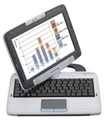
The Mirus Schoolbook Convertible looks like it’s a decent step forward in the design of a low-cost mobile computing device for education.
Mirus Schoolmate convertible netbook/tablet: designed for learning.
It’s a step up from existing netbooks and even the OLPC because it features a convertible design - the screen can be swivelled and locked flat so that it turns into a "tablet" computer, which responds to both the built-in stylus and to finger touch (like an iPhone).
The finger-responsive touch screen is particularly useful in an educational tablet computer because of the device’s utility as an ebook reader. Nobody wants to be holding a stylus to turn pages while reading an ebook, and this innovation allows stylus-free ebook reading. However, a fully finger-based design (like an iPad or iPhone) wouldn’t be optimal: the stylus is much better than a finger for more precise tasks such as drawing accurate diagrams or writing handwritten notes. And while I’m listing features that make this device better than Apple’s upcoming iPad for education, I should also mention that this device has a built in webcam (the iPad will not). :)
The design also features a liquid-resistant design just in case there’s an occasional spill or run through the rain - scenarios that are possible (or probable!) in a classroom, school yard, or school bag.
Like most netbooks, however, this device doesn’t have a massive amount of processing power or hard drive space; but it doesn’t really need it for the tasks it would most commonly be used for: accessing web-based activities and resources, working on homework or assignments, reading ebooks and basic communications and connectivity. Indeed, having reduced processing power means it’s far less likely to be used for playing the latest computer games rather than used as a learning tool.
After analysing the product features and reviews of it that are sprinkled across the web, I suspect that this device could be better in a classroom than any edu-netbook I’ve previously seen. The one specification that could probably do with improvement is the 5.5 hour claimed battery life. Some netbooks are now obtaining usable durations of 8-10 hours, and this would allow it to be used for a whole day without requiring a charge.
All in all though, this is a most capably specified device - so much so that I’m considering buying one myself to try out more rigorously.
Leonard Low
.
Blog
.
<span class='date ' tip=''><i class='icon-time'></i> Aug 19, 2015 06:24am</span>
|
|
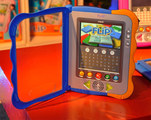
The FLiP, made by V-Tech, is an e-book reader targeted at children aged 3-7. It features a 4.3-inch colour touchscreen, QWERTY keyboard, rugged design and over 100 downloadable titles.
FLiP e-book reader
A programmable, touchscreen mobile learning device with a QWERTY keyboard for $60!? Things are getting very exciting for mobile learning. :)
Leonard Low
.
Blog
.
<span class='date ' tip=''><i class='icon-time'></i> Aug 19, 2015 06:24am</span>
|