Blogs
|
No, by "elearning terminology" I don’t mean the glossary that may appear at the end of some online courses. Elearning terminology is about the language that is used within learning solutions, and also across, if as most elearning designers, you manage more than one project for the same customer.
Elearning terminology is the common vocabulary you use to describe things and actions in your elearning solution. Click, create, canvas, adhesive, versioning software. Any "thing" or "action" that is relevant to the learning task you are supporting becomes a term.
Why terminology?
Why is elearning terminology important? Here are three important reasons to consider a good terminology strategy.
Learning effectiveness. Your elearning solution is a small piece in a bigger puzzle, where tools, processes and things already have their names. It is imperative that in order to provide the most effective learning solution, your elearning uses exactly the same words (terminology) that are used in the workplace. The effectiveness of your solution also depends on how seamlessly it integrates with other existing materials such as manuals, workplace signs, compliance standards documentation, manufacturer datasheets, etc.
Usability. Learners must deal with many platforms, software and devices during their day. Make their lives (and their learning) easier by creating usable elearning solutions that use exactly the same terminology they are used to see and read elsewhere. You may think it’s not that important whether we click, push, touch or press a screen button, but in fact the choice of terms have potentially huge consequences in elearning usability. Make sure you choose the right term and then stick to it throughout your solution.
Translation. If you ever think about translating your elearning solution, then having a solid terminology base and having elearning solutions that strictly adhere to that terminology will go a long way in ensuring that you minimize the cost of translating your elearning solution. The inconsistent use of names and verbs in an elearning solution make it incredibly hard to translate while keeping a minimum level of effectiveness and usability. Well managed terminology means cheaper translations.
Getting started
So how do you manage terminology? Here are three tips to get you started:
Create a simple glossary that contains key names and verbs used in your elearning solution. This will depend on the subject matter, but also on the industry, the hardware and software platform used, as well as any existing documentation already in use in the workplace.
For each entry, enter a brief description of when to use it, and also any other terms that you should avoid in favor of the chosen term. For example, if you decided that on-screen buttons on your platform are "clicked", then also add a note saying that the verb "push" is not acceptable, but has to be replaced by "click" instead.
Before each major milestone involving text (audio scripts going to recording, text going to prototype, etc.) make sure you perform a search (& replace, where appropriate) to wipe out any non-compliant terms.
Of course there are many advanced tools for managing terminology more efficiently, but for small projects or where you are not likely to handle more than 100 terms, then these simple steps will ensure your elearning terminology management improves learning effectiveness, usability and any potential translation work.
You will also have another strong argument to be involved in the next elearning project for this customer: you already know the terminology well and have the documentation to prove it; it will be easier for you than for competitors to apply it consistently in future learning solutions.
The post 3 reasons to manage elearning terminology appeared first on A Learning Blog.
A Learning Blog
.
Blog
.
<span class='date ' tip=''><i class='icon-time'></i> Aug 19, 2015 06:30pm</span>
|
|
Course surveys: Is this cheating?
If you had a simple, honest system to sway course result surveys by as much as 20% to your advantage, would you use it? What would this mean to the reliability of course surveys filled out by learners after ILT, webinars and elearning deliveries?
The setting
Imagine your work environment allowed you to deliver the same learning solutions both in person and as distance offerings. Imagine part of the evidence used for measuring results is the "exit survey", the one learners complete at the end of the offering. Imagine it contains several Kirkpatrick L1 questions in a 5-point Likert scale. Sounds familiar?
I have observed that opinions about exit surveys are somewhat polarized. Some businesses believe they are useless, and focus on results. On the other hand, and perhaps an opinion that gravitates closer to line managers, the exit survey is everything.
I’ve had the opportunity to experiment and see what evidence I could bring to the business to reaffirm or discredit exit surveys. So I created several experiments, and this is one of them.
The experiment
Taking advantage of a newly scheduled batch of offerings , I decided to focus on one specific question within the survey: "Will you be able to apply what you learned back in your job?". Yes, this question carries an assumption, and as such it was probably not the most scientific choice for an experiment. I chose it because if I was able to influence answers, it would be more impactful than others such as "Did you enjoy the course?".
Next, I planted the experimental piece in half of the scheduled offerings. I’m not talking about a design change, just a small addition: at certain points during the course, mostly after discussions, exercises or section recaps, I would insert a comment such as: "This is something you will be applying during your day to day work" or "…and this is why it’s so relevant to our jobs", etc. Only one sentence, only after section summaries and brief recaps, always linked to the wording of the survey question.
Then I delivered the two versions of the course several times, both in their face-to-face and over-the-wire flavors. The number of delivery times was again somewhat limited to be a proper scientific experiment. However, the results were surprising.
The results
While the survey results were largely consistent across all versions, my experiment question had improved one full notch relative to the control group. That’s a 20% improvement on a 5-point scale. What’s shocking is that I didn’t change the course content or design, and that the delivery method (online or face to face) was immaterial. All I did was make a small change in the experience of the course, and that change mattered. I believe we deliver experiences rather than content, and this is why I like to conduct small experiment like this one where content remains largely unchanged.
Do you think these experiments are "cheating"? Have you tried something similar? Are we really hacking course surveys? If you obtained similar results, would that change the way you think about measuring learning effectiveness?
The post Hacking course surveys appeared first on A Learning Blog.
A Learning Blog
.
Blog
.
<span class='date ' tip=''><i class='icon-time'></i> Aug 19, 2015 06:27pm</span>
|
|
My wish list for corporate learning 2015. Just four, all of them L&D maturity indicators.
1. "Blended" fades
No, we don’t stop blending. But we stopped talking about it because slowly but surely everything became more or less blended. At design time, all options are considered equally, without having to discuss technology-mediated versus no-tech solutions in a discussion that (quite artificially) precedes design. The use - or rather, the non-use of the term "blended" becomes a sign of maturity in L&D organizations.
If your L&D plan document for 2015 contains many instances of the word "blended", then your department is behind the curve. Those ahead have embraced technology and learning solution design by judicious use of the right affordances for the right learning activities and outcomes. There is no need to talk about "blended", just as we didn’t use a special term when printed matter, whiteboards, overhead projectors, radio or video became part of the L&D toolbox - it’s all part of the toolbox. Do you still "blend" today? If so, you must hurry, there’s a lot of ground for you to cover.
2. The LMS evolves
In the US, male workers hold on average 7 jobs in their first 10 years. In Europe, graduates hold an average of 1.6 jobs in their first three years ("Job Mobility in Europe, Japan and the US"). Still, the typical LMS of many large corporations provides a closed, non-portable experience for learners, with data owned by the company and not by the individual. And while we have witnessed the consumerization of IT reshape how organizations think about technology use, many have not moved an inch when it comes to learning data storage and portability.
Fortunately, the LRS and Tin Can specifications make it possible for learning systems to talk to each other, and do so in a richer vocabulary than what was available under SCORM. 2015 marks that inflection point where portability and Tin Can become one of the high priority items when considering any LMS upgrade or replacement. We have empowered employees in many ways, but not in how they choose and document their learning. Let’s start to make that happen in 2015.
3. The tech dust settles
It’s been a great year for designers and trainers who are not bound by strict rules on the type of technology they can use in the workplace. It has been, however, a year of experimentation more than fully developed applications. The app range supporting learning and training activities is vast, but fragmented, and in some cases not far from basic proof-of-concept builds.
My wish for 2015 is that it will mark the year where new patterns for L&D app development will start to emerge, with more focus on affordances that support specific learning activities and goals, on good integration paths, and less on technology itself. Only the disciplined developers who offer cross-platform solutions coupled with solid support will see their projects move on to 2016 with a substantial customer base.
4. We let MOOCs be
No more MOOC-derived acronyms please. Let’s leave MOOCs where they belong, a connectivist, aggregated, open learning space. Sorry, Coursera and Udemy, you are not it (last time I checked you don’t look like this), and no acronym rehash will ever make you closer to a true MOOC. The original design is an inspiration, a building block - let’s thank Downes, Siemens, Cormier et al. for their contribution, and let’s use that building block to create new pieces that fit the corporate and commercial contexts. But please let’s stop pretending that a paid-for, canned piece of self-paced individual elearning has anything to do with MOOCs.
In 2015, L&D teams stop feeling the urgency to do "something about MOOCs". First, because they have truly understood what they are, how they work and what aspects can help learning and development in organizations. Second, because they understand that corporate learning and the MOOC concept are partly incompatible, and there is no point in mixing water with oil, or calling oil by another name so it doesn’t look like you are trying to mix the unmixable. Social learning and personal learning paths you say? Now that sounds like being on the right track. Add an LRS to that please.
What do you think?
Are these part of your L&D wishes for 2015? Do you disagree with some of my "predictions"? What would you add? What would you change?
The post 4 L&D Wishes for 2015 appeared first on A Learning Blog.
A Learning Blog
.
Blog
.
<span class='date ' tip=''><i class='icon-time'></i> Aug 19, 2015 06:26pm</span>
|
|
Creating international elearning experiences is not simply a matter of translating content (see "Translating elearning into other languages: 6 tips"). The platform and architecture must also be ready to work in systems that use different formats and assumptions. While these differences become apparent as international users engage their computers and devices with your elearning, they will also put your own content to the test. Here are a few tips to ensure your platform will pass the internationalization test.
Challenge your existing scenarios
Your current learner scenarios most likely don’t include international customers. Take Europe, for instance, where more than 50% of the population speaks at least one other language. The fact that they are based in one country doesn’t necessarily determine the language they speak. It’s easy to make an assumption about what your learners in Switzerland speak, and you will probably be wrong.
If you don’t know what scenarios are, start creating some international personas.
Unlearning your ABCs
Everything you thought about the alphabet is wrong. A comes before B, but Å doesn’t. Can your platform display all the characters of your target language? This usually means ensuring you have a full Unicode implementation. Can it sort course titles according to the rules of the target language, or will it put Å after A, when in fact it should come after Z, Æ and Ø? (If you are speaking Norwegian). Can your authoring tools produce those characters for video, vectors and other artwork? Can your search service support those characters?
Displaying text has far more consequences than being able to support Unicode. Layout will be drastically altered if you want to support languages that are written from right to left, like Arabic. The placement of buttons, interactive areas, callouts, everything will be affected, and the platform must be able to mirror visual designs based on language displayed. Videos and charts that rely on sequences represented as diagrams flowing from left to right will have to be re-rendered in the opposite direction. Then… the subtleties: In Arabic, does the "Play video" button point to the right or to the left? Is the numeric keypad mirrored or not?
Finally, the choice of font becomes less of a stylistic matter and more of a readability issue. Some fonts we take for granted do not display other languages well. Usually this means having a small, versatile set of fonts to choose from, or more frequently, having more complex style sheets or logic that handles font selection from a wider range of options, according to the target language.
Reassessing screen real estate
It’s hard enough to design responsive elearning interfaces for such a wide range of screen sizes. Well, the problem gets worse - the typical English text usually takes more space (in some languages, considerably more space) once translated. How does your platform handle text expansion? Will it adapt button sizes and other interactive areas to contain longer text strings? In this Visitor Parking sign, the Spanish translation takes exactly double the space (in characters). How will your elearning design handle longer text? Smaller font size, as it was done here, is not an option!
4th of July is not in April
Date, time and number formats vary wildly from country to country. An elearning platform must get dates right, and it is not exactly helpful that your learner (based in Switzerland) sees that she completed a course at 2:00AM… Pacific Standard Time, even if the server is sitting in that time zone. If she completed the course on 4/7, then it was July and it wasn’t a national holiday for her, and hopefully her certificate of completion doesn’t state the wrong date.
Numbers can be equally tricky. Not only because the decimal and thousand separators change from country to country, but also because if you expect learners to type in numbers, then they are likely to use separators too. If your elearning assessment system is expecting 1000 as the correct answer, it should deem "1,000" as correct for a US learner, and "1.000" as correct for a Spanish learner. They are the same answer, just a different format.
Currency
A special case within number formats is currency. If your content includes currency, for example as part of an investment course, you will have to decide if the subject matter and your audience will tolerate the use of a foreign currency in the context of a learning environment. This may be perfectly OK for an MBA-level course, but if it’s about say home economics, it is probably better to use the local currency, or the entire course will miss the local touch that helps make a great learning experience.
If you charge subscriptions, course or certificate fees, there are some additional challenges. You’ll need to decide how to arrange payment systems that are customer-friendly: not every customer will be happy to pay in a foreign currency, even if their credit card allows for it. This is particularly true for smaller amounts, where bank and exchange-related fees may add up to a substantial portion of the total cost paid.
And if you decide to continue charging in your original currency, you still have to ensure customers aren’t making wrong assumptions. For example, if I find a course in Spanish, a price marked with the $ symbol, and a shopping experience that is in perfect Spanish, I may assume that the currency is Mexican peso if I live in Mexico. I’m thinking pesos, you are thinking US dollars, the currency symbol is the same, I click Pay… and $100 magically become $1,500 plus exchange fee. I am the customer that will cause overhead to your accounts department, and the one you won’t see again.
A good start
That covers some essential points about the platform that will ensure a great internationalization start. Now, it’s time to turn to content and ensure it is country and culturally appropriate. Don’t know where to begin? Start with these 10 Tips for Global Trainers. If you are planning large-scale internationalization, then it may be well worth thinking about things like terminology management too.
The post Creating international elearning appeared first on A Learning Blog.
A Learning Blog
.
Blog
.
<span class='date ' tip=''><i class='icon-time'></i> Aug 19, 2015 06:25pm</span>
|
|
Have you been asked to "blend" learning? In its rushed form, this process involves deciding which parts of an existing classroom course will fall into an "elearning bucket", and which portions remain in the "classroom bucket". It is a process, sometimes led by assumptions, that may yield a less-than-ideal split. So how do you protect the integrity of learning designs when moving portions to online format? Understanding affordances may help.
Affordance is a relatively new term (coined by Gibson) to describe the interactions that an environment offers to a certain organism. For example, a river affords swimming if you are a swan. The same river affords death -or at least trouble- if you are a beetle.
The term affordance was adopted by the design community, through Norman, for interaction design. Thus, to most people who regularly use computers, a rectangle containing an action verb should afford clicking; they call it a button. A triangle placed sideways under or over a static image should afford playing a video.
Black, white, and shades of gray
A button affords clicking. Or it’s just a trick, and doesn’t. Quite binary.
But these affordances are simple. Water lets you swim, or lets you drown. A button can be clicked, or not. In short, you either "can" or "can’t", Yes or No. It’s a mostly binary world.
When we take the term "affordance" from its ecology and design origins and move it to the field of learning, it enters a much more nuanced space. It is no longer about handles, door knobs and computer user interfaces. It’s about knowledge transfer, communication, data aggregation, self-assessment, personalization.
In this scenario, many things "can" be done, but with various degrees of success. For example, a discussion forum affords peer-supported learning. Video recording affords knowledge transfer. Yes, these technologies "can" do many things.
The trap
And here’s the trap that leads to some less-than-optimal decisions about what goes into the "elearning bucket": we tend to think about elearning affordances as binary. Can it be done electronically? Yes. So let’s do it electronically. When it comes to technology-supported L&D, we have an immediate tendency to think in binary, yes or no. And we tend not to think about the affordances of non-electronic alternatives. I have observed this behavior many times, and it works like this:
- The platform supports discussions under each topic
- So we can move all course discussions to the elearning module?
- Yes
- OK, let’s do it!
It’s not so simple
Let’s say you have classroom learning program supporting a big organization change. For example, the introduction of a new process, along with some new software, etc.
In this scenario, resistance to change by some vocal individuals is more than likely. The original classroom plan has discussions so people could voice their concerns. These discussions can be moderated and managed.
The request to "blend" this program results in all discussions being moved to an online forum. Now picture this:
9:00AM - New program is launched. Employees start watching elearning segments
4:00PM - No glitches, no problems so far. Rollout is going well. First few posts on discussion forums
7:00PM - The L&D team writes the launch retrospective report. It’s a success, they wrap up and go home
10:00PM - A well-crafted post by one of the most respected individuals in the company makes a strong argument against the new changes and processes. No L&D team members online, all celebrating
11:00PM - First responses from other employees strongly support the original post
10:00AM - The whole company is debating the new changes through the elearning forum
10:20AM - A rushed counterargument posted by L&D goes completely unnoticed as hundreds of new posts flood the system
10:40AM - L&D gets a call from the general manager
Yes, online forums support discussions. So does the classroom. But when you are likely to face fierce opposition by respected, influential employees, then the classroom offers an unbeatable set of affordances to manage that opposition right then and there, with limited viral effect.
The formula
Use to make better blended learning when converting existing solutions:
Always assume the answer to the question "Can we do that online?" is "Yes"
Create one column per each delivery method allowed within your blended solution. For example, elearning, classroom, job aids, social
Create affordance rows covering critical aspects of your learning solution: learning effectiveness, risk factors, subject complexity, geographical distribution
Score each row with a value from 1 to 5 indicating not "if" but "how well" the method affords this
Add scores vertically
Use these relative strength scores to make sound strategic decisions about your blended design. Iterate with every feedback round and update to continuously improve you affordance criteria.
The post Design better blended learning by understanding affordances appeared first on A Learning Blog.
A Learning Blog
.
Blog
.
<span class='date ' tip=''><i class='icon-time'></i> Aug 19, 2015 06:21pm</span>
|
|
If you are engaged in creating international elearning with Camtasia and like it as much as I do, perhaps you are wondering how to make the most of keystroke callouts when using other languages. Here are the glitches and workarounds I have found so far.
Capturing keystrokes
Camtasia Recorder does more than just capturing the screen: It also quietly takes note of what keys (other than plain letter and numbers) are being used, and also when they are being pressed.
When you add your recording to the timeline, you can make use of this great feature by right-clicking on the video segment and then selecting the last option, Generate Keystroke Callouts.
Camtasia’s Generate Keystroke Callouts dialog box
The Generate Keystroke Callouts dialog will appear. There are a few options to select the appearance of the callouts, and a preview. More importantly, there is a list of keystrokes logged by Camtasia Recorder. It is not the full list: By default, only key combinations (such as Ctrl+Home) are shown. If you want to include single keys as well (such as Enter or Esc) then make sure to click on the "Show all" button first.
Finally, click on Generate and Camtasia will place keystroke callouts right at the time in the video when the keys were actually pressed. A great feature, a great time saver… if you are creating English-only elearning.
¿Habla español?
Well, the answer is probably "Un poco" (a little). Although Camtasia may never be available in Spanish, and it looks like Techsmith scaled back its French localization efforts, it is clear that Camtasia wants to be multilingual when it comes to keystroke callouts.
Ctrl+Home keystroke callout generated by Camtasia with Spanish keyboard
If you are using a computer configured with more than one language (I’ve tried French and Spanish) Camtasia will insert the keystroke callouts in that language. Thus, if the recording has captured Ctrl+Home, during edition in Camtasia Studio the Generate Keystroke Callouts feature will yield Ctrl+Inicio, the correct key names for that combination if the computer is set to Spanish.
The good
Here’s the best part about generating keystrokes: It doesn’t really matter what keyboard layout you used during the recording. You can perform all recordings in a computer set up with just an English keyboard layout. This is because Camtasia is recording the key mappings, not the key names.
Windows taskbar showing currently selected keyboard layout
The crucial stage is when you invoke the Generate callout dialog from within Camtasia Studio, during video edition. If your computer is configured with multiple keyboard layouts, all you have to do is switch to the language you want the callouts in (by pressing Alt+Shift or Windows key+Spacebar repeatedly until you get to the desired layout, as indicated in the Windows taskbar) and then use Generate callouts.
If you are in the business of producing multilingual elearning, this is a very nice feature. Although some captures are language-dependent and require separate recordings, there are also instances where a single recording is valid in multiple language projects just by generating the keystrokes again in the target language.
This is especially true in multinationals where the application software may be available in a single language, but is being used by employees of many nationalities, with equal training needs.
The bad
There is bad, unfortunately. I am currently working on a Spanish project and, alas, I won’t be able to use the Generate Keystrokes functionality "as is", without a lot of additional work. The reason is that while Camtasia knows exactly what keys are being pressed and has demonstrated its ability to speak languages (at least with keys), some generated callouts don’t name keys correctly. Here is my snag list for Spanish:
Actual keystroke
Camtasia’s callout
Desired callout
Shift
Shift
Mayús
Caps Lock
Bloq mayus
Bloq Mayús
Num Lock
Num Lock
Bloq Num
Pause
Pause
Pausa
Print Screen
Print Screen
Impr Pant
Ç
è
Ç
Tab
Tabulacion
Tab
PgDn
Av pag
Av Pág
PgUp
Re pag
Re Pág
There are also some keystrokes that are not necessarily wrong, although I don’t see the need to spell them out, just as they aren’t in the English keyboard. When you spell out "left arrow" instead of showing a left arrow… well, it takes a lot of space and calls for a very small font, as shown in the sample below.
The ugly
If you have used Camtasia before, at this point you are probably thinking that you can create your own callouts to match the style of the keystrokes and place them over the offending ones.
But alas, Camtasia doesn’t use any of its own native callout styles to create the keystroke callouts. It uses something else. So no matter what you do, the callouts you create within Camtasia will never look like the keys produced by Generate keystrokes. You need to clone them, use some graphics application to craft the correct keys at the resolution of your project, and then place them.
The solution
The number of keys that are wrongly displayed for Spanish is not too high. Therefore, instead of making all keystroke callouts from scratch, I’ve decided to use the Generate Keystrokes functionality with some editing work afterwards. That means I had to create the Spanish keys I believe should be there. I used the "Traditional keystrokes" style, with no background, no shadow. Feel free to download them (links in the table above) for use in your projects.
1. Original keystroke2. Spanish, generated (font too small)3. French, generated (font overflow)4. Spanish, manually created
By the way, if you want to create your own, I’ll save you the guesswork: The font is Kartika, or at least it’s close enough. It wouldn’t have been my first choice of font, given its kerning… but I’m getting picky.
The ideal solution
But this workaround won’t change the frustrating fact that Camtasia can handle multilingual keyboards but doesn’t do it well right now.
I get the fact that Techsmith have decided not to localize the product due to low demand. But even assuming Camtasia remains forever an English/German product, all Techsmith have to do to get their Spanish and French keys right is ask. If they want to go further and offer a Generate keystroke feature that is truly multilingual and future-proof, I can think of at least two approaches that would not take much refactoring work. One involves mapped libraries, and the other text-based layout files. That’s right: Community-based layouts to suit all tastes. We are many eager users, we speak many languages, and all we are missing is the tools to get to work.
The post Creating international elearning with Camtasia: Glitches and tips appeared first on A Learning Blog.
A Learning Blog
.
Blog
.
<span class='date ' tip=''><i class='icon-time'></i> Aug 19, 2015 06:18pm</span>
|
|
I am going to pick up from my last post to add more tips that may help in creating international elearning with Camtasia, especially if you are creating multiple versions of the same solution in multiple languages.
As I explained in that post, because Camtasia generates keyboard callouts in real-time, as long as you have the desired keyboard layout language installed, it can produce it for you while editing the video.
Let’s continue with a couple of tips I find useful when creating multiple version of the same solution - for different languages, for different versions of the same software, for different versions of the hosting operating system…
Screen capture… Again
You may find yourself performing screen captures of pretty much the same sequence, with only minor differences, such as a language or version change. When you have a carefully crafted script, possibly translated to multiple languages, and a set of visuals and sequence already planned, any variations between screen captures will cause pain.
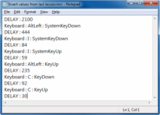
Text file containing JitBit Micro Recorder’s steps to insert a column in Excel. Delay times in milliseconds.
For these scenarios, I am using a macro solution from JitBit called Macro Recorder LITE. There are a couple of things I like about this macro recorder. The first is that it’s really simple: It has exactly the features I need and not a crowded interface with advanced functions that are just in the way. Second, the files this JitBit Macro Recorder generates are plain text files. I open them with a text editor, change the keystrokes that vary from version to version or language to language, and then I immediately have the entire sequence I need to capture, with the same timing, without errors, without effort. Speaking of timing, you can vary it with the text editor too.
Before you jump in, just one thing to ensure a smooth start: Camtasia Recorder and JitBit Macro Recorder LITE use the same system-wide hotkeys. The first task when trying them together is to change JitBit’s Start/Stop Recording hotkeys them so there’s no clash.
Sadly, Camtasia has trouble capturing the mouse cursor when controlled with JitBit. This is not a concern if you work is mostly with the keyboard. But if the mouse cursor is important for your recording, try Mouse Recorder - Camtasia seems OK with that one, although you won’t be able to do plain text editing of macros, they use a proprietary format. Although Mouse Recorder has some editing capabilities, it doesn’t allow file-wide changes such as a search and replace.
Bitmaps are your friends… for once
In the software localization industry, bitmaps are a known evil. Every time software contains a bitmap with text, it causes lots of extra work, because the bitmap needs to be re-rendered with translated text. It is a basic rule of international software authoring that bitmaps with text are always avoided.
However, when it comes to creating multiple-language versions of Camtasia videos, I am doing exactly the opposite: I use text-containing bitmaps whenever I know that a simple bitmap change will solve my localization problem.
The reason? Camtasia is very forgiving when it comes to missing media. Say you have created a new keystroke as I described in my previous post. Let’s say it’s the Shift key. Your Camtasia project has that media in the Clip Bin, and it features in your video ten times.
Camtasia sees the bitmap for my Shift Spanish key (deleted deliberately) is missing, and asks me to provide a location. If I provide the location of the French Shift key instead, that takes care of its translation in the whole project.
Now you move on to the next language version of the same piece. You can start from scratch, and insert or replace the corresponding version of the key ten times, or you can simply delete the bitmap you want to replace and open the project. Camtasia will notice the missing piece, and give you the opportunity to locate it. All you have to do is provide the location of the new bitmap, and Camtasia will insert it as in the original project. Of course, Camtasia won’t mind if the bitmap happens to contain a different version of the text.
What this means is no-edit localization for any resource that came in bitmap format. Yes, that’s right: Zero minutes editing time to get bitmaps in videos localized into multiple languages. Just delete bitmaps, get prompted for the location of their translated version, and save as new project.
The post Creating international elearning with Camtasia: More tips appeared first on A Learning Blog.
A Learning Blog
.
Blog
.
<span class='date ' tip=''><i class='icon-time'></i> Aug 19, 2015 06:13pm</span>
|
|
The main topic at last week’s Asian Human Capital and Leadership Symposium was how to build a stronger pipeline of leaders in Asia. The conference, held in Singapore, featured an impressive line-up of CHRO’s, L&D leaders, and business executives from companies such as Unilever, GE ASEAN, Siemens, Kimberly-Clark, Qualcomm, Infineon Technologies, DBS Bank, Fast Retailing and more.
These companies, as well as other multinationals in the region, are targeting development initiatives to put more Asians into leadership positions. Siemens, for example, said that its leadership positions in Asia used to be staffed primarily with expats, but now local Asians fill most of these roles. Many of the other conference participants had similar stories or were planning to get there.
Some of the key points from the conference were as follows.
WHAT MAKES AN EFFECTIVE GLOBAL LEADER?
To bolster their leadership pipelines, companies need to identify the essential elements of what makes an effective leader. Many of the conference participants pointed to SELF-AWARENESS - knowing one’s strengths and weaknesses and remaining open and teachable to new ideas and new ways of doing things. In a global role, flexibility and adaptability are imperative. Leaders must be able to adapt their styles to fit the context, which may vary according to different cultures, organizations, and even individual preferences. A high degree of adaptability and self-awareness, or "EQ" (emotional quotient), is essential for today’s global leaders.
Another critical capability is BUILDING TALENT. In a fast-growing Asian marketplace, the ability to recruit, develop, and retain top talent is essential to an organization’s competitiveness. Building talent was voted the most important capability in one of the conference workshops, and unfortunately was also rated the biggest skills gap in leaders today. Several executives stressed that leaders should be held accountable for talent development - they should have performance goals around development and retention measures. For example, one business leader said that his managers’ bonuses are tied to scores for employee satisfaction/engagement, which influences retention and productivity.
For many, INSPIRATIONAL LEADERSHIP ranked high as an essential capability. Leaders everywhere need to inspire people to follow them. They need to excite and motivate people - including employees, customers, partners, and stakeholders. How they inspire people may differ depending on the context. In the West, we have this concept of the "charismatic" leader - a leader who is passionate, visionary, and decisive. In other cultures or organizations, the leader may have to adopt a different style, such as a team-oriented leader who inspires people by building trust and loyalty. So how the leader inspires people may differ (which goes back our earlier discussion of or EQ), but all leaders need to get people to follow them.
Finally, COLLABORATION was rated an essential capability, particularly in Asia, where organizations need to create synergies through working in partnerships. The ability to partner with people and organizations is critical to success in the region.
WHAT CAN HR DO TO HELP?
Many companies have realized that the core aspects of what makes an effective leader have changed. In many cases, leadership roles need to be redefined and competencies revisited. Many conference participants talked about how old assumptions need to be discarded and replaced with a more objective, data-driven view. To this end, companies are using analytics to identify, assess, develop, and promote leaders within their organizations. HR organizations need to develop capabilities to use data to lead these discussions. (For more information on effective analytics teams, read our High-Impact Talent Analytics research.)
In addition, HR leaders need to take on a bold new role. A Group Executive at DBS Bank stated it this way,
"The best HR person is one who can change my view."
Business leaders don’t want an HR person to just nod and agree with everything they say. HR leaders need to be able to challenge the status quo and to take risks. This attitude is exactly in line with our new research on high-impact HR organizations which outlines the role of the bold new CHRO.
Finally, one of the key aspects of a high-impact HR organization is enabling managers to drive talent initiatives. HR needs to assist managers in acquiring, developing, and managing talent. One panelist stressed the importance of managers evangelizing talent initiatives - not HR. Of course HR plays a key role, but managers need to own it. Qualcomm’s CLO called this "business-led HR". Through our research and discussions with many companies we have found that too many HR organizations are designed only for efficient service delivery. Instead, they need to perform as enablers of smart leaders and good people managers. Read more about it in our new research brief.
Bersin Analyst Blogs
.
Blog
.
<span class='date ' tip=''><i class='icon-time'></i> Aug 19, 2015 06:08pm</span>
|
|
The last two weeks have been all about the candidate experience
for me. On Friday, September 19th, I had the pleasure of attending
the first-ever Candidate Experience Symposium,
organized by the Talent Board, with sponsors from the talent acquisition solution
provider industry. They announced the 62 US winners of the North American Candidate
Experience Awards (or CandEs)—for the full listing, see this link. And a special congratulations to those twelve organizations
that won with distinction, designated by an asterisk.
During the symposium, we heard from many of the
winners and here were some of the ways their candidate experiences stood out:
·
Declining all rejected candidates with a phone call
·
Sending responses to candidate applications with recruiters’ desk
phone numbers to encourage a personal touch
·
Capturing college applicants as hotel loyalty members so they'll
be customers for life
·
Determining if each step in the application process is really required
·
Remembering that the candidate experience is a life-long relationship
with your employment brand; it’s not just about the application process
Some wise pieces of advice were shared (check out #TheCandEs on
Twitter for more):
·
Treat candidates the way you’d like to be treated
·
Try to apply for a job at your organization to see what candidates
are going through
·
Measure both the candidate and the hiring manager experiences
·
Don’t forget an amazing onboarding experience to match an awesome
candidate experience
·
Remember the negative revenue impact of a poor experience for
candidates who might be future consumers
·
Treat departing employees as well as new hires since they continue
to be brand ambassadors when they leave and someday you may want to hire them
back
·
Focus on making sure your employees are excited to come to work,
as the more engaged your employees, the more engaged your candidates will be
·
Stop thinking about "jobs" and create
"experiences;" it's not about employee loyalty anymore
Then last Thursday, September 25th, I had the honor of presenting
at the World Talent Forum
in Munich, organized by IntraWorlds with Bersin by Deloitte as one of its
sponsors. I shared some of the recently published High-Impact Talent Acquisition data
related to the candidate experience, such as:
·
Developing active and passive talent pools is the second most
influential talent acquisition performance driver
·
Implementing an effective social media campaign is the third most
influential talent acquisition performance driver
·
An effective employment brand drives talent acquisition
performance outcomes and helps attract candidates and retain existing employees
Some good advice about the candidate experience was shared at the
World Talent Forum as well (check out #WoTaFo on Twitter for more):
·
To avoid firefighting, be clear on your critical target
groups—those roles that are critical to your business and those roles that are
hard to fill
·
Use Talent Scouts to proactively identify & reach out to
external candidates to create a pool of "ready-now" candidates for
critical roles
·
Talent scouts representing a company are more authentic than
recruitment agencies
·
Source from professional networks, referrals, regretted losses,
silver medalists (the #2 candidate who isn’t hired), restructuring companies
·
When you stay in touch with potential candidates, find out about
their aspirations (e.g., what would they really like to do) and their lives
(e.g., does their family situation allow them to move)
Finally, if you’d like to hear more on the candidate experience,
join me and Stephan Herrlich, the Founder and President of IntraWorlds, Inc. on
Tuesday, September 30th at
1:00 pm ET for a complimentary webinar, The
Long and Winding Candidate Journey: A Roadmap for Success
As always, I’d love to hear from you. Feel free to add a comment
below, connect with me on Twitter @RAEricksonPhD, or by email at rerickson@deloitte.com
This
publication contains general information only and Deloitte is not, by means of
this publication, rendering accounting, business, financial, investment, legal,
tax, or other professional advice or services. This publication is not a
substitute for such professional advice or services, nor should it be used as a
basis for any decision or action that may affect your business. Before making
any decision or taking any action that may affect your business, you should
consult a qualified professional advisor.
Deloitte
shall not be responsible for any loss sustained by any person who relies on
this publication.
Bersin Analyst Blogs
.
Blog
.
<span class='date ' tip=''><i class='icon-time'></i> Aug 19, 2015 06:08pm</span>
|
|
A bang just went off in the corporate training and HR market. One of the largest training content companies (Skillsoft) just finalized the acquisition of one of the largest learning platform companies (SumTotal Systems). In some ways this is like the makers of peanut butter and jelly buying the bakers of bread. The whole "sandwich" now comes from the same company. (One could call it "SkillTotal.")
While much of this deal was about growth, this acquisition represents the beginning of deeper integration between corporate learning and the LMS or learning technology market. Earlier this year Wiley acquired CrossKnowledge with this same goal: providing a more integrated, embedded, and engaging learning experience for corporate employees.
Let me give you some insights about what this all means:
1. The combined company has a new level of scale.
The combined company now has nearly 10,000 customers, more than 60 million users, and more than 2,400 employees around the world, making it among the largest corporate training providers. Skillsoft and SumTotal are both pioneers in their respective markets and each grew through a series of acquisitions. Skillsoft acquired Smartforce, NetG, ElementK, Mindleaders, Books24x7 and other smaller content providers. SumTotal is the combination of Click2Learn, Docent, Pathlore, GeoLearning, Mindsolve, and several other technology companies. So the new combined company has a very large customer base, enormous technology portfolio, and vast amounts of corporate training content.
While there are hundreds of other LMS and content companies, nearly all the others are smaller. With the exception of CrossKnowledge (now owned by Wiley), most content companies only sell content and most LMS companies only sell technology (although many LMS companies have reseller relationships with content providers). Companies have tried to do both over the years, but in almost every case the skills needed are quite different. Content companies need extensive expertise in instructional design, vertical content, and content management solutions while LMS companies need expertise in enterprise software, talent management technology, and ERP-like integration.
Skillsoft's acquisition of SumTotal gives the company both. The company now has a mature enterprise software business (which plays in all areas of talent management) as well as a large and mature training content business. The combination opens up a lot of new doors for innovation, better integration, and new customer value.
Scale brings value in many ways. With more customers and a larger sales force (the combined sales force is almost 4X the size of SumTotal's sales force), more consultants and third party providers are likely to migrate to the Skillsoft-SumTotal platform. There are more than 2,000 providers of content, tools, assessments, and platforms in this market, and many of them will now want to work with Skillsoft's platforms. The company almost rivals the ERP vendors for size and market reach.
2. Synergies. Expanded sales force for SumTotal. Technology team for Skillsoft.
How about company synergies? They fall into two major areas: sales and technology.
Skillsoft was always one of the leading sales organizations in this market. There isn't a corporate training manager that has not talked with a Skillsoft sales person, and most have purchased Skillsoft courses at one point during their career.
SumTotal is a well-established company in the LMS market and one of the top five market share leaders, but did not have a large sales force. (Read Bersin by Deloitte LMS 2014 for more details). The LMS market, which is now over $2.6 Billion in size, is growing at close to 24% annually - so there is a lot of buying going on. Together the company now has more feet on the street and can offer LMS to all content customers, and content to tall LMS customers.
The second synergy is technology. Skillsoft has been trying to build out it's technology capability for some time. While Skillport has become more of a scalable system each year, it could never truly reach enterprise LMS class, holding the company back from taking on a role as a customer's primary learning platform. This problem now goes away. Skillsoft can offer an enterprise class LMS as well as an entire suite of HR and talent management products, all integrated with content.
3. Improving the Learning Experience: Integrating content and technology.
The integration of content with platforms remains an opportunity as well. Over the last fifteen years the online learning industry grew into two marketplaces: content (e-learning) and technology (LMS and talent platforms). Customers purchased the two separately and only SCORM and hard work by vendors made sure that the two worked together.
Unfortunately this dual-industry structure has limited the industry's growth: user experience is inconsistent and many corporate training systems are hard to use, filled with duplicated content, and less engaging than integrated platforms like YouTube. People click on a course catalog, launch a course, a few windows open up, and the whole experience is messy. Mobile is even harder.
Even worse, it is very difficult to embed learning content into the flow of work. Consider a manager working on their goals or perhaps assessing their people and they need some help. Rather than just have a little window of training to view, the user has to browse to the course catalog to get a refresher. Nobody has time for this. Using the technology Skillsoft now owns (content plus tools like ElixHR), the company can now deliver real-time embedded learning in important new ways.
One of the stated goals for this merger is for Skillsoft to deeply integrate its content assets (which include courses, videos, and Books 24x7 online reference materials) into the SumTotal platform to create an integrated, holistic user experience. Now that all this content and technology is in one place, let's hope we see a whole new world of "integrated user experience" emerge. Today more and more learning experiences look like Ted or YouTube - its time for the LMS market to catch up.
The other major vendors (CornerstoneOnDemand, Saba, CrossKnowledge, and many others) have tried hard to build easy to use content interfaces, but never had the motivation to invest heavily. Skillsoft developed its OLSA technology for this exact purpose, but few vendors used it (one who adopted it was SumTotal). So let's hope that the combined company brings us a new learning experience which encourages other LMS vendors to follow its lead.
In the area of embedded learning, the company has a lot of innovation potential. SumTotal's Elixr product is context-intelligent middleware which enables any system to exchange information with the LMS and automatically launch content based on a user's activity. A major softwre vendor, for example, has integrated SumTotal into its CRM product so that sales people who open opportunities of a certain size and are not certified are automatically forced to take a course. The company has a similar interface available for Salesforce.
Imagine the on-demand learning applications possible: when a manufacturing person starts a machine they are not trained on, a course could pop open and they are forced to complete and pass it; when a service rep encounters a problem they are not certified on, the certification program automatically launches. The possibilities for "embedded learning" in the flow of work are endless.
4. Value to customers. Fewer vendors to deal with and potential price changes.
For the corporate training manager, Skillsoft is now a bigger one-stop-shopping vendor. For many buyers this makes life easier: the content must work well with the LMS and the talent management tools you get from SumTotal will presumably have deep integration with Skillsoft content. While Skillsoft content always worked with nearly every technology in the market, it is likely to work "better" with SumTotal over time.
SumTotal will still have to be an open platform. All the MOOCs (Udemy, Udacity, Coursera, EdX, NovoEd, and many more), content providers like Lynda.com, and hundreds of others will still want to work with SumTotal, and one could guess that they will feel even more pressure to do so.
We may also see Skillsoft decide to further discount its content for its LMS customers, making the synergies positive for total cost of ownership.
5. Competition. Increasingly strident.
In the learning market, Skillsoft now has even larger market share, giving the company more size and scale to use against competition. But with this size comes a much more complex set of competitors.
Now Skillsoft competes with entrenched, experienced technology companies like Workday, Oracle, SAP, Cornerstone, Saba, and other established LMS companies (most of which used to be partners). Each of these vendors are sophisticated and some have deep pockets. The Skillsoft sales force needs to be deeply trained and must learn how and when to position each product in an increasingly complex portfolio.
Will the integrated content-technology solutions be better than what companies can buy from others? Perhaps but not necessarily. These other vendors have very powerful systems, and each has unique capabilities. Cornerstone is among the most integrated talent platforms: Saba has unique learning capabilities; Workday is a leading next-generation HRMS and cloud ERP solution; SAP-SuccessFactors still takes a leadership position in the performance management and integrated global ERP market; and Oracle remains the #1 market share leader and clearly the #1 in recruitment technology. And all are building next generation analytics platforms, mobile, social, and easy to use interfaces.
So Skillsoft just jumped from a pond where they were a "big fish" into a pond with a lot of "many hungry sharks." This is going to force the Skillsoft executive team to learn the enterprise software business in a hurry.
6. Impact on the Industry.
I've been analyzing this industry for about 15 years now, and whenever this kind of acquisition happens it sets off a bunch of other falling dominos. The combination of content and technology of this scale could cause other LMS vendors to start scurrying around gobbling up other content companies. Bigger content players are likely to start to look for other platform partners as well. I know for a fact that many other companies in the publishing and recruiting industry want to get into this bigger space - so there is a lot of money out there looking for more deals like this. So we are likely to see more "content+technology" deals happen.
Will the combined company push more innovation? We certainly hope so. While Skillsoft has always been a market leader in revenue and market share, the company has not pushed the envelope in content and user experience innovation. SumTotal, by contrast, actually has a lot of innovative features in their products (even though many people are not aware of them). I would hope and ask that this combined company sees past "market share" and "growth" and start to take on a role as an innovative market leader. Go out and build something new that others have never done.
There are hundreds of opportunities for Skillsoft to lead this industry. The "bigdata" work with IBM is one: can Skillsoft really recommend learning to us in an intelligent way? Saba and [entity display="SAP" type="organization" subtype="company" active="false" key="sap" natural_id="fred/company/3756"]SAP[/entity] are moving this direction (creating the "Netflix recommendations for learning"). Could Skillsoft put their foot down and really make intelligent learning happen? Absolutely.
Another is embedded learning. Every role in business has "on-demand" learning issues. The sales training example I mentioned above is only one - imagine "on-demand" learning for customer service agents, medical professionals, repair professionals, and even financial professionals. Skillsoft could go after these markets with focused content integrated into the platform and sell something that people have never seen before. Let's hope (and I will push) that the combined company gives us these kinds of innovations. I know that other vendors are thinking this way.
And of course let's hope Skillsoft just makes corporate learning a more integrated, modern experience. The days of employees browsing through a course catalog and clicking on courses to see what to take just has to go. The MOOC marketplace, which now delivers almost as much training as all corporate training providers combined, has shown people what an easy-to-use, integrated learning experience looks like.
Will this deal disrupt the corporate training market? If they company is successful, the answer is yes. Once Skillsoft shows that content and platforms can be integrated in new and more compelling ways, standalone content providers are going to look for platform companies to buy or partner with. But Skillsoft has to execute.
Mergers are tricky and there is still a lot of work to do. If the combined team works closely together, focuses on innovative and integrated product strategies, and continues to take care of customers well, this merger could be a big success.
Bersin Analyst Blogs
.
Blog
.
<span class='date ' tip=''><i class='icon-time'></i> Aug 19, 2015 06:08pm</span>
|