Blogs
|
We just read Robert Mager’s book Developing Attitude Toward Learning, one of six books in the classic "Mager Six Pack" series. In this article, we’ll give you a short book review. We have another, longer article if you’d like to study in more detail his ideas about creating enthusiastic trainees who want to put their new knowledge and skills into practice at work.
Before we begin, know that this is part of a series of articles looking at the books and ideas in the Mager Six Pack. So far, we’ve also got articles on the following:
Book Reviews
Book Review: Mager’s Analyzing Performance Problems
Book Review: Mager’s Goals Analysis
Book Review: Mager’s Preparing Instructional Objectives
Overviews of Mager’s Techniques
Mager’s Technique: Analyzing Performance Problems
Mager’s Technique: Goal Analysis
Mager’s Technique: How to Write Performance-Based Learning Objectives
With that out of way, let’s get to this book review.
Need any help with your training program at work? Check out the e-learning courses from Convergence Training, our family of learning management systems, or just contact us.
Mager’s Developing Attitude Toward Learning
Mager’s book outlines a few key points:
People can influence other people
That influence can change the way the influenced person/people act or behave
In this way, trainers can have a great influence on learners who attend their training
The influence that trainers have on learners can affect how positively or negatively the learners feel about the training topic
The positive or negative feelings that the learners have about the training topic after the training is complete will influence their excitement and willingness to put the new knowledge, skill, and/or attitude "in action" at work
Given the set of basic assumptions listed above, Mager argues persuasively for doing what we can to help our learners create or maintain a positive attitude about the training topic. Along those lines, he gives a series of lists of things to do and not do. These lists include things you’d do before the training session, during the training session, and after.
The book was written with a classroom style/instructor-led teacher in mind, but many of the lessons apply to other types of training, including written materials (for example, we could include the importance of writing the instructional materials here) and e-learning (and we could include the importance of using compelling, well-conceived visuals here).
Great. But How Was the Book?
Now that you know what the book’s about and have a general sense of Mager’s ideas, let’s turn to the fun part of the review. Does it teach worthwhile stuff? Was it a fun read? Would I recommend it?
I’d answer "yes" three times here, although with a little more reservation than the hearty recommendations that I gave to some of his other books. I guess this one just seemed a little basic. It’s still worthwhile, though, and a good reminder even if you’re heard all or most of it before. We all benefit from reminders, and I admit I used lessons from the book to sharpen some of the things I have been doing in instructor-led training sessions too.
Hope you found that helpful. Again, if you want the full story, check out our in-depth discussion of his ideas in the book and then go read the book yourself. And keep your eyes on our blog as we continue working through the books in this series-we’ve got two more books to cover.
The post Book Review: Robert Mager’s "Developing Attitude Toward Learning" appeared first on Convergence Training Blog.
Convergence Training
.
Blog
.
<span class='date ' tip=''><i class='icon-time'></i> Aug 20, 2015 07:22am</span>
|
|
If you’re a trainer or design instructional material, your job is to train people.
But what exactly are you training them? What kinds of things? If your initial answer is "stuff for work," we can dive down a little deeper on that. The benefit of doing so is that once we realize that we train people on different kinds of "stuff for work" (or to speak a little more formally, we train people to help them with different types of learning), you can get a little more efficient and use different training techniques for each of those different types of learning that you want your employees to master.
That’s what we’re going to cover in this blog post. So if that sounds spot-on, continue reading. If you’re not quite sure how you feel about it, keep reading nonetheless, if you can spare the time. You just might find some tips to make the training programs at your workplace more effective and efficient.
Different Types of Learning
Different Types of Learning-Listed
So, let’s go back to that earlier discussion of teaching workers, and wanting them to learn, "stuff for work"
Obviously, you know that’s such a crude phrase it’s silly. You can break that down immediately, right? For example, you’d probably agree that there are things that your employees have to "know," and other things that they have to "know how to do." Right? So if our goal is to start teaching out the different types of learning, we’ve got a little start already.
But we can go even deeper, breaking that down further.
How do these types of learning strike you?
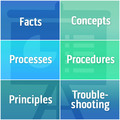
Facts
Concepts
Processes
Procedures
Principles
Troubleshooting
We’re going to spell each of these types of learning out for you in the sections below, but take a moment to review the list right now by yourself. Do you know what each of these are? Can you come up with an example of each? Can you think of times when you’ve tried to help workers learn each of them?
A note about sources: We’re not just typing out free associations here. As Newton said in his famous letter, we’re "standing on the shoulders of giants" in presenting this information. Most of these ideas originated with M. David Merrill’s Content-Performance Matrix. That original idea has been worked with and fleshed out by Dr. Ruth Colvin Clark in her books Developing Technical Training and Graphics for Learning and by Wellesley R. Foshay, Kenneth H. Silber, and Michael B. Stelnicki in their book Writing Training Materials that Work. These are the primary sources for this article (both Clark and Foshay/Silber/Stelnicki seem to begin with Merrill as a starting point; later, there are some places where they seem to call items from Merrill by different words, but I’ve "merged" those for simplicity, and still later, Foshay/Silber/Stelnicki add a "troubleshooting" level that perhaps extends beyond what Merrill and Clark talk about but could be considered an extension of "principles."
Different Types of Learning-Defined
Now let’s take a closer look at those different types of learning. Here’s a list of the kind of things you’ll probably want your employees to learn, with an example of each.
Training to Remember and Training to Apply
One way to look at training people is you can train them to "know" things and/or training them to "use" or "apply" that knowledge on the job.
When it comes to facts, you’ll train people because you want them to know the facts. So you’ll want them to be able to prove they remember the facts by having them repeat, list, or state them.
When it comes to the other types of learning, you want them to "know," but when it comes to on-the-job performance, you want them to be able to apply that knowledge. So that’s what you’ll be trying to teach them, what you should let them practice, and what you should assess their learning-by having them apply it in a realistic way, like they would on the job.
Here’s a table to help explain that better.
Matching Training Methods to Learning Types
Now that we’ve identified the six different types of learning listed above, let’s look at some suggestions for how to train your workers for each type of learning.
Training Your Employees So They Can Learn Facts
As Clark notes, "facts are unique, one of a kind information." (1)
For example:
This is the Metsko paper machine
Our goal is to produce tissue paper of X density
Every week we need to manufacture 300 tons of cardboard
It’s inefficient for the brain to process, store, and retrieve facts, simply because they’re somewhat random. All our brains can do is commit each individual fact to memory. And traditionally, job training programs (and yes, school education too) has tended to rely too much on getting people to remember facts.
Use a Job Aid for Facts When Possible
Instead of having people remember facts, try whenever possible to simply create job aids (or references) that they can refer to on the job and/or during training. For example, if a machine operator needs to enter up to ten different codes into a machine at different times of the day based on different circumstances, don’t try to teach the operator to remember all the codes. Instead, during training, provide a list of the codes and teach the operator to enter them at the correct times. Likewise, provide a job aid that includes a list of the codes at the spot in the work area where the operator needs to enter them.
Tips for When it’s Necessary to Train Learners to "Know" Facts
In some cases, a job aid won’t cut it and you will have to provide some training to your workers on the facts themselves. Below are some tips from Clark’s book:
Use Diagrams for "Concrete" Facts
A "concrete" is something unique and specific; Clark’s example is the 1040EZ tax form (which is distinct from the concept of "tax forms"). Another example might be "this is the off button for the bagger." One way to train your workers to identify concrete facts like this is to include a diagram with labels. For example, imagine a diagram of that bagger, with various parts, including the off button, labeled.
Use Tables and Lists for "Data" Facts
Present data, such as specifications about machine operating conditions, in the form of a list or table instead of embedding it in a normal written paragraph. Presenting data in this manner makes it easier to scan and process.
Use Sentences and Labels in Written Training Materials When Presenting Facts that Associate Two Concepts
In some cases, a fact might create an association between two concepts. A simple example might be "great white sharks are the apex predators in California’s Red Triangle region." A more work-focused example might be "ideal operating conditions for paper machines is to run between 85 and 95 percent peak efficiency."
In that example, present the fact in written materials with a label and then the fact in sentence form. Like this:
Ideal Operating Conditions: Paper machines should run at 85-95 percent capacity for ideal operating conditions.
Ask Employees to Derives Rules and Guidelines for Facts During Training
Stop and think of it. Facts presented in lecture format during training can put your employees to sleep pronto. "This is a winder. This is an accumulator. This is a log saw. This is a wrapper. This is a bundler. Etc…"
Instead of presenting facts in such a dry manner that presents information passively to your learners, try turning the tables so they’re active participants in their training.
Here’s Clark’s example: "…show an illustration of two or three sales tickets and ask, "What three items must be included on all sales tickets?" (2)
And here’s a different example: Show six rolls of paper towel-three rolls that pass QA test and three rolls that don’t. Then ask the students to list 2-3 characteristics of acceptable paper towel rolls.
Provide Plenty of Practice When Training on Facts
Because facts are somewhat random and the brain therefore processes them inefficiently, you’ll want to provide lots of practice for using facts during your training.
Clark recommends four different methods of doing this:
"Weave" factual information into training-If you’re training employees to perform a skill task, and performing that skill or task requires some set of factual knowledge, provide the employees with some reference of those facts (like a written document with the facts written down at their desk) that they can use during training.
Use a factual reference during training-If you’re training employees to perform a skill to task, and they’ll be able to refer to a job aid when performing the skill or task on the job, then have them practice using the job aid during the training too.
Drill and practice (consider e-learning for this)-In some cases, you won’t be able to provide a job aid for the worker to use in the field. Maybe it would create a safety risk, either because it would distract the worker from a critical task at hand or because the information needs to be retrieved in a split-second. In that case, old-fashioned drill-and-practice can help people "automate" their retrieval of facts. As a kid, I learned the multiplication tables with flash cards. Now e-learning courses are a more efficient way to do it. But let’s not kid ourselves-this can get boring. As a result, Clark suggests trying to embed the drill and practice into some form of game (search the Internet for "gamification and learning"-it’s a big thing these days).
Use mnemonic devices-It can be easier to remember a fact if it’s somehow associated with something else in your brain. As a kid, you may have learned the mnemonic devices "every good boy deserves fudge," "Dumb King Phillip Came Over from Germany Swimmingly" (I know, "dumb" isn’t very nice), and "ROY. G. BIV." Quick test-do you remember what these mnemonic devices stand for? If so, then that’s a testament to the power of this technique. When you can, try to create your own mnemonic devices to help your learners associate one fact with something else they know.
Assessing Learners on Factual Information
You rarely or never want to train someone a fact for its own sake. For example, you wouldn’t teach your learners what the bundler is just so they’ll know. Instead, you teach them what they bundler so is they can go to the bundler and begin operating it at the start of their shift.
Or, to make the point more directly, you’ll typically teach knowledge-based stuff like facts so that people can use those facts while performing some task on the job.
As a result, it’s not so important to test your employees on the actual facts. Instead, test their ability to perform the skill or task that you want them to perform on the job. If they can do it, then they know the facts well enough.
For additional information about specific types of graphics or visuals to use when training employees about facts, see our How to Create Graphics for eLearning post.
Training Your Employees So They Can Learn Concepts
One way to think of concepts is that they’re nouns. Or, in other words, they’re a set of things that share a number of critical characteristics. In Clark’s example, she says that all chairs are intended for sitting and have a back, a seat, some form of support from the floor (3). In a more work-related example, all palletizers have a way to put an empty pallet into place, stack product onto that pallet, remove the pallet when it’s full, and continue the cycle.
Two Types of Concepts
There are two types of concepts:
Concrete-Things like chairs and palletizers
Abstract-Things like integrity and efficiency
You’re probably most likely to train people about concrete concepts. It’s OK to train people on abstract concepts, but make sure you really know what you yourself mean (example: how exactly do you recognize "integrity"?).
Learning Concepts to Remember and Learning Concepts to Apply
In some cases, you’ll want your employees to remember concepts, and in others, you’ll want them to to apply those concepts. Let’s see what we mean here:
Remembering a concept--employee can restate the key characteristics. For example, they could restate the three characteristics of a palletizer. However, that in itself doesn’t mean they can identify a palletizer "in the field," if you will.
Apply a concept-employee can use the remember characteristics to identify the concept. For example, the employee can walk onto the workfloor and identify the palletizers.
You typically won’t train workers about concepts just so they can restate the key characteristics (meaning they "remember"). Instead, you’ll want them to apply the concept. In some cases, that’s the task they’ll perform-like, identify defective products and remove them. In other cases, they’ll need to identify one or more concepts in order to complete a procedure. For example, they may have to complete a procedure that involves five different tools or pieces of equipment, and as a result will need to know what each tool or equipment is and does.
Because you’re most likely training workers about concepts because you want them to apply the concept, make sure your learning objective is some form of action: "identify defective paper rolls" or "use machine X, machine Y, and machine Z to perform Task A."
Training Materials for Concepts
Clark recommends that you provide three things when teaching people about concepts (4). They are:
A definition-What are the characteristics that are critical to this concept-for example, chairs have back, seats, and a method of supporting themselves from the ground.
Examples-Different items that are part of this concept-for example, different types of chairs.
Non-examples-Things that aren’t part of the concept-something that’s closely related but not a match. For example, couches and beds are good non-examples of the concept "chair."
Analogies for Training about Concepts
Analogies are an effective and helpful way to teach concepts. An analogy is something that’s similar to but different than the concept. Clark gives an example of cutting up a pie into different-sized pieces to explain fractions of numbers. Analogies are helpful because they take something the learner is not familiar with and show how it’s like something the learner is familiar with. As a result, analogies only work when they compare the new concept with something the learner already knows.
Practice for Training about Concepts
Like most all training, your learners will benefit from practice when they’re learning a concept. Because you’ll probably want them to be able to recognize when things "fit" or "don’t fit" in a concept, you should set up scenarios in which they’re given examples and non-examples of the concept and ask them to correctly identify each.
For additional information about specific types of graphics or visuals to use when training employees about concepts, see our How to Create Graphics for eLearning post.
Training Your Employees So They Can Learn Processes
When you train employees about a process, you’re teaching them how something works.
Some common types of processes that Clark describes are (5):
Business processes-a description of an organizational work flow. Examples include hiring, performance reviews, submitting expense reports, etc. These include steps performed by different people and/or different departments/teams (if it’s something in which all steps are done by one person, it would be considered a procedure).
Technical processes-a description of the different stages in an industrial, manufacturing, or technical process
Scientific processes-a description of how natural phenomenon occur (such as lightning or a tornado)
Benefits of Process Training
Employees can benefit from understanding processes for multiple reasons, and understanding how the employee can benefit can help you determine if they need a more superficial, high-level overview or an in-depth, detailed explanation.
Understanding a business process-understanding a business process can help your worker know why the steps he or she must perform are important and/or exactly what’s important in each step (because they’ll know how others later use that). In many cases, you can provide only a superficial overview of a business process-just enough so the person knows how their steps fit into the big picture.
Understanding a technical process-you might want to teach a person about an entire technical process so they’ll know how the part they work on fits, which gives the employee a better chance of creating their part so it "fits in" well-the example that Clark gives in her book is of a computer programmer writing a piece of code that would be added to a larger code base. Another reason Clark mentions, and a key one in many industrial and manufacturing facilities, is that understanding how a process works is key for workers who have to keep that process operating within established productions goals and for others who are responsible for troubleshooting and fixing problems. Finally, having at least a superficial understanding of a work process at an industrial facility may improve overall morale.
Remembering or Applying Processes
You may want employees only to remember a process or know how to apply it.
If your goal is just to make the employee understand a process, then you can keep the training superficial and expect them only to be able to know or explain the process.
If your goal is to have them apply the concept, so their work fits into the overall product or so they can later troubleshoot a process, your training should teach them to apply (not just remember/restate) and you should assess your learners to use the knowledge of the process while applying the process (in troubleshooting, for example).
Presenting Processes During Training
Clark provides the following tips for presenting a process during training with employees:
If there are facts that the employee must know while learning the process, explain those first. For example, if a process involves multiple machines, including an "accumulator," begin by telling the names of the machines involved, including the accumulator and explain briefly what it does.
Explain the process in a combination of words, images, and tables/diagrams/charts.
Present the process within an orderly chart, diagram, or flow chart, making the order of the different steps clear.
Images that represent the different stages of a process can be very helpful, especially if there’s some form of visibly apparent "transformation" at each of the steps.
Allowing Practice for Learners
In some cases, it really won’t be necessary to let your employees practice with their understanding of a process. If identifying the different steps of the process isn’t something they’ll need to do on the job, then don’t bother setting up an opportunity for practice. For example, if you’ve explained a process just so they’ll know how the paperwork they create is used by other coworkers in different departments later, there’s no real need for practice.
In other cases, though, your employees WILL need to use their understanding of a process during their jobs. For example, if a maintenance worker has to troubleshoot a system to diagnose and fix a problem, he/she will have to use that process understanding to troubleshoot effectively. In that case, you should set up practice scenarios that allow the employee to practice using the process information to perform the troubleshooting (or whatever else they’d do on the job). Don’t just have them list the steps of the process. (You’ll read more about troubleshooting later in this article.)
Evaluating Employees for Their Mastery of Processes
The same points we just made about practice for concepts applies to evaluating employees’ understanding of processes as well. So, if you want your employees to have a superficial, overview-level understanding of a process just so they understand how their work "fits in," you probably shouldn’t evaluate them on the process. But, if you do have to evaluate them because they’ll have to use their understanding of the process on the job, then don’t just ask them to list the steps or explain the process, but evaluate them on their ability to perform the task(s) that requires them to understand the process (like evaluate them on troubleshooting exercises).
For additional information about specific types of graphics or visuals to use when training employees about processes, see our How to Create Graphics for eLearning post.
Training Your Employees So They Can Learn Procedures
A procedure is a simple list of task of steps that a worker must complete.
Identifying the Steps/Stages of Your Procedure
It can be a little tricky to correctly identify all the steps of a procedure before you teach the procedure to employees. If you’re not an expert on the procedure, this may be because you don’t know the procedure yourself. If that’s the case, talk with people who know the procedure well, and have them help you identify the steps. It can also be helpful to watch someone performing the procedure in the field, or to video tape them, so you can observe what they’re doing.
Be careful if you’re trying to learn the steps of a procedure from an expert performer. In many cases, experts like this know a procedure so well that parts of it become "automatic" to them. This means when they tell you the different steps, they may leave some out. Again, here’s where watching in the field or videotaping can help.
Identifying Steps for Novices and Steps for More Experienced Workers
When you’re identifying the steps of a procedure, keep in mind the type of employees you will be training and their related knowledge. In some cases, something that’s only a single "step" for an experienced worker will have to be presented as multiple steps for workers who are entirely new to the material. Clark gives a good example of logging on to a computer. For a worker who’s familiar with computers, that’s a simple step in a procedure. But for workers who aren’t familiar with computers, that’s multiple steps (turn on, press Ctrl-Alt-Del, enter username/password, etc.).
Linear and Branching (or Decision-Based) Procedures
While identifying the steps of a procedure, you’ll notice they may be of two types:
Linear procedures-you do the same steps in the same order every time
Branching (or decision-based) procedures-procedures that call for employees to make a decision at one or more step, with the future steps being based on the results of that decision. For example, if the procedure is about checking and changing oil, an if one step is to check the current oil level, then the next step will be "re-insert oil dipstick and stop procedure" if the oil level is fine but the next step will be "add engine oil" if the oil level is too low.
Make sure you know what type of procedure you’ve got-linear or branching-before you teach it to employees.
Job Aids for Procedures
Remember that for job training, your goal isn’t normally to have your workers be able to state the steps of a procedure. Instead, you want them to be able to perform the steps on the job. As a result, whenever possible, provide a job aid that explains the steps of the procedure and let them use that job aid during training and even in the field.
Training Workers to Perform Procedures
Clark explains that teaching your workers to perform procedures should include the following:
A clear explanation of the different steps of the procedure. This can be made more effective if the steps are listed in a table, diagram, or chart, and if the steps are accompanied with a photo, video, or other image.
A demonstration of how to perform the procedure so the employees can watch it being perform
An opportunity to practice performing the procedure, so the employees can practice doing it themselves
Feedback to the learners as they practice performing the procedure, telling them what they’re doing right and what they’re doing wrong. Always provide feedback in a friendly, non-threatening, supportive manner.
Evaluating Your Workers for Procedures
As is true with most of the other content types we’ve talked about (facts are the exception here), your employees can both know and be able to perform a procedure. Knowing means they can list the steps. Being able to perform means they can actually complete the procedure. In almost every case, what’s important on the job is if the employees can perform the procedure.
As a result, you’ll typically want to create assessments that evaluate if your workers can perform a procedure, not just list the steps.
For additional information about specific types of graphics or visuals to use when training employees about procedures, see our How to Create Graphics for eLearning post.
Training Your Employees So They Can Learn Principles
It may help to take a moment to remind ourselves of the difference between a procedure, which we just learned about, and a principle, which we’re about to learn about.
Performing Procedures and Applying Principles
When you train a worker to perform a procedure, you’re teaching them to perform a series of steps in the exact same order every time. The example that Clark gives is a cook at a fast-food restaurant who must prepare a burger the same way every time. Experts in learning and development sometimes refer to procedures as near-transfer tasks.
By contrast, when you’re training a worker to apply a principle, things aren’t going to be the same every time. You want your employee to follow or apply a set of guidelines to apply principles in a number of different circumstances, each of which will be different from the others. There will be no set order or exact duplication of steps. The example Clark gives is a master chef using the rules learned in culinary school to make an entirely different delicious dinner special night after night after night. Another example would be training a salesperson to apply principles to interact with a customer and close a deal-again, the situation will be different every time, and the sales person will have to think on his or her feet and do what’s necessary at each moment to apply the principles within the set of guidelines. Experts in learning and development sometimes call principles far-transfer tasks.
Principles and Guidelines
What you’ll be working with during this kind of training are:
Principles-cause-and-effect relationships that lead to specific, definable outcomes. For example, during management training, managers-to-be might be told that new employees respond well to assignments that are challenging but not so difficult they won’t be able to meet the challenge.
Guidelines-A set o f "rules" that, when applied, will help the employee apply the principle as a whole. To return to our "challenge new employees" example above, guidelines might include (1) ask employee what he/she is interested in, (2) determine employee’s current level of knowledge and skill, etc.
Making Sure Your Principles Are Valid
It’s harder, more time consuming, and generally takes more money to train people to follow guidelines and apply principles in shifting, dynamic situations on the job. That doesn’t mean we shouldn’t try to do it-ask any sales manager who’s seen sales increase as a result of sales training. But it does mean we should make sure the principles we’re trying to train are valid.
In short, don’t waste a lot of time and money on training if the ideas you’re pushing are half-baked or inaccurate.
To that point, Clark recommends checking professional literature and observing experts in the field to identify principles and guidelines.
Remembering and Applying Guidelines and Principles
As with the other types of training mentioned above, employees can either remember or apply guidelines and principles. But in most every case, because you want them to apply the principles on the job, you should write learning objectives that require them to apply the principles, provide training for application of the principles, and assess your employees’ learning by evaluating their application of the principles. In general, you shouldn’t be satisfied with whether or not they can restate the principles and guidelines.
Training for Application of Principles
When training your workers to apply principles within a set of guidelines, your training should include:
Present and explain the principles and guidelines clearly
Provide demonstrations/examples of the guidelines being applied in different scenarios (make sure to provide these demonstrations within a realistic, work-like environment-as close to the conditions the employee will experience on the job as possible)
Ask your employees questions about what they see in your different example scenarios, including:
Can they identify which principles are being applied, and when, in each example?
What do the scenarios have in common? How are they different?
What worked and what didn’t?
How could the examples that didn’t work be improved?
Give the employees several opportunities to practice applying the guidelines within different situations in a case-study/scenario-based training format (make sure you’re having employees practice within conditions that are the same as or as close as possible to the conditions they’ll experience on the job)
Give employees helpful, supportive feedback as they work through their practice scenarios; ask other employees who are also learning the principle to help with assessment/feedback
For additional information about specific types of graphics or visuals to use when training employees about facts, see our How to Create Graphics for eLearning post.
Training Your Employees So They Can Learn Troubleshooting
To discuss training employees to troubleshoot, we’ll rely more heavily on the Foshay/Silber/Stelnicki book, because Clark doesn’t give a chapter to it like she does the other types of learning.
However, before we begin, let’s review a few things Clark does say about troubleshooting in her book:
In simple troubleshooting scenarios, in which the employee will follow some form of linear or decision-based procedure (the kind that can be diagrammed in a flow chart), you can apply the rules for training procedures listed above. (6)
Machine/industrial operators will be more effective troubleshooters if they have a better understanding of the technical process used (7)
It’s fair to assume that a lot of what Clark addresses in the "principles" section could be applied to troubleshooting. In fact, throughout that section, she often uses the phrase "far-transfer tasks," which is similar to what Foshay/Silber/Stelnicki mean when they use the phrase "ill-structured problem solving" in their troubleshooting chapter.
According to Foshay/Silber/Stelnicki, here are some important notes about troubleshooting in general (8):
The employee must have a sound grasp on the underlying facts, concepts, processes, and procedures involved in the system they’re troubleshooting
The employee must being troubleshooting by defining the initial state of the system (the system while it’s experiencing a "problem" of some sort), the goal state (what they want the system to be like when the problem is corrected), and the constraints of the system.
The process of troubleshooting will be one of identifying all the possible causes, determining which are most likely, implementing solutions and testing to see if they worked.
It’s important for the employee to reflect on the troubleshooting process after the problem has been solved. This makes the employee a more effective troubleshooter in future times.
Training for Troubleshooting
Given what we’ve explained above, here are tips from Foshay/Silber/Stelnicki to teach workers to be more effective troubleshooters. These tips are for troubleshooting a particular system, but learning to troubleshoot well in general is a skill that can later be applied to other systems.
Begin by teaching all necessary, underlying facts, concepts, principles, and processes. Presumably, most or all of this would have been taught to the employee before he/she got to the point of troubleshooting.
Teach the principles of normal and abnormal operation, different possible failure modes, and the possibility of each
Present troubleshooting method: identify problem space (as described above-current state, ideal state, constraints of system)
Teach employee to troubleshoot by analyzing various causes of problem, determining likelihood of each, applying test/repair methods, and then analyzing to see if solution worked
Teach employee value and importance of reflecting on troubleshooting process after solution is discovered
Demonstrate troubleshooting process in several scenarios to allow employee to watch, observe, and learn from experienced troubleshooter
Ask employee for input/comments during troubleshooting demonstration
Provide employee with troubleshooting practice opportunities in realistic scenarios that match as closely as possible the conditions they’ll experience on the job.
Conclusion: Different Types of Training for Different Types of Learning
There you have it. By now, hopefully, you’ve seen that you train people at work on more than just "stuff at work." Instead, you train them on different types of materials, and these include facts, concepts, processes, procedures, principles, and troubleshooting. And, you’ve now seen that you can tailor your training methods to help your workers master these different types of materials more effectively.
Notes
1. Clark, Developing Technical Training, 106.
2. Clark, , 117.
3. Clark, , 82.
4. Clark, , 86.
5. Clark, , 126.
6. Clark, , 60.
7. Clark, 127.
8. Foshay/Silber/Stelnicki, Writing Training Materials that Work, pp. 153, 130-135.
The post Selecting Different Types of Training for Different Types of Learning appeared first on Convergence Training Blog.
Convergence Training
.
Blog
.
<span class='date ' tip=''><i class='icon-time'></i> Aug 20, 2015 07:22am</span>
|
|
We just wrote an extended blog post explaining the benefits of "chunking" your training materials and giving tips of how to do it.
Click here to read the extended article on chunking.
Otherwise, if you’d like a high-level overview of chunking and then would like to see how chunking can make your paper manufacturing training materials more effective, read on.
The Importance of More Effective Paper Manufacturing Training
Paper manufacturers face a series of difficult issues these days. For one, they have to complete with overseas producers who manufacture paper at lower labor costs. For another, they’ve got an aging workforce and the need to quickly "train up" new replacements that are young, bright, but inexperienced.
We have customers who have told us that it has typically taken 30 years to train a new hire to fill a high-level paper machine operator job. Faced with the challenges above, paper manufacturers realize they have to condense this training cycle. And that’s why it’s increasingly important to turn to the field of instructional design when creating training material for this industry.
Instructional design is the study of how to design, create, and deliver the most effective training materials. It’s based not just on things that people did in the past or "things my teachers did in school." Instead, it’s based on a scientific knowledge of how the brain works to process, store, retain, recall, and use information (known as cognitive science). Even better, instructional design is backed up with studies, evidence, and statistical data (see the classic book Evidence-Based Training Methods by Dr. Ruth Colvin Clark for an example).
One instructional design technique based on an understanding of how the brain works is called "chunking." We’ll explain it briefly, below, and show an example of chunking put to use in our Paper, Pulp, Tissue, and Corrugated e-learning libraries for paper manufacturers.
Convergence Training is a training provider that makes a series of learning management systems (LMSs) for importing, creating, assigning, delivering, tracking, and reporting on training materials of any type. In addition, we make hundreds of e-learning courses, including courses on paper, pulp, tissue, corrugated, health & safety, manufacturing, and more. We’ve even got apps for mobile devices. Contact us for more information.
The Bird’s Eye View on Chunking Training Materials
Chunking refers to taking training material (during the design phase), breaking them up into little "bite-sized" parts, and then organizing them in a way that makes the material easier for your employees to learn.
Chunking is helpful because of how our brains work-in particular, the limits on our working memory to hold only about four bits of information at a time.
Although learners who are novices or experts in a given topic can each only remember about four chunks at a time, experts can remember bigger chunks.
You should arrange chunks within training materials in a way that makes it easier for your employees to understand and remember them. Some organizational methods include job sequence, dependent learning, cause and effect, and whole to parts, but there are more.
Chunking training materials begins at a high level-the entire curriculum, for example-and then works its way down through modules, lessons, courses, and screens (or similar sub-divisions of your training materials).
An Example of Chunking Paper Training for Effective Paper Manufacturing Training
At Convergence Training, we use chunking techniques when we design and create our e-learning modules. And that pays off for our customers because their employees learn the materials more quickly, readily, and effectively.
For example, consider our Lime Mud Washers e-learning course (which is one title in our Paper Manufacturing course library) and consider how the various aspects of chunking, described below, will make it easier for your employees to understand this critical paper manufacturing technology.
Chunking Within Our Paper Manufacturing Curriculum
The course is just one part of our Recaust series of courses.
That is just one part of our Pulp Mill library.
And that is just one part of our Paper Manufacturing curriculum.
Chunking Within the Course
The entire course is only 16 minutes long, including the content screens, practice questions, and course-ending test.
The course is composed of multiple screens, each quite short.
The course includes practice questions every few screens to review new material.
Chunking Within the Screen
The screen in the sample (below) runs for only 23 seconds and explains only a few things:
Where the lime mud comes from
Where it’s discharged
What happens to the lime mud inside the lime mud clarifier
All of this makes it very easy for your employees to grasp and retain how the lime mud washers work. If they want, they can watch the video again to review the materials before advancing to the next screen. This gives them the ability to direct their own training-a key adult learning principle, and another example of instructional design techniques we use in our paper manufacturing training materials.
Convergence Training: Tools for More Effective Paper Manufacturing Training
Chunking is just one of many "aces in the hole" that Convergence Training uses to create more effective training materials for paper manufacturers. Our learning management systems (LMSs) were created in close consultation and are used by leaders in the paper manufacturing industry. Our e-learning courses feature unmatched realistic 3D graphics and were constructed using techniques from instructional design like the chunking we just discussed, or the inclusion of process training for better employee problem-solving and troubleshooting. And we have in-house paper subject matter experts to help you design custom training solutions of your own.
Contact us whenever you want. In the meantime, feel free to read and download the free Learning Management System (LMS) Buyer’s Guide below.
The post Effective Paper Manufacturing Training Programs: Better Training Through "Chunking" appeared first on Convergence Training Blog.
Convergence Training
.
Blog
.
<span class='date ' tip=''><i class='icon-time'></i> Aug 20, 2015 07:22am</span>
|
|
After much discussion and years of planning, OSHA just announced a new Confined Spaces in Construction rule (29 CFR 1926 Subpart AA). The rule goes into effect August 3, 2015 (later this year). So there’s time to learn about it and to prepare, but on the other hand, time’s moving and you should too.
We’ve put together some information for you to help you get ready. Hope you find it helpful.
Convergence Training is a training supplier with a large library of health and safety e-learning courses, learning management systems (LMSs) for companies of different sizes and industries, and custom training solutions. Contact us for more information or to set up a demo.
OSHA’s New Confined Spaces in Construction Rule
So let’s get right down to some of the big questions, shall we?
When does the new confined space rule for construction go into effect?
As noted above, August 3, 2015.
Is the rule for Construction, General Industry, or both?
The new rule (1926 Subpart AA) is for construction. The old rule (1910.146) is for general industry.
Who Has To Comply With Which Confined Space Rule?
General industry employers comply with the general industry rule (1910.146). Construction employers have to comply with the new, construction rule (1926 Subpart AA). To make that even easier, OSHA provides the following guideline:
"If you are doing construction work - such as building a new structure or upgrading an old one - then you must follow the construction confined space rule."
But, the new regulation itself also includes some exceptions:
"Exceptions. This standard does not apply to: (1) Construction work regulated by §1926 subpart P—Excavations. (2) Construction work regulated by §1926 subpart S—Underground Construction, Caissons, Cofferdams and Compressed Air. (3) Construction work regulated by §1926 subpart Y—Diving." [source: 1926.1201(b)]
What If My Workers Do Both Construction Work and General Industry Work?
The employer "will meet OSHA requirements if that employer meets the requirements of 29 CFR 1926 Subpart AA - Confined Spaces in Construction." (source: OSHA FAQ)
What Is a Confined Space?
A confined space is a space that is:
Large enough and so configured that an employee can bodily enter it
Has limited or restricted means for entry and exit
Is not designed for continuous employee occupancy (source: 1926 Subpart AA Definitions)
What Is a Permit-Required Confined Space?
"A permit space is a confined space that may have a hazardous atmosphere, engulfment hazard, or other serious hazard, such as exposed wiring, that can interfere with a worker’s ability to leave the space without assistance." (source: OSHA FAQ)
Who Can Work in a Permit-Required Confined Space?
"Only workers who have been assigned and trained to work in a permit space may do so. Additionally, before workers can enter a permit space, the employer has to write a permit that specifies what safety measures must to be taken and who is allowed to go in." (source: OSHA FAQ)
How Is This New Confined Spaces in Construction Rule Different than Rules that Previously Applied to Construction Work in Confined Spaces?
The new rule requires employers to determine:
What kinds of spaces their workers are in
What hazards could be there
How those hazards should be made safe
What training workers should receive
How to rescue those workers if anything goes wrong (source: OSHA FAQ)
How Is the Rule for Confined Spaces in Construction Different than the Rule for Confined Spaces in General Industry?
There are five important differences from the general industry rule. They are:
More detailed provisions requiring coordinated activities when there are multiple employers at the worksite. This will ensure hazards are not introduced into a confined space by workers performing tasks outside the space. An example would be a generator running near the entrance of a confined space causing a buildup of carbon monoxide within the space. (See the question below about controlling contractors, host employers, and entry employers for more on this.)
Requiring a competent person to evaluate the work site and identify confined spaces, including permit spaces
Requiring continuous atmospheric monitoring whenever possible
Requiring continuous monitoring of engulfment hazards. For example, when workers are performing work in a storm sewer, a storm upstream from the workers could cause flash flooding. An electronic sensor or observer posted upstream from the work site could alert workers in the space at the first sign of the hazard, giving the workers time to evacuate the space safely.
Allowing for the suspension of a permit, instead of cancellation, in the event of changes from the entry conditions list on the permit or an unexpected event requiring evacuation of the space. The space must be returned to the entry conditions listed on the permit before re-entry.
Also, OSHA added some provisions that clarify some things in the rule for General Industry. They are:
Requiring that employers who direct workers to enter a space without using a complete permit system prevent workers’ exposure to physical hazards through elimination of the hazard or isolation methods such as lockout/tagout.
Requiring that employers who are relying on local emergency services for emergency services arrange for responders to give the employer advance notice if they will be unable to respond for a period of time (because they are responding to another emergency, attending department-wide training, etc.).
Requiring employers to provide training in a language and vocabulary that the worker understands. (source: OSHA FAQ)
Plus, they added some terms to the definitions section. Check the rule to review all the definitions.
How Does This Rule Assign Responsibilities Between Host Employers, Controlling Contractors, and Entry Employers?
The rule makes the controlling contractor, rather than the host employer, the primary point of contact for information about permit spaces at the work site.
The host employer must provide information it has about permit spaces at the work site to the controlling contractor, who then passes it on to the employers whose employees will enter the spaces (entry employers).
Likewise, entry employers must give the controlling contractor information about their entry program and hazards they encounter in the space, and the controlling contractor passes that information on to other entry employers and back to the host.
As mentioned above, the controlling contractor is also responsible for making sure employers outside a space know not to create hazards in the space, and that entry employers working in a space at the same time do not create hazards for one another’s workers. (source: OSHA FAQ)
Here are some relevant definitions from the new standard that may help you make sense of the section above (source: 1926 Subpart AA Definitions):
Controlling Contractor: The employer that has overall responsibility for construction at the worksite
Entry Employer: Any employer who decides that an employee it directs will enter a permit space
Host Employer: The employer that owns or manages the property where the construction work is taking place
Will I Need a Written Confined Space Program?
Yes, if your workers will be entering permit-required confined spaces. (source: OSHA FAQ)
What Do I Need to Do If a Work Sites Has Confined Spaces But My Workers Won’t Enter Them?
Take effective steps to prevent your employees from entering the space. (source: OSHA FAQ)
Can I Contact OSHA for Compliance Assistance with this New Confined Spaces in Construction Rule?
Yes. Here’s the contact information: Directorate of Construction, Room N3468, OSHA, U.S. Department of Labor, 200 Constitution Avenue NW, Washington, DC 20210; telephone (202)-693-2020 or fax (202)-693-1689. (source: OSHA FAQ)
Where Can I Find More Information From OSHA About the New Confined Spaces in Construction Rule?
They’ve got a few resources for you. We’ve listed them below:
The rule in a reader-friendly .PDF version
Some FAQs (we relied heavily on these FAQs to write this article)
A fact sheet about confined spaces, crawl spaces, and attics
A fact sheet about confined spaces and pits
A fact sheet about confined spaces in sewer systems
Their confined spaces Safety and Health page
The post Confined Spaces in Construction Rule Issued By OSHA; Goes Into Effect August 3, 2015 appeared first on Convergence Training Blog.
Convergence Training
.
Blog
.
<span class='date ' tip=''><i class='icon-time'></i> Aug 20, 2015 07:22am</span>
|
|
A lot of workforce training materials are written. This is true if it’s something your workers will actually read. And it’s true of scripts that are used for e-learning training courses as well.
We’ve written earlier about style issues for your written training materials-click here to read more about that. That article includes some simple tips, such as writing at an appropriate reading level, using conversational words, and so on.
But in this article, we’re going to show you how to format training materials using simple techniques like headers, bullets, and tables to make your training materials more effective. This will apply to materials such as Word documents and PDFs that your employees read but also to PowerPoint presentations and e-learning courses they view on a monitor or screen.
Convergence Training is a training solution provide with many libraries of e-learning courses, different learning management systems (LMSs) for companies of different sizes and industries, and custom training solutions. Contact us to learn more or set up a demo.
How to Format Training Materials for Improved Learning
A large block of uninterrupted text on paper or a screen can be difficult to read. The same is true of writing that uses formatting that’s chaotic, random, or cluttered.
But by using simple formatting techniques, including bold section headers, bulleted and numbered lists, tables with clear titles and consistent layout, and more, you can make the information in that written material much easier for your workers to understand, remember, and apply on the job.
There are entire fields of study called structured writing and information mapping that address the issue of formatting your written materials for maximum comprehension. We won’t go into that amount of detail, but will cover a few highlights. You may then choose to study them in more depth on your own (there are even professional certifications offered). But as long as you are aware that formatting your written training materials can help, and know a few simple guidelines, you can begin using them to improve your training materials.
General Guidelines for Formatting Written Training Materials
The general idea is to format your written training materials so it’s very easy to scan them and predict what each section is about and/or to quickly understand what each section is about. In other words, you’re using the formatting to make it easier for your workers to identify the information you want them to learn. This allows the learner’s brain to "prime" itself to take the information in.
Below are some general tips for doing this.
Clean, Easy-to-Read Fonts
Select a font that’s clean and easy to read. Don’t select a decorative font that makes it harder to read.
Black and White (or something equally clean and simple)
The same basic rule applies to colors-keep it simple. Black text on a white background is easy to read. Steer clear of using different colors. You MAY occasionally use something like red to draw attention, especially in section headers, but remember to using this sparingly.
Shorter Sections
The human brain can actively process only a small amount of information at one time. Traditionally, it’s been assumed that "7 plus or minus 2″ describes that limit. But more recently, that estimate has been reduced to around 4.
As a result, it’s a good idea to break your long pieces of written (or spoken) materials up inot smaller chunks.
For more about this, check our article about chunking.
Bolded Section Headers
Bolded section headers, like the one immediately above, make it easy for your workers to see what’s coming up. That allows them to prepare for the information your section will include.
Allowing your workers to see a bolded section header and prepare for the information helps because we learn by associating new information with existing knowledge that’s stored away in our long-term memory.
Consider using section headers of different sizes and colors to show the organizational structure of your writing (such as the ones below)
first section header
sub-section header 1
sub-section header 2
new section header
Bulleted Lists
Use bulleted lists when possible to show information that is "parallel." Some tips for bulleted lists include:
Beginning with an introduction that applies to all bulleted items
Beginning each bulleted item with a noun or verb (not mixing and matching)
Numbered Lists
Numbered lists also help your employees process information. As you might have guessed, use numbered lists only when there is a true sequence or numerical order to your information, which is another tip to your readers.
Tables
Put information that has some form of relationship into a table. Tables make it easy to scan and identify the information you’re looking for, and it also helps to point our similarities and differences.
When you create a table, clearly label the table so it’s easy to tell what information it displays, clearly identify the different rows and columns, and try to present the information within each table cell in a formulaic manner so the information matches the other cells in that row or column.
Conclusion: How to Format Training Materials
There you have it. The most important thing you can take away from this article is that the way you write your training materials-not just the words and style, which we’ve covered in an earlier blog post, but the formatting, which we covered above-can make your training materials more or less effective.
You can study this more and get increasingly sophisticated over time. But just being aware of the issue in general and using the handful of tips offered above will really get you moving forward. Remember your goal is to make it easy for your employees to quickly scan your written materials, be able to predict what each section is about and how it’s different than the other sections, and to let them "prime" their brain for the written information they’re about to process.
We plan on following up with some additional posts about writing training materials in the future, so hang on for those as well. Until then, you may find the download below about learning objectives up your alley. Go ahead click-it’s free.
The post How to Format Training Materials To Make Learning Easier appeared first on Convergence Training Blog.
Convergence Training
.
Blog
.
<span class='date ' tip=''><i class='icon-time'></i> Aug 20, 2015 07:22am</span>
|
|
People familiar with lean manufacturing probably know the concept of value stream mapping.
Value stream mapping is the process of mapping, diagramming, or otherwise analyzing your current production state and a desired, more efficient future state. The point is to map the current state, search for and identify any inefficiencies that cause waste and don’t add value, and then map a new, more efficient process. And then, of course, to make changes to move toward that more efficient desired process.
Sounds simple enough, and it is. The key things to remember are that value stream mapping (1) is focused on the lean idea of making sure production steps are always intended to provide value to the customer and (2) removing all production steps that don’t provide value to the customer or aren’t otherwise necessary.
Trainers can learn a lot from their lean friends and from these concepts underlying value stream mapping. For one, trainers should always focus on providing value to their customers. It’s sometimes easy to forget this and sometimes easy to forget who the customer(s) is/are, so we’ll get back to this shortly. The second thing trainers can learn from lean value stream mapping is the importance of taking things out of training materials if they don’t provide benefit to the "customers." Again, we’ll get back to this point.
Convergence Training is a training solution provide with many libraries of e-learning courses, different learning management systems (LMSs) for companies of different sizes and industries, and custom training solutions. Contact us to learn more or set up a demo.
Who Are the Customers of Job Training?
Let’s take a closer look at this question. If you’re creating or delivering training materials, it’s important to always consider the value you’re providing to your customers in the same way that lean manufacturers always keep an eye on the value they provide to their customers.
But who are the customers of a trainer? The real answer is that trainers have two customers. The first, as you might have guessed, are the trainees. These are the employees at your company who need training to do their job more effectively, or more safely, or in some other desired manner. So it’s important to always keep the needs of the employees in mind at all times. Remember that you’re trying to provide training to help workers succeed at their jobs.
Here are a few ways you can do that:
Keeping your training relevant to their jobs
Keeping it based on real job-tasks
Letting them know how the training applies to their jobs
Making them active participants in the training when possible
Generally studying methods of effective training and applying them in your own training
One good place to start researching this is to learn more about adult learning principles.
If the employees are the customers of your training, then that’s also true of the company itself-or of the management who’s paying for the training. Because ultimately, you’re providing training to employees so they can help the company reach their business goals. It’s a good idea to know what the company’s business goals are and to make sure the training you’re creating/providing is intended to help the company reach those goals. You might want to touch base with management to see what those business goals are and what key performance indicators (KPIs) are used to track them.
To learn more about providing training that helps a company reach its business goals, read this article about Kirkpatrick’s Four Levels of Evaluation.
Cutting Waste from Training Materials
Now let’s talk about the second lean principle we mentioned earlier: removing steps that don’t provide or increase value to the customer.
In training, less is more. Meaning, employees learn more if you condense the training materials. So you could say "lean" training materials help people learn.
What you should always do as a trainer is begin with a set of learning objectives. Your learning objectives are a list of what the employees need to be able to do when training is over (click here and/or here to read more about learning objectives). Then, once you’ve got that list, create training that covers nothing but those learning objectives. Resist the temptation to add more.
But this is a point that some trainers struggle with. They want to include MORE information instead of less. Their intentions are good, and they’re ultimately trying to make the training better, even if it backfires. Here are some of the reasons people add more training materials than is necessary:
They think it’s interesting and that will keep the workers engaged
They enjoy the information themselves and want to include it for their own reasons
They’re not aware our ability to learn is limited to 4-7 "bits" of information at a time and they wrongly think the brain is like an empty pitcher ready to be filled with information
They know they should limit information but for some reason they do it anyway-maybe they feel the training schedule demands it
If any of these sound familiar to you, try keeping your training materials lean and to the point. If you’ve got extra stuff, give it the axe.
Value Stream Map Your Training and Keep It Lean
So now you’ve seen a few ways that trainers can benefit from borrowing the concept of value stream mapping from lean and applying it to their training.
So now you can actually create a value stream map of your training materials. Maybe start by looking at a specific job role and representing each course as a box in a flow chart. Do you have the right number of boxes to match what the employee needs to know, or do you have too many/too few? Is the order ideal? Likewise, you could zero in closer and look at a course to map the ideas covered in that one course.
It doesn’t matter how you decide to diagram your "value stream map" for your training materials. There are conventions used in doing this for lean manufacturing, but as long as you’re putting pencil to paper (or dry erase to white board) and getting a bird’s-eye view of your training materials, you’re off to a good start.
The basic idea is to analyze your current training materials and remove things that don’t add value because they don’t support the learning objectives. You can also make sure your training materials DO fully cover the learning objectives and that your workers are able to perform the necessary skills/behaviors on the job, because that’s your real goal. And of course that all the training is having a positive effect on a business goal as measured by one or more KPIs.
Hope this helps. Let us know if you have any thoughts about lean training materials.
The post Applying Lean Value Stream Mapping to Training appeared first on Convergence Training Blog.
Convergence Training
.
Blog
.
<span class='date ' tip=''><i class='icon-time'></i> Aug 20, 2015 07:22am</span>
|
|
People frequently ask us if MSHA allows mine operators to use online MSHA Part 46 training to satisfy some of the MSHA Part 46 training requirements. The short answer is-yes. But let’s look at it the question in a little more detail, shall we?
Does MSHA Allow Online MSHA Part 46 Training?
They do. Let’s see what the regulation [30 CFR 46.4(d)] says:
Training methods may consist of classroom instruction, instruction at the mine, interactive computer-based instruction or other innovative training methods, alternative training technologies, or any combination of training methods.
So, we’re covered with "interactive computer-based instruction."
Convergence Training is a training solutions provider with a host of learning management systems (LMSs) and e-learning courses available for you to use at your workplace. More specifically, we’ve got an LMS specially designed for MSHA compliance, mine safety e-learning courses, and other general health and safety training courses. Contact us for a demo or for more information.
Would You Use Just Online Training for Part 46 Training?
Well, you could. But if you look at that list from the Part 46 regulation above, you’ll see they’ve listed training of different types: classroom, instruction at the miner, computer-based….or any combination of training methods. We think MSHA is on to something there, especially with "…combination of training methods."
Many training experts recommend what’s called a blended learning solution for training. This means delivering training to your employees that includes training of different types of methods.
Using a blended learning solution lets you pick the best training method for each training need. It’s kind of like having a toolbox full of tools instead of walking around trying to fix everything with a hammer.
For example, you can use classroom instruction for training that can really benefit from person-to-person, interactive discussion. Instruction at the mine (or at the site of various machines and equipment) can be great for some aspects of task-based training. Online training can be really helpful because it frequently includes very sophisticated visuals that are hard to duplicate on your own. Plus, online training typically includes practice tests and real tests that you can use to check if you’re employees really understand the material. And written materials can be effective for training materials that don’t require a lot of person-to-person communicate or sophisticated visuals-like your drug and alcohol policy, for example.
Click to read more about blended learning solutions-best practices.
Can I See An Example of Online MSHA Part 46 Training?
Sure. Let’s set the scene first.
Part 46 requires that miners be given training that includes "an introduction to the mine environment" (this is required for New Miners and Newly Hired Experience Miners, for example). Many miners probably get this during a mine tour/mine walk-around, and that makes good sense.
But a different way to do this would be to use an online learning course and then follow that up with the site tour. You could have your miner watch a brief e-learning course that explains the basic features of a surface mine-things like highwalls, berms, the angle of repose, and so on. This could would include the sophisticated visuals, practice tests, and a scored test at the end. Your miner can take this at his or her own preferred speed, and can review any topic that he/she isn’t clear on.
Then, when you take that miner on a site tour, you’re reviewing those basic concepts and showing how they apply to your particular mine site. You can see how this might make your in-person training more effective.
Below is a short video sample of an online course called Physical Characteristics of Surface Mines e-Learning Course to give you an idea of how this could work.
Or click to review and see samples of an entire library of online courses for MSHA Part 46 compliance.
What about the Online Delivery and Tracking System? Can That Help Too?
So far, we’ve only discussed one half of online training solutions for MSHA Part 46 compliance. Those are the actual courses on various safety topics.
But the second half to the online equation is an online system you can use to deliver those courses in. Actually, an online system (know as a learning management system or simply LMS) can do more than just that. Check out the list below to see what it can do for you:
Create unique login access (username and password) for each worker
Allow you to divide your workers by site, department, team, and/or custom groups, making assignments and reporting easier
Create training materials that your workers can complete online-online quizzes, online checklists
Import training materials your workers can complete online-online courses, your own PowerPoints or PFDs, video files, etc.
Make records of instructor-led training, such as formal classroom training, weekly safety meetings, and off-site training, that can be assigned, tracked, and reported on
Create "assignable bundles" of training activities to match the MSHA Part 46 training programs-New Miner, Newly Hired Experienced Miner, New Task(s), Annual Refresher, and Site-Specific Hazard Awareness
Assign training to individual workers and/or to teams, departments, sites, custom groups, etc.
Allow workers to complete some of the training online and let the LMS automatically grant credit for completion of that training, typically if worker passes an online quiz or test or reads written material
Allow you to manually grant credit for completed training, including classroom training, training that happens in the field, or training that happens offsite
Allow you to run reports to see who’s done with training and who’s not-plus a lot of other important data
Allow you to schedule the LMS to automatically generate fresh reporting data and deliver those reports by email on a repeated basis to yourself or to others in your organization
Create documentation required by MSHA Part 46, including your Training Plan (for each mine site) and certificates of training (5000-23/5000-23 equivalent)
These aspects of an LMS can save you untold clerical work, time, frustration, scheduling complexities and logistics, and training record storage challenges.
The Skinny On Online MSHA Part 46 Training
There you have it. By now you’ve learned:
"Online training" is allowed for MSHA Part 46 training
Online training can be very beneficial for your MSHA Part 46 training
Online training is probably best used as part of a blended learning solution along with other training methods
Online training really includes two parts-the online courses and the LMS used to assign, deliver, track, report, etc.
Online training courses include many benefits: sophisticated visuals; self-paced learning; practice test questions; real pass/fail tests with recorded scores; easily reviewable; helpful "set up" for later instructor-led training, etc.
An LMS can help you adminster your training program, including training assignments, training scheduling, reporting, creating documentation required by MSHA, and more
We hope this helps clear up any questions you may have had about MSHA Part 46 and online training. If you’re curious and would like to know more, check out the mining safety e-learning courses and the MSHA LMS by Convergence Training. Or just contact us and we can set up a demo, let you "test drive" the system, and see how it can work for you.
We’ve also included a free download about MSHA, Part 46, Part 48, and how online solutions can help. Feel free to check it out below.
The post Is Online MSHA Part 46 Training Allowed? appeared first on Convergence Training Blog.
Convergence Training
.
Blog
.
<span class='date ' tip=''><i class='icon-time'></i> Aug 20, 2015 07:22am</span>
|
|
Before you begin any training program, you should first do a training needs analysis.
If you’re new to training, maybe you don’t know what a training needs analysis is. But not to fear, because we’re about to spell it out for you here.
And even better, because a big chunk of our customer base is made up of paper manufacturers, we’ll put it in those terms. If you’re not a paper manufacturer, but you’re still interested in learning about the training needs analysis, you can still learn from this article. Or you can read this more general training needs analysis article.
Convergence Training is the leading training provider to the paper manufacturing industries-including pulp, paper, tissue, corrugated, and converting. We have a large collection of e-learning courses for the industry and a series of learning management systems (LMSs) that were developed in cooperation with the biggest paper manufacturing companies in the world. Contact us to learn more.
Perform the Training Needs Analysis BEFORE You Create Training Materials
At some point, for whatever reason, you may decide that you need to create some training at your paper manufacturing site.
Maybe you’re the training manager and you’ve been tasked with heading up the entire learning & development department. Or maybe you’re the safety or EHS manager and you need to create some safety training. Or maybe you’re in production/operations, and you need to train workers to use a new machine that was just installed on the tissue converting line.
Whatever the reason, you’d be wise to perform the four-step training needs analysis before you charge ahead and create your training materials. So let’s learn more about analysis.
Four Stages of the Training Needs Analysis
A full training needs analysis includes four different stages. Those stages are:
Stage 1-The Organizational Analysis
During this phase, you find the organizational need or problem that seems to require a training intervention. This typically means identifying and then trying to closing a "gap" between current performance and desired future performance.
For example, we mentioned safety training earlier. If workers are consistently removing machine guarding, that’s your gap-the difference between the current state (guards removed).and the ideal state (all guards in place).
Or consider the earlier example of a new machine on your tissue converting line. Right now, your current state is that your workers don’t know how the machine works and how they should operate it. And your ideal state is that they would know how it works and how to operate it within their job role(s). So that difference is the gap you want to close.
So once you’ve completed your organizational analysis, you’re going to have identified some gap between the current state and a desired state. We gave two examples above, but remember that there are many other examples as well-potentially, any place where your company falls short of reaching a business goal could be a gap you identify during this analysis. So in that case, you’d want to know what the business goal is and what metric (or key performance indicator, also called a KPI) is used to measure it. That way you can gather information before and after training and use the metric/KPI to see if you’ve closed your gap or not.
Stage 2-The Problem Analysis
Once you’ve done your organizational analysis, and you’ve identified a gap to close, the next step is to perform a problem analysis. During the problem analysis, you’re going to investigate the problem, find its root cause, and see if training would actually help fix the problem.
In some cases, your analysis will show that training IS NOT the appropriate solution, and you can recommend doing something else to solve the problem. For example, let’s consider the missing machine guards. Maybe workers are fully aware what the machine guards are, what they are intended to do, and know that they’re not supposed to remove them. Training isn’t going to fix this problem, because the workers already have that information. Instead, during the problem analysis you may discover why the workers are removing the guards. For example, maybe the guards are poorly designed and they get in the way of the workers. In that case, the problem is the design of the guards, and referring the issue to engineering for a fix would be more productive than creating and leading a training session. In this case, you’d be done with your training needs analysis, and there would be no need to continue further.
But in other cases, training is the right call. If training CAN solve the problem, great. Then you’d continue on to the third stage of the training needs analysis. Let’s return to our earlier example of the new machine on your tissue converting line. You won’t have to analyze long to realize the "problem" is that workers aren’t familiar with the new machine precisely because it’s new. And, you can logically assume that with some training, they can learn what they need to do. So, you’d move on to stage 3.
Stage 3-The Job Role Analysis
If you’ve identified your gap in step 1 and determined that training is a workable solution in step 2, then it’s time to advance to the job role analysis, which is step 3.
During this analysis, you’ll need to determine the knowledge, skills, and abilities that people in one or more job roles need in order to perform their job (and therefore satisfy the organizational need/solve the problem).
So let’s go back to our example of the new machine on the tissue converting line. If there’s only one job role that needs to know how to operate the machine (let’s say the job role is called "converting line workers"), then you’ll come up with a list of the knowledge, skills, and abilities (KSAs) that people who fill the "converting line workers" job role will need in order to operate the new machine correctly. These necessary knowledge, skills, and abilities will be the basis of your learning objectives-click here to read more about learning objectives.
Of course, there may be people in more than one job role who need to know about the new machine. For example, maybe in addition to your converting line operators job role, it’s reasonable to assume that your maintenance workers will need to know about the new machine too. And it’s also reasonable to assume they may need a different set of knowledge, skills, and abilities (KSAs) than your converting line operators workers do. So you’d identify a different set of KSAs for people in the maintenance job role, which you’d use to create a different set of learning objectives for a different set of training materials (even if there is some overlap).
Stage 4-The Learner Analysis
During the learner analysis, you’ll want to learn about your training audience so that you’ll know how to best design training that will improve their performance and close the gap. Traits to look for include the current job performance; age, race, and gender; education level, prior experience and knowledge, preferred training styles, literacy (written and reading), computer literacy (if the training will be computer-based); personal interests and motivations, and more.
Knowing as much as possible about your learners gives you a better chance of creating training materials that will help them learn effectively.
A good place to start is by acknowledging that your employees are adults and by knowing that adults have shared characteristics that make some forms of training more effective for them and other forms less effective. These are known as adult learning principles-click to read more about adult learning principles.
Conclusion: The Training Needs Analysis and Paper Manufacturing
And there you have your short introduction to the training needs analysis, couched in language that should be familiar to folks in paper manufacturing and/or similar industries. After reading this, you may say to yourself "I’ve got no time to do that stuff" and go ahead and create training without it, but we encourage you to do this in at least an ababbreviated format. You’ll find that if you do, you training will be more effective, as measured by employee interest, actual employee learning (comprehension and retention), employee performance on the job, and ultimately in terms of your company reaching or getting closer to its business goals.
Additional Resources about the Training Needs Analysis
Here are some other resources to check to learn more about the training needs analysis. And remember, we’ll be writing more detail blog posts about each of the stages shortly, so keep coming back.
The Analysis materials on the Big Dog, Little Dog website
This overview of analysis on Connie Malamed’s instructional design blog
This training needs analysis flowchart on Cathy Moore’s instructional design blog
This fun little training needs analysis video, also by Cathy Moore
Training Needs Assessment: A Systematic Approach, a handy PowerPoint by Joan Strohauer
The post Training Needs Analysis for Paper Manufacturers appeared first on Convergence Training Blog.
Convergence Training
.
Blog
.
<span class='date ' tip=''><i class='icon-time'></i> Aug 20, 2015 07:22am</span>
|
|
Probably the most famous "steps of training" guidance is the one created by the instructional theorist Robert Gagne. Gagne’s ideas are justly well-regarded and we’ve already written an article about Gagne’s Nine Events of Instruction. So feel free to click that link you just passed up if you’re curious.
But in their 2003 book Writing Training Materials that Work: How to Train Anyone to Do Anything, Wellesley R. Foshay, Kenneth H. Silber, and Michael B. Stelnicki present their own, more updated steps. What makes these steps especially interesting (and I believe useful) is that they’re grounded in the field of cognitive psychology, the study of how the brain works and how people learn.
In this article, we’ll give you an overview of the steps, as you’d guess. And we’ll also present some additional ideas from the book. Of course, we encourage you to buy and read the book on your own, too.
Convergence Training is a training solution provide with many libraries of e-learning courses, different learning management systems (LMSs) for companies of different sizes and industries, and custom training solutions. Contact us to learn more or set up a demo.
What Steps of Creating Training Do Foshay, Silber, and Stelnicki List?
The three authors list five steps that learners (not trainers-that’s still to come) must perform in order to learn, and then for each of those "learner steps" they give steps of what trainers have to do to help the learner at that phase.
We’re going to start by just listing the five steps that learners have to go through. We’ll add the corresponding trainer steps shortly.
What Learners Must Do In Order to Learn
Here are the five steps that a learner has to go through to learn something new:
Focus their attention on new information
Link the new information with existing knowledge that’s already in their long-term memory
Organize that new information in their mind/memory in a way that matches the organization of the existing information they already have
Fully integrate the new information with the old information, reorganizing the "information packet" in the brain that contains the memory to reflect the new, unified knowledge
Strengthen the memory’s grasp of the new information
That’s it. Those are the steps that learners have to go through. As you can see by looking at the list, these are things the learner has to do in order, from top to bottom.
Next, let’s turn our attention to how trainers can help learners do this.
How Trainers Help Learners Through Their Five Steps of Learning
Now it’s time to look at how trainers can help learners through the five steps of learning new information.
It’s important to note that while the learners have to go through their five steps in order, there isn’t an exact order for what the trainers have to do, and this can vary in different circumstances.
Step 1, Help Learner Focus on New Information
Direct learners’ attention to new information
Give the "What’s in it for me?" to the learners
Encourage the learners-tell them they can do it
Step 2, Help Learner Link New Information With Existing Information Already in Memory
Help the learners recall any existing prerequisite knowledge that is required to build this new knowledge on
Help learners relate the new information to any existing knowledge, essentially "linking" the two
Step 3, Help Learner Organize the Information in Memory
Introduce the information in a diagram, flow chart, graphic organizer, or other presentation that helps learner see how the information is structured, organized, and related to other information (help the learner build a "mental map")
Explain the learning objectives-what knowledge and skills should the learners acquire (read this Learning Objectives article for more detailed information on this)
Organize and present information in small, logically ordered "chunks" (read this "Chunking" article for more detailed information on this)
Organize and format any text in training materials in a way that helps learners understand it (read this Formatting Written Training Materials article for on this topic for more detailed information on this)
Make use of well-designed visuals to help explain new information to learners (read this 25 Graphic Design Tips article and this Matching Graphics to Training Content article for more detailed information on this)
Step 4, Help Learner Unify and Reorganize the Information in Memory
Present the information in the way that makes it easiest to understand (the authors believe there are different types of training content, including facts, concepts, processes, procedures, principals/mental models, problem-solving, and troubleshooting, and that each type of training content calls for a different training strategy). Read the book for more detail on this, as their explanations spans at least six chapters, but you can also read this Matching Training Strategies to Training Content article to get the basics.
Present and/or demonstrate real-life examples of the new information being applied.
Step 5, Help Learner Strengthen the New Knowledge in Memory
Provide an opportunity for learners to practice applying the new information (let them "do it")
Give the learners feedback on on their practice-how they’re doing, what they’re doing right and wrong, why what they’re doing is right and wrong, answering questions, etc.
Summarize the information and its structure again to remind the learners what they learned
Test the learners to ensure they can meet/satisfy the learning objectives
Make sure learners get to apply the new information on the skill so they "use it, not lose it."
Additional Thoughts about this "Steps of Creating Training" Book
So now you have seen (a) the steps the learners have to go through and (b) the steps the trainer should go through to help the learner through the learning process.
Remember that to help the learner through Learning Step 4 (help learner unify and reorganize information in memory), the trainer is supposed to present the information in the way that makes it easiest to understand. As we mentioned earlier, the authors take six or more chapters explaining how to do this, so that explanation is beyond the scope of this article. However, we’ll give you the basic idea and then we’ll give you a link to a summary of a related issue.
Applying the Steps of Training to Different Types of Training Material
The authors follow a well-established line of thought in saying that training materials present information of different types, including:
Facts
Concepts
Principles and mental models
Well-structured problem-solving
Ill-structured problem-solving
Troubleshooting
They then use six chapters, one chapter per type of information listed above, showing how to apply the steps of training to each of these different information types. It may sound tedious and boring at first, and to be honest, that’s what I thought initially also. But after a while, I really began to appreciate their efforts, and I learned a lot. To truly "get it," I strongly recommend reading the book, but know that we have a similar blog post that covers a lot of this in a much shorter form-here it is.
Conclusion: An Updated Steps of Creating Training
The theoretical strength of this book is presenting a new model for designing and delivering training in a series of steps based on cognitive psychology. For that, we applaud. The practical (and no doubt time-consuming) strength of the book is that the authors gave very realistic examples of how to apply the steps to each of the information types described above. This really helped to make their steps more concrete in my own brain.
But even if you don’t go full-bore and use their entire method, I think there’s a lot of value in going over their steps of training and seeing which things you’re doing now and which you’re not. Even at that first level, their training steps serve as a nice checklist of things you should aim to do in all your training sessions.
The post Steps of Creating Training-Tips from Cognitive Psychology (and Foshay, Silber, and Stelnicki) appeared first on Convergence Training Blog.
Convergence Training
.
Blog
.
<span class='date ' tip=''><i class='icon-time'></i> Aug 20, 2015 07:22am</span>
|
|
Many customers come to us wondering if and how they can use online courses for the MSHA Part 46 training programs. In this article, we’re going to address those questions and then take a closer look at how to do it with one of the Part 46 training programs-New Miner. The same ideas, though, apply to the other training programs, such as Newly Hired Experienced Miner, New Tasks(s), Annual Refresher, and Site-Specific Hazard.
Before we begin, here are a few related articles that may help set the scene in case you’re new to MSHA or Part 46:
What Is MSHA Part 46?
Is Online MSHA Part 46 Training Allowed?
Online MSHA Part 46 Training Compliance: The Ultimate Guide (coming soon)
Now let’s take a look at a few key questions that are covered in more detail in those articles above.
The first is, "Is it OK to use online courses for MSHA Part 46 compliance?" That question is easy to answer: yes. 46.4(d) makes that clear:
"Training methods may consist of classroom instruction, instruction at the mine, interactive computer-based instruction or other innovative training methods, alternative training technologies, or any combination of training methods."
The second question, and a reasonable one, is "Does that mean I’d use ONLY online courses for MSHA Part 46 compliance?" And the answer to that is, no. You’d use the online courses as part of your training solution along with all the other types of training you are probably already providing-instructor-led, task-based, OJT/in-the-field, safety meetings, offsite training sessions, videos, and so on. This is called a blended learning solution-read more about blended learning here.
And a third question you might ask is "Would I use off-the-shelf online courses, have custom courses made for me, or make my own e-learning courses?" And the answer to this one is, you could do any or all of that. There are many nice off-the-shelf e-learning mining safety courses that you can use in a "plug-and-play" manner for Part 46. Primarily, these are going to cover introductory and/or general materials-things like explaining what highwalls and berms are or explaining the rights and legal responsibilities of miners. In addition, you could have an e-learning producer work with you to create custom e-learning courses for your site. Or, you could buy an inexpensive software program called an e-learning authoring tool and make your own (we’ve provided instructions about how to do that here). In this article, we’ll keep in mind that you have all three options for e-learning, but the examples we’ll preview and/or link to will be off-the-shelf mine safety courses.
Benefits of Online Courses for MSHA Part 46 Compliance
There are quite a few benefits of using online courses as part of your Part 46 training compliance effort. We’ve listed and briefly explained a few below:
Highly sophisticated visuals-many e-learning courses include impressive visuals (and visuals really help people learn). The graphics in these courses are things most of us can’t create on our own-3D animations, cut-away views, highlights and arrows perfectly timed with the audio, and more.
Built-in practice tests to let your employees check their understanding
Pass/fail tests at the end to determine if workers have a satisfactory understanding of the material
The ability to automatically create and store completion records online in a learning management system
The ability to deliver the courses to remote locations and/or to any worker 24/7
Significant cost savings over scheduling instructor-led training, paying travel and overtime expenses, etc.
More
With all these benefits, plus others we didn’t list, it’s worth adding online courses to the other types of training you’re already delivering for MSHA Part 46 compliance.
The Part 46 New Miner Training Program (46.5):
We said earlier we’d give some thoughts about using online training for the Part 46 New Miner training program. Let’s set the scene for that now.
MSHA Part 46 sets specific training requirements for different miners. One of those requirements is for newly hired miners who don’t have past experience as a miner. Here’s how the regulation puts it:
New Miner: A person who is beginning employment as a miner with a production-operator or independent contractor and who is not an experienced miner. [46.2(i)]
Typically, every newly hired miner must complete 24 hours of new miner training before that miner can work without being observed by an experienced miner. In addition, of these 24 hours, four hours must be completed before the new miner can begin work at all. And, finally, there are some exceptions for miners who did work at a mine in the past, received new miner training there, but never reached "experienced miner" status. For more information on these exceptions, see 46.5(f) and 46.5(g).
Training Topics Required by the Part 46 New Miner Training Program
In addition to the training deadline requirements and exceptions we just listed, the regulation also includes a list of topics that you must train your new miners on. We’ve spelled those specific new miner training requirements out for you below in the table.
When New Miner Training Must Occur
Subjects Required by New Miner Training Program
Before new miner begins work
1. An introduction to the work environment. Includes a visit and tour of the mine, or portions of the mine that are representative of the entire mine (walk-around training). The method of mining or operation utilized must be explained and observed.
Before new miner begins work
2. Instruction on the recognition and avoidance of electrical hazards and other hazards present at the mine. Instruction can include things such as traffic patterns and control, mobile equipment (e.g., haul trucks and front-end loaders), and loose or unstable ground conditions.
Before new miner begins work
3. A review of the emergency medical procedures, escape and emergency evacuation plans, in effect at the mine, and instruction on the fire-warning signals and firefighting procedures.
Before new miner begins work
4. Instruction on the health and safety aspects of the tasks to be assigned. Includes the safe work procedures of such tasks, the mandatory health and safety standards pertinent to such tasks, information about the physical and health hazards of chemicals in the miner’s work area, the protective measures a miner can take against these hazards, and the contents of the mine’s HazCom program.
Before new miner begins work
5. Instruction on the statutory rights of miners and their representatives under the Act. Instruction should be based on the Federal Mine Safety & Health Act of 1977.
Before new miner begins work
6. A review and description of the line of authority of supervisors and miners’ representatives and the responsibilities of such supervisors and miners’ representatives.
Before new miner begins work
7. An introduction to your rules and procedures for reporting hazards.
Before new miner begins work
8. Site-specific hazards. Note: Part 46 doesn’t specifically call out training on "site-specific hazards" in the same way that it does the other topics listed above (or below), but instead notes that the training topics listed above "must also address site-specific hazards." As a result, we’ve chosen to call them out specifically so it’s less likely you’ll miss this.
No later than 60 calendar days after a new miner begins work at the mine
9. Instruction and demonstration on the use, care, and maintenance of self-rescue and respiratory devices, if used at the mine.
No later than 60 calendar days after a new miner begins work at the mine
10. A review of first aid methods.
No later than 90 calendar days after a new miner begins work at the mine
11. The balance, if any, of the 24 hours of training on any other subjects that promote occupational health and safety for miners at the mine.
Examples of Online Courses for the Part 46 New Miner Training Program
Now that we’ve set the groundwork on Part 46 and the New Miner training program, let’s consider how online courses can help you provide SOME of that New Miner training.
Remember, you’ll use the online courses as part of a "blended learning solution" that takes advantage of many different types of training-instructor-led, written materials, on-the-job (OJT) training, task-based training, and more.
The New Miner "Introduction to the Mine Environment" Training Requirement
Below is a sample of an e-learning course about the Physical Characteristics of Mine Sites. This course can be used to help satisfy the 46.5(b)(2) training requirement to provide "an introduction to the mine environment…[during which] the method of mining or operation utilized must be explained or observed."
The e-learning course would do a great job of "setting the scene" for your newly hired miners. You can imagine how the visuals and self-paced learning style would be helpful to a brand new hire who’s never worked at a mine before. By the time they’re done with the course, they’ll have a good idea of what things like highwalls and berms are and will be at least familiar with a lot of the terms you use every day but that are totally new to them.
Then after the course, you can provide additional training. That would probably start with a mine-tour walk around. After that, you can use additional instructor-led training time to handle more advanced questions, focus on Q&A, address site-specific issues, and more. And your new hires will get even more information over time while working under the supervision of experienced miners in the field.
The New Miner "Self-Rescue and Respiratory Devices" Training Requirement
Now, let’s consider, consider a second example. How about the requirement in 46.5(c)(1) to provide "Instruction and demonstration on the use, care, and maintenance of self-rescue and respiratory devices, if used at the mine."
You could begin by having your miners review this Respirators e-learning course. Again, that will get them a base-level knowledge of terms and ideas. Then you can follow up with some instructor-led and hands-on training with your own respirators and the places they should be used.
MORE Online Courses for the Part 46 New Miner Training Program
Now that you’ve seen how TWO online courses can you help provide mine safety training for that one topic required for the Part 46 New Miner Training Program, take a look at the table below to see how you could include up to 26 different mining-specific e-learning courses (or more) as part of your MSHA Part 46 training plan.
An introduction to the work environment
Surface Mine Development, Operations, and Reclamation
Physical Characteristics of Surface Mines
Typical Surface Mining Equipment
Instruction on the recognition and avoidance of electrical hazards and other hazards present at the mine
Hazards Overview
Environmental Hazards
Equipment Hazards
Physical Hazards
Chemical Hazards
A review of the emergency medical procedures, escape and emergency evacuation plans, in effect at the mine, and instruction on the fire-warning signals and firefighting procedures
Emergency Procedures
Instruction on the health and safety aspects of the tasks to be assigned
Preventing Accidents
Using Personal Protective Equipment
Working Around Equipment
Maintaining and Repairing Equipment
Working in a Confined Space
Working on or Near Water
Working with Chemicals
Working with Electricity
Working with Explosives
Instruction on the statutory rights of miners and their representatives under the Act
Rights and Legal Responsibilities of Miners
A review and description of the line of authority of supervisors and miners’ representatives and the responsibilities of such supervisors and miners’ representatives
Line of Authority
An introduction to your rules and procedures for reporting hazards
Site Rules and Hazard Reporting
Site-specific hazards
You’re on your own here, or contact us for custom e-learning materials to match your site-specific needs
Instruction and demonstration on the use, care, and maintenance of self-rescue and respiratory devices, if used at the mine
Respirators
Escape Respirators and SCSRs
A review of first aid methods
First Steps in all First Aid Situations
First Aid for Emergencies
First Aid for Common Injuries
The balance, if any, of the 24 hours of training on any other subjects that promote occupational health and safety for miners at the mine
Again, you’re largely on your own here.Of course, you COULD provide additional safety e-learning courses from our general Health and Safety e-learning library.
Conclusion: Online Courses for the Part 46 New Miner Training Program
So there you have it.
Hopefully we’ve addressed some of the questions you might have had about online courses and MSHA Part 46 compliance.
In particular, we hope we’ve given you some useful tips about how online courses can be used in a blended learning solution not only to help you satisfy the training requirements but also to provide more effective training to your workers, partly by using the benefits of e-learning when it’s most likely to help your workers and partly by letting you save your own time for when instructor-led and/or hands-on training is most valuable in the training process.
The post Online Courses for the MSHA Part 46 New Miner Training Program appeared first on Convergence Training Blog.
Convergence Training
.
Blog
.
<span class='date ' tip=''><i class='icon-time'></i> Aug 20, 2015 07:22am</span>
|