Blogs
|
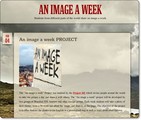
Let me share a project which has started this week, the "AN IMAGE A WEEK " project.An image a week PROJECT - An image a week via kwoutSome weeks ago, while reading about the 365 Project I started playing with the idea of having my students share images and write texts about them. However, I thought a photo a day would be impractical for my reality. Then, why not AN IMAGE A WEEK? Each student would take a photo to represent their week, write a 50-word text about it and send it to an assigned e-mail. My second thought was: why not invite other teachers from different countries to participate as well? I wrote some messages to teachers I know who teach students of similar ages and was thrilled all of them accepted the challenge.We'll have two groups from Uberlândia (Brazil), a group from Croatia, two groups from Italy, a group from Belgium and a group from Chicago. Click on the play button to watch the presentation Daniela Tomatis has created to introduce the project to students.The first step was to set up the main page (a posterous blog) for the posts.Then, to help our group work develop better I created a facebook group where teachers involved have been exchanging ideas.The project will take place from the 8th February to 22nd June, which make 20 weeks altogether. Therefore, by the end of the project each student will have shared 20 images along with 20 short texts.If you're interested in following our project this semester, please visit the AN IMAGE A WEEK page and leave us comments; every week lots of different posts will come to life.Thank you, Guido , Daniela Tomatis, Camila Sousa, Grace, Daniela Becchio and Arjana for joining the project.
Ana Maria Menezes
.
Blog
.
<span class='date ' tip=''><i class='icon-time'></i> Aug 26, 2015 10:02pm</span>
|
|
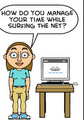
Do you lose track of time while using the net?Do you turn on the computer with lots of tasks to do but after a few hours discover you've done very little because you ended up surfing and doing other things?Well, if your answer is YES to both questions, you might find this post helpful. Many teachers I'm in contact with use the net for professional development, therefore we have lots of things to do while using the computer. The other day I was talking to a friend and she complained about the amount of time she wasted online instead of doing what she intended to do.I've walked that road but am happy to say, my time is better managed now. And what do I do? Well, it's pretty simple.Before I turn on my laptop, I write down a list of online tasks I should do that day, such as answer e-mails, check what my students have posted as homework, check direct messages in facebook ....As soon as I turn on the computer, I go to an online alarm clock http://kukuklok.com/ and set a time limit for surfing through my social network sites. These two simple things have helped me use my time better, juggling the different activities I have weekly: answer e-mails, facilitate an online course, prepare my lessons, check what my students have posted for homework, read articles for my M. A. program, write my theses, attend classes at University, teach and have fun. Want to read more about this? Check out this interesting article http://www.wikihow.com/Keep-Track-of-Time-While-Surfing-the-InternetAND YOU? How do you manage your time while surfing?
Ana Maria Menezes
.
Blog
.
<span class='date ' tip=''><i class='icon-time'></i> Aug 26, 2015 09:59pm</span>
|
|
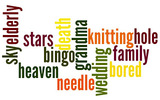
My inspiration for these video activities was this post by David Deubelbeiss.the activities are short.the videos are all found in Youtube.there's no need to prepare any extra material.1. Predicting what's going to happen.turn volume off.play parts of the video, stop and brainstorm with the whole class what they think is going to happen. Ex: I think he will .......Play and check their prediction.Suggested video: http://youtu.be/L6Cuq-BueEs 2. Taking notes / reconstructing sceneStudents watch the video and take notes of what happens in the scene.Pairs compare their notes and write a description of the whole scene.Students then read each other descriptions.Teacher can build a description of the scene with the whole class using http://livetyping.comSuggested video: http://youtu.be/bS1ePEZZCDY 3. Describe what you seeturn volume offget students into pairs.they stand up, one facing the screen and the other with the back to the screen.the one facing the screen describes what's happening in the scene.teacher pauses the video and students swap places.do the same for the rest of the video (or for as long as the teacher decides)Students write down a summary of the whole scene.If students want to, show the whole video with sound to the class.Suggested video: http://youtu.be/1Efrg23Sqe84. Imagining thoughtsDivide students in pairs.You can turn off the sound or not.While students watch the video, they try to write down what the girl and the man might be thinking. Teacher pauses video when necessary.Suggested video: http://youtu.be/8yIuiXxwUtw 5. Predicting + RetellingShow the wordcloud below and ask students to predict the story of the video. (PAIRS)Students watch the video .Pairs try to reconstruct or retell the story using the wordcloud (Speaking or Writing activity).Suggested video: http://youtu.be/rHKV92sNFVM6. Imagine an endingStudents watch the video up to 1.59 mins.Pairs tell each other what they remember.Pairs imagine an ending to the story and write it down.Students read their ending to the class.Show the rest of the video to the class.Suggested video: http://youtu.be/GJbiw_bOFmY7. Vocabulary Listask students to write the heading for two lists in their notebooks (CITY LIFE / NATURE)Students watch the video and have to complete the lists by writing down vocabulary related to each topic as it appears in the video.Debriefing: ask students what words they've written down.In pairs students discuss what they understood about the video.Suggested video: http://youtu.be/qdxbIRkITBkFor more suggested animations, check out this playlist I've put together:http://www.youtube.com/playlist?list=PL47140F33A452888D
Ana Maria Menezes
.
Blog
.
<span class='date ' tip=''><i class='icon-time'></i> Aug 26, 2015 09:59pm</span>
|
|
After reading Jose Picardo's post about having using only one iPad in class, I decided to give it a go. I've recently got an iPad as a gift and wanted to see what I could do with it in class.Well, this afternoon I took my iPad to class as I wanted to record students reading their own sentences to a voice thread created by a colleague (AureaStela). Stela had the brilliant idea to create a wordcloud with verbs which take GERUND and INFINITIVE and then asked her students to record sentences using the given verbs.This is what I proposed to my students today:1. First, I opened her voice thread on the IWB and played the recordings for them.2. Then, I assigned a different verb to each student and asked them to make a sentence using Gerund or Infinitive. I monitored helping them out with their sentences.3. I gave them a hand-out with a grammar exercise on the same topic and asked students to complete the exercise in class. Meanwhile, I would use my iPad to move round the class to record each student reading their own sentences ( I used the voicethread app for recording) . To make it faster, all students used my voice thread account.4. After I had saved all recordings, I played their recordings on the IWB for everyone to listen to. Impressions? I would definitely do this again. Students were involved and seemed to have enjoyed listening to all the sentences in class.
Ana Maria Menezes
.
Blog
.
<span class='date ' tip=''><i class='icon-time'></i> Aug 26, 2015 09:59pm</span>
|
|
This week, I planned to revise content students have recently seen by organizing a revision lesson as a CAROUSSEL.First of all, I selected 3 activities :Students would complete a grammar revision sheet and then use the answer key to correct it.Students would play a game called "Four-in-a-row" from the book "Grammar games and activities" where students have to know the infinitive/past/past participle of verbs.Students would choose from one of the topics provided in their own course book and write a dialogue discussing it using language to agree and disagree. Then, they would use my cell phone (Audioboo app) to record their dialogues. The 12 students were divided into 3 groups of four and I had them seating in different corners of the room. Students would have 20 mins to work with each activity. As a timer, I used the site ONLINE VIDEO CLOCK where you set an alarm by selecting a video clip from youtube. Before the caroussel activity started I explained what students would do at each station and by the end of the class all of them would have covered the 3 activities. Impressions? I liked the way I was free to move from one group to another and help when I was needed. Students were totally involved in doing the tasks. Moving from the different stations kept a dynamic pace to the lesson. An important point is to organize activities which take a similar time to cover and also have an extra activity up your sleeve for fast-finishers (in our case, I had conversation cards ). Next class, I intend to play their recordings from audioboo and ask them what they thought about it.One of the recordings created in class by students:
Ana Maria Menezes
.
Blog
.
<span class='date ' tip=''><i class='icon-time'></i> Aug 26, 2015 09:58pm</span>
|
|
I had already used EDUCREATIONS on my laptop during an EVO Session but had kind of forgotten it.Today, while searching for something else I stumbled into it again, but this time I decided to try its IPAD app which is totally free. This is what you can do with it:- You can draw using your finger and record your voice at the same time.- You can take a photo and record yourself talking about it.- You can use a picture from your photo gallery or from dropbox, draw and record your voice. After recording and saving it, you can share it via twitter, facebook or even grab the embed code for publishing online.MY FIRST TRIAL: http://www.educreations.com/lesson/view/my-living-room/844046/?ref=app How can wwe use it with students? - you can ask students to research about famous people in history, ask them to upload a picture and record themselves talking about that personality.- you can record screencasts drawing and writing explanations.- you can ask students to share a picture of something special to them and talk about it.- you can ask students to upload a picture of a place they would really like to visit someday and talk about it.- students can draw and tell a story.
Ana Maria Menezes
.
Blog
.
<span class='date ' tip=''><i class='icon-time'></i> Aug 26, 2015 09:58pm</span>
|
|
I can't recall exactly where I learned this activity from but I believe it's an interesting way of giving feedback to mistakes.This semester I've started a project with students where each week they select a picture , write a text about it and send them both to a designated e-mail address. The texts written by students are not edited beforehand , therefore, throughout the semester I tried to address their attention to the most common mistakes using different activities. For more information about the project, read a previous post.To play AUCTION is fairly simple. First you select sentences with no mistakes and sentences which contain the most common mistakes you want to draw attention to. You can have the list of sentences on a ppt, a word file or even a poster. Explain to students you will auction sentences and their goal is to buy as many correct sentences as they can. If they buy a correct sentence they will get their money back but if they get a wrong sentence, they will lose their money. If they don't buy any sentence, by the end of the auction, they will also lose their money. I used money from an old Monopoly game to give all my students the same amount of notes.Then, the auction starts. As soon as a sentence is sold, the teacher writes the name of the buyer and the amount paid next to the sentence. After all sentences have been sold, the teacher collects all the money from students and starts correcting the sentences with the students' help. If a sentence is right its buyer has the right to receive the money back. Keep on going until all the sentences have been analysed. The student with the highest amount of money WINS THE GAME. These are some pictures taken in class yesterday.
Ana Maria Menezes
.
Blog
.
<span class='date ' tip=''><i class='icon-time'></i> Aug 26, 2015 09:58pm</span>
|
|
I believe personalizing language is usually the best way to learn something. Having that in mind, last week, while teaching about Narrative Tenses, I decided to ask students to create their own sentences using different combinations of tenses.My objective was to help students see the different possibilities of expressing past actions. Then, I asked each pair to draw an image which would represent the actions described in their sentence. It was nice to observe how students could only draw after they had understood the sequence of events they had tried to express with their sentences.As a follow-up, students passed their pictures around the class and different pairs tried to guess the original sentence by looking at the drawing.In the following class, for warm-up, I used a quiz created with PHOTOPEACH where I used their own drawings and sentences. HAVE A LOOK AT THE QUIZQuiz: Narrative Tenses on PhotoPeachWould you like to learn how to create quizzes with PHOTOPEACH ? HOW TO DO IT 1. You create a slideshow.2. Then click EDIT, edit captions +photos.3. Click QUIZ, type questions and alternatives.4. Click OK and your photo quiz w/ background music is ready.You can see a more detailed tutorial w/ pictures at Sue Waters blog.
Ana Maria Menezes
.
Blog
.
<span class='date ' tip=''><i class='icon-time'></i> Aug 26, 2015 09:57pm</span>
|
|
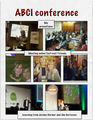
This month in Brazil, we have three big conferences for English Language Teachers: ABCI in São Paulo, Braz-tesol in Rio and CTJ seminar in Brasília. Well, as we are human beings after all, with a family and a husband I love, I had to make my choices : ABCI and CTJ.The conference had over 1,000 teachers and several guest speakers from various parts of the world : David Nunan, Nicky Hockly, Jim Screvener, Jeremy Harmer, Penny Ur, Herbert Puchta, Paul Seligson and many others.My presentation "Teacher, the dog ate my Homework." HOMEWORK + WEB 2.0, aimed to reflect a little bit about the homework experience and share a project developed with my students last year where apart from assigning traditional homework (workbook exercises) , students had to carry out 10 tasks using different webtools.With Bruno de Andrade's permission, I share his own notes about my presentation in São Paulo which can be read at Bruno's posterous about the event.Ana Maria starts by asking participants to talk about their homework assignments when they were studying English.Most participants claimed that homework was too structured and mechanical.Then she asked what kind of feelings they related with homework. Answers were: boredom, competition, threat.Next she asks the kind of hw we assign our students. She talked about the advances in teaching tools in the classroom, but what about hw? Has anything changed at all?We still tell our students to do the same exercises we did in the past.There's a big gap between the kind of activities we do in class and homework.How can we make hw more interesting?Harris Cooper: the use of HW as a pedagogical tool has had its ups and downs.Nowadays HW is seen as a possibility for further reading and writing tasks. Some students do their HW minutes before their class.Technology integration is a process! From user to integration it takes time.The 3 phases of educational technology 1 tech to present dynamic lessons2 tech for sts to have access to information3 tech for production and the sharing of products developed by stsWhere do you stand?To reach phases 2 and 3 teachers find some constraints such as one computer for the whole class, syllabus issues.The projectApart from assign HW, she alternated with exercises using different tools.Objective was to provide practice in different skills.The context involved 3 groups, 35 students who have been studying English for around 2 years.It's important to point out that these students were economically privileged.The 10 tasks challengeShe selected the tools according to skills she wanted her students to work with.Tip: plan and be flexible!She included the project into the evaluation system.The space to communicate with her students was Edmodo. There were tutorials and examples included on the guides on Edmodo.Sharing with parentsAna Maria, used a wiki to get parents involved.Challenge #1 - VokiChallenge #2 - Write ComicsChallenge #3 - Recordr.tvChallenge #4 - StixyChallenge #5 - Picture descriptionChallenge #6 - audioboo.fmChallenge #7 - GoAnimateChallenge #8 - Livetyping.comChallenge #9 - VokiChallenge #10 - VoicethreadClose to the end of the semester, Ana asked her students which kind of HW they prefer. Most of then prefere the webtools.A very Nice presentation!I also had the great pleasure to meet online friends I've had contact with for months and some for years and had never had the chance to meet face to face: Roseli Serra, Nicky Hockly, Bruno Andrade and Raquel Oliveira.What I'm taking home? Well, lots of insights provoked by the different teachers and speakers I had the pleasure to watch. Very simply put, I'm sure my baggage is a lot heavier than when I landed in São Paulo, with lots of insights, ideas and puzzles to solve.
Ana Maria Menezes
.
Blog
.
<span class='date ' tip=''><i class='icon-time'></i> Aug 26, 2015 09:57pm</span>
|
|
Well, I hadn't posted about this because I wrongly presupposed EVERYONE knew how to do this. So here it goes, this afternoon, a dear friend of mine saw a youtbe video which I have edited for my presentation in Brasília next week. I added some speech bubbles to a video in which my students say what they have learned from a project I developed last semester, AN IMAGE A WEEK. To make it easier to understand what my students say, I've included some speech bubbles from YOUTUBE.Camila, kindly asked how to do it and this is the quick tutorial. I used an app called sock puppet to record the dialogue, hosted it in youtube and then edited by adding the speech bubbles.
Ana Maria Menezes
.
Blog
.
<span class='date ' tip=''><i class='icon-time'></i> Aug 26, 2015 09:57pm</span>
|

.png?1506557803)